1
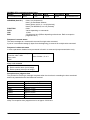
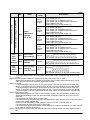
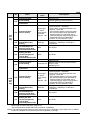
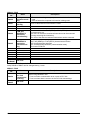
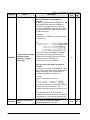
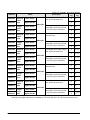
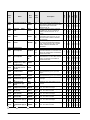
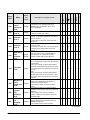
Stops
E3
Not paired
error
Stops
E4
Parameter
mismatch
error
Stops
Program
area error
Stops
E5
(Note)
FP10SH
Duplicated
output
error
E2
FP2SH
(Note)
FP2
Stops
FP-X
Syntax
error
E1
FPΣ
Operation
status
FP0R
Name
FP0
Error
code
FP-e
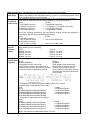
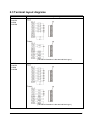
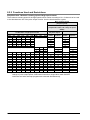
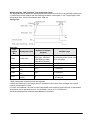
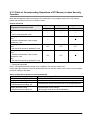
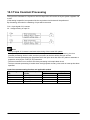
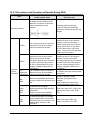
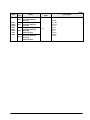
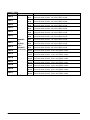
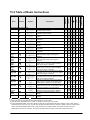
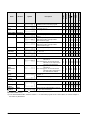
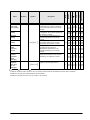
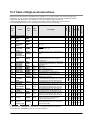
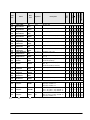
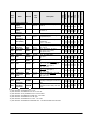
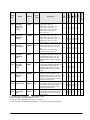
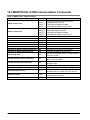
15.4.1 Table of Syntax Check Error
A
A
A
A
A
A
A
A
A
A
A
A
A
A
A
A
A
A
A
A
A
A
A
A
A
A
A
A
A
A
A
A
A
A
A
A
A
A
A
A
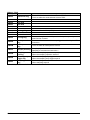
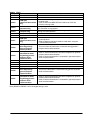
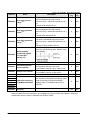
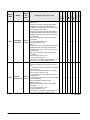
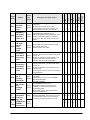
Description and steps to take
A program with a syntax error has been written.
⇒ Change to PROG. mode and correct the
error.
Two or more OT(Out) instructions and
KP(Keep) instructions are programmed using
the same relay. Also occurs when using the
same timer/counter number.
⇒ Change to PROG. mode and correct the
program so that one relay
is not used for two or more OT instructions. Or,
set the duplicated output to “enable” in system
register 20. A timer/counter instruction double
definition error will be detected even if double
output permission has been selected.
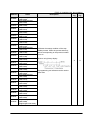
For instructions which must be used in a pair
such as jump (JP and LBL), one instruction is
either missing or in an incorrect position.
⇒ Change to PROG. mode and enter the two
instructions which must
be used in a pair in the correct positions.
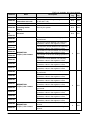
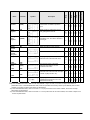
An instruction has been written which does not
agree with system register settings. For
example, the number setting in a program does
not agree with the timer/counter range setting.
⇒ Change to PROG. mode, check the system
register settings, and change so that the
settings and the instruction agree.
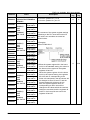
An instruction which must be written in a
specific area (main program area or
subprogram area) has been written to a
different area (for example, a subroutine SUB
to RET is placed before an ED instruction).
⇒ Change to PROG. mode and enter the
instruction into the correct area.
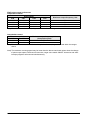
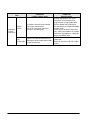
A: Available
Note) This error is also detected if you attempt to execute a rewrite containing a syntax error during RUN.
In this case, nothing will be written to the CPU and operation will continue.
15-69