1
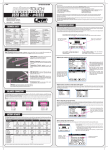
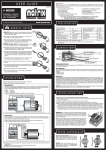
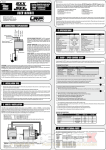
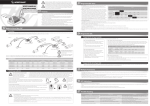
Discharge Process The adjustable high-performance discharge circuit (0.1 to 20.0A + 35A Pulse discharge) can be used for 1-10 cells NiMH/NiCd- and 1-4 cells Lixx-packs. The Stealth Touch informs you about all the data relating to the battery pack, e.g. discharge time, capacity, average voltage and internal resistance. By discharging your battery pack on the Stealth Touch, you obtain vital information about remaining capacity for optimizing your motor or gear ratio for the next run. This also maintains your battery packs in good condition. P1 PROFILE NAME . Discharge screen: DISCHARGE START DISCHARGE SETUP Current Pack.Volt Cutoff V. Cut-Temp START X CHECK STATUS: : 20.0A : 7.4V/2s : 3.2V : 55°C BATTERY......ok Connection...ok selected settings will be indicated again to avoid false settings for your battery. Cancel the operation by pressing X in upper right corner! your charger checks if all connections and the battery itself are ok and if discharge process can be started. Average voltage of your pack during discharging Internal resistance of your pack - Voltage of each cell in pack (if balancer is used!), for description see section „Balancer“. - Internal resistance of each cell in pack (if balancer is used!), for description see section „Balancer“. - Data View screens, , for description see section „View Last Data“. Cycle Temperature: by using the optional temperature sensor, you can set a maximum temperature which the battery is not This fully automatic cycling/matching function allows you to determine the actual performance of your packs. Battery packs change during their lifespan or different batteries may vary slightly. Use the Stealth Touch to detect the actual quality of your pack, this prevents nasty surprises. The „Cycle“ function can of course be used for all types of cells. allowed to reach during discharging. If battery reaches that temperature, the discharge process will be stopped. Discharge Wattage limitation: limited to 150W (Watts = Voltage x Current / e.g. for 7.4Vx20A = 148W)), this means packs with higher then 7.4V can not be discharged with 20A but the charger will automatically set the highest possible current by itself during discharging. The “Cycle” mode uses the charge and discharge values of the currently selected programm, stored under “SETUP” and is of course fully adjustable in regards of sequence and pause/delay times between the different operations of the cycle function as well. At the end of the process, the packs „performance“ will be indicated to you by informing you about: - Discharge Capacity in mAh - Discharge Time - Average Voltage during discharging - Internal resistance Balance You can simply balance your 2S to 4S LiPo- and LiFePo-batteries using the integrated balancer. The Stealth Touch indicates voltage and internal resistance for each cell in your pack. P1 BALANCE [1/2] X 1s:0.000V ▲2s:0.000V 3s:0.000V ▼4s:0.000V Gap 0.000V START Actual pack voltage STOP Cut-Off Voltage: The cut-off voltage can be adjusted for all types and numbers of cells. We recommend a cut-off voltage of 0.9V/cell with NiMH/NiCd-batteries and 3.2V/cell with LiPo-batteries. As an example: - 5.4V for a 6-cell NiMH/NiCd-pack - 6.4V for a 2S LiPo-pack. VIEW Discharge current DISCHARGE - further screens: The discharge current can be set from 0.1 - 20.0A and 35A pulse. If not otherwise specified by the battery manufacturer, the max. discharge current can be set to 20.0A „Sub-C size“ LiPo, LiFe and NiMH racing cells. However, lower grade cells and receiver-/transmitter battery packs you should use a lower the discharge current and should follow your battery manufacturer‘s recommmendations. BALANCE Discharge capcacity during running discharge process there is additional information available, by pressing „NEXT“ button you may access those. The available screens are (you jump to next by pressing „NEXT“ again): Discharge Current: . 00m05s 0030mAh 20.00A 07.50V 07.68V 0.0mΩ NEXT NEXT DISCHARGE - explanations: P1 PROFILE NAME Time elapsed since start of discharge _ DISCHARGE Capacity Current Voltage Avg.volt Resistance indication of voltage of each cell, gap between the worst two cells and graphical indication of difference. . CYCLE SETUP Automatic Cycle: values as selected in Setup, the screens look identical as during regular charge- or discharge operation but additional text reminds you that you are in „Cycle“ mode. START STOP NEXT P1 1s: 2s: 3s: 4s: P1 PROFILE NAME BALANCE [2/2] X 0.0mΩ 0.0mΩ 0.0mΩ 0.0mΩ NEXT P1 CYCLE Direction : Cycles : Chg Delay : Dischg Delay: indication of resistance of each cell and graphical indication of difference. NEXT X CD 01 10min 10min Select prefered sequence: C ⇨D = Charge, followed by discharging D ⇨C = Discharge, followed by charging D:C ⇨C = Initial Discharge, followed by charge/discharge Number of Cycles (1 to 10) Pause time before charging, after discharge (1-90min) Pause time before discharging, after charge (1-90min) SET STOP Motor - ESC - Servo - Check The Stealth Touch incorporates a fantastic feature which allows you to check your brushless motors sensors and even measure motor rpm! In combination with the built-in receiver simulator port you can even check speed-controls for correct function. The receiver simulator port also allows the check and centering of servo‘s. Connection - Servo Test: P1 PROFILE NAME . connect servo direct to connector port, be careful with correct polarity (black/minus must be on right side) Black MOTOR-ESC-SERVO SETUP START Min. pulse width: - range: 700 - 1500ms MOTOR-ESC-SERVO X Signal Min : 1100 Signal Max : 1900 Max. pulse width: - range: 1500 - 2300ms Connection - BL Motor Sensor check: SET selected pulse width values MOTOR-ESC-SERVO X 1100 1500 1900 Motor Sensors Rpm OK 0 „OK“ indicates that the hall-sensors inside your connected brushless motor work fine. After connecting your motor to the sensor port, you can rotate the shaft by hand. Here the measured RPM, when testing together with a speed-control will be indicated. Very useful to check your motor and/or speed-control for correct operation! the indicated black box is your „trigger“ (throttle or steering), you can drag it left & right with your finger and therefore alter the PWM output of the receiver simulator port. Speed Control Setup: you need to make your regular speed-control setup, so the speed-control learns the Stealth Touch‘s neutral, full throttle and full brake points, if you want to check your speed-control. connect a brushless motor direct to the „BL Motor Sensor Port“ using a standard brushless motor sensor wire. The sensor check is simple as the sensors get measured while you rotate the shaft by hand! Speed Control On/Off Switch: some speed-controls need to have on/off switch in Off position, when connecting to Stealth Touch (as it supplies it‘s own BEC!). So please make sure you test with switch in „OFF“ position first and if all works as it should this is fine for your speed-control. If your speed-control is dark when in off position, you should try on „ON“ positino. Connection - BL Speedo & Motor Check (incl RPM): To sensor connector of Stealth Touch or speed-control. To sensor connector of Stealth Touch or speed-control. Important: the Stealth Touch only simulates the receiver signal and measures your motors RPM, it does not provide the power to run the speedo/motor and a separate battery is still needed. motor RPM measurement can only work by using the „hall sensor wire splitter“ (see connection on right). Black Basically you connect everything as you would do in your car, with the only exception beeing the Y-Hallsensor-Splitter (as shown left + below) + that you connect the speed-controls receiver lead to the Stealth Touch instead of your receiver. connect speed-control direct to connector port, be careful with correct polarity (black/ minus must be on right side) Connector marked „SENSOR“, must be connected to motor. Important: Connecting speed-control or Stealth Touch to this „SENSOR“ connector will result in malfunction!!! You can do this measurements with the speedcontrol, motor and battery installed in your car as well!