1
Getting Started
Downloading Executable Code to the Nios Development Board
From the Nios II IDE, perform the following steps to download
executable code and run it on the board.
1.
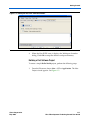
Choose Run... (Run menu). The Run window opens.
2.
Select Nios II Hardware in the Configurations list.
3.
Click New.
4.
Click the Target Connection tab.
5.
From the JTAG Cable list, select USB-Blaster. In a moment, the
Run button becomes active. See Figure 1–4.
Figure 1–4. Run Window in the Nios II IDE
Altera Corporation
May 2005
1–13
Nios II Development Kit Getting Started User Guide