1
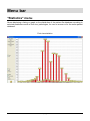
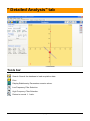
"Detailed Analysis" tab Zoom One or multiple zooms can be performed on the oscillograms. To zoom on a specific area: Position the mouse on the upper left corner of the area to zoom on. Click and maintain pressure on the mouse key while moving the mouse diagonally to the lower right corner of the area to zoom on. Adjust the size of the box in which the graph or part of the graph to zoom on is located and then release the mouse key. To return to the original size, click on . Postural parameters Surface of the ellipse of confidence at 90%. Length of the statokinesigram. Average Position X of the Center of Pressure (COP) upon the Left-Right axis (X). Average Position Y of the COP upon the Antero-Posterior Axis (Y). Standard deviation upon X or Y measures the dispersion of the COP in comparison its average position. From a statistical standpoint, 68% of the des oscillations of the COP have amplitude between +1 and –1 standard deviation; and 95% of the oscillations are between +2 and –2 standard deviations. LFS : Length per Surface Ratio (relates to the energy spent by the body to stay in upright position). VFY : Variance of the speed of displacements along the Y positioning of the COP. Ave. Speed : Average speed of the displacement of the COP. Speed Var. : Variance of the speed of the displacement of the COP. When normatives data are defined for specific exams, the parameters out of the normative data appear in red. To access a complete report of the stabilometry results, click on WINPOSTURE NV – User’s Manual Version 2.00 – Copyright 2008 . 35