1
Basic Operation
1
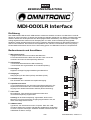
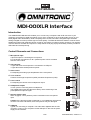
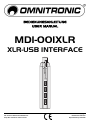
Use the supplied USB cable to connect the interface to an available USB port on your computer. The
indicating LED lights up red.
2
Connect your microphone (balanced or unbalanced) directly or via an XLR cable.
3
When using phantom-powered microphones, switch on the phantom power (+48 V) at the XLR input.
For this purpose, press the button +48V. The indicating LED lights blue.
Caution!
If the phantom power is switched on, no microphones with unbalanced output must be connected.
Otherwise these microphones may be damaged. During the stabilization phase (approx. 1 minute), you
must not change any connection.
4
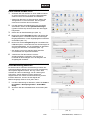
Connect stereo headphones with 3.5 mm plug to the headphones output. Alternatively, a monitor
system such as desktop speakers may be connected to the output. You can adjust the headphones
volume with the level control.
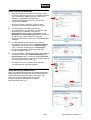
The headphones output provides direct monitoring of the preamplified microphone signal while
recording. If you have deactivated Direct Monitor mode (chapter Installation) and record in your DAW
with software monitoring turned on, you may experience a delay on the signal playback, commonly
know as latency.
5
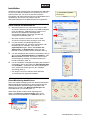
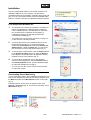
Check your computer’s system settings to make sure the interface was properly recognized by the
operating system (chapter Installation).
6
Open your recording software and select the interface as input device. Adjust the interface’s analog
input gain stage with your operating system or recording software and you are ready to record.
7
For optimum audio quality, set the gain control as high as possible. If the sound is distorted, reduce the
input amplification correspondingly. By adjusting the tone controls, the high frequencies (control HIGH)
and the low frequencies (control LOW) can be boosted or attenuated.
Safety Instructions
•
Maintenance and service operations are only to be carried out by authorized dealers. Damage, caused by
manual modifications on this device is not subject to warranty. If the device is used for other purposes than
originally intended or if it is not correctly connected, it may suffer damages and the guarantee becomes
void.
Protect the device against humidity and heat. The ambient temperature must always be between -5° C and
+45° C.
• For cleaning the device only use a dry cloth. Never use chemicals or water.
•
Technical Specifications
Power supply: ....................USB bus, max. 500 mA
Frequency range:...............20-20000 Hz
A/D converter:....................16 bits
Sampling frequency: ..........8-48 kHz
Microphone input: ..............3-pin XLR, bal.
Digital output:.....................USB mini-B
Headphones output: ..........3.5 mm stereo jack
Dimensions: .......................25 x 123 mm
Weight:...............................60 g
Operating system:..............Windows XP, Vista, 7
...........................................Mac OS X 10.0 and better
Please note: Every information is subject to change without prior notice. 15.10.2012 ©
12/12
00072664.DOC, Version 1.0