1
USER MANUAL
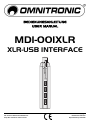
MDI-001XLR Interface
Introduction
The OMNITRONIC MDI-001XLR enables you to connect any microphone with XLR connector to your
computer. It is perfect for digital recordings of your music, podcasts or any acoustic audio source on your
DAW (Digital Audio Workstation). With a sampling rate of 16 bits, 48 kHz the integrated high-resolution
analog-to-digital converter provides high-end audio quality. The MDI-001XLR also features a built-in stereo
headphones output with separate volume control for zero-latency monitoring during recording. The interface
connects both PC and Mac and requires no setup thanks to its plug & play functionality. Delivery includes a
USB cable and a transport bag.
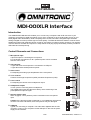
Control Elements and Connections
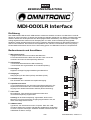
1 Microphone input
3-pin XLR input for connecting the microphone.
For condenser microphones, a 48 V phantom power can be activated
with the +48 V switch.
2 LED indicator
• Lights red when the microphone is connected to a USB port.
• Lights blue with activated phantom power.
3 Gain control
For adjusting the analog input amplification of the microphone.
4 Tone controls
Controls for the high frequencies (HIGH) and bass frequencies (LOW).
5 Level control
For adjusting the volume at the headphones output.
6 Headphones output
3.5 mm jack for connecting stereo headphones.
The headphones output provides zero-latency direct monitoring of the
preamplified microphone signal.
7 Selector switch +48V
When engaged, a 48 V phantom power is switched on the microphone
input.
Caution! If the phantom power is switched on, no unbalanced microphones
must be connected. Otherwise, these microphones may be damaged.
8 USB port
Type B, for connecting a computer. The audio data, digitized with the A/D
converter, is sent to your computer via this USB port. It also acts as power
supply for the interface.
8/12
00072664.DOC, Version 1.0