1
im Vertrieb von
4
CAMBOARD Electronics
Defining the SID-X1 Step-in Commander
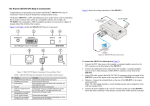
Figure 1 defines the front panel of the SID-X1.
Figure 1: SID-X1 Step-in Commander Front Panel
#
Feature
Function
1
AUDIO IN 3.5mm Mini Jack
Connect to an unbalanced stereo audio source
2
HDMI LED
Lights green when the HDMI input is selected
3
HDMI Connector
Connect to an HDMI source
4
DisplayPort LED
Lights green when the DisplayPort input is selected
5
DisplayPort Connector
Connect to a DisplayPort source
6
DVI LED
Lights green when the DVI input is selected
7
DVI Connector
Connect to a DVI source
8
PC-UXGA LED
Lights green when the PC-UXGA input is selected
9
PC-UXGA 15-pin HD
Connector (F)
Connect to a PC graphics source
10
INPUT SELECT Button
Press repeatedly to cycle and select one of the inputs to
switch to the output
11
STEP-IN Button
Press to activate the input on the switcher that the SID-X1
is connected to
12
ON LED
Lights green when the device is powered on
SID-X1 - Defining the SID-X1 Step-in Commander
www.camboard.de
5
Tel. 07131 [email protected]
Fax 07131 911203