1
im Vertrieb vonYour VS-88HCCAMBOARD
Electronics
8x8 Home Entertainment Matrix Switcher
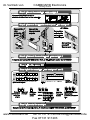
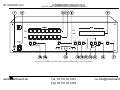
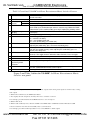
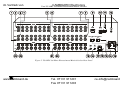
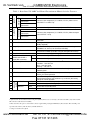
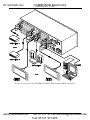
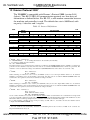
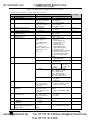
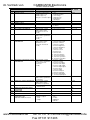
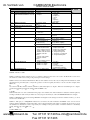
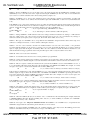
Table 3: Rear Panel VS-88HC 8x8 Home Entertainment Matrix Switcher Features
#
8
9
Function
Component
Component
5
6
7
INPUTS
4
Feature
S/PDIF
Y RCA Connectors
U/Cb/Pb RCA
Connectors
V/Cr/Pr RCA
Connectors
S/PDIF
Y RCA Connectors
U/Cb/Pb RCA
Connectors
V/Cr/Pr RCA
Connectors
RS-232 DB 9F Port
OUTPUTS
1
2
3
10 RS-485 Terminal Block Port
11 Setup Dipswitches
12 REMOTE IR 3.5mm Mini Jack
13 Power Connector with Fuse
14 OPTIONAL OPTICAL
OUT
IN
15 AUDIO ON CHAN. 2
TOSLINK Connector
16 ETH Factory Reset Button
17 ETHERNET Connector
18 ETH PROG Button
20
21
22
23
ANALOG
AUDIO
19 FLASH PROG Button
OUTPUTS
INPUTS
LEFT
RIGHT
LEFT
RIGHT
Connect to the digital audio source (from INPUT 1 to 8)
Connect to the component (Y, U/Cb/Pb, V/Cr/Pr) video source
(from INPUT 1 to INPUT 8)
Connect to the digital audio acceptor (from OUTPUT 1 to 8)
Connect to the component (Y, U/Cb/Pb, V/Cr/Pr) video acceptor
(from OUTPUT 1 to 8)
Connect to the PC or the Remote Controller via a null-modem
connection
Pins B (-) and A (+) are for RS-485; Pin G may be connected to the
shield (if required)
Dipswitches for setup of the unit (1, 2 and 3 are for setting the
Self Address #; and 4 is for RS 485 termination)
Connect to an external IR receiver unit for controlling the machine via
an IR remote controller (instead of using the front panel IR receiver)1
AC connector enabling power supply to the unit
Connect to the digital audio acceptor
Connect to the digital audio source
2
Press to reset to factory default definitions :
IP number 192.168.1.39
Mask – 255.255.255.0
Gateway – 192.168.1.1
Connects to the PC or other Serial Controller through computer
networking LAN
Push in to upgrade ETH firmware (see section 9.2);
release for normal operation
Push in3 for “Program” to upgrade the switcher microcontroller to the
latest Kramer firmware (see section 9.1.2), or release (the factory
default) for normal operation
Connect to the left audio acceptor (from OUTPUT 1 to 8)
Connect to the right audio acceptor (from OUTPUT 1 to 8)
Connect to the left audio source
Connect to the right audio source
1 Optional. Can be used instead of the front panel (built-in) IR receiver to remotely control the VS-88HC (only if the internal
IR connection cable has been installed)
2 First disconnect the power cord and then connect it again while pressing the ETH Factory Reset button. The unit will power
up and load its memory with the factory default definitions
3 Using a screwdriver if required
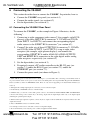
8
www.camboard.de
KRAMER: SIMPLE CREATIVE TECHNOLOGY
Tel. 07131 911201
[email protected]
Fax 07131 911203