1
Connecting the VS-44HC
6.3 Setting the Dipswitches
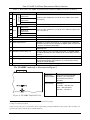
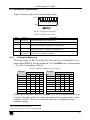
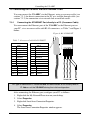
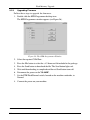
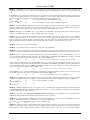
Figure 5 illustrates the factory default dipswitches:
OFF
ON
1 2 3 4 5 6 7 8
Figure 5: Dipswitch Settings
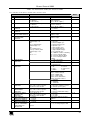
Table 4: Dipswitch Settings
DIPS
Function
Description
1, 2, 3, 4 Machine #
Set the MACHINE # (see section 6.3.1)
5
Reserved
OFF
6
S/PDIF
ON for IN 2 S/PDIF digital audio signal;
1
OFF when TOSLINK is selected (see section 6.3.2)
7
Optic
ON for IN 2 TOSLINK digital audio signal;
1
OFF when S/PDIF is selected (see section 6.3.2)
8
RS-485
Termination
ON for RS-485 Line Termination with 120 ;
OFF for no RS-485 Line Termination
6.3.1
Setting the Machine #
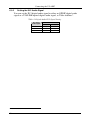
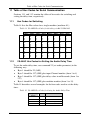
To control a unit via RS-232 or RS-485, each unit has to be identified via its
unique MACHINE #. Set the machine #2 on a VS-44HC unit via dipswitches
1, 2, 3 and 4, according to Table 5.
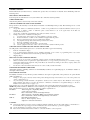
Table 5: Machine # Dipswitch Settings
DIPSWITCH
MACHINE #
1
2
3
1
ON
OFF OFF OFF
2
3
OFF ON
ON ON
4
OFF OFF ON
5
ON
6
OFF ON
7
ON
8
OFF OFF OFF ON
1
2
3
4
9
ON
10
11
OFF ON
ON ON
OFF
12
OFF OFF ON
ON
OFF
13
ON
ON
ON
OFF
14
OFF ON
ON
ON
ON
OFF
15
ON
ON
ON
OFF OFF
OFF OFF
OFF ON
ON
DIPSWITCH
MACHINE #
4
OFF OFF ON
OFF ON
OFF ON
OFF ON
ON
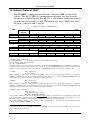
When connecting more than one VS-44HC unit, set a different machine # on
each unit. You do not have to number the units in the sequence order as they
connect to the PC, but it is essential that each unit is assigned a unique
machine number.
1 Do not set both DIP 6 and DIP 7 ON
2 When using a single unit, set the unit to MACHINE # 1
11