1
im Vertrieb von
CAMBOARD
Electronics
Contents
Contents
1
2
2.1
3
3.1
4
4.1
5
6
6.1
6.2
Introduction
Getting Started
Quick Start
Overview
Terminology Used in this User Manual
Your VS-88HC 8x8 Home Entertainment Matrix Switcher
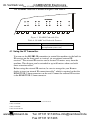
Using the IR Transmitter
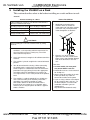
Installing the VS-88HC on a Rack
Connecting the VS-88HC
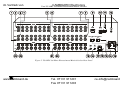
Connecting the VS-88HC Rear Panel
Connecting and switching the Audio Signals
6.2.1
Digital Audio Input Output Switching
14
6.3
Setting the Dipswitches
15
6.3.1
Setting the Self Address #
15
7
7.1
7.2
Controlling the VS-88HC
Controlling via RS-232 (for example, using a PC)
Controlling via RS-485
16
16
17
7.2.1
Set the Dipswitches
17
7.3
Controlling the VS-88HC via the ETHERNET Port
19
7.3.1
7.3.2
7.3.3
Connecting the ETHERNET Port directly to a PC (Crossover Cable)
Connecting the ETHERNET Port via a Network Hub (Straight-Through Cable)
Configuring the Ethernet Port
19
20
20
8
8.1
8.2
Operating the VS-88HC
Displaying Unit Characteristics
Choosing the Audio-Follow-Video or Breakaway Option
21
21
22
8.2.1
8.2.2
Setting the Audio-Follow-Video Option
Setting the Breakaway Option
22
22
8.3
8.4
Switching OUT-IN Combinations
Confirming Settings
22
23
8.4.1
8.4.2
Toggling between the At Once and Confirm Modes
Confirming a Switching Action
23
23
8.5
Storing/Recalling Input/Output Configurations
24
8.5.1
8.5.2
Storing an Input/Output Configuration
Recalling an Input/Output Configuration
24
24
8.6
8.7
9
9.1
Setting and Adjusting the Audio Delay Time
Locking the Front Panel
Flash Memory Upgrade
Switcher Flash Memory Upgrade
25
26
27
27
9.1.1
Downloading from the Internet
27
www.camboard.de
1
1
1
3
4
4
9
10
11
11
13
i
Tel. 07131 [email protected]
Fax 07131 911203