1
2.6 Display possibilities
2.6.1 Single profile
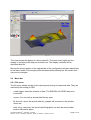
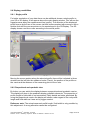
For better evaluation of your data there can be additional shown a single profile to
your 2D or 3D display. It will appear above the main display window. You will see the
signal process along the measurement line (profile). The selection of the displayed
profile occurs by the use of the mouse via both buttons marked with arrows or with a
double click with the mouse pointer on the wanted spot in the 3D-Display. The 3Ddisplay shows a red line cursor according to the actual profile.
Moving the mouse pointer along the selected profile there will be indicated in three
windows on the left side the measured value (Z-axis), the position of the profile on
the x-axis and the distance of the measuring point to the x-axis.
2.6.2 Proportional and quadratic view
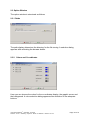
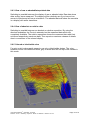
By button you can switch the display between a proportional and quadratic version.
The display will show in the quadratic display quadratic elements. The proportion of
profile length to field width is not considered. Partly details are better presented. By
using the proportional version the display will shown under regard of the real profile
length and field width as it was set by logger readout.
Reference note: The actual measured profile length / field width is only possible by
this adjustment. A wrong allocation cannot be recognized.
User Manual EMFAD® - ScanPRO, July 2008
Detector - Scout / Detecting - Systems - Röher / © EMFAD® - GmbH & Co. KG
Page 13 of 14