1
Detailed overview of experiments
By click on the experiment name one is lead to its detailed overview. A detailed insight
into the experiment is offered here, especially information about the number of
experiment and the exact session dates. The detailed overview consists of the tabs
Sessions, Participants, Invitations and Data and Options. A detailed description of the tabs
follows below.
Tab: Session
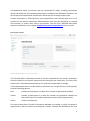
The tab sessions offers an overview of the sessions scheduled so far and allows compiling
new sessions or altering already existing data.
Besides session name, time and place further information about the number of
registered participants and the number of participants needed is provided here.
Furthermore, in the menu item place a list of preset rooms where the session takes place
can be chosen. Such lists can be predefined in the menu item Administration > Options.
Via menu item Participants or the line where participant details are displayed a list of
session participants is accessible. In this list session participants can either be moved to
other sessions or be deleted.
Moreover, within the participant list it is possible, to state, whether participants attended
an experiment or not. There are three check boxes for each participant „appeared“,
„attended“ und „absent“. For every user the number of „appeared“ and „absent“assignments in hroot is counted and can be used as filter criterion, so unreliable users can
be excluded from sessions beforehand.
Tab: Participants
The tab Participants serves the user management for the whole experiment, so further
Participants can be assigned for an experiment here. Thereby only those users are
regarded, who are not assigned to the experiment yet.
Besides the user overview this tab allows to minimize the field via filters to a certain
group thus enabling aimed matching for an experiment.
In addition, one can view into a list of participants, who are already assigned for an
experiment. Through this list it is possible to send messages to the pool members. Even
the assignment or deleting of single participants can be operated here. Of course the
filter function is also available for this operation. If a pool member is assigned for a
session, the session date will be displayed in the participant list.
Further, the tab participants opens the possibility to view the history of participant
assignments. In doing so the date, the search and filter criteria and the number of pool
member assignments or pool member deletions will also be displayed so that former
participant assignments can be revised and documented.
4