1
HD-TVI DVR User Manual
2
Hardware Installation
2.1 Install Hard Drive
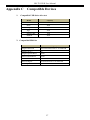
Check the unit and the accessories after getting the DVR. Please don’t power up the unit till
the physical installation is complete.
Notice: 1. This series support two SATA hard drives. Please use the hard drive the
manufacturers recommend specially for security and safe field.
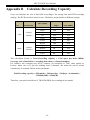
2. Please calculate HDD capacity according to the recording setting. Please
refer to “Appendix B Calculate Recording Capacity”.
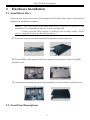
① Loosen the screws on the back and side of the device to remove the cover.
② Put the HDDs on the bottom of the device and turn over the device and fix the HDDs
with the screws.
③ Connect the power and data cables and install the cover back and fix it with the screws.
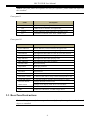
2.2 Front Panel Descriptions
3