1
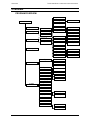
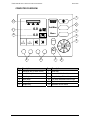
OVERVIEW
TEEJET 500 SLURRY COMPUTER OPERATORS MANUAL
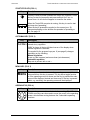
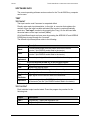
START/STOP KEY (POS. 1)
Key
Description
This key is used to power up/down the Teejet 500 computer. Press
this key to start the computer and press and hold for 3 sec. to
power down. An info-box will appear to reconfirm the action.
When the Teejet 500 computer is running, this key is used to start
and stop slurry spreading.
When the key is pressed the symbol on the screen (pos. 12)
changes depending on the whether the spreader is spreading or
not, see page 10.
AUTO/MAN KEY (POS. 2)
Key
Aut/Man
Description
The AUTO/MAN key is used to change between automatic and
manual slurry regulation.
”MAN” is shown in the top left-hand corner of the display when
manual regulation is selected.
The symbol for the program keys pos. 9 (see page 9) changes
depending on the following:
Manual regulation:
Arrow up (rate increase) and arrow down (rate decrease).
Automatic regulation:
Step rate in percent with + and –.
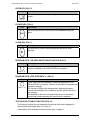
MENU KEY (POS. 3)
Key
Menu
Description
The computer alternates between the operating screen and the main
menu each time this key is pressed. The key has a toggle function
so if the operating screen is shown and the key is pressed the main
menu will be displayed instead and visa versa. If the key is pressed
whilst, e.g. encoding, the operating screen will be displayed.
ARROW KEYS (POS. 4)
Key
Description
The arrow keys are used to select and alter a setting. The UP and
DOWN arrow keys are also used to move the cursor in the operating
screen, which allows moving between the 2 selectable operating
functions.
8