1
SDB
908
Part N : 9726.02 / 9726.02
o
SAT-TV Demodulator
DVB-S/-S2 → CI → ASI-TS & A/V
10. Programming by web server
*
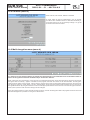
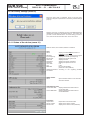
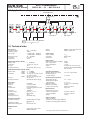
10.1 Main menu
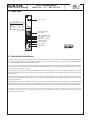
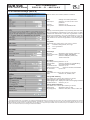
Name of device, item number, address in headend
Description Name of program (max. 30 characters)
Input
SAT IF
Symbol rate
Standard
Status adjustment range: 950 ... 2150 MHz
adjustment range: 1000 ... 45000 kSps
selection: auto, DVB-S, DVB-S2
display whether SYNChronization or
noSYNChronization with input
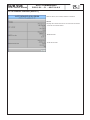
BISS settings
(will only be available if “BISS decryption” option is enabled)
BISS key
BISS-E injected-ID input of the 12-digit code in BISS mode 1
or the 16-digit code in BISS mode E
input of the 14-digit code in BISS mode E,
no input in BISS mode 1.
ASI output
(will only be available if “ASI output” option is enabled)
Polarity
TS source
selection: normal, inverse
selection: auto, original
A/V program settings
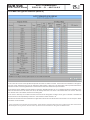
Program listing see menu 2
Service ID adjustment range: 0...65535
Service type displays the type of selected service
(TV, Radio)
Audio PID 1 lang. no adjustment range: 0...47 1
Language code 1
displays the code of the selected lang. 1
Audio PID 2 lang. no adjustment range: 0...47 1
Language code 2
displays the code of the selected lang. 2
Audio description
selection: on, off 2
Audio settings
Audio gain adjustment range: +6 ... -20 dB
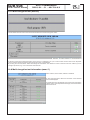
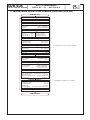
Common Interface
Status
CA menu
status message of the CA module
see menu 3
Multidecryption
Menu
see menu 4
Operating status SNMP trap mess. SYNC control Factory settings selection: on, off, reset
on, off, if SNMP option in HCB x00 is
enabled, otherwise “locked“ is displayed
synchronization test at input. selection:
fast, normally, slowly
see menu 10
Routing to the appropriate adjustment menu:
Software options see menu 1
Extended settings see menu 8
Status see menu 10
Software overview see menu 11
In the SDB 908, it is possible to select 1 or 2 audio PID‘s for transmitting. If you select only one language, then this is transmitted in the present audio
mode (mono, stereo, dual). If you choose, however, two audio PID‘s, a dual tone is generated from both of them, as the dual tone 1 the language of the
audio PID 1, as the dual tone 2 the language of the audio PID 2 (see also menu 8). The audio PID 2 is disabled by a non numerical character.
1
If you activate the function of audio description, a dual tone is automatically generated if a program in the appropriate format into the selected service
is transmitted, which is transmitted in dual tone 1 the original and the dual tone 2, the descriptive explanation of the image. There is however necessary
that there is set as the audio PID 1 the appropriately labeled audio stream of the service.
2
* For further details see the HCB manual
5