1
DAMP RATE SELECT
Adjustable damping is available to steady the display when
measuring pulsating pressure or flow. The Smart
Manometer has a range of damping rates of 0.1, 0.2, 0.5, 1,
2, 5, 10, and 25 seconds. Damping is done by averaging
new data from the pressure sensor against previously
collected data. The microprocessor collects data from the
sensor every 0.1 seconds. The display updates every 0.5
seconds, showing the current 0.1 second pressure reading.
When set at 25 seconds, the display updates every 0.5
seconds with the average of the previous 25 seconds
readings. Therefore, it takes up to 25 seconds from the time
pressure is applied until the manometer displays the full
scale applied pressure. Min/Max display updates every 0.1
seconds.
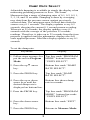
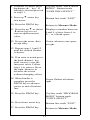
To set the damp rate:
Keystroke
Display
1. Follow steps on page 4 to Top line reads “PROGRAM
MODE” bottom line reads
put the unit in Program
“UNITS SELECT”.
Mode.
2. Press the up
key.
arrow
Bottom line reads “DAMP
RATE SELECT”.
3. Press the PRGM key.
Top line reads “DAMP
RATE SELECT”.
4. Press the up or down
arrow keys until the
desired damp rate is
displayed on bottom line.
Bottom line shows damp
rate in seconds.
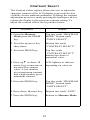
5. Press the PRGM key.
Top line reads “PROGRAM
MODE” bottom line reads
“UNITS SELECT”.
6. Press the down arrow
key.
Bottom line reads “EXIT”.
7. Press the PRGM key.
Returns to Measure Mode.
8