1
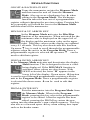
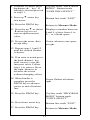
3. Press up or down
arrow key until desired
engineering unit is
displayed.
Engineering units on bottom
line of display change.
4. Press the PRGM key to
select engineering unit.
Top line reads “PROGRAM
MODE” and bottom line
reads “UNITS SELECT”.
Bottom line reads “EXIT”
5. Press the down arrow
key.
Display returns to Measure
Mode in new engineering
units.
6. Press PRGM key.
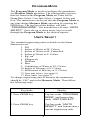
USER UNIT SELECT
Engineering units not included in the standard selection can
be programmed into the manometer using the Units Select
register in the Program Mode. This is done by an internal
microprocessor that multiplies the applied pressure in the
base factory calibration units by the value in the user unit
register. For example, 1 PSI equals 2.30894 Feet of Water
at 60° F. A 20 PSI manometer can be programmed to read
out in Feet of Water using the following steps:
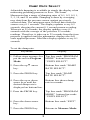
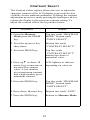
Keystroke
Display
1. Follow steps 1-3 in
“Units Select” (pg. 4)
until “USER UNIT
SELECT” is displayed.
Reads “USER UNIT
SELECT” on the bottom line.
2. Press PRGM key. (see
Note: on pg. 7)
Reads “VALUE=” on the top
line and “CHANGE?: YES”
on the bottom line.
3. To change the value
press the PRGM key.
Top line reads “USER UNIT
VALUE”.
5