1
Entering your Weight and Maximum Heart Rate
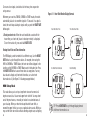
1. Press MODE until you get to the HRM SETUP Mode. Next press
STOP/RESET/SET to enter the setting state. The currently selected zone
begins to flash. (For the Fitness Model, press SET/RESET.)
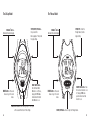
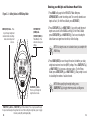
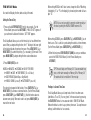
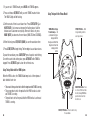
Figure 2.3 – Setting Values in HRM Setup Mode
MODE (NEXT) Button – Press
to cycle through weight and
maximum heart rate settings
when customizing a heart
rate zone.
STOP/RESET/SET
(DONE) Button –
(SET/RESET (DONE) for
Fitness Model) - Press
when done to save your
settings.
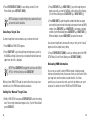
2. Press START/SPLIT (+) or HEART RATE (-) to cycle through the preset
target zones as well as the MANUAL setting. (For the Fitness Model,
press START/STOP (+) or HEART RATE (-).) Each zone, including the
default lower and upper heart rate limits, will be flashing.
NOTE: Your target zones are customized once you complete the
HRM Setup.
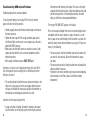
3. Press MODE (NEXT) to move through the values that define your body
weight and maximum heart rate (MHR) settings. Press START/SPLIT (+)
or HEART RATE (-) to increase or decrease values. (For the Fitness
Model, press START/STOP (+) or HEART RATE (-).) Body weight is used
in calculating the number of calories burned.
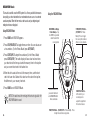
HEART RATE (-) Button –
Press to cycle through the
target heart rate zones.
NOTE: When specifying the weight setting, press
START/SPLIT (+) to toggle between pounds and kilograms.
START/SPLIT (+) Button – (START/STOP (+) for Fitness Model) - Press to cycle upward through
the preset and manually set target heart rate zones. When setting the weight value, press to toggle
between pounds (LB) and kilograms (KG).
12
13