1
How This Manual Is Organized
Overview
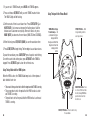
We’ve divided this manual into four main sections:
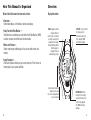
Display Information
• Overview —
General descriptions of the buttons, features and display.
• Using Your Heart Rate Monitor —
Describes how to combine your watch with a Heart Rate Monitor (HRM)
to obtain, measure and review heart rate information.
• Modes and Features —
Simple, step-by-step walkthroughs of how to use watch modes and
features.
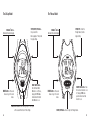
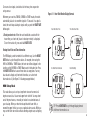
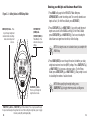
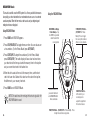
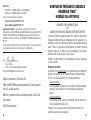
FLAGS - Appear around the
display to reflect the
current mode, or to indicate
an activity occurring in the
background. For example,
the stopwatch flag indicates
the Chronograph or
Stopwatch feature is
actively timing your laps.
TOP LINE - Top one-third of
the display, used for
information such as lap
times, day/date, HRM
information and flags.
• Usage Examples —
Real-world scenarios that show you how to make your Timex® watch an
integral part of your workout activities.
In some modes information
displayed on these two
lines can be swapped based
on your preference.
2
BOTTOM LINE - Bottom
two-thirds of the display,
used for information such
as time of day, lap/split
time, HRM information
and flags.
3