1
Operating Instructions
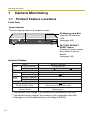
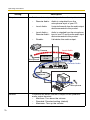
Side view
Mounting holes
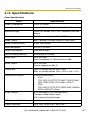
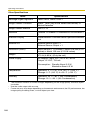
Fix a steel plate with M3 screws (customer-provided) into the 4 holes.
DC
IN
PO
WER
VIDE
O
IN
AU
UD
DIIO
O
IN
IN
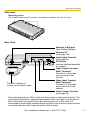
Rear View
IN
I/O
OUT
IN
AUDIO
OUT
IN
VIDEO OUT
12 V
The MAC address is
written on the bottom label.
*
Ethernet (LAN) port
(See Getting Started)
External I/O
(see page 143)
Audio Input Terminal
(see page 26)
DC IN jack
Use the attached specified
AC adaptor.
Video Output Terminal
(BNC Terminal)*
Connect it to the video
input terminal of the
monitor.
Video Input Terminal
(BNC Terminal)*
Connect it to the video
output terminal of the
camera.
Audio Output Terminal
(see page 26)
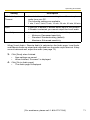
Terminating resistance (75Ω) is built into this product's video input terminal. This
terminating resistance is opened automatically when the cable is connected to
both video input terminal and the video output terminal. In this case, it is
terminated by terminating resistance that has built to the monitor's input terminal
connected with the video output terminal with the cable.
[For assistance, please call: 1-800-272-7033]
11