1
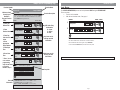
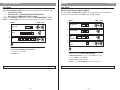
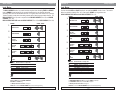
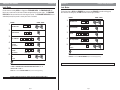
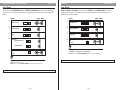
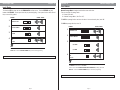
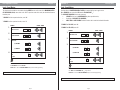
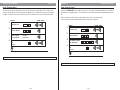
Define Open Time
Function 18
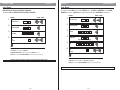
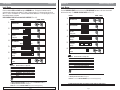
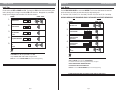
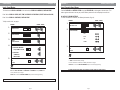
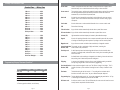
Function 30
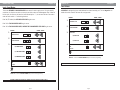
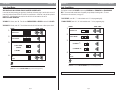
Manual Passage Mode
Level: Master
Level: Master
This function SETS the time the lock will REMAIN OPEN to allow access. The time INTERVAL may vary
between 1-9 SECONDS. Shorter open times help to prevent tailgating. If user opens the door within the set
time, access will be granted.
Manual Passage Mode is designed to allow free access to the door.
There are two types of passage mode:
1. Entered at the door.
2. Schedule Passage Mode. (See Func. 05.)
ENTRIES
1.
VISUAL / AUDIO
#
Valid User Code
To CLOSE the passage function and return the door to its normal security level, enter "0".
To OPEN the passage function, enter "1".
2.
3.
Function Number
Set Time
1
8
*
*
1 to 9 Seconds
4.
Exit
See Note
*
ENTRIES
1.
2.
3.
Valid User Code
IF ERROR ON ENTRY OR NO ENTRY IN 5 SECONDS, LOCK WILL TIME-OUT. BEGIN AT STEP 1.
#
0
*
(0) CLOSE
0
*
(1) OPEN
1
*
Function Number
3
Select One:
Note
The DEFAULT for this function is 3 SECONDS.
ENTER “#” to return to FUNCTION NUMBER (Step 2) and continue programming.
4.
VISUAL / AUDIO
Exit
See Note
*
Note
There is NO additional POWER USAGE while the door is in passage mode.
The DEFAULT for this function is “0” CLOSE.
Function can be used to OVERRIDE SCHEDULED PASSAGE MODE by entering “0” Closed.
ENTER “#” to return to FUNCTION NUMBER (Step 2) and continue programming.
IF ERROR ON ENTRY OR NO ENTRY IN 5 SECONDS, LOCK WILL TIME-OUT. BEGIN AT STEP 1.
Page 18
Page 19