1
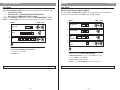
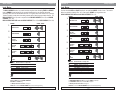
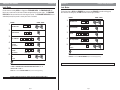
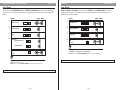
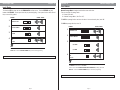
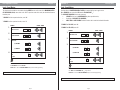
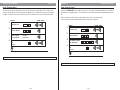
Double Code Entry
Function 33
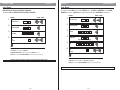
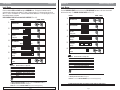
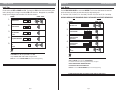
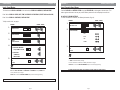
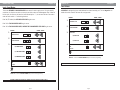
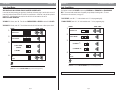
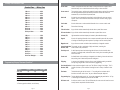
Function 34
Lock Audio
Level: Grand Master
Level: Master
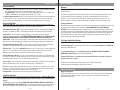
The function REQUIRES 2 VALID USER CODES to be entered in order to gain access. For higher security
restrictions, this function can also be set to require one of the codes to be of Management Level. When set
for this option, the first user will enter their code followed by the “*”, the next user will have 5 seconds to
enter their code and the “*” before being timed out.
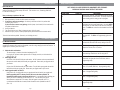
LOCK AUDIO is designed to give an audio feedback from internal sounding unit. The lock keypad has an
audible click which sounds at all times with every keystroke.
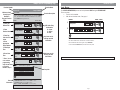
Enter "0" (E72 default) for ONE VALID USER CODE to gain access.
ENTRIES
1.
VISUAL / AUDIO
Valid User Code
#
Enter "1" for TWO VALID USER CODES to gain access.
Enter “2" for TWO VALID USER CODES, ONE MUST BE A MANAGEMENT LEVEL CODE to gain access.
ENTRIES
1.
2.
3.
VISUAL / AUDIO
3
Select One:
(0) SINGLE USER
(1) TWO VALID USERS
(2) MANAGER & USER
4.
Exit
See Note
3.
3
0
1
2
*
*
*
*
*
(0) Audio OFF
0
*
(1) Audio ON
1
*
3
Select One:
*
4.
4
Function Number
#
Valid User Code
Function Number
2.
Exit
See Note
*
Note
The DEFAULT for the LOCK AUDIO function is “0” AUDIO OFF.
ENTER “#” to return to FUNCTION NUMBER (Step 2) and continue programming.
IF ERROR ON ENTRY OR NO ENTRY IN 5 SECONDS, LOCK WILL TIME-OUT. BEGIN AT STEP 1.
Note
The DEFAULT for this function is “0” SINGLE USER.
ENTER “#” to return to FUNCTION NUMBER (Step 2) and continue programming.
IF ERROR ON ENTRY OR NO ENTRY IN 5 SECONDS, LOCK WILL TIME-OUT. BEGIN AT STEP 1.
Page 22
Page 23