1
Function 03
Add
Resetting
Group Schedule
the E72
RESETTING THE E72
There may be a time when you need to fully reset your E72 and start over. If you reset the E72, all
previous information in the lock memory will be lost. (This includes: users, scheduling, GGM code,
E72 ID and lock settings.)
Here are the steps to perform a full reset.
1. Remove batteries.
2. Wait approximately 5 minutes to allow capacitor to discharge.
3. If you have a sensor array package, turn the key in the lever and hold it in position while
completing steps 4 and 5.
If you do not have a sensor array package, install a jumper (not included) in the connector with
the yellow and black wires.
4. Insert the batteries.
5. The LED will first turn red. When it changes to green, the lock is reset.
6. Remove the key or jumper (to remove jumper depress yellow and black wire connector catch).
The lock is back to factory default. (Restart by re-initializing the lock.)
E72 Memory Upgrades
E72 MEMORY UPGRADES
Memory upgrades can be purchased from your local SDC distributor or directly from the factory. These
upgrades are permanent and cannot be downgraded, even after a long storage period with no batteries. To
upgrade your E72 memory, there are 3 steps.
1.
2.
3.
Obtain the lock serial number.
The serial number is printed on the exterior backplate of the E72.
Or, using the IDT, the serial number appears on the IDT display, as well as, on the header of the
audit trail (Func. 15).
Obtain upgrade code.
Call SDC at 1-805-494-0622 with your serial number. An SDC customer service representative will
take your order and fax back/call back with your upgrade code. Please retain your upgrade code for
your records.
OR
Call your local SDC distributor with your serial number. They will obtain your upgrade code and fax
back/call back with your upgrade code. Please retain your upgrade code for your records.
Install upgrade number into the E72.
Using Function 20, (Lock Upgrade) enter your upgrade code from the back of your upgrade card.
Note: By upgrading the E72’s memory, the lock will reset to the factory defaults. All
information currently stored in the memory will be lost. It is recommended before updating your
memory, use the IDT to download an audit trail (Func. 15). This will allow you to use the
information later to update the E72’s memory. After the upgrade is complete, the E72 is
re-initialized and the GGM code is created, stored information can be uploaded from the IDT
(Func. 14).
Page v
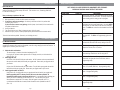
Group Security Levels
NOTE: GROUPS 02-09 ARE RESERVED FOR MANAGEMENT LEVEL PERSONNEL.
SCHEDULING FUNCTIONS CANNOT RESTRICT THESE USERS.
Group Name
Group No.
Description
Factory Code
FC
None
Factory code “9991234” is the code entered into the lock on
new installations or after full resets. The factory code will act
as the starting point for setting up the lock program.
Great Grand Master
GGM
None
Every lock must contain only one GGM code. The GGM has
the highest level of security authorization. Due to the GGM’s
security level, this code should not be used on an everyday
basis. The GGM user code will set the standard format for all
users.
Grand Master
GM
02
GM is the highest level of security that should be used on an
everyday basis. The GM has full programming rights at all
times.
Master
M
03
Master has programming rights to control user access, but
not functions which effect the security settings of the E72.
Supervisor Group
04
This is the last management group with ability of First
Supervisor To Arrive (Func. 31) access.
Security Guard Group
05
This level allows group members to upload/download audit
and scheduling information to the lock using the IDT.
Emergency Group
06
For Police, Fire Department, Emergency Medical Services etc.
At this level, the group has access at all times, with no
programming ability
Maintenance Group
07
This level is for a group that needs access to the lock at all
times. (Ex. plumber, HVAC etc.) No programming ability.
Service Group
08
This level is for a group that needs access to the lock at all
times. No programming ability.
Open Group
09
This level is for a group that needs access to the lock at all
times. No programming ability.
10-99
These groups have limited access as programmed with no
programming ability.
Users
Page vi