1
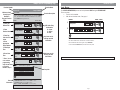
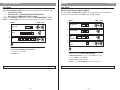
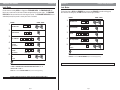
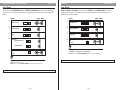
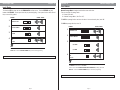
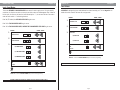
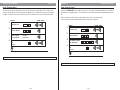
Upload Lock Information
Function 14
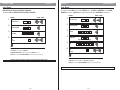
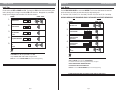
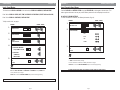
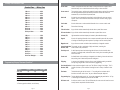
Function 15
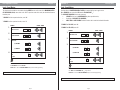
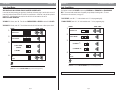
Download Audit Trail
Level: Security Guard
Level: Security Guard
This function will take the information stored in the IDT and upload and update the E72’s memory. Any
changes made at the door via the keypad and not updated in the computer will be lost once the update is
complete. For further instruction on the uses of the IDT or software, refer to the IDT instruction manual.
Function will DOWNLOAD the E72 audit trail to the IDT. The number of events downloaded are user defined
but limited to your upgrade option. For the standard E72, the maximum number of downloadable events are
64.
ENTRIES
1.
2.
3.
4.
VISUAL / AUDIO
Valid User Code
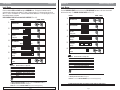
After a download, the IDT display will show: battery status, lock ID and serial number.
For the maximum number of downloadable events, see the chart on page 30.
#
ENTRIES
1.
Function Number
1
4
*
2.
Wait For Upload
to be Completed
See Hand
Held Device
3.
Exit
See Note
*
4.
Note
ALL existing SCHEDULE INFORMATION not updated in the computer will be lost upon upload.
IF ERROR ON ENTRY OR NO ENTRY IN 5 SECONDS, LOCK WILL TIME-OUT. BEGIN AT STEP 1.
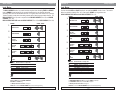
VISUAL / AUDIO
#
Valid User Code
Function Number
1
5
*
Enter Number of Events
to be Downloaded
Exit
See Note
*
*
Note
Consult page 30 for maximum number of downloadable events.
IF ERROR ON ENTRY OR NO ENTRY IN 5 SECONDS, LOCK WILL TIME-OUT. BEGIN AT STEP 1.
Page 26
Page 27