1
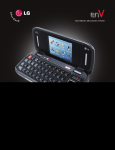
Getting to Know Your Phone
9
10
11
1
2
BACK
12
3
13
4
8
5
7
14
6
FRONT
Set Up Email
1.Power/Lock Key
2. Earpiece
3. Touch Screen
4. Home Key
5. Menu Key
SIDES
6.
7.
8.
9.
10.
Microphone
Search Key
Back Key
3.5mm Headset Jack
Camera Lens
In addition to providing mobile access to your Gmail™
inbox and syncing your Gmail contacts, setting up
a Google™ account on Enlighten will allow you to
take advantage of many of your phone’s other great
features, such as Google Talk™ and Android™ Market.
Sign in to a Google Account
1.From the Home screen, touch Applications
> Gmail
.
2. Read the information and touch Next to continue.
3.Touch Sign in. (You may also create a Google
account if you don’t yet have one. Just touch Create
and follow the on-screen steps.)
4.Slide open the keyboard and enter the username
and password associated with your Google account,
and then touch Sign in again.
5.You may be asked to enter a verification code; if so,
enter the text you see in the box and touch Next.
Touch Finish setup.
6.Once syncing is complete, you’ll be taken to your
Gmail inbox. Touch an email to read it, or press the
for more options.
Menu Key
1 1 .
12.
13.
14.
Speaker
Volume Keys
USB/Charging Port
Camera Key