1
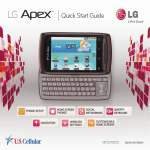
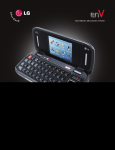
QWERTY Keyboard
12
1
11
2
10
3
9
4
5
6
Customize Your Phone
1.Back Key
2. Menu Key
3. Caps/Shift Key
4. Function Key
5. Symbols Key
6. Vibrate Mode Key
7
8
7.
8.
9.
10.
1 1.
12.
Space Key
Voice Dialer Key
Directional Keys
Enter Key
Backspace Key
Search Key
Add shortcuts, favorites, apps, and widgets to any
of the seven home screens. Jump quickly between
screens using simple finger motions. Organize
Enlighten to fit your lifestyle!
1.On the Home screen, pinch two fingers together
to bring up thumbnails of all seven screens.
2.Touch a blank screen’s thumbnail to switch to
that screen.
3.Press and hold an empty part of the screen.
4.Touch a category (Widgets, Shortcuts, Folders, or
Wallpapers), and then touch an item to add it to
the screen or to change the wallpaper.