1
Quick Start
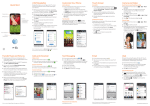
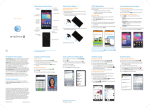
Camera lens
Status LED
Earpiece
3.5 mm
headset jack
Micro USB
charging port
Camera lens
Dual Flash
Volume keys
Power/lock key
Transfer Music and Pictures
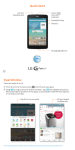
Connect your LG G3 to your computer with
a USB cable. Steps may vary depending on
your operating system.
You may be prompted to install PC
programs. Tap OK > Media device (MTP).
On your PC, choose Open device to view
files using Windows Explorer.
Your phone will appear as another hard
drive on your computer. Click on the drive to
view it.
Drag and drop your files* into the
corresponding folders, such as Music,
Movies, or Pictures. You can also transfer
files from your PC to your phone.
When you’re finished, swipe down on top
of the screen. Tap Media device (MTP) >
Charge phone. You may now unplug your
device.
*Files must be Digital Rights Management (DRM) free.
AT&T Ready2Go
Set up your device quickly and easily by using
Ready2Go:
• Set up Email accounts and Facebook®
• Sync your contacts and calendar
• Connect to Wi-Fi®
You can use Ready2Go when you first activate
your device or open it later from the app tray.
The wizard will guide you through the setup
process.
Note: To skip the wizard, tap Remind Later > exit. To return
to the wizard from the home screen, tap
> .
Calls and Voicemail
Visual Voicemail
View your voicemail messages as a list in your
mailbox and play them in the order you like.
From the home screen, tap > .
Make a Call
Switch to the
QSlide version
of dialer
Go to your
contact list
Access settings
and additional
options
View
recent calls
View groups
View
dialer
View your
favorite
contacts
Access
voicemail
Delete
Make a call
Note: To reset your voicemail password, go to
att.com/resetvm.
Customize Your Phone
Customize your phone by adding app
shortcuts and widgets to your home screens.
Home screen
Press and hold an empty spot on a home
screen and choose a category:
• Apps: Add shortcuts from the app tray.
•Widgets: Add dynamically updating
widgets.
•Wallpapers: Change your wallpaper.
To move an item, press and hold it and drag
it to a new location. To delete it, drag it to
Remove.
Your Sounds
From the home screen, press and hold
and tap All settings > Sound. You can change
your ringtones, set notification sounds, and
adjust your touch feedback options.
Text Messaging
Message thread
Delete message
Compose a new message
Access settings and
additional options
Access settings and
additional options
Call your contact
Attach a file
Send your message
Please don’t text and drive.
Messaging rates apply.
Touch Screen
KnockON
KnockON is enabled at default. Double-tap
an empty part of the screen or the top bar to
lock the phone. Double-tap again to wake it.
Notifications Panel
Tap to adjust
your Quick
Settings
Access all
settings
Remove all
notifications
Tap to
respond to
a notification
Swipe left or
right to
remove a
notification
Email
View folders and additional email accounts
Refresh your inbox
Compose a new email
Access settings and
additional options
Choose a recipient
from your contact list
Attach a picture or other file
Send your message
Note: Contact your IT administrator to help set up your
corporate Microsoft® Exchange account.
Camera, Video, and
Sharing Photos
Switch
camera
shot modes
Change
camera
settings
Exit camera
Take a
picture
Switch
between
front- and
rear-facing
cameras
Toggle flash
on/off/auto
Show/hide
camera icons
Access the
Gallery
Record a
video
Share photos
Tap the thumbnail in the lower right of
the screen.
Tap .
Tap an option and follow on-screen
instructions.
Web
Enter a web
address or
search terms
Go forward
a page
Go back
a page
Switch to the
QSlide version
of browser
Create a
new browser
window
Access settings
and additional
options
Access the
Browser Bar
Note: To disable the Browser Bar,
swipe up on
> > Toolbar.
MBM64519101(1.0)
Quick Start
Camera lens
Status LED
Earpiece
3.5 mm
headset jack
Micro USB
charging port
Camera lens
Dual Flash
Volume keys
Power/lock key
Transfer Music and Pictures
Connect your LG G3 to your computer with
a USB cable. Steps may vary depending on
your operating system.
You may be prompted to install PC
programs. Tap OK > Media device (MTP).
On your PC, choose Open device to view
files using Windows Explorer.
Your phone will appear as another hard
drive on your computer. Click on the drive to
view it.
Drag and drop your files* into the
corresponding folders, such as Music,
Movies, or Pictures. You can also transfer
files from your PC to your phone.
When you’re finished, swipe down on top
of the screen. Tap Media device (MTP) >
Charge phone. You may now unplug your
device.
*Files must be Digital Rights Management (DRM) free.
AT&T Ready2Go
Set up your device quickly and easily by using
Ready2Go:
• Set up Email accounts and Facebook®
• Sync your contacts and calendar
• Connect to Wi-Fi®
You can use Ready2Go when you first activate
your device or open it later from the app tray.
The wizard will guide you through the setup
process.
Note: To skip the wizard, tap Remind Later > exit. To return
to the wizard from the home screen, tap
> .
Calls and Voicemail
Visual Voicemail
View your voicemail messages as a list in your
mailbox and play them in the order you like.
From the home screen, tap > .
Make a Call
Switch to the
QSlide version
of dialer
Go to your
contact list
Access settings
and additional
options
View
recent calls
View groups
View
dialer
View your
favorite
contacts
Access
voicemail
Delete
Make a call
Note: To reset your voicemail password, go to
att.com/resetvm.
Customize Your Phone
Customize your phone by adding app
shortcuts and widgets to your home screens.
Home screen
Press and hold an empty spot on a home
screen and choose a category:
• Apps: Add shortcuts from the app tray.
•Widgets: Add dynamically updating
widgets.
•Wallpapers: Change your wallpaper.
To move an item, press and hold it and drag
it to a new location. To delete it, drag it to
Remove.
Your Sounds
From the home screen, press and hold
and tap All settings > Sound. You can change
your ringtones, set notification sounds, and
adjust your touch feedback options.
Text Messaging
Message thread
Delete message
Compose a new message
Access settings and
additional options
Access settings and
additional options
Call your contact
Attach a file
Send your message
Please don’t text and drive.
Messaging rates apply.
Touch Screen
KnockON
KnockON is enabled at default. Double-tap
an empty part of the screen or the top bar to
lock the phone. Double-tap again to wake it.
Notifications Panel
Tap to adjust
your Quick
Settings
Access all
settings
Remove all
notifications
Tap to
respond to
a notification
Swipe left or
right to
remove a
notification
Email
View folders and additional email accounts
Refresh your inbox
Compose a new email
Access settings and
additional options
Choose a recipient
from your contact list
Attach a picture or other file
Send your message
Note: Contact your IT administrator to help set up your
corporate Microsoft® Exchange account.
Camera, Video, and
Sharing Photos
Switch
camera
shot modes
Change
camera
settings
Exit camera
Take a
picture
Switch
between
front- and
rear-facing
cameras
Toggle flash
on/off/auto
Show/hide
camera icons
Access the
Gallery
Record a
video
Share photos
Tap the thumbnail in the lower right of
the screen.
Tap .
Tap an option and follow on-screen
instructions.
Web
Enter a web
address or
search terms
Go forward
a page
Go back
a page
Switch to the
QSlide version
of browser
Create a
new browser
window
Access settings
and additional
options
Access the
Browser Bar
Note: To disable the Browser Bar,
swipe up on
> > Toolbar.
MBM64519101(1.0)
Input Language
Change Device and Input Language
From the home screen, press and hold
and tap All settings > General > Language
& input.
To change the device language, tap
Language.
To change the keyboard input language, tap
next to the desired keyboard.
Tap Input language and keyboard layout.
Tap a language to select it. You can change
languages by tapping when you have a
keyboard open, for instance while typing a
text message.
Wi-Fi and Bluetooth®
Connect to Wi-Fi
From the home screen, press and hold
and tap All settings > Networks >
Wi-Fi.
Tap
to turn on Wi-Fi.
Tap a network name. Enter a password if
required and then tap Connect.
Use Bluetooth
From the home screen, press and hold
and tap All settings > Networks >
Bluetooth.
Tap
to turn on Bluetooth.
The LG G3 will automatically search for
devices. Tap a device to pair. See the
Bluetooth device’s user manual for more
information on pairing.
Dual Window
Interact with two apps at once. To launch Dual
Window, press and hold
.
Tap to open your two
most recently used apps
Drag an app to the top and
bottom of the screen
Drag to adjust
window size
Network Indicators
Your 4G LTE wireless device will indicate
which of the AT&T wireless networks you are
connected to. A network indicator does not
necessarily mean that you will experience any
particular upload or download data speeds.
4G LTE: Connected to the AT&T 4G LTE
network.
4G: Connected to the AT&T HSPA+
network. The AT&T HSPA+ network is
capable of delivering 4G speeds when
combined with enhanced backhaul. 4G
availability is increasing with ongoing
backhaul deployment.
E: Connected to the AT&T EDGE/2G
network.
Actual data upload and download speeds depend on
various factors, including the device, network utilization,
file characteristics, terrain, etc. Learn more at: wireless.
att.com/learn/articles-resources/wireless-terms.jsp,
your AT&T Wireless Customer Agreement, Section 3.2
“Where and How Does AT&T Service Work?”
4G LTE not available everywhere. LTE is a trademark of
ETSI. Learn more at att.com/network.
QSlide Function
The QSlide function enables an overlay on your
phone’s display for easy multitasking. You can
open two QSlide apps on top of a third app
from your library.
QSlide apps
Slide to adjust
transparency
View the
application in
full screen
mode
Close the
application
Google Play™ Store
Once you have set up your Google™ account,
you can download apps, music, movies, and
more from the Play Store.
Tap to access
your apps,
wishlist, and
more
Tap to view
a category
Search
Google Play
for an app or
other item
Notes:
• To purchase a paid app, you will need to set up a payment
method with Google Wallet™.
• You may want to download apps over Wi-Fi to save on
your data plan usage.
Knock Code™
Get direct access to the home screen while
keeping your phone secure.
Setup
From the home screen, press and hold
and tap Lock screen settings > Select
screen lock > Knock Code > Next.
Follow the on-screen prompts to set up a
Knock Code and backup PIN.
Use
•When the screen is dark, enter your Knock
Code anywhere on the screen.
•If you enter your Knock Code incorrectly
5 times, you’ll be prompted to enter your
backup PIN.
AT&T Services
AT&T offers a multitude of apps designed to
make your everyday life easier.
myAT&T: Track your usage, review and
pay your bill, and update your data plan
services.
AT&T Mobile Hotspot: Share your mobile
network data connection with other Wi-Fi
devices.
AT&T Locker™: Safely store and share all
your photos, videos, and documents with
up to 5 GB of free storage.
AT&T Mobile Locate: Back up contacts
and media, locate a lost device, and get
device support.
AT&T Navigator ®: Get voice-guided,
turn-by-turn driving directions and traffic
updates.
Mobile TV: Watch LIVE, on-demand, and
downloadable mobile TV.
AT&T Smart Wi-Fi: Maximize your
battery performance and data plan,
simplify access to AT&T Hot Spots and
Wi-Fi networks, automate your Wi-Fi
connections, and track your data usage.
Data rates may apply. Mobile TV and AT&T Navigator
require a separate subscription. Mobile TV requires
mobile broadband service. Service not available in all
areas. Programming subject to blackout restrictions.
Download and watch capability available for select
content, requires Wi-Fi connection, and is available for
viewing for limited time periods.
AT&T DriveMode®
When your vehicle is in motion, automatically
respond to incoming calls, texts, and emails.
Access
Settings
Call 911
Turn AT&T
DriveMode
on/off
Access
navigation:
Google Maps™ or
ATT Navigator®
View your
Allow List
Access music:
Google Play™ Music
or music player
AT&T DriveMode is free to AT&T customers. Standard
data and messaging rates apply to auto-reply messages.
Find More Information
On your phone
• Tutorials and videos: Apps > Device Help
• Access your account: Apps > My AT&T
On the Web
• Tutorials and videos: att.com/DeviceHowTo
• Manage your wireless account, including
suspending service if your phone is stolen:
att.com/MyATT
Give us a call
• 800-331-0500
• 611 from any AT&T wireless phone
Accessories
•att.com/WirelessAccessories
• Visit your AT&T store
Portions © 2014. LG, LG Life’s Good, and the LG logo
are registered trademarks of LG Corp. Portions © 2014
AT&T Intellectual Property. All rights reserved. AT&T, the
AT&T logo and all other AT&T marks contained herein
are trademarks of AT&T Intellectual Property. All other
marks contained herein are the property of their
respective owners.
Printed in Korea
Input Language
Change Device and Input Language
From the home screen, press and hold
and tap All settings > General > Language
& input.
To change the device language, tap
Language.
To change the keyboard input language, tap
next to the desired keyboard.
Tap Input language and keyboard layout.
Tap a language to select it. You can change
languages by tapping when you have a
keyboard open, for instance while typing a
text message.
Wi-Fi and Bluetooth®
Connect to Wi-Fi
From the home screen, press and hold
and tap All settings > Networks >
Wi-Fi.
Tap
to turn on Wi-Fi.
Tap a network name. Enter a password if
required and then tap Connect.
Use Bluetooth
From the home screen, press and hold
and tap All settings > Networks >
Bluetooth.
Tap
to turn on Bluetooth.
The LG G3 will automatically search for
devices. Tap a device to pair. See the
Bluetooth device’s user manual for more
information on pairing.
Dual Window
Interact with two apps at once. To launch Dual
Window, press and hold
.
Tap to open your two
most recently used apps
Drag an app to the top and
bottom of the screen
Drag to adjust
window size
Network Indicators
Your 4G LTE wireless device will indicate
which of the AT&T wireless networks you are
connected to. A network indicator does not
necessarily mean that you will experience any
particular upload or download data speeds.
4G LTE: Connected to the AT&T 4G LTE
network.
4G: Connected to the AT&T HSPA+
network. The AT&T HSPA+ network is
capable of delivering 4G speeds when
combined with enhanced backhaul. 4G
availability is increasing with ongoing
backhaul deployment.
E: Connected to the AT&T EDGE/2G
network.
Actual data upload and download speeds depend on
various factors, including the device, network utilization,
file characteristics, terrain, etc. Learn more at: wireless.
att.com/learn/articles-resources/wireless-terms.jsp,
your AT&T Wireless Customer Agreement, Section 3.2
“Where and How Does AT&T Service Work?”
4G LTE not available everywhere. LTE is a trademark of
ETSI. Learn more at att.com/network.
QSlide Function
The QSlide function enables an overlay on your
phone’s display for easy multitasking. You can
open two QSlide apps on top of a third app
from your library.
QSlide apps
Slide to adjust
transparency
View the
application in
full screen
mode
Close the
application
Google Play™ Store
Once you have set up your Google™ account,
you can download apps, music, movies, and
more from the Play Store.
Tap to access
your apps,
wishlist, and
more
Tap to view
a category
Search
Google Play
for an app or
other item
Notes:
• To purchase a paid app, you will need to set up a payment
method with Google Wallet™.
• You may want to download apps over Wi-Fi to save on
your data plan usage.
Knock Code™
Get direct access to the home screen while
keeping your phone secure.
Setup
From the home screen, press and hold
and tap Lock screen settings > Select
screen lock > Knock Code > Next.
Follow the on-screen prompts to set up a
Knock Code and backup PIN.
Use
•When the screen is dark, enter your Knock
Code anywhere on the screen.
•If you enter your Knock Code incorrectly
5 times, you’ll be prompted to enter your
backup PIN.
AT&T Services
AT&T offers a multitude of apps designed to
make your everyday life easier.
myAT&T: Track your usage, review and
pay your bill, and update your data plan
services.
AT&T Mobile Hotspot: Share your mobile
network data connection with other Wi-Fi
devices.
AT&T Locker™: Safely store and share all
your photos, videos, and documents with
up to 5 GB of free storage.
AT&T Mobile Locate: Back up contacts
and media, locate a lost device, and get
device support.
AT&T Navigator ®: Get voice-guided,
turn-by-turn driving directions and traffic
updates.
Mobile TV: Watch LIVE, on-demand, and
downloadable mobile TV.
AT&T Smart Wi-Fi: Maximize your
battery performance and data plan,
simplify access to AT&T Hot Spots and
Wi-Fi networks, automate your Wi-Fi
connections, and track your data usage.
Data rates may apply. Mobile TV and AT&T Navigator
require a separate subscription. Mobile TV requires
mobile broadband service. Service not available in all
areas. Programming subject to blackout restrictions.
Download and watch capability available for select
content, requires Wi-Fi connection, and is available for
viewing for limited time periods.
AT&T DriveMode®
When your vehicle is in motion, automatically
respond to incoming calls, texts, and emails.
Access
Settings
Call 911
Turn AT&T
DriveMode
on/off
Access
navigation:
Google Maps™ or
ATT Navigator®
View your
Allow List
Access music:
Google Play™ Music
or music player
AT&T DriveMode is free to AT&T customers. Standard
data and messaging rates apply to auto-reply messages.
Find More Information
On your phone
• Tutorials and videos: Apps > Device Help
• Access your account: Apps > My AT&T
On the Web
• Tutorials and videos: att.com/DeviceHowTo
• Manage your wireless account, including
suspending service if your phone is stolen:
att.com/MyATT
Give us a call
• 800-331-0500
• 611 from any AT&T wireless phone
Accessories
•att.com/WirelessAccessories
• Visit your AT&T store
Portions © 2014. LG, LG Life’s Good, and the LG logo
are registered trademarks of LG Corp. Portions © 2014
AT&T Intellectual Property. All rights reserved. AT&T, the
AT&T logo and all other AT&T marks contained herein
are trademarks of AT&T Intellectual Property. All other
marks contained herein are the property of their
respective owners.
Printed in Korea