1
AT&T Ready2Go
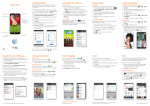
Set up your device quickly and easily by using
Ready2Go:
• Set up Email accounts
• Sync your contacts
• Connect to Wi-Fi®
You can use Ready2Go when you first activate
your device or open it later from the app tray.
The wizard will guide you through the setup
process.
Note: To skip the wizard, tap not now > exit. To return to the
wizard from the home screen, tap
> .
Calls and Voicemail
Visual Voicemail
View your voicemail messages as a list in your
mailbox and play them in the order you like.
From the home screen, tap > .
Make a Call
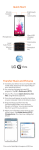
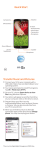
Go to your
contact list
Switch to the
QSlide version
of dialer
View
recent calls
Access settings
and additional
options
View groups
View
dialer
View your
favorite
contacts
Access
voicemail
Delete
Make a call
HD Voice Capable™ - Clear conversations
and reduced background noise.
LG G3 Vigor supports AT&T HD Voice which enables
background noise reduction and crisp audio quality when
both callers are using AT&T HD Voice compatible phones
within the AT&T HD Voice coverage area and have HD
Voice provisioned on their account. HD Voice has limited
availability in select markets. For further details on AT&T
HD Voice and service restrictions, visit att.com/hdvoice.
Note: To reset your voicemail password, go to
att.com/resetvm.