1
Getting to Know Your
Smartphone
For more information, visit
att.com/DeviceSupport.
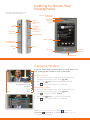
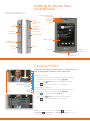
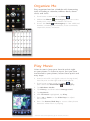
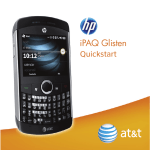
3.5mm Hands-Free
Connector
Earpiece
Proximity
Sensor
Stylus
Connector
Slot
Jog
Wheel
Charger/
Cable/
Hands-Free
Connector
microSD™
Card Slot
Volume Keys
Touch Screen
Keypad Lock/
Unlock Key
Reset
Camera
Key
Send Key
Power/
End Key
Microphone
Camera/Video
Capture everything around you in vivid detail via
the 3 megapixel camera and camcorder.
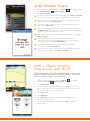
Taking a Picture
1. From home screen mode and with the phone
rotated horizontally, press the
Key.
Brightness
View Full/Normal Screen
Shot Mode
Go To
Menu
Close
2. Press the
3. Tap
Key again to take the picture.
to send the photo to someone.
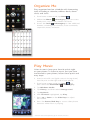
Recording a Video
1. From home screen mode and with the phone
rotated horizontally, press the
Key.
2. Tap
, and then select Video.
3. Press the
4. Tap
Key to start/stop recording.
to send the video to someone.
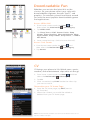
Note: From home screen mode, tap Menu
and select the
subcategory. Tap Pictures & Videos to see your
Multimedia
saved photos and recordings.