1
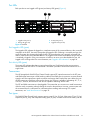
Each power supply is capable of providing all of the switch’s power needs. During normal operation, each
power supply provides half of the demand. If one power supply goes offline, the second power supply
steps up and provides the difference.
The power supplies are hot-pluggable and interchangeable. Hot-pluggable means that you can remove
and replace one power supply while the switch is in operation without disrupting service. See ”Transceiver
Removal and Replacement” on page 61 for information about replacing the power supplies.
Connecting a power supply to an AC voltage source energizes the switch logic circuitry. Internal fans
provide cooling. Air flow is front-to-back.
Switch management
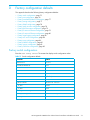
The switch supports the following management tools and protocols:
• QuickTools web applet, page 19
• Simple SAN Connection Manager, page 19
• Command line interface, page 19
• Simple Network Management Protocol, page 20
• Storage Management Initiative–Specification (SMI-S), page 20
• File transfer protocols, page 20
QuickTools web applet
QuickTools is a browser-based graphical user interface (GUI) that provides switch management
capabilities beyond those of Simple SAN Connection Manager. You run QuickTools by opening the switch
IP address with an internet browser on your workstation. See the HP StorageWorks SN6000 Fibre Channel
Switch QuickTools Switch Management User Guide. QuickTools provides the following management
features:
• Faceplate device management
• Switch stack management
• Switch and port statistics
• Configuration wizard
• Zoning administration
• Fabric tree for fabric management
• User account configuration
• Switch and fabric events
• Operational and environmental statistics
• Global device nicknames
• Inband management of other switches in the fabric
• Online help
Simple SAN Connection Manager
HP StorageWorks Simple SAN Connection Manager is a GUI-based management application for HP
StorageWorks that runs on a workstation known as the management station. It provides basic automated
configuration and management of switches, HBAs, and storage devices.Simple SAN Connection Manager
version 3.0 or later is required for the HP SN6000 Fibre Channel Switch.
Command line interface
The command line interface (CLI) provides monitoring and configuration functions by which the
administrator can manage the fabric and its switches. The CLI is available over an Ethernet connection or
a serial connection. For more information, see the HP StorageWorks SN6000 Fibre Channel Switch
Command Line Interface Guide.
HP StorageWorks SN6000 Fibre Channel Switch Installation and Reference Guide
19