1
HP AdvanceStack 10Base-T Hubs
Installation and Reference Guide
©Copyright Hewlett-Packard Company 1995.
All Rights Reserved.
Reproduction, adaptation, or translation without
prior written permission is prohibited, except as
allowed under the copyright laws.
Disclaimer
The information contained in this document is
subject to change without notice.
Applicable Products
HEWLETT-PACKARD COMPANY MAKES NO
WARRANTY OF ANY KIND WITH REGARD TO
THIS MATERIAL, INCLUDING, BUT NOT
LIMITED TO, THE IMPLIED WARRANTIES OF
MERCHANTABILITY AND FITNESS FOR A
PARTICULAR PURPOSE. Hewlett-Packard shall
not be liable for errors contained herein or for
incidental or consequential damages in connection
with the furnishing, performance, or use of this
material.
HP J2600A
HP J2601B
HP J2602B
Hewlett-Packard assumes no responsibility for
the use or reliability of its software on equipment
that is not furnished by Hewlett-Packard.
Trademark Credits
Warranty
MS-DOS® and Microsoft® are U.S. registered
trademarks of Microsoft Corporation.
Ethernet is a registered trademark of Xerox
Corporation.
See the warranty card shrink-wrapped with this
manual.
Publication Number
5964-4601
Edition 2
October 1995
Printed in Singapore.
8000 Foothills Boulevard MS 5551
Roseville, California 95747-5551
A copy of the specific warranty terms applicable
to your Hewlett-Packard product and replacement
parts can be obtained from your HP Sales and
Service Office or authorized dealer.
HP AdvanceStack 10Base-T Hubs
At A Glance
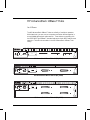
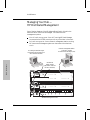
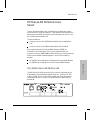
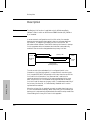
The HP AdvanceStack 10Base-T hubs are a family of multiport repeaters.
With these hubs, you can connect computers and other devices together in
an unshielded twisted-pair cable network. These hubs are compliant with
the IEEE 802.3 Type 10Base-T standard and support both 802.3 and Ethernet
networks. There are three models in the HP AdvanceStack 10Base-T hub
family:
Reset
Exp Slot
Security
Activity
ThinLAN
Console
AUI/Xcvr
Collision
Power
AdvanceStack HP J2600A
Thin LAN
12
11
10
9
8
7
6
5
4
3
2
1
10Base-T
Hub-12
Fault
Distributed Management
RS-232
Extension
AUI/Xcvr
Slot
In Out
HP AdvanceStack 10Base-T Hub-12 (HP J2600A)
HP AdvanceStack 10Base-T Hub-24 (HP J2601B)
HP AdvanceStack 10Base-T Hub-48 (HP J2602B)
iii
Features
Network Connections
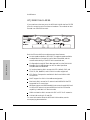
12, 24, or 48 twisted-pair ports. The 12-port hub has built-in RJ-45 jacks.
The 24-port and 48-port hubs have industry-standard 50-pin telco connectors
that can be fitted with 50-pin/RJ-45 Adapters included with the hubs.
A ThinLAN port (BNC) for connection to a ThinLAN coaxial cable segment.
This port is used to connect hubs together and to connect the hubs to a
common network backbone.
Upgradeable Design
The AUI/Xcvr slot for installing one of the HP Transceiver Modules.:
- HP Fiber-Optic Transceiver Module (HP J2606A)—for 10Base-FL
- HP Twisted-Pair Transceiver Module (HP J2607A)—for 10Base-T
- HP ThinLAN Transceiver Module (HP J2608A)—for 10Base2
- HP AUI Port Module (HP J2609A)—to attach external transceivers
Ability to expand the hubs’ capabilities by adding to the Expansion Slot the
following optional components:
-
Distributed Management
HP Ethernet SNMP Module
HP AdvanceStack Dial-A-LAN 2A/Plus V.34
HP AdvanceStack Dial-A-LAN 4A
HP AdvanceStack Router 210 Module
RJ-45 extension ports for “chaining” the HP AdvanceStack hubs together,
allowing access to all the hubs in the chain from one RS-232 out-of-band
connection into the chain, or from a network management station. The
out-of-band control is from a PC running HP Stack Manager or an ASCII
terminal or PC emulating an ASCII terminal.
The RS-232 out-of-band management port for attaching a personal computer
running the included Windows-based HP Stack Manager software or for
controlling the hub from an ASCII terminal or a PC emulating an ASCII terminal.
If the hub has an HP Ethernet SNMP Module installed, this serial connection
can also be made through a modem attached to the RS-232 port. The HP Stack
Manager software can also configure, monitor, and diagnose the hub or an
entire stack of hubs.
(continued on next page)
iv
Features (continued)
Modular, Easy-to-Use Design
LEDs showing power, activity, collisions, and port status provide quick,
easy-to-read hub status information and troubleshooting assistance.
A small footprint that allows you to install the hub in a large variety of ways,
including on a desk, under a desk, or on a wall.
Metal brackets (included with the hub) that can be easily attached to the
hub for mounting it in a standard 19-inch telco rack or on a wall.
Automatic segmentation (also called auto-partitioning) of ports that are
experiencing excessive collision problems. This improves network integrity
and aids in fault isolation.
Reliable Operation
A power supply that automatically adjusts to the voltage range of the ac power
being supplied to the hub (90-120 volts or 200-240 volts). No voltage range
setting or fuse change is needed.
For the Hub-24 and Hub-48, a power connector for the HP J2962A Redundant
Power Supply (RPS) which will be available at the end of 1995. With the
rack-mountable RPS, your hub will receive redundant DC power for increased
reliability.
The ability to “hot swap” a hub. Removing a hub connected to other hubs
through the built-in ThinLAN connector does not bring down the network; you
can upgrade or replace hubs in a stack with the network up and running.
A self-test for fault identification when the hub is powered on or when it is
reset. (The hub can be reset from the HP Stack Manager, from a network
management station, or by pressing the Reset button.)
Standards-Based Compatibility
Compatible with the IEEE 802.3 Type 10Base-T standard to support both
802.3 and Ethernet networks.
v
Front Panel
hub status LEDs
and reset button
twisted-pair port LEDs
Optional AUI port module
installed in AUI/Xcvr slot
ThinLAN
network
port
twisted-pair ports
cable management
guide
chain ports
RS-232 console port
(for distributed management)
Back Panel
power connector
vi
redundant power
connector for the Hub-24
and Hub-48
cover plate over slot for
HP Ethernet SNMP Module
Perforate
HP Customer Support Services
How to get the latest software/agent firmware
You can download any of the following:
HP AdvanceStack SNMP firmware:
HP Interconnect Manager:
HP Stack Manager
asfw.exe
icmupdt.exe
stkmgr.exe
from the HP BBS, HP FTP Library Service, CompuServe, and the World Wide
Web. After you download the file, exact the file by typing filename /x. For
example asfw.exe /x
HP BBS
Set your modem to N-8-1, set speed up to 14400 bps, and with your telecommunication program (e.g., Windows Terminal) dial (208) 344-1691 to get the
latest software for your HP networking product.
HP FTP Library Service
1) FTP to Internet IP Address - ftp ftp-boi.external.hp.com
2) Log in as anonymous and press [Return] at the password prompt.
3) Type bin to set the transfer type.
4) Type cd pub/networking/software
5) Type get filename to transfer the file to your computer and quit.
CompuServe
1) Login to CompuServe.
2) Type go hpsys
3) Type lib 7
4) Type download filename and then quit.
World Wide Web
http://www.hp.com/go/network_city
Select the Support section, then Downloads and Patches. Download the file
you need and extract it by typing: filename /x
Do you have questions about designing your expanding network? From this
web site, you can also download the Designing HP AdvanceStack Networks
Guide which addresses capacity planning or dial 1-800-752-0900 to receive a
copy through the mail.
Obtain the latest agent firmware (asfw.exe, icmupdt.exe,
stkmgr.exe) from:
HP FTP Library:
ftp ftp-boi.external.hp.com
World Wide Web:
http://www.hp.com/go/network_city
HP BBS
(208) 344-1691
CompuServe
go hpsys
lib 7
download asfw.exe
Perforate
Perforate
Perforate
Perforate
✁
Contents
1
Installing the HP AdvanceStack 10Base-T Hubs
Installation Summary . . . . . . . . . . . . . . . . . . . . . . . . . . . 1-2
Included Parts . . . . . . . . . . . . . . . . . . . . . . . . . . . 1-2
Installation Steps . . . . . . . . . . . . . . . . . . . . . . . . . . . . . 1-3
1. Install Add-in Modules (optional) . . . . . . . . . . . . . . . . . 1-3
2. Verify the Hub’s Operation . . . . . . . . . . . . . . . . . . . . . 1-4
3. Mount the Hub . . . . . . . . . . . . . . . . . . . . . . . . . . . . 1-5
Mounting the Hub in a Rack or Cabinet . . . . . . . . . . . . . 1-6
Mounting the Hub on a Wall . . . . . . . . . . . . . . . . . . . . 1-10
4. Complete the Network Connections to the Hub
Connecting Computers and Other Devices . .
Hub-to-Hub Network Connections . . . . . . .
Hub-to-Network Backbone Connections . . .
Network Port Connections . . . . . . . . . . .
Cable Management . . . . . . . . . . . . . . . .
.
.
.
.
.
.
.
.
.
.
.
.
.
.
.
.
.
.
.
.
.
.
.
.
.
.
.
.
.
.
.
.
.
.
.
.
.
.
.
.
.
.
.
.
.
.
.
.
.
.
.
.
.
.
1-11
1-11
1-12
1-13
1-14
1-19
5. Connect the Hub to the Distributed Management Console
(optional) . . . . . . . . . . . . . . . . . . . . . . . . . . .
Using a Direct Serial Connection . . . . . . . . . . . . . .
Using a Modem Connection with HP Stack Manager . . .
Using the Distributed Management Chain . . . . . . . . .
.
.
.
.
.
.
.
.
.
.
.
.
1-20
1-21
1-22
1-24
vii
Contents
2
Installing and Using HP Stack Manager
Software Description . . . . . . . . . . . . . . . . . . . . . . . . . . . 2-2
Computer Requirements . . . . . . . . . . . . . . . . . . . . . . . . . 2-3
Installing and Starting HP Stack Manager . . . . . . . . . . . . . . . 2-4
HP Stack Manager Basic Features . .
Communications Settings . . . .
Connect/Disconnect . . . . . . .
Automatic Chain Display . . . .
Online Help . . . . . . . . . . . .
Port Status Display . . . . . . . .
LAN Traffic Statistics . . . . . .
Hub Identification . . . . . . . .
Port Enable/Disable . . . . . . .
Port Counters . . . . . . . . . . .
Reset . . . . . . . . . . . . . . . .
Redundant Power Supply (RPS)
viii
.
.
.
.
.
.
.
.
.
.
.
.
.
.
.
.
.
.
.
.
.
.
.
.
.
.
.
.
.
.
.
.
.
.
.
.
.
.
.
.
.
.
.
.
.
.
.
.
.
.
.
.
.
.
.
.
.
.
.
.
.
.
.
.
.
.
.
.
.
.
.
.
.
.
.
.
.
.
.
.
.
.
.
.
.
.
.
.
.
.
.
.
.
.
.
.
.
.
.
.
.
.
.
.
.
.
.
.
.
.
.
.
.
.
.
.
.
.
.
.
.
.
.
.
.
.
.
.
.
.
.
.
.
.
.
.
.
.
.
.
.
.
.
.
.
.
.
.
.
.
.
.
.
.
.
.
.
.
.
.
.
.
.
.
.
.
.
.
.
.
.
.
.
.
.
.
.
.
.
.
.
.
.
.
.
.
.
.
.
.
.
.
.
.
.
.
.
.
.
.
.
.
.
.
2-5
2-6
2-6
2-7
2-7
2-7
2-7
2-7
2-8
2-8
2-8
2-8
HP Stack Manager Advanced Features . . .
Higher-Speed Serial Access . . . . . .
Modem Access for HP Stack Manager
IP Configuration . . . . . . . . . . . .
Password . . . . . . . . . . . . . . . .
Authorized Managers . . . . . . . . . .
Backup Link . . . . . . . . . . . . . . .
Robust Port Control . . . . . . . . . .
Network Tests . . . . . . . . . . . . . .
Factory Reset . . . . . . . . . . . . . .
.
.
.
.
.
.
.
.
.
.
.
.
.
.
.
.
.
.
.
.
.
.
.
.
.
.
.
.
.
.
.
.
.
.
.
.
.
.
.
.
.
.
.
.
.
.
.
.
.
.
.
.
.
.
.
.
.
.
.
.
.
.
.
.
.
.
.
.
.
.
.
.
.
.
.
.
.
.
.
.
.
.
.
.
.
.
.
.
.
.
.
.
.
.
.
.
.
.
.
.
.
.
.
.
.
.
.
.
.
.
.
.
.
.
.
.
.
.
.
.
.
.
.
.
.
.
.
.
.
.
.
.
.
.
.
.
.
.
.
.
2-9
2-9
2-9
2-10
2-10
2-11
2-11
2-11
2-12
2-12
Contents
3
Hub Reference
Front and Back Panel Descriptions . . . . . . . . . . . . . . . . . . . 3-2
Front of the hub . . . . . . . . . . . . . . . . . . . . . . . . . . 3-3
Back of the Hub . . . . . . . . . . . . . . . . . . . . . . . . . . . 3-5
How the Hubs Work . .
Collision Detection
Auto-Segmentation
Link Beat . . . . .
.
.
.
.
.
.
.
.
.
.
.
.
.
.
.
.
.
.
.
.
.
.
.
.
.
.
.
.
.
.
.
.
.
.
.
.
.
.
.
.
.
.
.
.
.
.
.
.
.
.
.
.
.
.
.
.
.
.
.
.
.
.
.
.
.
.
.
.
.
.
.
.
.
.
.
.
.
.
.
.
.
.
.
.
.
.
.
.
.
.
.
.
.
.
.
.
.
.
.
.
3-5
3-5
3-6
3-7
Managing Your Hub —HP Distributed Management
Chaining the Hubs . . . . . . . . . . . . . . . .
Out-of-Band Management . . . . . . . . . . . .
In-Band (Network) Management . . . . . . . .
.
.
.
.
.
.
.
.
.
.
.
.
.
.
.
.
.
.
.
.
.
.
.
.
.
.
.
.
.
.
.
.
.
.
.
.
3-8
3-9
3-9
3-9
Security Features . . . . . . . .
Port Security . . . . . . .
Authorized Managers List
Password Protection . . .
.
.
.
.
.
.
.
.
.
.
.
.
.
.
.
.
.
.
.
.
.
.
.
.
.
.
.
.
.
.
.
.
.
.
.
.
.
.
.
.
.
.
.
.
.
.
.
.
.
.
.
.
.
.
.
.
.
.
.
.
.
.
.
.
.
.
.
.
.
.
.
.
.
.
.
.
.
.
.
.
.
.
.
.
3-10
3-11
3-11
3-12
Optional Modules . . . . . . . . .
HP Ethernet SNMP Module
HP Transceiver Modules . .
HP Router Module . . . . .
.
.
.
.
.
.
.
.
.
.
.
.
.
.
.
.
.
.
.
.
.
.
.
.
.
.
.
.
.
.
.
.
.
.
.
.
.
.
.
.
.
.
.
.
.
.
.
.
.
.
.
.
.
.
.
.
.
.
.
.
.
.
.
.
.
.
.
.
.
.
.
.
.
.
.
.
.
.
.
.
3-12
3-12
3-14
3-15
HP Dial-a-LAN Remote Access Server . . . . . . . . . . . . . . . . . 3-17
HP J2623A Dial-A-LAN 2A/Plus V.34 . . . . . . . . . . . . . . . 3-17
HP J2624A Dial-A-LAN 4A . . . . . . . . . . . . . . . . . . . . . 3-18
Firmware Enhancements . . . . . . . . . . . . . . . . . . . . . . . . 3-19
ix
Contents
4
Troubleshooting
Troubleshooting Approaches . . . . . . . . . . . . . . . . . . . . . . 4-2
Diagnosing with the LEDs . . . . . . . . . . . . . . . . . . . . . . . . 4-3
LED Pattern During Self-Test . . . . . . . . . . . . . . . . . . . 4-3
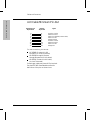
LED Error Indications . . . . . . . . . . . . . . . . . . . . . . . 4-4
Installation Problems . . . . . . . . . . . . . . . . . . . . . . . . . . . 4-6
Incorrect Installation . . . . . . . . . . . . . . . . . . . . . . . . 4-6
ASCII Console Connection Problems . . . . . . . . . . . . . . 4-6
Cabling Problems . . . . .
Connections . . . . .
Non-standard Cables
Topology . . . . . . .
.
.
.
.
.
.
.
.
.
.
.
.
.
.
.
.
.
.
.
.
.
.
.
.
.
.
.
.
.
.
.
.
.
.
.
.
.
.
.
.
.
.
.
.
.
.
.
.
.
.
.
.
.
.
.
.
.
.
.
.
.
.
.
.
.
.
.
.
.
.
.
.
.
.
.
.
.
.
.
.
.
.
.
.
.
.
.
.
.
.
.
.
.
.
.
.
4-7
4-7
4-7
4-8
Unusual Network Activity . . . . . . . . . . . . . . . . . . . . . . . . 4-8
IP Configuration Errors . . . . . . . . . . . . . . . . . . . . . . . . . 4-8
Diagnostic Tests . . . . . . . . . . . . . . . .
Testing the Hub Only . . . . . . . . . .
Testing the Hub’s Ports and the Links
Testing Twisted-Pair Cabling . . . . .
.
.
.
.
.
.
.
.
.
.
.
.
.
.
.
.
.
.
.
.
.
.
.
.
.
.
.
.
.
.
.
.
.
.
.
.
.
.
.
.
.
.
.
.
.
.
.
.
.
.
.
.
.
.
.
.
4-9
4-9
4-9
4-10
Clearing a Password . . . . . . . . . . . . . . . . . . . . . . . . . . . 4-11
Customer Support Services . . . . . . . . .
Hewlett-Packard FTP Library Service
CompuServe . . . . . . . . . . . . . .
HP FIRST Fax Retrieval Service . . .
HP Network Phone-In Support (NPS)
x
.
.
.
.
.
.
.
.
.
.
.
.
.
.
.
.
.
.
.
.
.
.
.
.
.
.
.
.
.
.
.
.
.
.
.
.
.
.
.
.
.
.
.
.
.
.
.
.
.
.
.
.
.
.
.
.
.
.
.
.
.
.
.
.
.
.
.
.
.
.
4-12
4-13
4-14
4-15
4-15
Contents
A
Cables and Connectors
Recommended Cables . . . . . . . . . . . . . . . . . . . . . . . . . . A-3
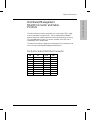
Twisted-Pair Cable/Connector Pin-Outs . . . . . . . . . . . . . . . .
Twisted-Pair Cable for Hub-to-Computer Network Connection
Twisted-Pair Cable for Hub-to-Hub Distributed Management
Chaining (not a network connection) . . . . . . . . . . . . . .
Twisted-Pair “Crossover” Cable for Hub-to-Hub Network
Connection . . . . . . . . . . . . . . . . . . . . . . . . . . . . .
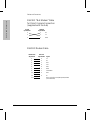
Twisted-Pair Cable Pin Assignments . . . . . . . . . . . . . . .
A-4
A-4
A-5
A-6
A-7
ThinLAN Cable Requirements . . . . . . . . . . . . . . . . . . . . . . A-7
AUI Cable Minimum Pin-Out . . . . . . . . . . . . . . . . . . . . . . . A-8
Distributed Management RS-232 Connector and Cable Pin-Outs . .
Pin-Out for Hub’s RS-232 Port Connector . . . . . . . . . . . .
RS-232-C “Null Modem” Cable for Direct Console Connection
(supplied with the hub) . . . . . . . . . . . . . . . . . . . . . .
RS-232-C Modem Cable . . . . . . . . . . . . . . . . . . . . . .
B
Specifications
C
Network Addressing
A-9
A-9
A-10
A-10
Communication Between the Hub and Network Management Station C-2
IPX Addressing for Novell NetWare . . . . . . . . . . . . . . . . . . . C-3
IPX Addressing Notes: . . . . . . . . . . . . . . . . . . . . . . . C-3
IP Addresses for IP and Non-IP Networks . . . . . . . . . . . . . . . C-4
Using Assigned IP Addresses . . . . . . . . . . . . . . . . . . . C-4
Building Your Own IP Addressing Scheme . . . . . . . . . . . C-4
Using BOOTP . . . . . . . . . . . . . . . . . . . . . . . . . . . . . . . C-6
The BOOTP Process . . . . . . . . . . . . . . . . . . . . . . . . C-6
BOOTP Table File Entries . . . . . . . . . . . . . . . . . . . . . C-6
xi
Contents
D
Backup Links
Description . . . . . . . . . . . . . . . . . . . . . . . . . . . . . . . . D-2
Limitations . . . . . . . . . . . . . . . . . . . . . . . . . . . . . D-3
Additional Notes . . . . . . . . . . . . . . . . . . . . . . . . . . D-3
Configuring a Backup Link . . . . . . . . . . . . . . . . . . . . . . . . D-4
Identifying the Backup Link . . . . . . . . . . . . . . . . . . . . . . . D-5
Indications of Backup Link
Activation . . . . . . . . . . . . . . . . . . . . . . . . . . . . . . . . . D-6
Reactivating the Primary Link . . . . . . . . . . . . . . . . . . . . . . D-7
Example Topologies . . . . . . . . . . . . . . . . . . . . . . . . . . . D-8
Example 1: Hub-to-Hub . . . . . . . . . . . . . . . . . . . . . . D-8
Example 2: Backup Link Using Alternative Medium . . . . . . D-9
Safety and Regulatory Statements
Index
xii
1
Installation Summary
Installation Steps
1. Install Add-in Modules (optional)
2. Verify the Hub’s Operation
3. Mount the Hub
4. Complete the Network Connections to the Hub
5. Connect the Hub to the Distributed Management
Console (optional)
Installing the HP AdvanceStack
10Base-T Hubs
Installing the
HP AdvanceStack Hubs
Installing the HP AdvanceStack 10Base-T Hubs
Installation Summary
The basic hardware installation procedure for the HP AdvanceStack
10Base-T Hubs is as follows:
1. Install the Ethernet SNMP Module and/or one of the Transceiver
Modules (optional).
2. Verify the hub’s operation.
3. Mount the hub in a rack, on a wall, or on a tabletop.
4. Connect the hub to a network or other hubs, and connect
computer(s) and/or other device(s) to the hub’s ports.
5. Connect an out-of-band management console to the hub (optional).
Included Parts
Each of the three HP AdvanceStack 10Base-T hubs has the following
components shipped with it:
HP Stack Manager Software Kit
HP AdvanceStack 10Base-T Hubs Installation and Reference
Guide—this manual (5964-4601)
Product Registration Kit
Serial cable for attaching a PC to the out-of-band management port
(5182-4794)
50-pin/RJ-45 Adapters (J2605-61001)—2 supplied with the 24-port
hub, 4 with the 48-port hub
accessory kit(s)—accessories vary with hub model purchased:
•
the 5063-4251 kit (shipped with all hub models):
– two mounting brackets
– two cable ties
– four 3/8-inch M4 machine screws
– four 5/8-inch number 12-24 screws
•
the 5063-4252 kit (shipped with the 24-port and 48-port hubs):
– four telco hooks
– four telco hook screws
(continued on next page)
1-2
Installing the HP AdvanceStack 10Base-T Hubs
Installing the
HP AdvanceStack Hubs
Power cord, one of the following:
Australia/New Zealand (8120-6175)
Denmark (8120-6178)
Europe (8120-6174)
Switzerland (8120-6179)
Japan (8120-6176)
United Kingdom (8120-6173)
United States/Canada (8120-6177)
Installation Steps
1. Install Add-in Modules (optional)
The HP AdvanceStack 10Base-T Hubs can be custom-configured by
installing an optional Ethernet SNMP Module and/or an HP Transceiver
Module. If you intend to install any of these optional modules, refer to
the documentation that was shipped with it.
It may be more convenient to install these optional modules before
installing the hub in a rack or other location. Inspect your installation
site and identify whether the hub’s module slots will be accessible.
1-3
Installing the HP AdvanceStack 10Base-T Hubs
Installing the
HP AdvanceStack Hubs
2. Verify the Hub’s Operation
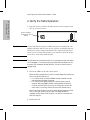
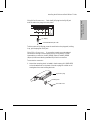
1. Plug the power cord into the hub’s power cord receptacle and
into an ac power source.
power receptacle
on the back of the
Hub-24.
Caution
If your installation requires a different power cord than the one
supplied with the hub, be sure to use a power cord displaying the
mark of the safety agency that defines the regulations for power
cords in your country. The mark is your assurance that the power
cord can be used safely with the hub.
Note
The hub does not have a power switch; it is powered on when the power
cord is plugged in. The hub’s power supply automatically adjusts to any
ac power source between 90 and 240 volts. You do not have to set the
voltage range.
2. Check the LEDs on the hub’s front panel.
When the hub is powered on, it performs a self-diagnostic test during
which time all the LEDs are lit.
• For a hub without an optional SNMP Module installed, the selftest takes approximately 3 seconds.
• For a hub with an SNMP Module, the self-test takes up to 60
seconds. While the SNMP Module is being tested, the Activity,
Collision, and RPS LEDs are not lit (or flickering if there is network traffic on the hub) and the Exp Slot LED flashes slowly.
At the end of the self-test, a correctly operating hub keeps the Power
LED on, the Fault LED will be off, and, if an SNMP Module is
installed, the Exp Slot LED will stay lit. If an RPS is connected, the
RPS LED stays on.
3. Unplug the hub.
1-4
Installing the HP AdvanceStack 10Base-T Hubs
Installing the
HP AdvanceStack Hubs
3. Mount the Hub
The HP AdvanceStack hubs can be mounted in three ways:
in a rack or cabinet
on a wall
on a table
The hardware for mounting the hub is included in the Accessory Kit
(5063-4251) packed with the hub. If you are mounting the hub to a wall,
however, you will also need four 5/8-inch number 12 wood screws,
which are not included in the Accessory Kit.
To mount a hub in a rack or on a wall, you will need a Phillips
(cross-head) number 1 screwdriver.
To locate the hub on a table or other horizontal surface, no special tools
are necessary. Be certain to pick a sturdy table in an isolated area. You
may want to secure the hub’s cables to the leg of the table to prevent
people from tripping over them.
Mounting
Precautions:
Before mounting a hub, plan its location and orientation relative to
other devices and equipment. Also consider the cabling that will be
attached to the hub and ports that will be used. If you use the cable
guide bar on the right side of the hub’s front, make room for the
grouped cables to trail out from the right side of the hub.
Ensure that the HP AdvanceStack hub(s) do not overload the power
circuits, wiring, and over-current protection. To determine the
possibility of overloading the supply circuits, add together the
ampere ratings from the nameplates of all your hubs (and other
equipment) installed on the same circuits and compare the total with
the rating limits for the supply circuits.
Make sure that the power source circuits are properly grounded,
then use the supplied power cord to connect the HP AdvanceStack
hub to the circuit. See the Safety Statements at the end of this
manual.
Do not install the HP AdvanceStack hub in an environment where
the operating ambient temperature might exceed 55°C (131°F).
Make sure the air flow around the sides of the hub is not restricted.
1-5
Installing the HP AdvanceStack 10Base-T Hubs
Installing the
HP AdvanceStack Hubs
Mounting the Hub in a Rack or Cabinet
Note that the rack or cabinet should be adequately secured to prevent it
from falling over.
1. Using a Phillips (cross-head) screwdriver, attach the mounting brackets
to the hub with the 10-mm M4 screws included in the Accessory Kit.
The top of each bracket should align with the top of the hub.
align top of bracket
with top of hub
Be careful not to overtighten the screws.
10-mm M4
screws
Note that several different rack mount positions are possible by
using the different holes in the bracket and the hub. The illustration
shows the recommended position for a rack mounting; it provides
the most well balanced position for the hub.
1-6
Installing the HP AdvanceStack 10Base-T Hubs
Installing the
HP AdvanceStack Hubs
Important
Note
Steps 2 through 4 below apply to mounting a single hub or the
first of multiple hubs in a rack. The mounting brackets are
designed to make it easy to install this first hub, and once it is
installed correctly, to easily install subsequent hubs by placing
them on top, one at a time, and then securing them to the rack.
To make the process easy, it is important to get the first hub
located correctly.
This first hub (or single hub) should be mounted in a position
toward the bottom of the rack for stability and to make it easier
to put the other hubs on top.
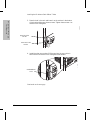
2. As shown below, partially install a screw (5/8-inch number 12-24) in
each rack upright. Ensure that the screws in each upright are at the
same level.
If you are stacking multiple hubs in a single rack and want them to fit
tightly, the selection of the first screw holes is important. In an EIAstandard 19" telco rack, the screw hole pattern is repetitive-pairs of
holes are separated by 0.5-inch or 0.625-inch. Insert these first screws
in the repeats with vertical pairs of the holes being close together.
Insert these first screws in the upper hole of one of these close pairs,
as shown in the illustration.
Insert a screw into the
top hole of a close (0.5inch) pair—like one of
these—one in each of
the rack uprights.
One upright of an EIA
19-inch telco rack
1-7
Installing the HP AdvanceStack 10Base-T Hubs
Installing the
HP AdvanceStack Hubs
3. Place the hub in the rack and lower it so the notches in the bottom
of the bracket slide onto the two screws. Tighten these screws—be
careful not to overtighten.
Upper hole in the
bracket
Lower notch in the
bracket
4. Install the other two number 12-24 screws into the upper hole in
each bracket. Be careful not to overtighten these screws.
Install additional
screw
Continued on the next page.
1-8
Installing the HP AdvanceStack 10Base-T Hubs
Installing the
HP AdvanceStack Hubs
Notice that for the first hub you mounted, you used the bottom notch
and the top hole in the bracket. For the next hub above, you use the
bottom hole and the top notch, as show in the illustration below.
Continue to alternate “notch and hole, hole and notch” for all hubs to be
installed.
To assist you, a single hash mark is located by one notch/hole pair and a
double hash mark is located by the other pair on the bracket.
1-9
Installing the
HP AdvanceStack Hubs
Installing the HP AdvanceStack 10Base-T Hubs
Mounting the Hub on a Wall
Important
A hub should be mounted only to a wall or wood surface that is
at least 1/2-inch plywood or its equivalent.
1. Using a Phillips (cross-head) screwdriver, attach the mounting
brackets to the hub in one of the positions shown in the illustrations
below with the 10-mm M4 screws included in the Accessory Kit.
2. Attach the hub to the wall or wood surface with 5/8-inch number 12
wood screws (not included).
Bracket mounting
position for flat
mounting on a wall.
10-mm M4 screws
Bracket mounting position for
bookshelf-style mounting on a wall.
Plug the power cord into the hub’s
power receptacle before mounting
the hub. There may not be enough
room to do so after the hub is
mounted.
10-mm M4 screws
1-10
Installing the HP AdvanceStack 10Base-T Hubs
Installing the
HP AdvanceStack Hubs
4. Complete the Network Connections
to the Hub
Reconnect the hub to the power source and then make the
network connections to the hub. (For the Hub-24 and Hub-48, see the
documentation accompanying the Redundant Power Supply if you are
using redundant power.) Typical hub connections are to:
network devices such as computers, and printers
a network backbone
another HP AdvanceStack 10Base-T Hub, or other Ethernet hub
Some examples of connections that can be made to your hub are shown
below. Specific details about connecting your network cabling to the
hub’s ports are included later in this chapter.
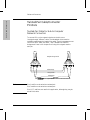
Connecting Computers and Other Devices
Devices connected to the hub’s
50-pin telco connector through a
cross-connect block
Devices connected directly to a
50-pin/RJ-45 adapter on the hub
1-11
Installing the HP AdvanceStack 10Base-T Hubs
Installing the
HP AdvanceStack Hubs
Hub-to-Hub Network Connections
The HP AdvanceStack 10Base-T Hubs can be connected together using
any of the hub’s network ports. It is strongly recommended that you
use the built-in ThinLAN (BNC) port for connecting hubs together. By
using that port, up to 30 hubs can be connected together on a common
ThinLAN segment, and a computer at one end of that segment can
communicate with a computer all the way at the other end of the
segment. By using the built-in BNC port, the maximum the repeater
hop-count increment through the entire segment is only two.
See the Designing HP AdvanceStack Workgroup Networks guide for
information on valid network topologies.
ThinLAN Port to ThinLAN Port
ThinLAN coax connecting the hubs together
Twisted-Pair to Twisted-Pair Port – “Cascading”
twisted-pair cable with Tx
and Rx pairs reversed*
*In a twisted-pair cable connection between hubs, Tx and Rx pairs must be
reversed. You can use the HP 92214W Crossover cable with inline adapter to
reverse the pairs. See appendix A, “Cables and Connectors”, for more
information.
1-12
Installing the HP AdvanceStack 10Base-T Hubs
Installing the
HP AdvanceStack Hubs
Hub-to-Network Backbone Connections
A single HP AdvanceStack 10Base-T Hub or a stack of hubs can be
connected to a network backbone. These examples show connection
to ThinLAN and fiber-optic backbones.
Connecting to a ThinLAN Backbone
ThinLAN coax
backbone
Connecting to a Fiber-Optic Backbone
fiber-optic
cable
HP Fiber-Optic
Transceiver Module (HP J2606A)
Reset
Exp Slot
Security
Activity
ThinLAN
Console
AUI/Xcvr
Collision
Power
Rx
In Out
Reset
Exp Slot
Tx
Security
Activity
AUI/Xcvr
Collision
Power
ThinLAN
AdvanceStack HP J2600A
Thin LAN
12
11
10
9
8
7
6
5
4
3
2
1
10Base-T
Hub-12
Console
12
11
10
9
8
7
6
5
4
3
2
1
10Base-T
Hub-12
HP J2606A
Distributed Management
Extension
RS-232
Light
Status
Thin LAN
Fault
Fiber-Optic
AdvanceStack HP J2600A
Fault
Distributed Management
E t
i
RS 232
1-13
Installing the HP AdvanceStack 10Base-T Hubs
Installing the
HP AdvanceStack Hubs
Network Port Connections
The HP AdvanceStack 10Base-T Hubs have the following network ports:
twisted-pair
ThinLAN (BNC)
AUI/Xcvr Slot
This section describes how to connect cables to these ports.
Twisted-pair Connections
Twisted-pair connections can be made through the 12-port hub’s built-in
RJ-45 jacks and the 24 and 48-port hubs’ 50-pin telco connectors, used
either directly or with a 50-pin/RJ-45 Adapter (J2605-61001).
Using the 50-pin/RJ-45 Adapter: To install the 50-pin/RJ-45 Adapter
(J2605-61001) on the 24 and 48-port hubs’ telco connectors:
slot in the hub
50-pin telco
connector
1. Insert the hook on the back of the adapter into the slot on the hub’s
face.
insert hook
in slot
press adapter
onto telco
connector
secure adapter
with thumb screw
2. Pivot the adapter and press it onto the telco connector.
3. Make sure the hook is in the hub’s slot, then secure the adapter to
the hub using the thumb screw. Do not overtighten the screw.
1-14
Installing the HP AdvanceStack 10Base-T Hubs
B
12
11
10
9
8
7
6
5
4
3
2
12
10
8
6
4
2
11
9
7
5
3
1
1
B
Installing the
HP AdvanceStack Hubs
Using RJ-45 Connectors: Push the RJ-45 plug into the RJ-45 jack
until the tab on the plug clicks into place.
10Base-T
Hub-24
RJ-45 plug
unshielded twisted-pair cable
To disconnect an RJ-45 plug, press the small tab on the plug and, holding
it up, pull the plug out of the jack.
Using Telco Connectors: If you prefer to make your twisted-pair
connections through a cross-connect block, wiring closet, or other
intermediary connection, the HP J2601B (24-port) and HP J2602B
(48-port) hubs have industry-standard 50-pin telco connectors.
To use a telco connector:
1. Attach the mounting hook included in the Accessory Kit (5063-4252)
to the threaded hole on the back of the telco plug. Be careful not to
overtighten the screw holding the hook.
50-pin telco plug
mounting hook
1/2-in 4-40 screw
1-15
Installing the HP AdvanceStack 10Base-T Hubs
Installing the
HP AdvanceStack Hubs
2. Insert the hook into the slot on the hub’s face.
insert hook
in slot
press telco plug
onto connector
secure plug with
attached screw
3. Pivot the telco plug onto the 50-pin telco connector and press it into
place.
4. Make sure the mounting hook is in the hub’s slot, then secure the
telco plug to the hub by tightening the screw on the telco plug into
the hole on the hub. Be careful not to overtighten the screw.
To remove a telco connector, reverse this process.
Note
1-16
If you are using a mixture of 50-pin/RJ-45 Adapters and right-angle
50-pin connectors on an HP AdvanceStack 10Base-T Hub, position the
Adapters to the left of the right-angle 50-pin connectors.
Installing the HP AdvanceStack 10Base-T Hubs
Installing the
HP AdvanceStack Hubs
ThinLAN Connections
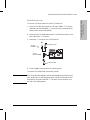
To connect a ThinLAN cable to the hub’s ThinLAN port:
1. Attach a ThinLAN cable section to one side of a BNC “T” connector.
(Hewlett-Packard offers BNC “T” connectors with insulating covers.
Order product number HP 92227A.)
2. Attach another ThinLAN cable section or a 50-ohm terminator to the
other side of the “T” connector.
3. Attach the “T” connector to the ThinLAN port.
OR
50-ohm
terminator
ThinLAN cable
BNC “T”
connector
ThinLAN cable
4. Cover the BNC connector with an insulating cover.
To remove a ThinLAN cable, reverse this process.
Note
Each ThinLAN cable segment must be terminated using a 50-ohm terminator at each end. In the illustration above, a 50-ohm terminator would
be placed on one side of the BNC “T” connector if that connector is at
the end of the cable segment.
1-17
Installing the HP AdvanceStack 10Base-T Hubs
Installing the
HP AdvanceStack Hubs
AUI/Xcvr Slot
Optional transceiver modules can be installed in the hubs’ AUI/Xcvr slot
to provide additional connectivity choices, including:
HP Fiber-Optic Transceiver Module (HP J2606A)—for 10Base-FL
HP Twisted-Pair Transceiver Module (HP J2607A)—for 10Base-T
HP ThinLAN Transceiver Module (HP J2608A)—for 10Base2
HP AUI Port Module (HP J2609A)—to attach external transceivers
See the documentation accompanying the optional transceiver modules
for cabling configurations for those modules.
Note
In order to use an external transceiver with an HP AdvanceStack
10Base-T Hub, the SQE Test and Loopback Test options, if present, must
be disabled on the transceiver. Transceivers that cannot disable these
tests cannot be used with the HP AdvanceStack 10Base-T Hubs.
An HP 28641A ThinMAU does not meet this requirement and cannot be
used. Use an HP 28641B ThinLAN transceiver instead.
Similarly, an HP 30241A ThickMAU with a date code D-3017 or earlier
cannot be used. (The date code is found on a small white sticker on the
body of the device. Lower numbers indicate an earlier manufacturing
date.) Instead, use an HP 30241A with date code F-3105 or later and
follow the instructions included with the ThickMAU for disabling the
SQE Test.
1-18
Installing the HP AdvanceStack 10Base-T Hubs
Installing the
HP AdvanceStack Hubs
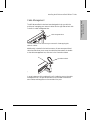
Cable Management
The HP AdvanceStack hubs have been designed to help you with the
problem of managing your network cables. On the right side of each hub
is a built-in cable management bar.
cable management bars
The bars have slots in them that you can use for tie-wrapping the
network cables.
Additionally, included in the hub’s accessory kit are some specialized
cable ties that allow you to wrap the cables and then attach the bundle
to the cable management bar, as shown in the illustration below.
specialized cable tie
In some instances, all the cables will not fit inside the post on the cable
management bar. The specialized cable tie can be used to bundle the
extra cables and hang them on the outside of the post.
1-19
Installing the HP AdvanceStack 10Base-T Hubs
Installing the
HP AdvanceStack Hubs
5. Connect the Hub to the Distributed
Management Console (optional)
The HP AdvanceStack hubs can be controlled in two ways:
from a PC running the HP Stack Manager software that is supplied
with the hubs
from an ASCII terminal or PC running a terminal emulation (requires
an HP Ethernet SNMP Module to be installed in the hub or in one of
the hubs in the distributed management chain)
The PC serves as a console for an out-of-band management session that
enables you to configure, monitor, and diagnose one hub or a stack of up
to 16 hubs that are chained together. The HP Stack Manager software is
described in chapter 2, “Installing and Using HP Stack Manager”.
With the HP Ethernet SNMP Module, the module’s console is also used
to configure, monitor, and diagnose one hub or a stack of up to 16 hubs
that are chained together. You can access the console through a terminal
emulator on your PC or through a terminal.
There are three ways to access a hub:
through a direct serial connection
through a modem connection (available for HP Stack Manager or
ASCII terminal only if an HP J6203 Ethernet SNMP Module is
installed in the hub to which the modem is connected)
through the distributed management chain
1-20
Installing the HP AdvanceStack 10Base-T Hubs
Installing the
HP AdvanceStack Hubs
Using a Direct Serial Connection
The out-of-band management port on the hub is a 9-pin serial (RS-232-C)
port used to connect the hub to the personal computer or terminal. Note
that you must have an HP Ethernet SNMP Module installed in the hub
to use the ASCII console.
To connect to the PC or terminal through the out-of-band management
port:
1. Attach the console cable (5182-4794) supplied with the hub to the
out-of-band management port on the front of the hub. Attach the
other end of the serial cable to an available 9-pin serial port on the
personal computer or 25-pin serial port on the terminal. If only a
25-pin serial port is available, use a 9-pin-to-25-pin port adapter
(not supplied).
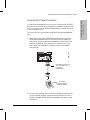
serial cable for connecting
a PC or terminal to the
console port
(p/n 5182-4794)
PC running
HP Stack Manager or
a terminal emulator
2. For HP Stack Manager, define the out-of-band port’s data communication settings using the “Communications Settings” function in
HP Stack Manager. See the HP Stack Manager online help for more
information.
1-21
Installing the HP AdvanceStack 10Base-T Hubs
Installing the
HP AdvanceStack Hubs
3. For a hub with an SNMP module and the RS-232 cable connected to a
terminal, switch on the terminal’s power (or switch on the PC’s power
and start the terminal emulation program). Configure the terminal
for 8 bits per character, 1 stop bit, no parity, Xon/Xoff handshaking,
and a baud rate of 38400, 19200, 9600, 4800, 2400, or 1200.
4. For a terminal, press return several times for the prompt, =>. The
baud rate for communication between the hub and the terminal is set
automatically when you press [Return].
Using a Modem Connection with HP Stack
Manager
(To set up a modem connection with the ASCII console, see chapter 2 in
the manual accompanying the Ethernet SNMP Module.)
Note
This option requires that an HP Ethernet SNMP Module (HP J2603A or
B) be installed in the hub to which you are connecting the modem.
You will need two modems, one connected to the hub (the “remote
modem”) and the other to the PC (the “local modem”).
The modems that have been tested for use with the HP AdvanceStack
hubs are all listed in the modem configuration screens in HP Stack
Manager. You just have to select the modem you are using from the list
and HP Stack Manager automatically provides the correct initialization
string.
The basic steps to connect the hub to HP Stack Manager with a modem
link are:
1. Connect the modem that will be used on the hub to your PC’s serial
port and configure the modem by using the “Remote Modem” initialization screen from the “Settings” menu in HP Stack Manager.
2. Connect the remote modem to the RS-232 port on the front of the
hub using a standard “straight-through” modem cable. For pinouts
and recommended cables, see appendix A, “Cables and Connectors”.)
The cable included with the hub will not work for connecting a
modem to the hub.
1-22
Installing the HP AdvanceStack 10Base-T Hubs
Installing the
HP AdvanceStack Hubs
3. Connect the “local modem” to the serial port on your PC or install it
in the PC if it is an internal modem, and configure that modem by
using the “Local Modem” initialization screen in HP Stack Manager.
4. From the “Communications” screen under the “Settings” menu, click
on the Modem button and enter the phone number of the remote
modem.
5. From the main screen click on the “Connect” button to establish the
communication connection between the two modems. Once the
connection is established, the hub or stack of hubs will be displayed
on the HP Stack Manager’s main screen.
See the HP Stack Manager online help for more specific instructions.
1-23
Installing the HP AdvanceStack 10Base-T Hubs
Installing the
HP AdvanceStack Hubs
Using the Distributed Management Chain
It is not necessary for each hub in a chain to be connected to the
computer that is running HP Stack Manager or an ASCII terminal. When
you have “chained” several hubs together through their Extension ports,
only one of the chained hubs needs to have a connection to the
computer. As described earlier, the connection can be either directly
through a serial cable, or remotely through a modem link.
Once the HP Stack Manager program or the ASCII terminal is started
and the connection is made to the stack, all the hubs in the chain are
automatically discovered and displayed by the HP Stack Manager. On
the ASCII console, the list of hubs is displayed by the CHainlist
command. You are then able to use either interface program to
configure, monitor, and diagnose other hubs in the chain.
The chain can extend up to
185 meters, end-to-end, and
can include up to 16 hubs.
PC connected by a serial
cable or modem link to one
of the hubs in the chain
twisted-pair cables
forming the chain
Hubs are chained together by connecting them through the Extension
ports on the front of the hub using standard “straight-through” 10Base-T
twisted-pair cables.
This “chained” connection is independent of any network
connections between hubs.
A maximum of 16 hubs can be chained together in a single chain. The
maximum total length of the twisted-pair cable segments in the chain
should not exceed 185 meters.
1-24
2
Software Description
Computer Requirements
Installing and Starting HP Stack Manager
HP Stack Manager Basic Features
HP Stack Manager Advanced Features
Installing and Using
HP Stack Manager
Installing and Using HP Stack Manager
This chapter describes how to install and use the HP Stack Manager
software and lists the program’s basic and extended features.
The HP AdvanceStack hubs can be controlled from an ASCII terminal or
terminal emulation program but this requires that the hub (or one of the
hubs in the stack) have an HP Ethernet SNMP Module installed. See the
HP Ethernet SNMP Module manual for more information on using the
ASCII console.
Installing and Using
HP Stack Manager
Software Description
The HP Stack Manager is a Windows-based software application,
included with each HP AdvanceStack hub, that serves as the console for
the hubs. It is included with the hubs. It enables you to configure,
monitor, and diagnose your hub from a PC connected to the hub through
a direct serial link or a remote modem link. With the HP Stack Manager
software, you can also configure and monitor any HP AdvanceStack hub
that is “chained” to that hub via the Distributed Management Extension
(In/Out) ports.
(Connecting a hub to a console and “chaining” the hubs is described in
chapter 1, “Installing the HP AdvanceStack 10Base-T Hubs”.)
HP Stack Manager provides basic management functions for all the
HP AdvanceStack hubs. If a hub has an HP Ethernet SNMP Module
installed, the advanced features, described later in this chapter, are
available for that hub.
For extended management capabilities, HP Interconnect Manager is an
SNMP-compliant network management program that can manage HP
AdvanceStack hubs from any network management station on the
network.
2-2
Installing and Using HP Stack Manager
Computer Requirements
The HP Stack Manager software runs on IBM-compatible personal
computers with the following minimum configuration:
Installing and Using
HP Stack Manager
Microsoft Windows version 3.1 (or later)
80386 (or higher) processor
4 Mbytes of RAM
2 Mbytes of available hard disk space
a 3-1/2" 1.44 Mbyte floppy disk drive
an available RS-232 (serial) port or modem
a VGA monitor
You will also need the following equipment to connect the PC to the hub:
a serial cable (included with hub) to connect the PC directly to the
hub, or two modems (if connecting through a modem link) and a
standard modem cable to connect the modem to the hub. The cable
included with the hub will not work as a modem cable.
See appendix A, “Cables and Connectors” for details on appropriate
cables. Connecting the hub and the PC (or modem) is described in
detail in chapter 1, “Installing the HP AdvanceStack 10Base-T Hubs”.
10Base-T twisted-pair cables (if you have multiple hubs that you are
chaining together).
2-3
Installing and Using HP Stack Manager
Installing and Starting
HP Stack Manager
To install the HP Stack Manager software:
1. With Windows running, insert the floppy diskette into your
computer’s diskette drive.
Installing and Using
HP Stack Manager
2. Select the Run option from the Program Manager File menu.
3. Type the following into the command line entry field:
[drive] :\setup
where [drive] is the letter designating your diskette drive. For
example, “b:\setup”.
The HP Stack Manager installation program will start.
4. Select the directory where you want to store your HP Stack Manager
files by accepting the default directory that is displayed for you or
typing over the default entry with the name of the directory you
desire.
The installation program will install the software in the specified
directory and create an HP Stack Manager program group and icon
in Windows Program Manager.
5. To start the HP Stack Manager, open the HP Stack Manager group in
the Program Manager and double-click the HP Stack Manager icon.
The Main window of the HP Stack Manager is displayed.
2-4
Installing and Using HP Stack Manager
Using Windows
The HP Stack Manager software uses the standard features of the
Microsoft Windows user interface. If you are unfamiliar with using
Windows, consult your Windows documentation for more details on
using a mouse, menus, icons, buttons, online help, and other Windows
features.
Using Online Help
Installing and Using
HP Stack Manager
Specific information about the HP Stack Manager software is included
in the online help that accompanies the software. This chapter describes
the general capabilities of the HP Stack Manager software. For
step-by-step instructions on how to use the HP Stack Manager, refer to
the online help system.
To access the HP Stack Manager online help, either select Help from the
menu bar, or click the Help button on each of the screens where help is
available.
HP Stack Manager Basic Features
The HP Stack Manager’s basic features are available on each of the three
AdvanceStack 10Base-T Hubs. They include:
Communications settings
Connect/disconnect
Automatic chain display
Online help
Port status display
LAN traffic statistics
Hub identification
Port counters
(continued on next page)
2-5
Installing and Using HP Stack Manager
Port enable/disable
Reset
Redundant Power Supply (RPS) status (for the Hub-24 and Hub-48)
There is also an extended set of features available only to hubs that have
an HP J2603A or B Ethernet SNMP Module installed. These are
described later in this chapter under “Advanced Features”. Features not
available to your hub will be “grayed out” on the HP Stack Manager
menus and/or any associated buttons will not be displayed.
Installing and Using
HP Stack Manager
A description of each basic feature follows. For specific information
about how to use a feature, consult the online help system.
Communications Settings
This function is accessed through the “Settings” menu on the HP Stack
Manager main screen. Use this function to define the settings for the
serial communication between the hub and the PC running HP Stack
Manager.
If the hub to which the serial connection is being made does not have
the HP Ethernet SNMP Module installed, this connection can be only a
direct connection at 9600 baud. If the hub has the module installed, the
connection can be direct or through a modem and at a wide range of
baud rates. These expanded connection capabilities are described later
under “HP Stack Manager Advanced Features”. The communications
settings can be stored in an individual file for each serial connection.
See the HP Stack Manager online help for more information.
Connect/Disconnect
These functions are accessed through the “Connect” and “Disconnect”
buttons on the HP Stack Manager main screen. Use this function to
establish a connection to the hub from the PC as defined by the current
communications settings.
2-6
Installing and Using HP Stack Manager
Automatic Chain Display
The Chain Display window displays a list of HP AdvanceStack hubs that
HP Stack Manager detects in the chain to which you have connected.
Information about each hub is shown including the hub model and its
station address. From this window you can access any of the hubs in the
chain and, if you so desire, monitor it and/or change its configuration.
Online Help
Installing and Using
HP Stack Manager
HP Stack Manager provides an online help system that has step-by-step
instructions for using the program’s features. The help system can be
accessed from the main menu, or from a Help button on each of the
function screens.
Port Status Display
The Port Status display is a graphical representation of the front of the
hub. This display is accessed when you “double-click” on the hub listed
in the Chain Display window, or when you click on the hub and then
click on the Access button. In the display, the colors and symbols for
each port indicate its status. You can select the port you wish to monitor
or control by clicking on the symbol for that port.
LAN Traffic Statistics
The graphical hub display includes two bar graphs that indicate network
activity and collision levels that the hub is experiencing.
Hub Identification
The Identify function displays general information about the currently
selected hub. Access this information by clicking on the ID icon.
2-7
Installing and Using HP Stack Manager
Port Enable/Disable
This function turns the port selected on the Port Status display on or off.
Port Counters
Installing and Using
HP Stack Manager
The Port Counters function displays summary tables of several counters
that are useful in diagnosing problem conditions on the hub’s ports.
Counter values are displayed for each of the hub’s network ports. See
the HP Stack Manager online help for counter descriptions.
Reset
The Reset function performs the start-up self-test on the hub. The
process resets and tests the hub hardware, and changes the port counter
values to zero. The hub’s configuration information remains unchanged.
This function temporarily (approximately 3 seconds) interrupts the
hub’s repeater operation, but this will normally not have an effect on the
network connections or operation. (This option has the same effect as
pressing the Reset button on the front of the hub or cycling power on
the hub.)
Note
When you perform a reset, your HP Stack Manager session with that hub
will be terminated. If you reset the hub to which the serial connection
(direct cable or modem link) is made, the connection between the PC
running HP Stack Manager and the hub will be terminated; you will have
to reestablish the connection to access the hub or stack of hubs. If you
reset one of the other hubs in the chain (not the one connected to the
serial connection), the HP Stack Manager session will continue but
access to that hub will be lost. You will have to click on the Refresh
button so that HP Stack Manager can “rediscover” that hub before you
can access that hub again.
Redundant Power Supply (RPS)
For the Hub-24 and Hub-48, the status of the Redundant Power Supply is
shown in the lower right corner of HP Stack Manager. The Redundant
Power Supply is either connected, disconnected, or has an internal error.
2-8
Installing and Using HP Stack Manager
HP Stack Manager
Advanced Features
In addition to the basic features described earlier in this chapter, the
following HP Stack Manager advanced features are available on hubs
that have an HP J2603A or B Ethernet SNMP Module installed:
Higher-speed serial access
Modem access for HP Stack Manager
Installing and Using
HP Stack Manager
IP configuration
Password
Authorized managers
Backup link
Robust Capabilities
Network test
Factory default reset
A description of each extended feature follows below. For specific
information about how to use a feature, consult the online Help system.
Higher-Speed Serial Access
When you install an HP Ethernet SNMP Module in your hub, additional
baud rates that are higher than the default of 9600 can be used to
connect the PC running HP Stack Manager to the hub. See the HP Stack
Manager online help for more information.
Modem Access for HP Stack Manager
When you install an HP Ethernet SNMP Module in your hub, the serial
connection between the PC running HP Stack Manager and the hub can
be through a modem connection. HP Stack Manager helps you
automatically configure the two modems that will be attached to the hub
and to your PC. See the HP Stack Manager online help for more
information.
2-9
Installing and Using HP Stack Manager
IP Configuration
The IP Configuration window is used to define the parameters necessary
for the hub to communicate with a network management station using
the TCP/IP network protocol.
The hub’s default configuration causes the hub to retrieve this
information automatically from an IP server using the Bootstrap
Protocol (BOOTP). The Novell NetWare IPX protocol is also enabled on
the hub by default, so the hub can automatically communicate with a
network management station using IPX/SNX.
Installing and Using
HP Stack Manager
If you are configuring your hub to communicate with a network
management station using TCP/IP and you do not have a BOOTP server
set up, use this screen to manually configure the hub’s IP address and
other IP configuration parameters.
See appendix C, “Network Addressing”, for more information.
Password
The Password function is used to establish password protection for
access to the hub from the serial port and from SNMP management
stations. Once a password is configured, it is also used as the SNMP
community name for network management access to the hub.
Note
The password is stored on the hub that has the HP Ethernet SNMP
Module installed in it. For password protection on the serial connection
to your hub or stack of hubs, you must connect the serial cable or
modem to the hub that has the SNMP Module installed. If the serial
connection is to one of the hubs in the stack that does not have the
SNMP Module installed, the password does not prevent access through
that serial connection; although, network management access is still
password protected. To provide optimal security, you should also install
your hub(s) in a locked space.
It is possible to clear the password if you forget it. See “Clearing the
Password” in chapter 4, “Troubleshooting”.
2-10
Installing and Using HP Stack Manager
Authorized Managers
The Authorized Managers window is used to specify the IP or IPX
network addresses of SNMP management stations authorized to manage
this hub and which of the stations should receive SNMP event alarms.
Backup Link
Installing and Using
HP Stack Manager
The Backup Link window is used to specify two of the hub’s network
ports (AUI, ThinLAN, or twisted-pair) to be used in a backup
(redundant) connection to another hub. It enables you to connect a
second physical link between hubs that will work if the first link fails.
The backup link is used only in the event of primary link failure, thus
eliminating the possibility of loops in the network.
See appendix D, “Backup Links” for more information.
Robust Port Control
The Robust Port Control window allows you to invoke options to
improve the hub’s ability to tolerate network problems resulting from
excessive collisions. The configurable options are:
Intelligent Segmentation Recovery
Late Collision Monitoring
These features are described in chapter 3, “Hub Reference”, under
“Auto-Segmentation”. See the HP Stack Manager online help for
information on how to invoke these features, and when it is appropriate
to do so.
2-11
Installing and Using HP Stack Manager
Network Tests
The Network Tests window enables you to perform Ping, IPX, and Link
network tests. These tests are used to verify the connection between the
hub and a specified network device. The devices tested must support the
test(s) by being able to send the appropriate response packets.
HP AdvanceStack 10Base-T hubs support all of these tests.
The Ping test sends Internet Control Message Protocol (ICMP) Echo
Request (“ping”) packets to another node with the specified IP address
and waits for Echo Response packets in return.
Installing and Using
HP Stack Manager
The IPX test sends IPX test packets to the specified IPX device and
waits for an IPX test packet in return.
The Link test sends IEEE 802.2 Test command packets and waits for an
IEEE 802.2 Test response packet in return.
Factory Reset
When you install an HP Ethernet SNMP Module in your hub, the Reset
function in HP Stack Manager offers an additional reset option, Factory
Reset. A factory reset resets the hub’s configuration, except the IP
configuration, to the factory default values. The factory reset also
causes the hub to perform its self-test, and then causes the results listed
below:
all network ports are enabled
link beat is enabled for all the 10Base-T twisted-pair ports
hub counters are reset to zero
a configured password is deleted
the system name, system location, and system contact are deleted
Thinwatch is disabled
the authorized managers list is cleared and the configuration is reset
to "Allow management from any address”
any backup link configuration is cleared; both ports are returned to
the enabled state
the Robust Port Control features are disabled
the IP configuration is not changed
any security configuration is cleared
2-12
3
Front and Back Panel Descriptions
How the Hubs Work
Managing Your Hub — HP Distributed Management
Optional Accessories
Firmware Enhancements
Hub Reference
Hub Reference
Front and Back Panel Descriptions
Front Panel
The 24-port hub is shown; the 12-port and 48-port hubs are essentially the same.
hub status LEDs
and reset button
Optional AUI port module
installed in AUI/Xcvr slot
ThinLAN
network
port
Hub Reference
twisted-pair port LEDs
twisted-pair ports
cable management
guide
chain ports
RS-232 console port
(for distributed management)
Back Panel
power connector
3-2
redundant power
connector
cover plate over
slot for HP Ethernet SNMP Module
Hub Reference
Front of the hub
Status LEDs The Status LEDs indicate whether the hub is functioning
properly or not. For further details on error conditions indicated by the
Status LEDs, see chapter 4, “Troubleshooting”.
LED
Power (green)
ExpSlot (green)
State
Meaning
On
The hub is receiving power.
Off
The hub is not receiving power.
On
An optional HP SNMP Module is properly installed in the hub’s back panel slot.
Off
An SNMP Module is not installed.
Flashing
slowly
Security (orange)
Off
(functional only if
an HP Ethernet
SNMP Module
is installed
in the hub)
Flashing
rapidly
The SNMP Module is being self-tested (after hub power on or a reset). If this state
continues for more than 25 seconds, see chapter 4, “Troubleshooting”.
The normal state.
A security violation has occurred on one or more of the network ports, or an
unauthorized network management station has attempted to access the hub.
If a port security violation has occurred, the corresponding port LED will flash at the
same time and rate as the Security LED.
Network management authorization is performed through the Authorized Managers
function of HP Stack Manager, and the port security configuration is performed
through HP Interconnect Manager. See “Security Features” later in this chapter.
Fault (orange)
Hub Reference
Activity (green)
Flickering ON while a packet is being transmitted. Normally, the LED appears to flicker. In
heavy traffic, it may appear on all the time.
Off
The normal state. Indicates that there are no fault conditions on the hub.
On
The hub has failed its self-test after being powered on or reset.
Flashing
slowly
A port has been auto-segmented or the Redundant Power Supply has experienced a
failure. The corresponding port or RPS LED will also be flashing slowly.
Console (green)
On
This hub is currently being accessed by HP Stack Manager, ASCII terminal, or Telnet.
RPS (green)
On
This hub is receiving power from the connected HP J2962A Redundant Power
Supply or RPS (available at the end of 1995).
Off
This hub is not receiving power from the RPS.
Flashing
Slowly
Collision (orange)
An error has occurred on the RPS connected to the hub. See the documentation
provided with the RPS for troubleshooting.
Flickering This LED is on while a collision is detected on any of the attached cable segments. If
collisions are infrequent (which is normal) the light may be imperceptible. In a
network with heavy traffic, the LED will glow and flicker dimly, indicating collisions
are occurring. If it appears on continuously (with no flicker), it is a possible indicator
of a network fault. See chapter 4, “Troubleshooting”.
3-3
Hub Reference
Port LEDs (green) There is an LED associated with each network
port on the hub, twisted-pair, the AUI/Xcvr port, and the ThinLAN port.
Each port LED indicates the status of the port associated with it.
Port Type
LED State
Twisted-pair
On
Link beat is detected from the attached node.
Off
The port is not receiving the link beat signal from the attached node.
Flashing
Slowly *
Meaning
The port has been auto-segmented. The Fault LED will also be flashing at the same rate.
See “Auto-Segmentation” later in this chapter.
Flashing The port has experienced a security violation. The Security LED will also be flashing at the
Rapidly ** same rate. See “Security Features” later in this chapter.
ThinLAN
On
– The port is enabled and it is not auto-segmented.
Off
EITHER:
– The port has been disabled through HP Stack Manager or a network management
station, OR,
– Thinwatch is disabled (the default setting) and the port is auto-segmented
because of an excessive collision condition. The default setting for Thinwatch is
“disabled”–Thinwatch can be enabled through HP Interconnect Manager or the
ASCII console interface with the HP Ethernet SNMP Module.
Hub Reference
Flashing
slowly *
The port has been auto-segmented and Thinwatch is enabled. The Fault LED will also be
flashing at the same rate. See “Auto-Segmentation” later in this chapter.
Flashing The port has experienced a security violation. The Security LED will also be flashing at the
Rapidly ** same rate. See “Security Features” later in this chapter.
AUI / Xcvr
On
The AUI/Xcvr port is enabled and not segmented. (This LED will always be on under these
conditions, even if this port is not being used.)
Off
The port has been disabled through HP Stack Manager or a network management station.
Flashing
slowly *
The port has been auto-segmented. The Fault LED will also be flashing at the same rate.
See “Auto-Segmentation” later in this chapter.
Flashing The port has experienced a security violation. The Security LED will also be flashing at the
Rapidly ** same rate. See “Security Features” later in this chapter.
* The slow flash rate is approximately once each 1.5 seconds.
** The rapid flash rate is approximately 3 times each second. This condition can exist only if an SNMP Module is
installed in the hub.
Reset Button The Reset button resets the hub and performs the
power-on self-test. It is recessed to prevent accidental resets. Use a pen
point or straightened paper clip to depress the button. For a description
of the effect of this reset, see “Resetting the Hub” in chapter 4, “Troubleshooting”.
3-4
Hub Reference
Back of the Hub
Expansion Slot
The Expansion Slot is used to add an HP Ethernet SNMP Module
(HP J2603A or B). See the “Optional Accessories” section later in this
chapter for more information on the HP Ethernet SNMP Module.
Redundant Power Supply Connector
The back of the Hub-24 and Hub-48 has a Redundant Power Supply
(RPS) connector to add the HP J2962A Redundant Power Supply.
How the Hubs Work
Hub Reference
The HP AdvanceStack 10Base-T Hubs are multiport repeaters that
conform to the IEEE 802.3 repeater specification. Data signals coming
into the hub from any of its ports are automatically regenerated and
transmitted to all the other hub network ports. The hub regenerates the
data without interpreting the contents, so it can be used in either IEEE
802.3 or Ethernet networks and with any upper-level protocol.
Collision Detection
The hub also performs collision detection. A collision occurs when two
nodes try to transmit at the same time. When the hub detects this, it
stops repeating the colliding transmissions and starts transmitting a
jamming signal. The jamming signal tells the transmitting nodes that a
collision has occurred. The colliding nodes then stop transmitting for a
random amount of time before attempting to retransmit the data. Once
the collision condition is removed, the hub stops transmitting the
jamming signal and normal operation is resumed.
3-5
Hub Reference
Auto-Segmentation
The Basic Feature
The hub will automatically segment (temporarily disable) a network
port if a collision condition exists for an excessive duration (between
1024 and 2048 bit times) or occurs during each of 32 consecutive
attempts to transmit. The hub monitors the segmented port and
automatically re-enables the port when a minimum length packet can be
successfully transmitted or received without a collision occurring.
Excessive collisions may be caused by faulty wiring. If a port’s transmit
(Tx +/-) wires have been shorted to the receive (Rx +/-) wires of any
port, a collision will be detected when that port attempts to transmit. If a
port’s receive (Rx +/-) wires are not connected properly, collisions may
occur because the hub cannot detect the presence of network traffic on
that port and may thus transmit at inappropriate times.
A port may occasionally also become segmented when network traffic is
extremely heavy causing an abnormally high collision rate.
Intelligent Segmentation Recovery
(Available on hubs with the HP Ethernet SNMP Module)
Hub Reference
Intelligent Segmentation Recovery makes it more difficult for a problem
port to automatically re-enable itself to send traffic on the network. For
a port configured with Intelligent Segmentation Recovery, once it has
been disabled due to extended or excessive collisions, it will be
automatically re-enabled only when it is able to transmit a minimum
length packet without a collision condition occurring. This feature
prevents a port from re-enabling itself when it just receives traffic from
the attached node or when it receives reflected noise or crosstalk
caused by faulty wiring.
The Intelligent Segmentation Recovery feature is enabled through the
“Robust” function in HP Stack Manager or the RObustness command in
the ASCII console interface. The default setting is OFF.
Late Collision Monitoring
(Available on hubs with the HP Ethernet SNMP Module)
When this feature is enabled, the hub will automatically disable (turn
off) a network port when persistent late collisions are detected on that
port.
3-6
Hub Reference
Late collisions occur when a node starts transmitting after another node
has already transmitted at least 512 bits. They are usually caused when
network topology rules (such as cable length limitations or hub hop
counts) do not meet the IEEE 802.3 specifications. Late collisions may
also be caused by faulty wiring that prevents a hub from being able to
detect traffic on a network port.
Note
Because failures due to late collisions are the result of critical network
design errors or cabling errors, the hub will not automatically re-enable
the port. You must manually re-enable the port (after the problem is resolved) either through the HP Stack Manager’s “Port” function or an
SNMP network management station.
Late Collision Monitoring is configurable for either single node
connections—to isolate problem nodes, or multiple node connections
(cascaded ports or backbone connections)—to isolate parts of the
network. The Late Collision Monitoring feature is enabled through the
“Robust” function in HP Stack Manager or the RObustness command in
the ASCII console. The default setting is OFF.
Link Beat
Hub Reference
Type 10Base-T devices use a signal called link beat (also called link test
pulse). This signal informs the hub of the presence of a device
connected to it over twisted-pair cable and of the integrity of the
twisted-pair link between them. The hub will not transmit packets out of
twisted-pair ports that do not sense the link beat signal.
3-7
Hub Reference
Managing Your Hub —
HP Distributed Management
One of the key features of the HP AdvanceStack family of hubs is the
ease with which a hub can be managed. There are two main
management options:
Out-of-band management from a PC running HP Stack Manager
connected to the RS-232 console port of any of the hubs in the stack.
In-band management from a network management station running
HP Interconnect Manager anywhere on the network that the hubs
are in.
PC running HP Stack Manager
connected to the hub stack or an
ASCII terminal emulator
Hub Reference
HP Ethernet
SNMP Module
(required for ICM and
the ASCII terminal)
distributed management chain
3-8
Network management station
on the LAN, running
HP Interconnect Manager (ICM)
Hub Reference
Chaining the Hubs
The HP AdvanceStack hubs can be easily connected together with
standard unshielded twisted-pair cable through their Extension (In/Out)
ports to form a distributed management chain. When hubs are “chained”
together, any hub in the stack can be managed from a single PC running
HP Stack Manager, or, if one hub in the stack has the HP Ethernet SNMP
Module installed, the entire stack can be managed from an SNMP
network management station or from an ASCII terminal or PC terminal
emulator. The chain can extend up to 185 meters (end-to-end) so
multiple wiring closets can be managed from a single location. Note that
this is not a network connection, it is only a management connection
between the hubs.
Refer to chapter 1, “Installing the HP AdvanceStack 10Base-T Hubs” for
information about chaining and network connections.
Out-of-Band Management
Hub Reference
The basic management program included with your hub, HP Stack
Manager, is a Windows-based graphical user interface that serves as the
console for the HP AdvanceStack hubs. With this program you can
configure, monitor, and diagnose your hub or a chain of hubs. Refer to
chapter 2, “Installing and Using HP Stack Manager”, for more details
about out-of-band management.
Included with the HP J2603A or B Ethernet SNMP Module is an ASCII
console interface that can also be used to configure, monitor, and
diagnose your hub or a chain of hubs. The SNMP Module must have
firmware agent A.03.00 or later. Refer to the HP Ethernet SNMP Module
Installation and Reference Guide for more information.
In-Band (Network) Management
When an HP Ethernet SNMP Module is installed in your
HP AdvanceStack 10Base-T Hub, the hub can be managed remotely by
any network management product that complies with the Simple
Network Management Protocol (SNMP) standard.
3-9
Hub Reference
MIB (Management Information Base) Support
The HP AdvanceStack 10Base-T Hub with an installed HP Ethernet SNMP
Module supports the following MIB standards: MIB-II (RFC 1213), IEEE
802.3 Repeater MIB (RFC 1516), and IEEE 802.3 MAU MIB (RFC 1515).
In addition, the hub implements HP MIB extensions that are available on
request. Contact your HP-authorized LAN dealer or local HP sales office.
Using HP Network Management
HP offers an SNMP-compliant network management product that can
manage your HP AdvanceStack hub (HP Interconnect Manager). This
product uses a windowing interface to:
manage multiple HP hubs and other HP network devices, including
a “chain” of HP AdvanceStack hubs
automatically generate a graphic display of the network map
gather network traffic statistics
enable and disable ports
configure port security and other security features on the hub
run tests of the hub
test network links to other devices
Hub Reference
Using Non-HP Network Management
To manage an HP AdvanceStack hub from a non-HP network
management product, you must first obtain HP’s MIB extensions.
Contact your HP-authorized LAN dealer or local HP sales office for more
information.
Security Features
If you have installed an HP Ethernet SNMP Module in your
HP AdvanceStack 10Base-T Hub, your hub has these security features:
port security
authorized managers list
password protection
3-10
Hub Reference
Port Security
Note
This feature is configurable over the network from a network management station running HP Interconnect Manager, or out-of-band from an
ASCII terminal or terminal emulator.
The HP AdvanceStack 10Base-T Hub with HP Ethernet SNMP Module
provides two main types of security on each of its network ports.
Intruder Prevention for inbound data (from the end user to the hub)
Eavesdrop Prevention for outbound data (from the hub to the end
user)
Both of these types of security can be configured on each network port
individually (the twisted-pair ports, the ThinLAN port, and the AUI/Xcvr
port) and are enabled by comparing the source and destination address
of each packet received or transmitted by the hub to each port’s
Authorized Station Address—the station address of the device that you
configure to be authorized to communicate through that hub port.
Hub Reference
See the HP Interconnect Manager documentation for more information
on the Interconnect Manager control of this feature; see the HP Ethernet
SNMP Module documentation for description of the ASCII terminal
SEcure command.
Authorized Managers List
The HP AdvanceStack 10Base-T Hub with an HP Ethernet SNMP Module
installed can be configured with a list of up to ten network management
stations that are authorized to manage the hub. This list is configured
through the “Authorized Managers” function in the HP Stack Manager
program, the MAnagers command from an ASCII terminal, and through
HP Interconnect Manager. See chapter 2, “Installing and Using HP Stack
Manager”, for more information on the HP Stack Manager command; see
the HP Ethernet SNMP Module manual for the MAnagers command; see
the Security chapter in the HP Interconnect Manager documentation.
If an unauthorized management station attempts to access the hub
(especially to perform SNMP “set” commands), the Security LED on the
hub’s front panel will flash.
3-11
Hub Reference
Password Protection
The hub can be assigned a password to restrict access to the hub’s
console interface and to the hub’s configuration from network
management stations. The password also acts as the SNMP community
name. The password is configured through the “Password” function in
the HP Stack Manager program. See chapter 2, “Installing and Using HP
Stack Manager”, for more information; see the HP Ethernet SNMP
Module manual for the PAssword command.
Optional Modules
HP Ethernet SNMP Module
Hub Reference
The HP Ethernet SNMP Module (HP J2603A or B) is an optional
component that can be added to an HP AdvanceStack 10Base-T Hub to
provide extended hub functions and management capabilities.
HP Ethernet SNMP Module
If the optional HP Ethernet SNMP Module is installed in the hub, you
have these additional features:
Advanced embedded agent code enabling the hub to be managed
remotely from a network management station that supports SNMP
over IP (using the configured IP address) or Novell NetWare (IPX).
The agent code also provides HP EASE (Embedded Advanced
Sampling Environment) for enhanced network diagnostics from a
network management station.
3-12
Hub Reference
Automatic sensing of the baud rate on the out-of-band management
port, and support for higher port baud rates beyond the default 9600
baud.
Full V.22bis modem line control for remote out-of-band management
access to the hub or stack of hubs.
Capability to manage up to 16 hubs in a chain, even if the other hubs
do not have management modules.
Security features including port security, network management
authorization, and hub access password protection. See “Security
Features” in this chapter for more information.
Support for a redundant backup link to another hub to enhance
network fault tolerance.
An Intel i960 RISC processor, 1 megabyte RAM, 8 kilobytes EEPROM
for configuration data, and 256 kilobytes flash EEPROM for
additional processing power and future upgrade capabilities.
Updatable firmware that enables enhancements to be downloaded
either from a computer attached to the out-of-band management
port or over the network. (See “Firmware Enhancements” later in
this chapter.)
Hub Reference
With firmware version A.03.00 or later, the agent code provides an
ASCII terminal interface for configuring, monitoring, and
troubleshooting the hub (a similar set of features to the
Windows-based HP Stack Manager interface.) To obtain the latest
firmware, see the end of chapter 4, “Troubleshooting” for
information on how to download the latest agent code.
3-13
Hub Reference
HP Transceiver Modules
The HP Transceiver Modules are optional modules that can be added to
an HP AdvanceStack hub. They provide extended connectivity choices
from the hub to Ethernet networks. You have a choice of using any of
these modules:
HP J2606A Fiber-Optic
Transceiver Module for 10Base-FL
HP J2607A Twisted-Pair
Transceiver Module for 10Base-T
HP J2608A ThinLAN
Transceiver Module for 10Base2
Hub Reference
HP J2609A AUI
Port Module for external transceivers
3-14
Hub Reference
HP Router Module
The HP J2628A Router 210 Module is an auxiliary module for the
HP AdvanceStack 10Base-T Hub. The Router 210 Module attaches to the
HP J2603B Ethernet SNMP Module and is then installed in the hub’s
expansion slot.
SNMP module
connector
(internal
LAN port)
Battery (maintains
the configuration in
RAM when the hub
is powered off)
Status LEDs
Clear
button
Reset
button
Hub Reference
WAN port
connector
The router module includes two ports:
An external synchronous WAN port supporting RS-232/V.24/V.28,
V.35, X.21, or RS-422/RS-449/V.36 interfaces at speeds of 9.6 Kbit/s to
2.048 Mbit/s. This port allows HP Point-to-Point, PPP, V.25 bis
(dial-up/ISDN), SMDS, frame relay, and LAPB (X.25) connections to
other routers, over point-to-point or switched circuits
An internal Ethernet/802.3 LAN port, through which the router
module communicates with the hub
The router provides both bridging and routing capabilities and supports
the following routing services:
Internet Protocol (TCP/IP protocol suite)
DECnet Phase IV
Xerox XNS
Novell IPX
3-15
Hub Reference
AppleTalk Phase 2
Transparent bridging with support for the Spanning Tree Protocol
The router module can be configured and managed in various ways:
Through the hub’s RS-232 Distributed Management port, connected
(locally, or through a modem) to a PC running the HP Stack Manager
software supplied with the router module (HP Stack Manager runs
the router module’s VT-100 terminal interface)
Through any standard SNMP network management software, such
as HP Interconnect Manager in HP-UX
Through Telnet access over the network
Additional features include:
“SmartBoot”, which allows another HP router or a BOOTP server on
the network to automatically configure the router module when it is
first booted after installation. This eliminates the need for expert
personnel at the site where the router module is installed
HP EASE (Embedded Advanced Sampling Environment)
Hub Reference
The ability to download enhancements to the router module’s
operating system. The download is conducted through the hub’s
RS-232 Distributed Management port.
For more information about the HP Router 210 Module, see its
accompanying documentation.
3-16
Hub Reference
HP Dial-a-LAN Remote Access
Server
The two HP AdvanceStack Dial-A-LAN auxiliary modules are remote
access servers for Ethernet networks. These products serve remote PCs,
Macintoshes, and UNIX workstations by allowing users to dial in to a 12,
24, or 48-port AdvanceStack hub.
The two models are:
a two-port version: HP J2623A AdvanceStack Dial-A-LAN 2A/Plus
V.34
a four-port version: HP J2624A AdvanceStack Dial-A-LAN 4A
Each module requires an Ethernet SNMP Module (J2603B) for
installation into the Expansion Slot of an HP AdvanceStack hub.
If you do not have a J2603B SNMP Module already, you can purchase the
Dial-A-LAN and SNMP modules together in either of the following
bundles:
HP J2633A Dial-A-LAN 2A/Plus V.34 and HP Ethernet SNMP Module
HP J2634A Dial-A-LAN 4A with the HP Ethernet SNMP Module
Hub Reference
HP J2623A Dial-A-LAN 2A/Plus V.34
The HP Dial-A-LAN 2A/Plus has two RJ-11 connectors and two built-in
V.34 modems. The V.34 modems support V.34, V.FC, V.32bis, V.32, V.22,
V.22bis, V.22A/B, V.23, V.21, Bell 212A, and Bell 103. They also support
compression and error correction as specified V.42, V.42bis, MNP 2-5,
and LAP-M.
3-17
Hub Reference
HP J2624A Dial-A-LAN 4A
If you need more than two ports, the HP Dial-A-LAN 4A has four RS-232
ports for connecting up to four external modems. This module can also
be used in an ISDN environment.
Both the 2-Port and 4-Port modules support these features:
Access speeds available to 115 Kbps. Throughput speeds available
are dependent on line quality, type of data transmitted, and the
remote node’s ability to function at this sustained rate.
Hub Reference
Configurable through HP Stack Manager and from the Dial-A-LAN
Manager. Dial-A-LAN Manager can be run under OpenView
DOS/Windows and Windows.
PC and workstation dial-in access with PPP (default), SLIP, and
CSLIP. IP, IPX, NetBEUI, and LLC dial-in are also supported.
PPP Stacker Compression available for dial-in and LAN-to-LAN
connections.
DHCP support for dial-in client address assignment.
Macintosh dial-in access for IP networks with ARPA 2.0. MacTCP
supported for IP connections.
Windows support and DOS-based dial-out access through NASI and
Int 14 for IPX networks to remote BBS services. No file transfer
capability is available in IP dial-out mode.
UNIX workstation dial-in access with SLIP or PPP for IP networks.
LAN-to-LAN routing for IP and IPX.
For more information about the HP Dial-A-LAN modules, see the
accompanying documentation.
3-18
Hub Reference
Firmware Enhancements
Hewlett-Packard continually tests and improves its products. When
firmware enhancements are made to the HP AdvanceStack hubs that
have an optional HP Ethernet SNMP Module installed, you will be able
to easily update them with the new code. The updated code can be
loaded from a PC attached to the hub’s out-of-band management port or
downloaded over the network. See the end of chapter 4, “Troubleshooting”
for information on how to download the latest agent code.
The update procedure is described in the file that comes with the latest
SNMP Module firmware for your HP AdvanceStack hub.
Hub Reference
3-19
4
Troubleshooting Approaches
Diagnosing with the LEDs
Installation Problems
Cabling Problems
Unusual Network Activity
IP Configuration Errors
Diagnostic Tests
Customer Support Services
Troubleshooting
Troubleshooting
This chapter describes how to diagnose and resolve operating problems
with the HP AdvanceStack 10Base-T Hubs.
This chapter describes these topics:
basic troubleshooting approaches
diagnosing with the LEDs
installation, cabling, and unusual network activity problems
diagnostics tests
Additionally, certain diagnostic functions useful for troubleshooting are
contained in the HP Stack Manager software. These functions are
described in chapter 1, “Installing and Using HP Stack Manager” and in
the software’s online help system. Some of these diagnostic functions
are available only to hubs that have an HP Ethernet SNMP Module
(HP J2603A or B) installed.
Troubleshooting Approaches
There are three primary ways to diagnose hub problems:
By checking the LEDs on the front of the hub as described in
“Diagnosing with the LEDs” later in this chapter.
By visually inspecting the unit and all its connections as described in
the “Installation Problems” and “Cabling Problems” sections later in
this chapter.
By using the HP Stack Manager’s diagnostic functions described in
chapter 2, “Installing and Using HP Stack Manager”, and in the
software’s online help system.
Troubleshooting
Alternatively, if you don’t have a Windows-capable PC, you can use
an ASCII terminal or PC running a terminal emulator to monitor hub
status and run diagnostic tests. For this operation, the hub, or one of
the hubs in the stack, must have an HP Ethernet SNMP Module
installed. See the module’s documentation for more information on
the ASCII terminal interface.
4-2
Troubleshooting
Diagnosing with the LEDs
Most problems with the hub can be diagnosed using the LEDs on its
front panel. This section describes the normal LED pattern when the
hub is being self-tested, and LED patterns that indicate error conditions
on the hub.
LED Pattern During Self-Test
When the hub is first turned on and whenever it is reset, it performs a
self-diagnostic test during which time all the LEDs should be lit. The
LED pattern varies during the self-test depending on whether the hub
has an optional HP Ethernet SNMP Module installed.
For a hub without an SNMP Module, the self-test takes
approximately 3 seconds during which time all the LEDs (except the
RPS LED) are lit.
For a hub with an SNMP Module, the 3-second hub test takes place
first (all the LEDs are lit), followed by the SNMP Module self-test,
which lasts approximately an additional 57 seconds. While the SNMP
Module is being tested, the Activity, Collision, and RPS LEDs are not
lit (or are flickering if there is network traffic on the hub), and the
Exp Slot LED flashes slowly.
When the self-test completes, the LEDs then go into their normal
operational state or indicate an error condition.
The tables on the following two pages list the hub’s LEDs, their possible
states, and diagnostic tips to resolve any error conditions.
Troubleshooting
4-3
Troubleshooting
LED Error Indications
The tables on the next two pages describe LED patterns that indicate
error conditions.
LED patterns indicating problems
Power Collision
Fault Security
Diagnostic Tips
RPS
Exp
Slot
Port
OFF
*
*
*
*
*
*
ON
*
OFF
OFF
*
*
OFF or
flashing
intermittently for
a port in
use.
Check power cord and power source. If OK, replace
hub.
Check cabling on indicated port.
Use HP Stack Manager or the ASCII console STatus
command to determine the state of the port. For
HP Stack Manager, review the graphical image of
your hub to determine whether:
– the port was disabled by the Port function. Reenable if desired. A disabled port is grayed-out with
a black bar through it.
– For a twisted-pair port, link beat is not detected. In
this condition, the link beat bar (below the port
symbol on the graphic display) will be red. Be sure
the cable is properly connected.
– For the ThinLAN port, Thinwatch is disabled (the
default value) and the port is auto-segmented (the
port symbol will be red).
Thinwatch improves diagnosis of a faulty ThinLAN
port. Configure Thinwatch from HP Interconnect
Manager or from the ASCII terminal.
Troubleshooting
ON
Appears
solidly
ON
*
*
*
*This LED is not important for the diagnosis.
4-4
*
*
Very frequent collisions could indicate a network
fault or improperly terminated cable.
A transceiver attached to the AUI port may not have
the SQE test disabled.
Troubleshooting
LED patterns indicating problems
Power Collision
Fault Security
Diagnostic Tips
RPS
Exp
Slot
Port
ON
*
Slow
Flash
OFF
*
*
Slow
Flash
The port has been auto-segmented because of too
many collisions. Check cable terminations,
connections, SQE setting on any external
transceivers, and status of attached network devices
for causes of the excess collisions.
ON
*
Slow
Flash
*
Slow
Flash
*
*
The redundant power supply (RPS) may no longer be
providing redundant power. See the documentation
provided with the RPS for troubleshooting.
OFF
*
*
*
OFF
*
*
The hub is not receiving power from the redundant
power supply (RPS) or the cable connection is loose.
If you have an RPS connected, check the cable
connections.
ON
*
*
Rapid
Flash
*
ON
Rapid
Flash
A port security violation has occurred on a hub with
an HP Ethernet SNMP Module. The port is disabled.
Port security parameters are configurable from
HP Interconnect Manager. See the documentation
for that program for more information.
ON
*
*
Rapid
Flash
*
ON
ON
*
ON
ON
*
Slow
Flash
(for
more
than 60
sec.
after a
reset
or
power
on)
*
ON
ON
*
ON
All ON
The HP Ethernet SNMP Module has failed self-test
and/or its firmware code has become corrupted. This
is frequently the result of a failure during
downloading of new code. Repeat the download
process.
If the hub self-test fails again, contact your
HP-authorized LAN dealer or HP representative for
assistance.
Under this condition, the hub will continue its normal
repeater function, but the console and control
capabilities will be limited.
Variable; A hub hardware failure was detected during selfall may test. Self-test does not complete so the LEDs will
be ON stay on longer than 60 seconds.
Power cycle the hub. If this condition persists, the
hub may have to be replaced. Contact your
HP-authorized LAN dealer or HP representative for
assistance.
* This LED is not important for the diagnosis
4-5
Troubleshooting
ON
An unauthorized network management station has
Not
Flashing attempted to access a hub with an HP Ethernet
SNMP Module.
Troubleshooting
Installation Problems
By carefully following the installation procedures described in chapter
1, “Installing the HP AdvanceStack 10Base-T Hubs”, you can avoid most
problems caused by improper installation of the hub or one of its
components.
Incorrect Installation
Incorrectly installing the hub, the HP Ethernet SNMP Module, or a
transceiver module can result in one or all of these components
malfunctioning or not functioning at all. If one or all of these
components appear to not be functioning, re-check the installation
procedure and, if necessary, re-install the component correctly.
If no power appears to be getting to the hub unit, check the power cord
at both the back of the hub and the ac power outlet to be certain the
cord is properly connected.
ASCII Console Connection Problems
The ASCII console was added to the HP J2603B Ethernet SNMP Module
firmware versions A.03.00 or later. If your EEPROM is older, you do not
have the ASCII console. See chapter 3, “Hub Reference” for information
on how to update your HP J2603A or B Ethernet SNMP Module with the
latest firmware.
You can determine your firmware version with HP Stack Manager or
HPInterconnect Manager. To determine your firmware version, follow
these steps:
Troubleshooting
1. In HP Stack Manager, double click on a hub that has an SNMP Module.
2. Click on the Identify icon.
3. Scroll through the list until you see SNMP Agent EEPROM Vers.
4-6
Troubleshooting
Cabling Problems
A high percentage of network problems are due to faulty cabling.
Cabling problems usually result in the failure of a hub to connect to a
network, another hub, or the console.
Connections
All cables attached to the hub should be checked to see that they are
properly connected. Proper network and out-of-band management
connections are described in chapter 1, “Installing the HP AdvanceStack
10Base-T Hubs”.
Properly connecting cables to the transceiver modules is described in
the documentation that accompanies those modules.
If the ThinLAN port is being used, be certain the ThinLAN cable segment
attached to the port is properly terminated with a 50-ohm terminator at
both ends, as described in chapter 1, “Installing the HP AdvanceStack
10Base-T Hubs”.
Non-standard Cables
Mis-wired cables may cause numerous network collisions, and can
seriously impair network performance. Before connecting cables into
your network, you should verify that they comply with the applicable
standards. For a list of compatible cables and a description of the
pinouts for each port on the hub (which can be used to confirm the
compatibility of unlisted cables), see appendix A, “Cables and
Connectors”.
Troubleshooting
4-7
Troubleshooting
Topology
It is important to make sure you have a valid network topology.
Common topology faults include excessive cable length and excessive
repeater delays between nodes. If you have trouble after recent changes
to a network, switch back to the previous topology. If you no longer
have any trouble, the new topology is probably at fault. Refer to the
guide entitled Designing HP AdvanceStack Workgroup Networks for
topology configuration guidelines. Contact your HP-authorized LAN
dealer or local HP sales office to get a copy of this guide.
Unusual Network Activity
Network activity that exceeds accepted norms often indicates a
hardware problem with one or more of the network components,
including, possibly, the hub. Unusual network activity is usually
indicated by the LEDs on the front of the hub or measured with one of
the diagnostic tools in the HP Stack Manager. Refer to “Diagnosing with
LEDs” earlier in this chapter for information on using LEDs to identify
unusual network activity.
IP Configuration Errors
Troubleshooting
If you are using IP communications, make sure your IP configuration
parameters are set properly. Use the HP Stack Manager’s IP
Configuration function. (This function is available only on hubs that
have an installed HP Ethernet SNMP Module.) Incorrect IP
configuration on the hub will prevent it from communicating with the
network management station, and may cause other network problems.
In particular, make sure you provide the hub with a unique IP address,
and that you use the correct subnet mask for your network. See
appendix D, “Network Addressing”, for more information.
4-8
Troubleshooting
Diagnostic Tests
The HP Stack Manager software provides tests and indicators that can
be used to monitor the hub and its network connections. See chapter 2,
“Installing and Using HP Stack Manager”, and the software’s online Help
system for more details about these tests and indicators.
Testing the Hub Only
If you believe that the hub is not operating correctly, you can test the
hub’s circuitry by resetting the hub through one of these procedures:
Press the Reset button.
Select the “Power-on Reset” option from HP Stack Manager’s Reset
function or select type the REset command using the ASCII console.
Select the “Power-on Reset” option from the HP Interconnect
Manager interface.
Each of these procedures will cause the hub to complete its power-on
self-test. If any error conditions exist in the hub, the LEDs should
display the condition. See “Diagnosing with the LEDs” earlier in this
chapter to interpret the LED display.
Testing the Hub’s Ports and the Links
These tests are available only on hubs that have an HP Ethernet SNMP
Module installed.
Troubleshooting
To test the hub’s ports and the attached network links, choose one of the
following ways to run a test between the hub and an addressable device
connected at the remote end of each of the cables you wish to test:
Select Link Test from HP Stack Manager’s Network Test function.
This causes the hub to send IEEE 802.2 Test command packets to a
specified network device. The device must be able to send an IEEE
802.2 Test response packet upon receipt of a Test command packet.
You specify the remote device by its 12-digit hexadecimal station
address.
Continued on the next page.
4-9
Troubleshooting
Select Ping Test from HP Stack Manager’s Network Test function or
type the PIng command at the ASCII terminal. This is a network
layer test that you can run on TCP/IP networks. The hub sends IP
Echo Request packets to a specified network device. This works
with devices that have an IP address and are able to respond to an
ICMP Echo Request packet. You specify the remote device by its IP
address.
Select IPX Test from HP Stack Manager’s Network Test function.
This is a network layer test that you can run on Novell NetWare IPX
networks. The hub sends IPX test packets to a specified network
device. This works with devices that have an IPX address and are
able to respond to an IPX test packet. You specify the remote device
by its IPX address.
If the test passes, the hub’s port, the network link, and the remote device
are all working properly. If you are testing the AUI port, this also tests
the transceiver that is attached to the port.
If the test fails, you can test the hub using the “Testing the Hub Only”
procedures on the previous page. You should also verify that the remote
device is powered on and functioning properly, and that the cable is
good.
If the hub passes its tests, but the network test (link test, Ping test, or
IPX test) fails, the problem is in the cabling, the remote device, or
possibly the output circuitry of the hub’s port.
See the HP Stack Manager online help for more information on how to
execute these tests.
Testing Twisted-Pair Cabling
Troubleshooting
The twisted-pair cable attached to the HP AdvanceStack 10Base-T Hub
must be compatible with the IEEE 802.3 Type 10Base-T standard. To
verify that your cable is compatible with this standard, you can use the
HP J2263A Cable Test Set. The older HP 28687A Wire Test Instrument
can also be used. HP also offers a wire testing service. Contact your
HP-authorized LAN dealer or your local HP sales office for more
information.
4-10
Troubleshooting
Clearing a Password
There is a Password Clear button on the HP Ethernet SNMP Module that
is accessed through a hole in the hub’s Expansion Slot cover plate. You
can use this button to clear a forgotten password that was previously
configured on the hub. The password is configured from either:
HP Stack Manager
HP Interconnect Manager, or
ASCII terminal interface
Press the Password Clear
button with a pen or other
pointed object.
To clear the password, press and hold the button for approximately
five seconds.
As an indication that the password has been cleared, the Security LED
on the front of the hub will come on and stay on until the button is
released.
Note
After the password has been cleared, access to the hub from the
HP Stack Manager and from SNMP management stations will no longer
be password protected.
Troubleshooting
4-11
Troubleshooting
Customer Support Services
Hewlett-Packard offers support 24 hours a day, seven days a week
through the use of automated electronic services including:
Hewlett-Packard BBS and World Wide Web
Hewlett-Packard FTP Library Service on the Internet
CompuServe
HP FIRST FAX Retrieval Service
HP Interconnect Manager (icmupdt.exe), HP Stack Manager (stkmgr.exe)
and SNMP firmware for your AdvanceStack hubs (asfw.exe) are
available through the HP BBS, World Wide Web, CompuServe, and the
HP FTP Library Service. After you download the file(s) from one of
these sources, you type filename /x. For example, icmupdt /x
HP BBS and World Wide Web
The HP BBS phone number is (208) 344-1691. Set your modem
communication settings to:
parity = N
data bits = 8
stop bits = 1
baud rates = 300, 1200, 2400, 4800, 9600, or 14400
The URL address for the World Wide Web is:
http://www.hp.com/go/network_city
Troubleshooting
From this web site, you can download files and learn about HP
networking products. After you download the file, extract the file (e.g.,
icmupdt /x)
4-12
Troubleshooting
Hewlett-Packard FTP Library Service
To access the HP FTP Library, follow these steps:
1. Enter the command:
ftp ftp-boi.external.hp.com
The ftp> prompt appears.
2. At the ftp > prompt, enter:
anonymous
3. At the password prompt, enter your internet e-mail address.
4. At the ftp > prompt, set the transfer type to binary:
bin
5. Change directories:
cd pub/networking/software
6. Retrieve the file by entering:
get filename (e.g., get asfw.exe)
7. Quit the FTP session by entering:
quit
8. Extract the file (e.g., asfw /x)
Troubleshooting
4-13
Troubleshooting
CompuServe
CompuServe is an electronic information and communication service
run by an independent company. The service is typically accessed with a
computer and modem and uses standard voice telephone lines for
transmitting and receiving data. CompuServe is available 24 hours-a-day,
seven days per week. The participants pay a monthly fee as well as an
hourly connect charge for this service. To get the latest agent firmware
from CompuServe, follow these steps:
1. Login to CompuServe.
2. Type: go hpsys
3. Type: lib 7
4. Type: download filename (e.g., download icmupdt.exe)
5. Log off CompuServe.
Troubleshooting
6. Extract the file (e.g., icmupdt /x)
4-14
Troubleshooting
HP FIRST Fax Retrieval Service
HP FIRST is an automated fax retrieval service that is available 24 hours
a day, seven days a week. HP FIRST provides information on the
following topics:
Product information
Troubleshooting instructions
Technical reviews and articles
Configuration information
To access HP FIRST, dial one of the following phone numbers from your
touch-tone telephone:
Location
Phone Number
U.S. and Canada Only
(800) 333-1917 and press 1
for HP FIRST
Outside the U.S. and
Canada
(208) 344-4809 and press 9
for HP FIRST
To receive a list of currently available documents, enter document
number 19941. The information you requested will be sent to you by
return fax.
HP Network Phone-In Support (NPS)
Call your HP Authorized Dealer or the nearest HP Sales and Support
Office. In addition, the HP Network Phone-In Support (NPS) service
provides expert technical assistance for U.S.A. customers through an
NPS contract or at an hourly rate (1-800-790-5544) Monday through
Friday, 5 am to 6 pm.
Troubleshooting
4-15
A
Recommended Cables
Twisted-Pair Cable/Connector Pin-Outs
ThinLAN Cable Requirements
AUI Cable Minimum Pin-Out
Distributed Management Connector/Cable Pin-Outs
Cables and Connectors
Cables and Connectors
Cables and Connectors
This appendix lists cables that have been tested and verified for use with
the HP AdvanceStack 10Base-T Hubs. It also includes minimum pin-out
information so, if you wish to use an unlisted cable, you can verify that
the cables used in your installation are correctly wired. Note that each
pin-out does not necessarily match the pin-out for the corresponding HP
cable, but cables manufactured to follow the minimum pin-out will
function correctly.
Note
Incorrectly wired cabling is the most common cause of problems for
LAN communications. HP recommends that you work with a qualified
LAN cable installer for assistance with your cabling requirements.
These topics are discussed:
Recommended HP cables
Twisted-pair cable/connector pin-outs
ThinLAN cable requirements
AUI cable
Console connector and cable pin-outs
For information about the cable used for the Redundant Power Supply
(RPS), see the documentation accompanying the RPS.
A-2
Cables and Connectors
Cables and Connectors
Recommended Cables
Cable Function
Port Type on PC,
or Modem
Cable Type
HP Product Number
Network connections to the hub:
Hub to end node
connection
—
Twisted-pair “straight- 92268A, B, C, D, or N (4-pair)
through” cable
92214R, S, or T (25-pair)
Hub to hub
“cascade”
connection
—
Twisted-pair
“crossover” cable
92214W (6-inch Crossover Cable)
Hub to hub ThinLAN
backbone connection
—
IEEE Type 10Base2
Thin coaxial cable
92214U (0.5 meter),
includes a BNC “T” connector and one 50-ohm
terminator
Transceiver
connection to the
AUI Port Module *
—
AUI cable
92264D (1 meter)
92254A through H (6–48 meters)
92254J (5 meters)
* An AUI cable is not necessary with some transceivers such as the HP 28685B EtherTwist Transceiver, the HP 28641B
ThinLAN Transceiver, and the HP 28683A Fiber-Optic Transceiver. These transceivers can be attached directly to the
AUI connector on the AUI Port Module.
Console PC connection to the hub’s RS-232 port:
Connecting the PC
directly to the hub’s
RS-232 port
9-pin male
RS-232-C 9-pin female RS-232-C cable provided with the hub
to 9-pin female null
(HP p/n 5182-4794)
modem or “crossover”
cable
25-pin male
RS-232-C 9-pin female HP 24542H
to 25-pin female null
modem or “crossover”
cable
Connecting a modem 25-pin female
to the hub’s RS-232
port
RS-232-C 9-pin female
to 25-pin male
standard modem or
“straight-through”
cable
HP 24542M
Hub to hub connections for distributed management
Distributed
management
extension
connections
—
Twisted-pair “straight- 92268A, B, C, D, or N (4-pair)
through” cable
A-3
Cables and Connectors
Cables and Connectors
Twisted-Pair Cable/Connector
Pin-Outs
Twisted-Pair Cable for Hub-to-Computer
Network Connection
To connect PCs or other network devices to the hub, use a
“straight-through” 10Base-T cable. The twisted-pair wires must be
twisted through the entire length of the cable. The wiring sequence must
conform to AT&T 258A (not USOC ). See “Twisted-Pair Cable Pin
Assignments” later in this chapter for a listing of the signals used on
each pin.
Straight-through cable
white/orange
orange/white
white/green
green/white
Note
Pins 1 and 2 must be wired to a twisted pair.
Pins 3 and 6 must be wired to a twisted pair.
Pins 4, 5, 7, and 8 are not used in this application, although they may be
wired in the cable.
A-4
Cables and Connectors
Cables and Connectors
Twisted-Pair Cable for Hub-to-Hub Distributed
Management Chaining
(not a network connection)
To connect hubs to each other through the Extension (In/Out) Ports to
form a distributed management chain, use a “straight-through” 10Base-T
cable. The twisted-pair wires must be twisted through the entire length
of the cable. The wiring sequence must conform to AT&T 258A (not
USOC). See “Twisted-Pair Cable Pin Assignments” later in this chapter
for a listing of the signals used on each pin.
Straight-through cable
blue/white
white/blue
Note
Pins 4 and 5 must be wired to a twisted pair.
Pins 1 ,2, 3, 6, 7, and 8 are not used in this application, although they may
be wired in the cable.
The maximum total length of all the extension cables in a chain is 185
meters.
A-5
Cables and Connectors
Cables and Connectors
Twisted-Pair “Crossover” Cable for
Hub-to-Hub Network Connection
For wiring between two hubs for data communications, the transmit and
receive pairs must be reversed. The twisted-pair wires must be twisted
through the entire length of the cable. See “Twisted-Pair Cable Pin
Assignments” later in this chapter for a listing of the signals used on
each pin.
Crossover cable
white/orange
orange/white
white/green
green/white
Note
Pins 1 and 2 on the hub 1 end must be wired through a twisted pair to
pins 3 and 6 on the hub 2 end. Pins 3 and 6 on the hub 1 end must be
wired through a twisted pair to pins 1 and 2 on the hub 2 end.
Pins 4, 5, 7, and 8 are not used in this application, although they may be
wired in the cable.
A short crossover
cable (like the
HP 92214W) can be
used to adapt a
straight-through
twisted-pair cable for
“cascading” hubs
through the twistedpair ports.
A-6
Crossover cable
hub
straight-through
in-line adapter
straight-through
cable
hub
Cables and Connectors
Cables and Connectors
Twisted-Pair Cable Pin Assignments
Twisted-Pair Straight-Through Cable
Hub End
Signal
(receive +)
(receive –)
(transmit +)
(transmit –)
Computer or
Transceiver End
Pins
Pins
1
2
3
6
1
2
3
6
Signal
(transmit +)
(transmit –)
(receive +)
(receive –)
Twisted-Pair Crossover Cable
Hub 1-end
Signal
(receive +)
(receive –)
(transmit +)
(transmit –)
Hub 2-end
Pins
Pins
1
2
3
6
6
3
2
1
Signal
(transmit –)
(transmit +)
(receive –)
(receive +)
ThinLAN Cable Requirements
The thin coaxial cables used with the HP AdvanceStack 10Base-T Hubs
must comply with the IEEE 802.3 Type 10Base2 requirements. Some
RG-58 A/U or RG-58 C/U cables meet these requirements.
The maximum length of a single thin coaxial cable segment is 185 meters.
The minimum length (for example, to connect adjacent hubs in a rack)
is 0.5 meter.
A-7
Cables and Connectors
Cables and Connectors
AUI Cable Minimum Pin-Out
Transceiver end
15-pin female
Hub end
15-pin male
2
3
4
5
6
9
10
12
13
2
3
4
5
6
9
10
12
13
Signal
Control In circuit A
Data Out circuit A
Data In circuit Shield (common drain)
Data In circuit A
Voltage Common
Control In circuit B
Data Out circuit B
Data In circuit B
Voltage Plus
For this connection, you can use:
HP 92264D (1-meter thin AUI
extension, pin 4 not connected)
HP 92254A through H (6-meter
through 48-meter thick AUI cables)
HP 92254J (5-meter thin AUI cable,
pin 4 not connected)
Some longer cables may have all 15 pins wired.
See the IEEE 802.3 standards document for
definitions of the pins not shown here.
A-8
Cables and Connectors
Cables and Connectors
Distributed Management
RS-232 Connector and Cable
Pin-Outs
The hub’s console connector is wired as if it is a terminal (DTE), ready
to be connected to a modem (DCE). The HP AdvanceStack 10Base-T
Hubs include a null modem cable that can be used to directly connect a
PC to be used as the console. To connect a modem to the hub, use a
standard RS-232-C modem cable.
This section provides pin assignment information for the cables you can
use on the hub’s Distributed Management RS-232 port.
Pin-Out for Hub’s RS-232 Port Connector
PIN
US
CCITT
DIN
1
2
DCD
109
M5
Rx
104
D2
3
Tx
103
D1
4
DTR
108
S1
5
GND
102
-
6
DSR
107
M1
7
RTS
105
S2
8
CTS
106
M2
9
RI
125
M3
A-9
Cables and Connectors
Cables and Connectors
RS-232-C “Null Modem” Cable
for Direct Console Connection
(supplied with the hub)
PC end
9-pin female
Hub end
9-pin female
2
2
Rx
3
3
Tx
5
5
GND
RS-232-C Modem Cable
Modem end
25-pin male
Hub end
9-pin female
2
3
Tx
3
2
Rx
4
7
RTS
5
8
CTS
6
6
DSR
7
5
GND
8
1
CD OR DCD
20
4
DTR
22
9
RI
23
A-10
Signal
DRS – typically on V.24 (European) modems
(not connected)
B
Specifications
Specifications
Physical
HP J2600A 12-Port Hub
HP J2601B 24-Port Hub
HP J2602B 48-Port Hub
Width:
44.2 cm (17.4 in)
44.2 cm (17.4 in)
Depth:
29.8 cm (11.7 in)
29.8 cm (11.7 in)
Height:
6.6 cm (2.6 in)
11.0 cm (4.3 in)
Weight:
4.1 kg (9.0 lb)
5.0 kg (11.0 lb)
Electrical
Specifications
(The HP AdvanceStack hubs automatically adjust to any voltage between 100
and 240 volts and any frequency between 50 and 60 Hz.)
ac voltage:
Typical current:
Maximum current:
Frequency range:
100-127 volts
Voltage tolerance of +/- 10%
200-240 volts
Voltage tolerance of +/- 10%
0.6 A (HP J2600A, J2601B)
0.8 A (HP J2602B)
0.3 A (HP J2600A, J2601B)
0.4 A (HP J2602B)
1.0 A
0.6 A
50/60 Hz
50/60 Hz
The maximum current ratings represent the current that could be drawn with a
fully loaded expansion slot and external MAU’s.
Environmental
Operating
Non-Operating
Temperature:
0°C to 55°C
(32°F to 131°F)
-40°C to 70°C
(-40°F to 158°F)
Relative humidity:
(non-condensing)
15% to 95%
at 40°C (104°F)
15% to 90%
at 65°C (149°F)
4.6 km (15,000 ft)
4.6 km (15,000 ft)
Maximum altitude:
Connectors
The 50-pin and RJ-45 twisted-pair ports are compatible with the
IEEE 802.3 Type 10Base-T standard.
The ThinLAN port is compatible with the IEEE 802.3 Type 10Base2
standard.
The RS-232-C console port conforms to V.22 bis. (Modem use
requires HP J2603A or B Ethernet SNMP Module.)
B-2
Specifications
Electromagnetic
Emissions
FCC part 15 Class A
CISPR-22 Class A
EN 55022 Class A
VCCI Level I
Immunity
ESD
IEC 801-2 (1991) (4 kV CD, 8 kV AD)
Radiated (Immunity)
IEC 801-3 (1984) (3 V/m)
Electrical Fast Transient
IEC 801-4 (1988)
0.5kV signal lines
1.0kV power lines
Specifications
Safety
IEC 950: (1991)+A1,A2/.EN60950 I(1992)+A1,A2
UL1950
CSA 950
NOM-019-SCFI-1993
Accoustic Noise
Not applicable
SNMP Network Management Agent Support
(with HP J2603A or B Ethernet SNMP Module)
RFC 1213 – MIB-II
RFC 1516 – IEEE 802.3 Repeater MIB
RFC 1515 – IEEE 802.3 MAU MIB
HP Enterprise-Specific Extensions
Warranty
See the warranty card that is shrink-wrapped with this manual.
Datacomm Declarations
United Kingdom:
The HP J2600A, J2601B, and J2602B hubs are approved under Approval
Number NS/G/1234/J/100003 for indirect connection to public
telecommunications systems within the United Kingdom.
B-3
C
Communications Between Hub
and Network Management Station
IPX Addressing for Novell NetWare
IP Addressing for IP and non-IP Networks
Using BOOTP
Network Addressing
Network Addressing
Communication Between the Hub
and Network Management Station
The HP AdvanceStack 10Base-T Hubs that have an HP Ethernet SNMP
Module (HP J2603A or B) installed in them can be managed over the
network by HP network management products, for example HP
Interconnect Manager. These hubs can also be managed by any other
network management products that comply with the Simple Network
Management Protocol (SNMP) standard and have standard SNMP
MIB-browser functionality.
The communication between the SNMP network management station
and the hub takes place using the network layer protocols, IPX for
Novell networks, or IP for TCP/IP networks.
Which protocol you use depends on the protocol being used by the
network management station. Additionally, if the network management
station is on the other side of a router from your hub, the protocol you
run on both the hub and the network management station depends on
which protocol the router can handle.
Network Addressing
The network layer communications require that the hub have a network
layer address. This appendix provides some background information on
IPX and IP addressing.
C-2
Network Addressing
IPX Addressing for Novell NetWare
The Novell NetWare network operating system uses a proprietary
protocol called Internetwork Packet Exchange (IPX). The IPX protocol
firmware is always available on an HP AdvanceStack 10Base-T Hub; it
becomes active when the hub gets an IPX address. The IPX address
consists of a network number and a device identification. The address is
automatically assigned to the hub as follows (no IPX configuration of
the hub is necessary):
The network number is automatically assigned by a router or file
server on the network that is running the IPX protocol.
The device identification is usually the hub’s station address (also
known as the MAC address, Ethernet address, or physical address).
This address is a unique 12-digit hexadecimal number assigned to the
hub at the factory.
IPX Addressing Notes:
Network Addressing
Because the IPX address is assigned automatically, no IPX
configuration is necessary; therefore no IPX configuration is
provided on the hub console interface. By default, the hub is ready
to be managed by an SNMP network management station that is
configured for IPX communications.
If your hub is part of a network that is running IPX only, you do not
need to perform the IP configuration.
C-3
Network Addressing
IP Addresses for IP and Non-IP
Networks
If you have chosen to manage your hub with an SNMP/IP network
manager, your hub must be configured with an IP address. If your
network will be connected with other networks that use IP addresses,
you must use assigned IP addresses. Otherwise, you can build your own
IP addressing scheme (described on the next page).
Using Assigned IP Addresses
Network Addressing
Hewlett-Packard strongly recommends that if you intend to expand,
integrate, or connect your network to other networks, you use an
assigned IP address (globally administered addresses). There is a formal
process to assign unique IP addresses to networks worldwide.
Government Systems, Incorporated (GSI) is in charge of assigning IP
addresses. You must fill out and submit an application form to GSI. You
can get this form by either sending an electronic mail message to
[email protected] or by writing GSI at the following address:
Mailing Address
Government Systems, Inc.
Attn: Network Information Center
14200 Park Meadow Drive, Suite 200
Chantilly, VA 22021
Telephone
in U.S. only:
worldwide:
FAX:
1-800-365-3642
1-703-802-4535
1-703-802-8376
Allow at least eight working days for GSI to process an IP address
request.
Building Your Own IP Addressing Scheme
If your network is isolated and will not be connected to any other
networks that use IP addressing, you can build your own IP addressing
scheme (locally administered addresses). If you use your own
addressing scheme, be aware that any connection to another IP network
could cause communication problems on both networks. The IP
addresses on the two networks must be compatible. Each address must
be unique.
C-4
Network Addressing
The following documents have detailed descriptions on how to build
your own IP addressing scheme:
HP Interconnect Manager Getting Started Guide:
(OpenView/Windows: HP part number 5963-2619)
(OpenView/HP-UX: HP part number 5963-2687)
Internetworking With TCP/IP: Principles, Protocols, and
Architecture
Author: Douglas E. Comer
Publisher: Prentice-Hall, Inc.
Example Addressing Scheme
On the next page is an example of a class C addressing scheme. Class C
addresses allow up to 254 devices to be configured. If you have 254 or
fewer devices to be managed on your network, you can use the
addressing scheme shown below. If you have more than 254 devices to
configure, see the referenced documents and use a class B addressing
scheme. Class B allows 65534 devices to be configured.
Network Addressing
The IP address format is X.X.X.X, where each X is an integer between 1
and 255. The integers are separated by decimal points. For a given
network with its own class C addressing scheme, the first three integers
of each address must be the same. The fourth integer must be unique for
each addressed device. Do not use 0 or 255 as the value in the last
position on the right. They are reserved integers.
For three hubs and an HP network management station on the network,
the class C addresses might be:
management station
first hub
second hub
third hub
…
192.1.1.1
192.1.1.10
192.1.1.11
192.1.1.12
…
The IP Configuration function in the HP Stack Manager software
enables you to specify IP addresses. See chapter 2, “Installing and Using
HP Stack Manager”, and the software’s online help system for details.
C-5
Network Addressing
Using BOOTP
BOOTP (Bootstrap Protocol) is used to download network
configuration data from a server (the BOOTP server) to the hub. The
configuration data the hub retrieves from the BOOTP server is:
the IP address for the hub
the subnet mask for the subnet on which the hub is installed
the default router
If you have configured the hub’s IP parameters on a BOOTP server, you
do not need to use the IP Configuration function in HP Stack Manager.
As shipped from the factory, the hub is configured to use BOOTP to
retrieve the IP configuration information.
The BOOTP Process
Network Addressing
When the hub is powered on, it broadcasts BOOTP requests that contain
the hub’s station address. The BOOTP server receives the request and
searches its BOOTP table file for an entry that matches the hub’s station
address. If a match is found, the configuration data in the associated file
entry is returned to the hub as a BOOTP reply. For most UNIX systems,
the BOOTP table is contained in the /etc/bootptab file. The example
below applies to the BOOTP table for UNIX systems.
BOOTP Table File Entries
An entry in the BOOTP table file /etc/bootptab for an HP AdvanceStack
10Base-T hub would be similar to the following:
hphub24:\
:ht=ether:\
:ha=080009123456:\
:ip=190.40.101.22:\
:sm=255.255.255.0:\
:gw=190.40.101.1:\
:vm=rfc1048:
C-6
Network Addressing
Definitions of the table entry fields:
hphub24
is a user-defined symbolic name to help you find the correct section of the
bootptab file. If you have multiple hubs that will be using BOOTP to get their IP
configuration, you should use a unique symbolic name for each hub.
ht
is the “hardware type” tag. For the HP AdvanceStack 10Base-T hubs, set this to
ether (for Ethernet). This tag must precede the ha tag.
ha
is the “hardware address” tag. Use the hub’s 12-digit station address.
ip
is the IP address to be assigned to the hub. Enter the address in the dotteddecimal format as shown in the example on the previous page.
sm
is the subnet mask of the subnet in which the hub is installed.
gw
is the IP address of the default router (or gateway) that allows the hub to
communicate with systems that are not on the local network segment. If there is
no default router, do not include this tag.
vm
is a required entry that specifies the BOOTP report format. For the HP
AdvanceStack 10Base-T hubs, you must set this parameter to rfc1048 .
Notes for the bootptab file:
Network Addressing
Blank lines and lines beginning with the pound sign (#) are ignored.
Make sure you include a colon (:) and a backslash (\) as a
continuation indication at the end of each line except the last one.
The last line should end with just a colon (:).
Spaces are not allowed between the characters on a line.
Names, such as hphub24 must begin with a letter and can only
contain letters, numbers, periods, or hyphens.
C-7
D
Description
Configuring a Backup Link
Identifying the Backup Link
Indications of Backup Link Activation
Reactivating the Primary Link
Example Topologies
Backup Links
Backup Links
Description
Note
The Backup Link function is available only for HP AdvanceStack
10Base-T Hubs in which an HP Ethernet SNMP Module (HP J2603A or
B) is installed.
In some network configurations a critical link exists, for example
between two workgroups that regularly share or exchange data over
the network. To maintain the integrity of such a critical link, the
HP AdvanceStack 10Base-T Hubs offer a backup link feature. A backup
link is a separate cable run between two hubs that is automatically
enabled if the connection designated as the primary link fails.
SNMP
hub A
“monitoring
hub”
802.2 test packets
“primary” link
802.2 response packets
SNMP
hub B
“remote
hub”
“backup” link
(normally inactive)
Backup Links
The hub on which the redundant link is configured (hub A in the
illustration—the “Monitoring Hub”), is responsible for monitoring the
link. It sends IEEE 802.2 Test packets to the hub at the other end of the
link (hub B in the illustration—the “Remote Hub”) and looks for
response packets from that hub. If the response packets fail to come
back, the primary link is considered as having failed and the backup
link, which had not been carrying any traffic, is enabled automatically. If
the primary link does fail, it is automatically disabled until it can be
repaired and re-enabled.
When the primary link is repaired, you must re-enable the primary port.
It is not re-enabled automatically. When the primary port is enabled, the
backup port is automatically disabled and returned to backup mode. See
“Reactivating the Primary Link” later in this appendix.
D-2
Backup Links
Limitations
The hubs at both ends of the redundant link must have an
HP Ethernet SNMP Module installed.
Each hub can monitor a single backup link (only one backup link
can be configured on each hub). But, the hub may be at the remote
end of one backup link and at the monitoring end of a backup link to
a different hub.
A given hub should be connected to the remote end of no more than
two backup links. If it is functioning as the remote hub in more than
two backup links, it may not be able to respond to the test packets
fast enough when there is a high level of data traffic on the network
segments.
This ability to respond may be improved by increasing the time
between test packet transmissions on the monitoring hubs. For all
the backup links in which the remote hub is involved, the time
configured on the monitoring hubs for those links should be
increased by one second for each additional backup link beyond two
links. Add one to this count if the remote hub is also functioning as a
primary (monitoring) hub in a different link.
Additional Notes
Any port on the hub can be used for either the primary link or the
backup link.
Backup Links
Any combination of media types can be used. For example, a thin
coax link from the ThinLAN port can act as a backup link to a
twisted-pair link using one of the hub’s twisted-pair ports. A
transceiver installed in the hub’s AUI/Xcvr slot, or externally
attached to an AUI Port Module in the AUI/Xcvr slot, can provide a
primary or backup link over any type medium (twisted-pair, coax, or
fiber-optic cable). (See “Sample Topologies” later in this appendix.)
The primary link and the backup link cabling should be run over
different paths (through different conduits, for example) to reduce
the possibility that damage will occur to both cables simultaneously.
D-3
Backup Links
Configuring a Backup Link
Configure the Monitoring Hub Only. All configuration of the
backup link is performed from the HP Stack Manager program, and you
perform the complete backup link configuration on the “monitoring”
hub. On the “remote” hub, you only need to make sure the ports used in
the primary and backup links are both enabled.
Use the HP Stack Manager’s Backup Function. To configure this
link, you use the Backup function in the HP Stack Manager. In the
screen, you provide the following information:
the port to be used for the backup link
the port to be used for the primary link
the station address of the hub at the remote end of the link
how frequently (in seconds) test packets (used to check the status of
the primary link) should be sent to the remote hub
how many consecutive response failures will trigger activation of the
backup link
(You can also use the equivalent ASCII console BAckup command.)
Follow this Configuration/Installation Sequence. If a hub is
installed in a network that includes two connections to another hub, and
the backup link has not yet been configured, a loop in the network exists
causing some network performance degradation. For this reason, it is
better to configure the backup link on the hub before the hub is installed
in the network. It is best to follow these steps:
1. Attach a PC running HP Stack Manager to the hub’s RS-232 port, or
to the RS-232 port of any of the hubs in the chain containing the hub
you want to configure, and start HP Stack Manager.
Backup Links
2. Access the hub you want to configure. (Remember that this hub
must have an HP Ethernet SNMP Module installed.)
3. Use the Backup function to configure the backup link. (See the
Backup function description in chapter 2, “Installing and Using HP
Stack Manager”, or the software’s online help).
D-4
Backup Links
4. Complete the network cable connections between the monitoring
hub and the remote hub. (For instructions, see “Port Connections” in
chapter 1, “Installing the HP AdvanceStack 10Base-T Hubs”.)
5. Enable the primary port with the HP Stack Manager’s Port function.
This step is necessary because until you have completed step 3
(connecting the cables), the test packets cannot be successfully sent
through the primary port. The primary port will therefore be disabled
and the backup port will be activated. Once you enable the primary
port, it assumes the active role.
6. On the remote hub, make sure that the ports connected to both the
primary and backup links are enabled. On the monitoring hub, the
status of the primary and backup ports is controlled by the hub’s
firmware; you do not need to explicitly enable the monitoring hub’s
ports.
Identifying the Backup Link
The ports designated as the primary and backup ports are identified in:
the HP Stack Manager’s Backup function window.
HP Interconnect Manager. (See the that product’s documentation for
more information.)
ASCII console interface by using the BAckup command
The primary port is identified by (pri), the backup port by (bkup).
Backup Links
D-5
Backup Links
Indications of Backup Link
Activation
When the primary link fails (“n” consecutive test packet responses were
not received on the primary port from the other hub), the backup link is
automatically enabled. The effect of this change is displayed on the
monitoring hub’s LEDs and management interface. Activation of the
backup link does not change the status of any of the ports on the remote
hub.
On the hub’s LEDs, the primary port LED goes off, and the backup port
LED goes on.
On the HP Stack Manager’s front panel display for the hub, the status of
the primary port changes from ON to OFF, and the backup port changes
from OFF to ON.
On HP Interconnect Manager, you can automatically monitor the status
of the backup link from the network management station. See your HP
Interconnect Manager documentation for more information.
Backup Links
On the ASCII terminal STatus command display, the primary port
(labeled pri) changes from ON to OFF, and the backup port (labeled
bkup) changes from OFF to ON.
D-6
Backup Links
Reactivating the Primary Link
When the primary link is repaired, you can use any of the following
methods to re-enable the primary port:
From HP Stack Manager click on the primary port on the Port Status
display and use the Port function to enable that port.
From HP Stack Manager, use the Reset function to perform a
Power-on reset. This will restore the primary port’s active status.
From the ASCII terminal, use the POrt command to enable the
primary port.
From the ASCII terminal, use the REset command to reset the hub.
This will restore the primary port’s active status.
Press the Reset button on the front of the hub, or cycle power on the
hub. These processes will reset the hub and restore the primary
port’s active status. These techniques are useful if you do not have
access to HP Stack Manager (for example, because the hub is in a
wiring closet and a console is not connected).
From an HP network management station, re-enable the primary
port. See the network management product documentation for
details on how to enable a port.
When the primary port is re-enabled, the backup port is automatically
disabled and returned to backup mode.
Backup Links
D-7
Backup Links
Example Topologies
Following are two simple example topologies that may give you some
ideas on how a backup link could be used in your network.
Example 1: Hub-to-Hub
In this example topology, the primary and backup links consist of
twisted-pair cable segments between two HP AdvanceStack hubs.
Wiring Closet 1
Wiring Closet 2
Backup Links
To another network
Primary Link
Backup Link
D-8
Backup Links
Example 2: Backup Link Using Alternative
Medium
In this topology, the primary link consists of a twisted-pair cable
between twisted-pair ports on two HP AdvanceStack hubs; the backup
link is from AUI port to AUI port on the two hubs. Depending on the
type of transceivers used, the backup link could use thin coax,
fiber-optic cable, or even twisted-pair cable. Note that any of the
network ports on these hubs can function as a backup to any other port.
Wiring Closet 1
Wiring Closet 2
To another network
Backup Links
Primary Link
(twisted-pair cable
Backup Link
(twisted-pair, thin coax,
or fiber-optic)
D-9
Safety and Regulatory Statements
Safety and Regulatory
Statements
Safety Information
Safety Symbols
Documentation reference symbol. If the product is marked with this symbol, refer
to the product documentation to get more information about the product.
WARNING
A WARNING in the manual denotes a hazard that can cause injury or death.
CAUTION
A CAUTION in the manual denotes a hazard that can damage equipment.
Do not proceed beyond a WARNING or CAUTION notice until you have understood
the hazardous conditions and have taken appropriate steps.
Grounding
These are safety class I products and have protective earthing terminals. There must be an
uninterruptible safety earth ground from the main power source to the product’s input wiring
terminals, power cord, or supplied power cord set. Whenever it is likely that the protection has
been impaired, disconnect the power cord until the ground has been restored.
For LAN cable grounding:
If your LAN covers an area served by more than one power distribution system, be
sure their safety grounds are securely interconnected.
LAN cables may occasionally be subject to hazardous transient voltages (such as
lightning or disturbances in the electrical utilities power grid). Handle exposed metal
components of the network with caution.
Servicing
There are no user-serviceable parts inside these products. Any servicing, adjustment,
maintenance, or repair must be performed only by service-trained personnel.
These products do not have a power switch; they are powered on when the power cord is
plugged in.
2 Safety Information
Symboles de sécurité
Symbole de référence à la documentation. Si le produit est marqué de ce
symbole, reportez-vous à la documentation du produit afin d’obtenir des
informations plus détaillées.
WARNING
Dans la documentation, un WARNING indique un danger susceptible d’entraîner
des dommages corporels ou la mort.
CAUTION
Un texte de mise en garde intitulé CAUTION indique un danger susceptible de
causer des dommages à l’équipement.
Ne continuez pas au-delà d’une rubrique WARNING ou CAUTION avant d’avoir
bien compris les conditions présentant un danger et pris les mesures
appropriées.
Cet appareil est un produit de classe I et possède une borne de mise à la terre. La source
d’alimentation principale doit être munie d’une prise de terre de sécurité installée aux bornes
du câblage d’entrée, sur le cordon d’alimentation ou le cordon de raccordement fourni avec le
produit. Lorsque cette protection semble avoir été endommagée, débrancher le cordon
d’alimentation jusqu’à ce que la mise à la terre ait été réparée.
Mise à la terre du câble de réseau local:
si votre réseau local s’étend sur une zone desservie par plus d’un système de distribution
de puissance, assurez-vous que les prises de terre de sécurité soient convenablement
interconnectées.
Les câbles de réseaux locaux peuvent occasionnellement être soumis à des
surtensions transitoires dangereuses (telles que la foudre ou des perturbations dans
le réseau d’alimentation public). Manipulez les composants métalliques du réseau avec
précautions.
Aucune pièce contenue à l’intérieur de ce produit ne peut être réparée par l’utilisateur. Tout
dépannage, réglage, entretien ou réparation devra être confié exclusivement à un personnel
qualifié.
Cet appareil ne comporte pas de commutateur principal ; la mise sous tension est effectuée
par branchement du cordon d’alimentation.
Informations concernant la sécurité 3
Safety and Regulatory
Statements
Informations concernant la sécurité
Safety and Regulatory
Statements
Hinweise zur Sicherheit
Sicherheitssymbole
Symbol für Dokumentationsverweis. Wenn das Produkt mit diesem Symbol
markiert ist, schlagen Sie bitte in der Produktdokumentation nach, um mehr
Informationen über das Produkt zu erhalten.
WARNING
Eine WARNING in der Dokumentation symbolisiert eine Gefahr, die
Verletzungen oder sogar Todesfälle verursachen kann.
CAUTION
CAUTION in der Dokumentation symbolisiert eine Gefahr, die das Gerät
beschädigen kann.
Fahren Sie nach dem Hinweis WARNING oder CAUTION erst fort, nachdem
Sie den Gefahrenzustand verstanden und die entsprechenden Maßnahmen
ergriffen haben.
Dies ist ein Gerät der Sicherheitsklasse I und verfügt über einen schützenden Erdungsterminal.
Der Betrieb des Geräts erfordert eine ununterbrochene Sicherheitserdung von der
Hauptstromquelle zu den Geräteingabeterminals, den Netzkabeln oder dem mit Strom
belieferten Netzkabelsatz voraus. Sobald Grund zur Annahme besteht, daß der Schutz
beeinträchtigt worden ist, das Netzkabel aus der Wandsteckdose herausziehen, bis die Erdung
wiederhergestellt ist.
Für LAN-Kabelerdung:
Wenn Ihr LAN ein Gebiet umfaßt, das von mehr als einem Stromverteilungssystem
beliefert wird, müssen Sie sich vergewissern, daß die Sicherheitserdungen fest
untereinander verbunden sind.
LAN-Kabel können gelegentlich gefährlichen Übergangsspannungen ausgesetzt
werden (beispielsweise durch Blitz oder Störungen in dem Starkstromnetz des
Elektrizitätswerks). Bei der Handhabung exponierter Metallbestandteile des
Netzwerkes Vorsicht walten lassen.
Dieses Gerät enthält innen keine durch den Benutzer zu wartenden Teile. Wartungs-,
Anpassungs-, Instandhaltungs- oder Reparaturarbeiten dürfen nur von geschultem
Bedienungspersonal durchgeführt werden.
Dieses Gerät hat keinen Netzschalter; es wird beim Anschließen des Netzkabels eingeschaltet.
4 Hinweise zur Sicherheit
Simboli di sicurezza
Simbolo di riferimento alla documentazione. Se il prodotto è contrassegnato
da questo simbolo, fare riferimento alla documentazione sul prodotto per
ulteriori informazioni su di esso.
WARNING
La dicitura WARNING denota un pericolo che può causare lesioni o morte.
CAUTION
La dicitura CAUTION denota un pericolo che può danneggiare le attrezzature.
Non procedere oltre un avviso di WARNING o di CAUTION prima di aver
compreso le condizioni di rischio e aver provveduto alle misure del caso.
Questo prodotto è omologato nella classe di sicurezza I ed ha un terminale protettivo di
collegamento a terra. Dev’essere installato un collegamento a terra di sicurezza, non
interrompibile che vada dalla fonte d’alimentazione principale ai terminali d’entrata, al cavo
d’alimentazione oppure al set cavo d’alimentazione fornito con il prodotto. Ogniqualvolta vi
sia probabilità di danneggiamento della protezione, disinserite il cavo d’alimentazione fino a
quando il collegamento a terra non sia stato ripristinato.
Per la messa a terra dei cavi LAN:
se la vostra LAN copre un’area servita da più di un sistema di distribuzione elettrica,
accertatevi che i collegamenti a terra di sicurezza siano ben collegati fra loro;
i cavi LAN possono occasionalmente andare soggetti a pericolose tensioni transitorie
(ad esempio, provocate da lampi o disturbi nella griglia d’alimentazione della società
elettrica); siate cauti nel toccare parti esposte in metallo della rete.
Nessun componente di questo prodotto può essere riparato dall’utente. Qualsiasi lavoro di
riparazione, messa a punto, manutenzione o assistenza va effettuato esclusivamente da
personale specializzato.
Questo apparato non possiede un commutatore principale; si mette scotto tensione all’inserirsi
il cavo d’alimentazione.
Considerazioni sulla sicurezza 5
Safety and Regulatory
Statements
Considerazioni sulla sicurezza
Safety and Regulatory
Statements
Consideraciones sobre seguridad
Símbolos de seguridad
Símbolo de referencia a la documentación. Si el producto va marcado
con este símbolo, consultar la documentación del producto a fin de
obtener mayor información sobre el producto.
WARNING
Una WARNING en la documentación señala un riesgo que podría
resultar en lesiones o la muerte.
CAUTION
Una CAUTION en la documentación señala un riesgo que podría resultar
en averías al equipo.
No proseguir después de un símbolo de WARNING o CAUTION hasta no
haber entendido las condiciones peligrosas y haber tomado las medidas
apropiadas.
Este aparato se enmarca dentro de la clase I de seguridad y se encuentra protegido por una
borna de puesta a tierra. Es preciso que exista una puesta a tierra continua desde la toma de
alimentación eléctrica hasta las bornas de los cables de entrada del aparato, el cable de
alimentación o el juego de cable de alimentación suministrado. Si existe la probabilidad de que
la protección a tierra haya sufrido desperfectos, desenchufar el cable de alimentación hasta
haberse subsanado el problema.
Puesta a tierra del cable de la red local (LAN):
Si la LAN abarca un área cuyo suministro eléctrico proviene de más de una red de
distribución de electricidad, cerciorarse de que las puestas a tierra estén conectadas
entre sí de modo seguro.
Es posible que los cables de la LAN se vean sometidos de vez en cuando a voltajes
momentáneos que entrañen peligro (rayos o alteraciones en la red de energía
eléctrica). Manejar con precaución los componentes de metal de la LAN que estén al
descubierto.
Este aparato no contiene pieza alguna susceptible de reparación por parte del usuario. Todas
las reparaciones, ajustes o servicio de mantenimiento debe realizarlos solamente el técnico.
Este producto no tiene interruptor de potencia; se activa cuando se enchufa el cable de
alimentación.
6 Consideraciones sobre seguridad
Safety and Regulatory
Statements
Safety Information
Safety Information 7
Safety and Regulatory
Statements
Regulatory Statements
FCC Statement (For U.S.A. Only)
Federal Communications Commission Radio Frequency Interference
Statement
Warning: This equipment generates, uses, and can radiate radio frequency energy. If it is not
installed and used in accordance with the instruction manual, it may cause interference to radio
communications. It has been tested and found to comply with the limits for a Class A computing device pursuant to Part 15 of FCC Rules, which are designed to provide reasonable protection against such interference when operated in a commercial environment. Operation of this
equipment in a residential area is likely to cause interference, in which case the user at his own
expense will be required to take whatever measures may be required to correct the interference.
If this equipment causes interference to radio reception (which can be determined by unplugging the power cord from the equipment) try these measures: Re-orient the receiving antenna.
Relocate the equipment with respect to the receiver. Plug the equipment and receiver into different branch circuits. Consult your dealer or an experienced technician for additional suggestions.
VCCI Class 1 (For Japan Only)
Note
This is a class A product. In a domestic environment, this
product may cause radio interference, in which case the user may
be required to take adequate measures.
8 Regulatory Statements
The following Declaration of Conformity for the HP AdvanceStack 10Base-T
Hubs complies with ISO/IEC Guide 22 and EN 45014. The declaration identifies the product, the manufacturer’s name and address, and the applicable
specifications that are recognized in the European community.
Declaration of Conformity 9
Safety and Regulatory
Statements
Declaration of Conformity
Index
Index
Index
Symbols
C
50-pin telco connectors 1-15
50-pin/RJ-45 adapter 1-14
cable
See also interface
cable management 1-19
specialized cable tie 1-19
cable tie
using 1-19
cables
distributed management chain A-3
HP cables for console connection A-3
hub-to-hub cascading A-6
modem cable pin-out A-10
network connections A-3
RS-232 cable supplied with hub A-10
RS-232 console port A-3
twisted-pair connector pin-outs A-4
cables and connectors A-2
cabling problems 4-7
cascading
hub to hub connection 1-12
twisted-pair cable connection A-6
chain
automatic display of the hubs 2-7
cable pin-outs A-5
cables to build it A-3
connection procedures 1-24
chaining the hubs
distributed management connections 3-9
out-of-band management access 1-24
clearing the password 4-11
collision detection 3-5
Collision LED 3-3
communications settings screen 2-6
CompuServe
obtaining files from 4-14
computer requirements
for HP Stack Manager 2-3
configuring a backup link D-4
connect/disconnect function 2-6
connections
computers and other devices 1-11
distributed management 3-8
hub to hub networking 1-12
hub to network backbone 1-13
network 1-11
out-of-band management 1-20
connector specifications B-2
connectors A-2
Console LED 3-3
A
accessory kits 1-2
Activity LED 3-3
advanced features of HP Stack Manager 2-9
AdvanceSlot
See Expansion Slot
AppleTalk 3-16
approaches to troubleshooting 4-2
ASCII console interface
in out-of-band management 3-9
AUI cable
minimum pin-out A-8
AUI Port Module 1-iv
AUI/Xcvr port LED 3-4
AUI/Xcvr slot 1-iv, 1-18, 3-2
authorized managers 3-11
configuring in HP Stack Manager 2-11
auto-segmentation 3-6
basic operation 3-6
intelligent segmentation recovery 3-6
late collision monitoring 3-6
automatic display of the chained hubs 2-7
B
back panel description 3-2
backup link
configuration process D-4
configuring in HP Stack Manager 2-11
description D-2
example topologies D-8
identification D-5
indications of activation D-6
limitations D-3
operational notes D-3
reactivating the primary link D-7
basic features of HP Stack Manager 2-5
BBS
obtaining software from 4-12
BNC connector 1-17
BOOTP C-6
example BOOTP table entry C-6
bulletin board
obtaining software from 4-12
Index-2
Index
A-3
D
Declaration of Conformity C-9
DECnet 3-15
default settings of the hub 2-12
descriptions
front and back hub panels 3-2
HP Stack Manager 2-2
diagnosing with the LEDs 4-3
diagnostic tests 4-9
testing the hub only 4-9
testing the ports and links 4-9
testing twisted-pair cabling 4-10
distributed management 3-8
chain cables A-3
chain description 3-9
E
electrical specifications B-2
electromagnetic specifications B-3
enabling/disabling network ports 2-8
enhancements, firmware 3-19
environmental specifications B-2
Ethernet SNMP Module
LED pattern during self-test of 4-3
part of hub installation 1-3
slot location 3-2
See SNMP module
Ethernet SNMP Module, features
bulleted list of features 3-12
factory reset option 2-12
HP Stack Manager advanced features 2-9
intelligent segmentation recovery 3-6
late collision monitoring 3-6
MIB support 3-10
modem access for console 1-22
security features 3-11
Examples
backup link topologies D-8
BOOTP table entry C-6
IP addressing scheme C-5
Exp Slot LED 3-3
Expansion Slot 3-5
F
factory reset
option in HP Stack Manager 2-12
Fault LED 3-3
fax
using to get HP product information
firmware enhancements 3-19
frame relay 3-15
front of the hub
description 3-2
illustration 1-iii
port LEDs 3-4
reset button 3-4
status LEDs 3-3
ftp
obtaining files from HP 4-13
4-15
H
help, in HP Stack Manager 2-5, 2-7
hot swapping the hub 1-v
Hourly support
calling for 4-15
how the hub works 3-5
auto-segmentation 3-6
collision detection 3-5
link beat 3-7
HP cables
for console connection A-3
HP Dial-a-LAN remote access server
about 3-17
HP Ethernet SNMP Module
See Ethernet SNMP Module
HP FIRST FAX Retrieval Service
using 4-15
HP FTP Library Service
using 4-13
HP Router Module
about 3-15
HP Stack Manager
advanced features 2-9
authorized managers function 2-11
automatic chain display 2-7
backup link function 2-11
basic description 2-2
basic features 2-5
basic serial access speed 2-6
communications settings function 2-6
computer requirements 2-3
Index-3
Index
console port
cables for connecting
HP cables A-3
customer service
types of 4-12
Index
Index
connect/disconnect function 2-6
factory reset option 2-12
higher serial access speeds 2-9
hub identification information 2-7
installation procedures 2-4
IP configuration function 2-10
LAN traffic statistics 2-7
modem access 2-9
network test function 2-12
online help 2-5, 2-7
part of distributed management 3-9
password function 2-10
port counters 2-8
port enable/disable 2-8
port status display 2-7
reset function 2-8
robust port control 2-11
RPS function 2-8
hub identification, in HP Stack Manager 2-7
hub to hub network connections 1-12
cascading the hubs 1-12
using the ThinLAN port 1-12
I
in-band (network) management
description 3-9
included parts 1-2
installation problems 4-6
installing HP Stack Manager 2-4
installing the hub
mounting procedures 1-5
network connections 1-11
out-of-band management connections
rack or cabinet mounting 1-6
summary of steps 1-2
verifying hub operation 1-4
wall mounting 1-10
intelligent hub
See managing the hub
intelligent segmentation recovery 3-6
setting in HP Stack Manager 2-11
interface
See also cable
RS-232/V.24/V.28 3-15
RS-422/RS-449/V.36 3-15
V.35 3-15
X.21 3-15
Internet
obtaining latest drivers from 4-13
Index-4
1-20
obtaining software from 4-12
Internet protocol 3-15
IP address C-4
globally administered addresses C-4
locally administered addresses C-4
IP configuration
errors in 4-8
from HP Stack Manager 2-10
IPX address C-3
IPX test 4-10
L
LAN traffic statistics, in HP Stack Manager
LAPB 3-15
late collision monitoring 3-6
setting in HP Stack Manager 2-11
LEDs
Activity 3-3
AUI/Xcvr port 3-4
Collision 3-3
Console 3-3
detailed description 3-3
diagnosing the hub status 4-3
Exp Slot 3-3
Fault 3-3
pattern during self-test 4-3
patterns showing error conditions 4-4
port 3-4
Power 3-3
rapid flash rate 3-4
RPS 3-3
Security 3-3
slow flash rate 3-4
ThinLAN port 3-4
twisted-pair ports 3-4
verifying hub operation 1-4
link beat
description 3-7
link pulse
See link beat
link test 4-9
list
Ethernet SNMP Module features 3-12
included parts 1-2
transceiver modules 3-14
M
managing the hub 3-8
in-band (network) management
3-9
2-7
Index
N
network addressing
IP address C-4
IPX address C-3
network connections
50-pin telco connectors 1-15
50-pin/RJ-45 adapter 1-14
cable management 1-19
hub to computer connections 1-11
hub to hub connections 1-12
hub to network backbone 1-13
port connections 1-14
RJ-45 connectors 1-15
ThinLAN connector 1-17
network management
communication with the hub C-2
description 3-9
HP management product 3-10
non-HP 3-10
network ports
counter tables 2-8
enabling and disabling 2-8
network tests
running from HP Stack Manager 2-12
Novell NetWare C-3
O
online help, in HP Stack Manager 2-5, 2-7
operation of the hub, basic description 3-5
optional modules 3-12
Ethernet SNMP Module 3-12
transceiver modules 3-14
out-of-band management
chain cables A-3
chain connection 1-24
connecting to the hub 1-20
description 3-9
direct serial connection 1-21
modem connection 1-22
RS-232 port pin-out A-9
out-of-band management
RS-232 port 1-iv
Index
network management features 3-10
out-of-band management 3-9
MIB support 3-10, B-3
modem cable pin-out A-10
modem connection
out-of-band management 1-22
specifying in HP Stack Manager 2-9
mounting the hub 1-5
precautions 1-5
rack or cabinet 1-6
wall mounting 1-10
P
partition
See auto-segmentation
parts list 1-2
password protection 3-12
clearing the password 4-11
setting in HP Stack Manager 2-10
physical specifications of hubs B-2
Ping test 4-10
point to point
See WAN
port LEDs 3-4
AUI/Xcvr 3-4
ThinLAN 3-4
twisted-pair 3-4
port security 3-11
port status display, in HP Stack Manager 2-7
ports
AUI Port Module 1-iv
connection procedures 1-14
enabling and disabling 2-8
network counter display 2-8
status display in HP Stack Manager 2-7
ThinLAN 1-iv
twisted-pair 1-iv
power cord 1-3
caution statement 1-4
Power LED 3-3
PPP 3-15
precautions for mounting the hub 1-5
procedures
configuring a backup link D-4
connecting a modem 1-22
direct serial connection 1-21
hub installation 1-2
installing HP Stack Manager 2-4
network connections to the hub 1-11
network port connections 1-14
rack or cabinet mounting 1-6
wall mounting the hub 1-10
pulse, link
See link beat
Index-5
Index
Index
R
rack or cabinet mounting 1-6
recommended cables A-3
Redundant Power Supply (RPS)
from HP Stack Manager 2-8
on the back panel 3-5
Redundant Power Supply (RPS) LED
Regulatory statements C-8
reset button 3-4
resetting the hub
effect on HP Stack Manager 2-8
from HP Stack Manager 2-8
reset button 3-4
troubleshooting procedure 4-9
RJ-45 connectors 1-15
robust port control 2-11
router module
about 3-15
RPS LED 3-3
RS-232 console port 1-iv
3-3
S
Safety information C-2
security
authorized managers 3-11
overview of features 3-10
password protection 3-12
port security 3-11
Security LED 3-3
segmentation
automatic segmentation of ports 3-6
intelligent segmentation recovery 3-6
late collision monitoring 3-6
self-test
LED pattern during 4-3
serial connection
for out-of-band management 1-21
slot
AUI/Xcvr 1-iv, 3-2
Ethernet SNMP Module 3-2
SmartBoot 3-16
SMDS 3-15
SNMP Module 3-15
See Ethernet SNMP Module
specialized cable tie 1-19
specifications
connectors B-2
datacomm declarations B-3
Index-6
electrical B-2
electromagnetic B-3
environmental B-2
MIB support B-3
physical B-2
SQE test
disable on external transceivers
Stack Manager
See HP Stack Manager
Station address
use in IPX address C-3
status LEDs
description 3-3
summary
installation steps 1-2
1-18
T
technical support
types of 4-12
testing ports and links 4-9
testing twisted-pair cabling 4-10
ThinLAN cable requirements A-7
ThinLAN connections 1-17
ThinLAN port 1-iv
cable requirements A-7
ThinLAN port LED 3-4
topology faults 4-8
transceiver modules
list of available transceivers 3-14
part of hub installation 1-3
transceivers, external
SQE test requirement 1-18
troubleshooting
approaches 4-2
cabling problems 4-7
diagnosing with the LEDs 4-3
diagnostic tests 4-9
installation problems 4-6
IP configuration errors 4-8
IPX test 4-10
LED pattern during self-test 4-3
LED patterns showing errors 4-4
link test 4-9
Ping test 4-10
testing the hub 4-9
testing the ports and links 4-9
testing the twisted-pair cables 4-10
topology faults 4-8
unusual network activity 4-8
Index
Index
twisted-pair cable
hub-to-computer connection A-4
hub-to-hub connection A-6
hub-to-hub management chain A-5
pin assignments A-7
pin-outs A-4
twisted-pair cabling
testing 4-10
twisted-pair port LEDs 3-4
twisted-pair ports 1-iv
50-pin telco connectors 1-15
50-pin/RJ-45 adapter 1-14
connection procedures 1-14
RJ-45 connectors 1-15
U
unusual network activity
4-8
V
verifying hub operation
1-4
W
wall mounting the hub 1-10
warranty
summary statement B-3
World Wide Web
obtaining software from 4-12
WWW
obtaining software from 4-12
X
X.25 3-15
XNS/IPX 3-15
Index-7
© Copyright 1995
Hewlett-Packard Company
Printed in Singapore 10/95
Manual Part Number
5964-4601
*5964-4601*