1
KEYS AND KNOBS
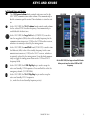
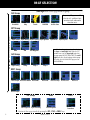
Left-hand Keys and Knobs
k
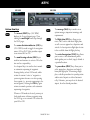
The COM power/volume knob controls unit power and, in the
GNS 530W, communications radio volume. Press momentarily to
disable automatic squelch control. Turn clockwise to turn the unit
on.
j
In the GNS 530W, the VLOC volume knob controls audio volume
for the selected VOR/ Localizer frequency. Press momentarily to
enable/disable the ident tone.
y
In the GNS 530W, the large left knob (COM/VLOC) is used to
tune the megahertz (MHz) value of the standby frequency for the
communications transceiver (COM) or the VOR/Localizer receiver,
whichever is currently selected by the tuning cursor.
v
In the GNS 530W, the small left knob (PUSH C/V) is used to tune
the kilohertz (kHz) value of the standby frequency for the communications transceiver (COM) or the VLOC receiver, whichever
is currently selected by the tuning cursor. Press this knob momentarily to toggle the tuning cursor between the COM and VLOC
frequency fields.
W
In the GNS 530W, the COM flip-flop key is used to swap the
active and standby COM frequencies. Press and hold to select the
emergency channel (121.500 MHz).
V
In the GNS 530W, the VLOC flip-flop key is used to swap the
active and standby VLOC frequencies
(i.e., make the selected standby frequency active).
190-00357-01 Rev H
GPS 500W
GNS 530W
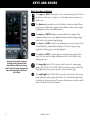
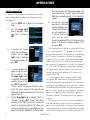
On the GNS 530W, the large and small left knobs
allow you to tune the desired COM or VLOC
frequency.
3