1
Saving and Loading Song Data
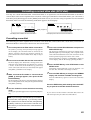
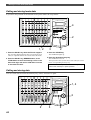
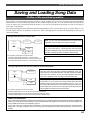
Saving data
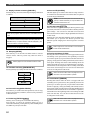
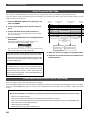
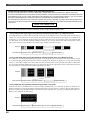
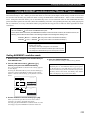
* You can back up data using the “Save PGM ?” menu
in SETUP mode. The following procedure assumes that
a recorded disk has been inserted in the current SCSI
drive, Program 1 (P01) has been selected, and an
unformatted disk will be used as the backup disk.
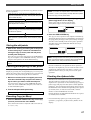
<[Save PGM ?] menu>
* Output signal options:
* Program options:
* Track options:
[AdAt], [dAT], [SCSi id-6]
P01 - P99 (an individual Program)
When using an adat or DAT: tracks 1–8,
tracks 1–16, Tracks 1–24;
When using a SCSI disk: All tracks will be
automatically selected.
44.1kHz
SETUP
MB
REMAIN
SYNC OUT
CLK
DRIVE
SCSI
AUTO
A.PUNCH
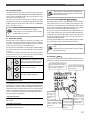
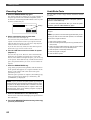
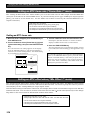
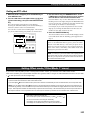
When the formatting operation is completed,
[COMPLETED !] lights up, [SCSi id-6] flashes, then the FD8 displays the following.
This example shows that the data to be saved is Program
1 on the current drive. If the current drive has multiple
Programs, use the JOG dial to select the desired Program.
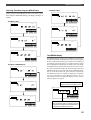
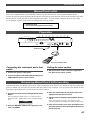
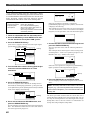
1. Insert an unformatted disk into the backup drive.
44.1kHz
ABS
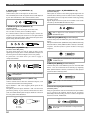
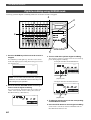
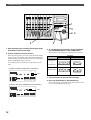
2. Press the SETUP key to enter SETUP mode, then
use the JOG dial to select [Save PGM ?] menu.
3. Press the EXECUTE/YES key.
[Save Device ?] appears and the selected output signal
option flashes. ([dAT] flashes.)
Flashing
44.1kHz
SETUP
SYNC OUT
DRIVE
CLK
SCSI
AUTO
A.PUNCH
SYNC OUT
CLK
DRIVE
SCSI
AUTO
A.PUNCH
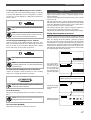
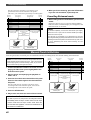
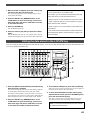
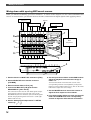
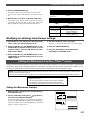
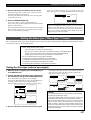
7. Use the JOG dial to select the desired Program and
press the EXECUTE/YES key.
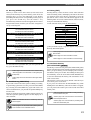
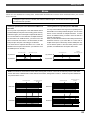
The save operation starts and the following indication
appears.
This example shows that Program 1 data is being saved
as Backup data 1. As the save operation progresses, the
REMAIN value (e.g.: -58MB) counts down.
44.1kHz
SETUP
44.1kHz
SETUP
MB
REMAIN
Flashing
SYNC OUT
CLK
AUTO
SYNC OUT
CLK
DRIVE
SCSI
DRIVE
SCSI
AUTO
A.PUNCH
A.PUNCH
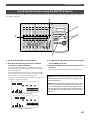
4. Turn the JOG dial to select a flashing [SCSi id-6] to
select the connected SCSI drive as a save
destination.
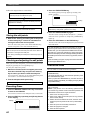
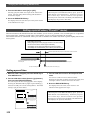
When the save operation is completed, [COMPLETED!]
lights up and the following indication appears.
44.1kHz
SETUP
44.1kHz
SETUP
COMPLETED !
SYNC OUT
Flashing
CLK
SYNC OUT
CLK
AUTO
DRIVE
Lights up
SCSI
AUTO
A.PUNCH
DRIVE
SCSI
A.PUNCH
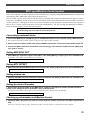
8. Press the EXIT/NO key to exit SETUP mode.
The FD-8 displays ABS 0 of the Program on the current
drive.
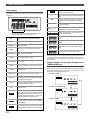
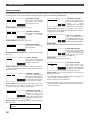
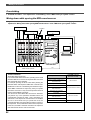
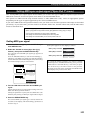
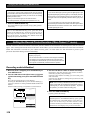
5. Press the EXECUTE/YES key.
The FD-8 recognizes that a disk in the backup drive is
unformatted, and displays [Unformat ?], then proceeds
to the [Bk Format?] menu (backup disk format) in SETUP
mode, then displays the following.
44.1kHz
SETUP
Flashing
SURE ?
SYNC OUT
CLK
AUTO
DRIVE
SCSI
A.PUNCH
6. Press and hold down the RECORD button, and
press the EXECUTE/YES key.
The FD-8 displays the following and starts formatting the
disk. The unformatted disk area size will count down as
the format operation progresses.
88
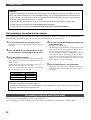
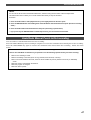
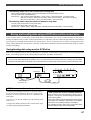
Note: The backup data will use the number of the saved
Program. (e.g., if you save P01 [#0001 data, the backup data
will be named as B01[#0001.) You cannot edit the title of the
backup data.
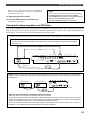
The above procedure assumes that the saved data size is
smaller than the available space of the backup disk. You can
use only one backup disk. To save data larger than a single
backup disk, refer to the next <Memo> for information on
saving data using multiple backup disks.