1
Maple
Rev.D
A5 size
06/17/97
Chapter 2
pass 0
R
Accessing the printer utilities
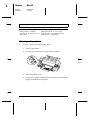
To access the EPSON utilities, follow these steps:
1. From the DOS prompt, make sure the current directory is
drive C.
2. To access the EPSON Remote! utility, type PRNSET, and
press Enter.
To access the EPSON Label Form utility, type EPUTIL\EPLABEL,
and press Enter.
3. Follow the on-screen instructions to use the utilities.
Setting Up Your Software
2-23
2