1
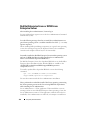
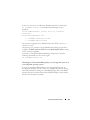
You can include the REINSTALL customization parameter on the command
line and assign the feature ID (IDs) of the software feature that you want to
reinstall. For example,
msiexec.exe /i SysMgmt.msi REINSTALL=BRCM /qb
This command runs the installation for Dell OpenManage Systems
Management and reinstalls only the Broadcom agent, in an unattended but
not silent mode.
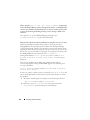
You can include the REMOVE customization parameter on the command
line and assign the feature ID (IDs) of the software feature that you want to
uninstall. For example,
msiexec.exe /i SysMgmt.msi REMOVE=BRCM /qb
This command runs the installation for Dell OpenManage Systems
Management and uninstalls only the Broadcom agent, in an unattended but
not silent mode.
You can also choose to install, reinstall, and uninstall features with one
execution of the msiexec.exe program. For example,
msiexec.exe /i SysMgmt.msi REMOVE=BRCM /qb
This command runs the installation for managed system software, and uninstalls
the Broadcom agent. This execution is in an unattended but not silent mode.
MSI Return Code
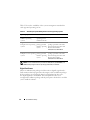
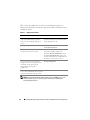
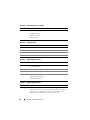
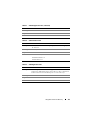
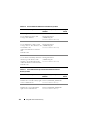
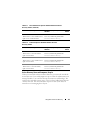
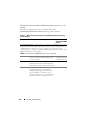
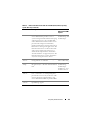
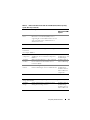
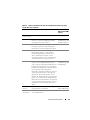
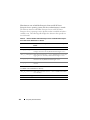
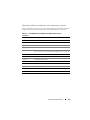
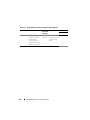
An application event log entry is recorded in the SysMgmt.log file. Table 3-4
shows some of the error codes returned by the msiexec.exe Windows Installer
Engine.
Table 3-4. Windows Installer Return Codes
Error Code
Value
Description
ERROR_SUCCESS
0
The action is completed
successfully.
ERROR_INVALID_PARAMETER
87
One of the parameters was
invalid.
58
Installing Managed System Software on Microsoft Windows Operating Systems