1
Utility Panel
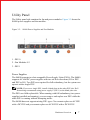
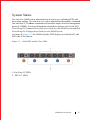
The Utility panel side contains the fan and power modules. Figure 3-2 shows the
S6000 power supplies and fan modules.
Figure 3-2.
S6000 Power Supplies and Fan Modules
1 - PSU 0
2 - Fan Modules 0-2
3 - PSU 1
Power Supplies
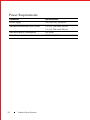
The S6000 supports two hot-swappable Power Supply Units (PSUs). The S6000
supports AC and DC power supplies with two air-flow directions (I/O to PSU
and PSU to I/O). Two PSUs are required for full redundancy, but the system can
operate with a single PSU.
NOTE: If you use a single PSU, install a blank plate in the other PSU slot. Dell
Networking recommends using power supply 1 (PSU1) as the blank plate slot.
The PSUs are field replaceable. When running with full redundancy (two power
supplies installed and running), you can remove and replace one PSU while the
other PSU is running without disrupting traffic.
The S6000 does not support mixing PSU types. You cannot replace an AC PSU
with a DC PSU and you cannot replace an AC-R PSU with a DC-R PSU.
Hardware Overview
7