1
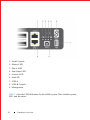
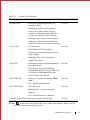
Table 3-1.
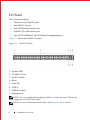
System LED indicators
Feature
System LED
Detailed Description
Comment
• Solid green–Normal operation. CLI
prompt available
I/O side
• Blinking green–Boot-up in progress
• Solid yellow–Major Fault. Displays
summary of all major faults within the
system; the faults are traffic affecting
• Blinking yellow–Minor Fault. Displays
summary of all minor faults within the
system; the faults are not traffic affecting
Power LED
• Off–No power
I/O side
• Solid Yellow–POST in progress
• Solid green–Normal operation (dual or
single supply)
• Blinking yellow–One of the power
supplies has failed
FAN LED
• Solid green–Fan powered and running at
the expected rpm
I/O side
• Solid yellow–Fan failed including
incompatible airflow direction when PSU
or fan trays of differing airflows are
inserted in the same chassis
MASTER LED
• Solid green–System in stacking Master
mode
I/O side
• Off – Switch in Slave mode
LOCATOR LED
• Off – No power
I/O side
• Blinking blue – Locator function is
enabled
• Off – Locator function is disabled
7-DIGIT Stack LED It indicates a number for stacking.
I/O side
NOTE:
When one of the FAN LEDs on the utility side indicates failure, the fan
LED on the I/O panel displays yellow.
Hardware Overview
11