1
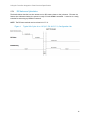
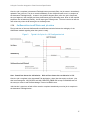
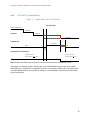
Lifecycle Controller Integration―Best Practices Specification 33.4.4.3 Inventory - After all jobs are executed, SSM will re-inventory the system and signal the iDRAC to re-sync its database. The total timeout for SSM should include 1 minute to inventory each NIC FQDD on the target system after job completion. The total timeout for SSM should include 30 seconds to inventory each RAID controller installed on the target system after job completion. 33.4.4.4 Cleanup - The total timeout for SSM should include 2 minutes to unload and cleanup the UEFI environment prior to reboot. 33.4.5 RSStatus/JobStatus - After SSM completes, the system will reboot and proceed with CSIOR, as described in 33.4.7. In parallel, the iDRAC will refresh its database based on updated inventory. The total timeout for RSStatus / JobStatus should include 5 minutes to obtain the inventory data generated and update the iDRAC database. Check Status = Reloading and then Status = Ready as described in section 20 of the WSIG for Windows. 33.4.6 Check refreshed data - - Once RSStatus / JobStatus are Ready / Completed respectively, NIC and BIOS need to be reinventoried to ensure that all pending data was cleared and the set values were successfully applied. NIC and BIOS inventory are described in sections 33.3.3 and 33.3.5. Error to user stating failures if any pending values still persist or if set values weren’t applied as required. 33.4.7 CSIOR - On the server side, the following tasks are redone since the machine will reboot and perform CSIOR. The overall timeout for SSM should include the following timeouts: o POST – as described in section 33.4.3 o CSIOR – UEFI Initialization, similar to section 33.4.1 o CSIOR – Inventory o CSIOR – Cleanup 33.5 iSCSI boot information In addition to the programmatic steps shown in section 4.16, additional detailed information about the script is added below. 1. Check FQDD if LOM/NDC or add-in o On 11G Embedded = LOM Integrated = LOM o On 12G Embedded = LOM Integrated = NDC o Addins can be Slot, Mezzanine, etc. 2. Check LOM/NDC enablement 155