1
Dock for iPod
Your Media Everywhere
The Control4® Dock for iPod is the most effective and affordable way to connect
your iPods to your Control4® system. The Control4 Dock for iPod offers better
navigation and control than existing docks, allowing you to effectively distribute
music and video throughout your home. Access a single iPod or connect all of your
family’s iPods at the same time simply by adding more docks.
Control4 delivers the benefits of a truly automated home by providing solutions that
are affordable, easy to install, and designed to adapt to any home or lifestyle.
Features and Benefits
Smart Design
•Access your music from virtually anywhere — Use any Control4 interface to control your iPod,
even if it’s physically docked in a different room.
•Better navigation and control — Using familiar navigation, you can view album cover art for
your music and control your iPod.
•Sleek tabletop design — Integrates easily into any Control4 environment.
Easily access your iPods, navigate your
playlists, view music cover art, and
manage your music from any Control4
on-screen or touch-screen interface.
Easy To Install
•Seamless integration — Just dock your iPod for immediate accessibility by your Control4 system.
•Simple installation — Easy to install, set up and personalize in new or existing homes.
•Standards-based — IP based connections via standard Ethernet allow fast, accurate two-way
communication with the central home controller.
Easy to Use
•For one iPod or many — Multiple docks can be placed in the home and managed through
standard navigation that supports a wide range of iPod products.
•Play your iPod in any room — Like digital music, multiple rooms can access a single audio or
video stream from your iPod.
•Charge while you listen — Your iPods will recharge anytime they are docked.
Control4 • 11734 South Election Road • Salt Lake City, Utah 84020 • p: 801.523.3100/1.888.400.4070 • f: 801.523.3199 • www.control4.com
Dock for iPod
Technical Specifications
Model Number
•C4-IPDKTT-E-B
Communications
•10/100BaseT Ethernet
Inputs and Outputs
•Video Output: Component, Composite
•Audio: Left/Right stereo
•Network: Ethernet 10/100Base-T, RJ45 jack
Related Control4 Products
What’s in the Box
•Control4 Dock for iPod
•Power adapter and power plug
•Audio/Video breakout cable with 3.5 mm
to RCA plugs (Red/White/Yellow)
•HC-200 interconnect cable with 3.5 mm
to 3.5 mm plugs (Dock audio output to
HC-200 audio input)
•Control4 Dock for iPod Setup Guide
In addition to the Dock for iPod,
Control4 offers:
Home Controller HC-300 — Powerful
whole home automation controller with
high definition on-screen graphics.
Power Requirements
•120VAC
Dimensions
•W x H x D~: 5.5” x 3.75” x 1.25” (including connectors)
Environmental
•Operating temperature -5º C to 50º C
•Humidity 5% to 90% non-condensing
•Storage temperature -20º C to 60º C
4 Zone Amplifier — This state-of-the-art
digital amplifier delivers 8 channels of
high quality sound.
Supported iPods
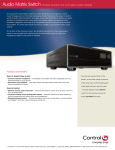
Audio Matrix Switch — Intelligently
control music throughout the home.
Copyright © 2008 Control4 Corporation. All rights reserved. Control4, the Control4 logo and Everyday Easy are registered trademarks or trademarks of Control4 Corporation in the
United States and/or other countries. Other names or brands may be claimed as the property of others.
Control4 • 11734 South Election Road • Salt Lake City, Utah 84020 • p: 801.523.3100/1.888.400.4070 • f: 801.523.3199 • www.control4.com