1
ENCORE
S20E
Operator's
Manual
READ THIS BOOK
This book has important information for the use and safe operation of this machine. Failure to read this
book prior to operating or attempting any service or maintenance procedure to your ALTO machine could
result in injury to you or to other personnel; damage to the machine or to other property could occur as
well. You must have training in the operation of this machine before using it. If you or your operator(s)
cannot read English, have this manual explained fully before attempting to operate this machine.
Si Ud. o sus operadores no pueden leer el Inglés, se hagan explicar este manual completamente antes
de tratar el manejo o servicio de esta máquina.
All directions given in this book are as seen from the operator’s position at the rear of the machine.
For new books write to: ALTO U.S. Inc., 2100 Highway 265, Springdale, Arkansas 72764.
Form No. 74839B
8/04
CLARKE TECHNOLOGY
Printed in the U.S.A.
Table of Contents
Operator Safety Instructions .............................................................................................. 3
Introduction & Machine Specifications ............................................................................... 5
Procedures for Transporting Machine ................................................................................ 6
Machine Control Panel ....................................................................................................... 8
Machine Controls and Features ......................................................................................... 9
How to Prepare the Machine for Operation ........................................................................ 10
How to Install a Brush or Pad Driver ...................................................................... 10
How to Remove a Brush or Pad Driver .................................................................. 10
How to Operate the Machine ............................................................................................. 11
How to Operate the Squeegee ............................................................................... 11
Filling the Solution Tank ......................................................................................... 11
Operating the Machine ........................................................................................... 12
How to Clean a Dirty Floor ..................................................................................... 12
SECTION II - Parts and Service Manual
How to Correct Problems in the Machine .......................................................................... 14
Maintenance ....................................................................................................................... 16
Procedures Before Work is Began......................................................................... 17
Procedures to Perform at the End of Work ............................................................ 18
Procedures to Perform Every Week ...................................................................... 18
Maintenance for the Squeegee ............................................................................... 19
How to Adjust the Squeegee .................................................................................. 19
How to Clean the Solution Line .............................................................................. 20
Machine Variables and Accessories .................................................................................. 21
Accessories ....................................................................................................................... 21
Encore S20E Final Assembly Drawing .............................................................................. 22
Parts List ................................................................................................................ 23
Encore S20E Recovery Drawing ....................................................................................... 24
Parts List ................................................................................................................ 25
Solution Tank Assembly Drawing ...................................................................................... 26
Parts List ................................................................................................................ 27
Rear Panel Assembly Drawing .......................................................................................... 28
Parts List ................................................................................................................ 29
Electrical Cover Assembly Drawing and Parts List ........................................................... 30
Squeegee Lift Assembly Drawing and Parts List ............................................................... 31
Squeegee Assembly Drawing and Parts List .................................................................... 32
Squeegee Assembly Drawing and Parts List .................................................................... 33
Encore S20E Frame Assembly Drawing and Parts List .................................................... 34
Brush Lift Assembly Drawing and Parts List ..................................................................... 35
Brush Housing Assembly Drawing and Parts List ............................................................. 36
Optional Brake Assembly Drawing and Parts List ............................................................. 37
115V Vacuum Motor Drawing and Parts List ..................................................................... 38
230V Vacuum Motor Drawing and Parts List ..................................................................... 39
Gearbox Assembly Drawing and Parts List ....................................................................... 40
Motor and Gearbox Assembly Drawing and Parts List .................................................... 41
Encore S20E 115V Connection Diagram .......................................................................... 42
Encore S20E 115V Electrical Schematic .......................................................................... 43
Encore S20E 230V Connection Diagram .......................................................................... 44
Encore S20E 230V Electrical Schematic .......................................................................... 45
Page
-2-
CLARKE TECHNOLOGY Operator's Manual -Encore S20E
OPERATOR SAFETY INSTRUCTIONS
WARNING
AVERTISSEMENT
ADVERTENCIA
DANGER:
Failure to read and observe all DANGER statements could result in
severe bodily injury or death. Read and observe all DANGER
statements found in your Owner's Manual and on your machine.
WARNING:
Failure to read and observe all WARNING statements could result in
injury to you or to other personnel; property damage could occur as
well. Read and observe all WARNING statements found in your
Owner's Manual and on your machine.
CAUTION:
Failure to read and observe all CAUTION statements could result in
damage to the machine or to other property. Read and observe all
CAUTION statements found in our Owner's Manual and on your
machine.
DANGER:
Failure to read the Owner's Manual prior to operating or attempting any service or
maintenance procedure to your Clarke Technology machine could result in injury to
you or to other personnel; damage to the machine or to other property could occur
as well. You must have training in the operation of this machine before using it. If
you or your operator(s) cannot read English, have this manual explained fully
before attempting to operate this machine.
DANGER:
Operating a machine that is not completely or fully assembled could result in injury
or property damage. Do not operate this machine until it is completely assembled.
Inspect the machine carefully before operation.
DANGER:
Machines can cause an explosion when operated near flammable materials and
vapors. Do not use this machine with or near fuels, grain dust, solvents, thinners,
or other flammable materials. This machine is not suitable for picking up hazardous dust.
DANGER:
Using a machine with a damaged power cord could result in an electrocution. Do
not use the machine if the power cord is damaged. Do not use the electrical cord
to move the machine.
DANGER:
Electrocution could occur if maintenance and repairs are performed on a unit that
is not disconnected from the power source. Disconnect the power supply before
attempting any maintenance or service.
DANGER:
Electrocution or fire could occur if the machine is used on a power circuit that
repeatedly trips or is undersized. Have a licensed electrician check the fuse,
circuit breaker or power supply, and/or contact your local Clarke Technology
distributor for assistance.
WARNING:
Operating this machine from anywhere other than the back of the machine could result in
injury or damage. Operate this machine only from the rear.
WARNING:
This machine is heavy. Get assistance before attempting to transport or move it. Use
two able persons to move the machine on a ramp or incline. Always move slowly. Do
not turn the machine on a ramp. If operating machine on a gradient over 2%, do not
stop, turn or park. Read the "Procedures For Transporting" in this manual before transporting as machine might topple over if not strapped..
WARNING:
Machines can topple over if guided over the edges of stairs or loading docks and cause
injury or damage. Stop and leave this machine only on a level surface. When you stop
the machine, put all switches into their "OFF" position.
CLARKE TECHNOLOGY Operator's Manual -Encore S20E
Page
-3-
Page
WARNING:
Maintenance and repairs performed by unauthorized personnel could result in damage or
injury. Maintenance and repairs must be performed by authorized Clarke Technology
personnel only.
WARNING:
Any alterations or modifications of this machine could result in damage to the machine or
injury to the operator or other bystanders. Alterations or modifications not authorized by
the manufacturer voids any and all warranties and liabilities.
WARNING:
Electrical components of this machine can "short-out" if exposed to water or moisture.
Keep the electrical components of the machine dry. Wipe the machine down after each
use. For storage, keep the machine in a dry building.
WARNING:
Operating a machine without observing all labels and instructional information could
result in injury or damage. Read all machine labels before attempting to operate. Make
sure all of the labels and instructional information are attached or fastened to the machine. Get replacement labels and decals from your Clarke Technology distributor.
WARNING:
Wet floor surfaces can be slippery. Water solutions or cleaning materials used with this
type of machine can leave wet areas on the floor surface. These areas can cause a
dangerous condition for the operator or other persons. Always put "Caution" signs
around/near the area you are cleaning.
WARNING:
Improper discharge of waste water may damage the environment and be illegal.
The United States Environmental Protection Agency has established certain regulations
regarding discharge of waste water. Also, city and state regulations regarding this
discharge my be in effect in your area. Understand and follow the regulations in your
area. Be aware of the environment hazards of chemicals that you dispose.
CAUTION:
Use of this machine to move other objects or to climb on could result in injury or damage. Do not use this machine as a step or furniture. Do not ride on this machine.
CAUTION:
Your machine warranty will be voided if anything other than genuine Clarke Technology
parts are used on your machine. Always use Clarke Technology parts for replacement.
CAUTION:
Using an extension cord with this machine will result in a drop in voltage and loss of
power. Use of an extension cord is not recommended.
-4-
CLARKE TECHNOLOGY Operator's Manual -Encore S20E
Introduction & Machine Specifications
Introduction & Machine Specifications
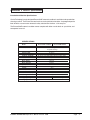
Clarke Technology’s newly designed Encore S20E automatic scrubber is an efficient and superior floor
cleaning machine. The Encore uses one brush to scrub a path 20 inches wide. A squeegee wipes the
floor while the vacuum motor removes the dirty solution from the floor - all in one pass.
The Encore S20E automatic scrubber comes complete with either a scrub brush or a pad driver, and
one operator’s manual.
SPECIFICATIONS:
Model
Model
Motor, Vac
Power Supply
Solution Tank
Recovery Tank
Parabolic Squeegee
Motor, Brush
Brush
Brush Speed
Brush Pressure
Speed, Forward
Drive Wheels
Length
Width (over brush housing)
Height
Sound Level (DBA)
Cleaning Swath
Weight (Dry)
Shipping Weight
Shipping Dimensions
Encore S20E - 00900A
Encore S20E 00910A
w/Brake - 00800E
w/Brake - 00910E
1 HP two stage
tangential discharge
75' cord
14 gallons
14 gallons
32" (81cm) hard width w/34" (86cm) flex blade width
.75 hp PM
20 inch
250 rpm
Floating
brush assist.
8" x 2" Neoprene thread
52½"
22¼"
43½"
78
20 inch
338 lbs.
153 kg
.
350 lbs.
187 kg
28" x 65.5" x 46.5"
CLARKE TECHNOLOGY Operator's Manual -Encore S20E
Page
-5-
Procedures For Transporting
How to Put the Machine Into a Van or Truck
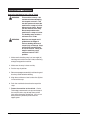
WARNING:
This machine is heavy. Get
assistance before attempting
to transport or move it. Use
two able persons to move the
machine on a ramp or incline.
Always move slowly. Do not
turn the machine on a ramp.
Do not stop and leave the
machine on a ramp or incline.
The loading ramp must be a
minimum of 32" wide.
WARNING:
Machines can topple over if
guided over the edges of
stairs or loading docks and
cause injury or damage. Stop
and leave this machine only
on a level surface. When you
stop the machine, put all
switches into their "OFF"
position.
1. Make sure the loading ramp is at least eight (8)
feet long and a minimum of 32" wide, and strong
enough to support the machine.
2. Make sure the ramp is clean and dry.
3. Put the ramp in position.
4. Remove squeegee assembly, brush housing and
brush or pad driver before loading.
5. Align the machine on a level surface five (5) feet
in front of the ramp.
6. Push the machine backwards to the top of the
ramp.
7. Fasten the machine to the vehicle. Clarke
Technology recommends a strap over the top of
the machine and a strap to keep the machine
from rolling forward or backwards. If this is not
done, there is a possibility of the machine
toppling over.
Page
-6-
CLARKE TECHNOLOGY Operator's Manual -Encore S20E
Procedures For Transpoting (cont.)
How to Remove the Machine From a Van or
Truck
1. Make sure there are no obstructions in the area.
2. Make sure the unloading ramp is at least eight
(8) feet long and a minimum of 32" wide, and
strong enough to support the machine.
3. Make sure the ramp is clean and dry.
4. Put the ramp in position.
5. Unfasten the machine.
WARNING:
The machine is heavy. Make
sure you use two able
persons to assist in moving
the machine down the ramp.
6. Get two people to pull machine off ramp. It is
recommended that the machine be unloaded in
the forward position.
7. As the machine begins to travel down the ramp,
use two people to maintain a slow downward
speed.
8. Replace squeegee assembly, brush housing,
and brush or pad driver after machine is unloaded and ready to use.
CLARKE TECHNOLOGY Operator's Manual -Encore S20E
Page
-7-
Machine Control Panel
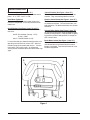
Main Switch (See Figure 1, Item "A")
The main switch turns "ON" the power to the control
panel. "O" is "OFF" and "I" is "ON".
Control Handles (See Figure 1, Item "D")
The control handles are located at the rear of the
machine. They are used to guide the machine.
Hour Meter (Optional)
The hour meter indicates the number of hours the
machine has operated. It runs only when the brush
motor is on.
Solution Control Knob (See Figure 1, Item "E")
The solution control knob regulates the flow of chemical solution to the floor. To increase the flow, turn
knob clockwise. To decrease the flow, turn counter
clockwise.
Circuit Breakers (See Figure 1, Items "B" and "C")
The circuit breakers reset button are located on the
rear cover.
Vacuum Motor Switch (See Figure 1, Item "F")
To activate vacuum motor, lower squeegee handle.
Handle has two positions. Lowest position is operating position and the middle position is transport to
clear vacuum hose.
Item B - Brush Motor (10 amp - 115V)
(5 amp - 230V)
Item C - Control Breaker (2.5 A)
Brush Motor Switch (See Figure 1, Item "G")
To activate brush motor, lower handle. Brush Motor
and solution flow will activate when the traverse
buttons are pushed. To shut brush motor off, raise
handle to top position.
If a circuit breaker trips, determine which motor is not
operating and turn the main switch "OFF". Wait five
minutes and push the reset button back in. Turn the
main switch "ON" and try again. An authorized
service person should be contacted if the breaker trips
again.
D
D
E
A
B
C
F
G
Figure 1
Page
-8-
CLARKE TECHNOLOGY Operator's Manual -Encore S20E
Machine Controls and Features
Squeegee Lift Handle, See Figure 2
The squeegee lift handle is located below the control
handles in the center. It is used to raise or lower the
squeegee. The vac motor is turned on when the
handle is lowered to either the first or last position.
NOTE: Squeegee must be raised to at least the first
position when the machine is backed up.
Float Shut Off, See Figure 3
The shut-off switch for the vac motor is located in the
recovery tank. It automatically turns off the vac motor
when the recovery tank is full. NOTE: If excessive
foaming in recovery tank, defoamer must be
added. Damage to vacuum motor could result
from foam.
Parking Brake, See Figures 4a and 4b (Optional)
The parking brake prevents movement of the machine.
It is located at the rear lower left side of the machine.
To engage the brake, push the pedal down (Figure 4a).
To release the brake, lift pedal up (Figure 4b).
Figure 3
CAUTION: Do not activate the brake while the
machine is moving.
Figure 4a
Figure 2
CLARKE TECHNOLOGY Operator's Manual -Encore S20E
Figure 4b
Page
-9-
How To Prepare the Machine For Operation
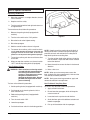
How To Install The Brush Or Pad Driver
To install the brush or pad driver on the machine,
follow this procedure:
1. Turn the main switch "OFF".
2. Put the brush lever in the "UP" position.
3. Go to the front of the machine.
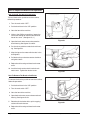
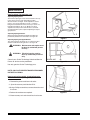
4. Using a short Phillips screw driver, loosen the
latch screw enough to allow the retainer to be
free of the cover. (See figure 5a, 1)
5. Open the brush motor cover and remove the
brush housing. See figures 5a and 5b.
1
Figure 5a
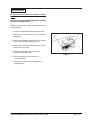
6. Put a brush or pad driver under the brush housing. See figure 5c.
7. Align the lugs on the motor with the slots in the
brush gimbal.
8. Pull the brush up and rotate counter clockwise
until gimbal locks.
9. Replace brush housing and close brush motor
cover.
10. Install the brush retainer latch into the brush
motor cover. Tighten the retainer screw.
Figure 5b
How To Remove The Brush or Pad Driver
To remove the brush or pad driver from the machine,
follow this procedure:
1. Put the brush lever in the "UP" position.
2. Turn the main switch "OFF".
3. Go to the front of the machine.
4. Open the brush motor cover and remove brush
housing. See figures 5a-5c.
5. Rotate brush clockwise with a quick snapping
action until brush releases.
Figure 5c
6. Replace brush housing and close brush motor
cover.
Page
-10-
CLARKE TECHNOLOGY Operator's Manual -Encore S20E
How To Operate The Machine
How To Operate The Squeegee
The squeegee wipes the floor while the vacuum motor
removes the dirty solution form the floor. Use your
right hand to lower or raise the squeegee handle. To
operate the squeegee, follow this procedure:
1. To lower the squeegee and start the vac motor,
move the squeegee lever to the right and down.
See figure 6.
2. To raise the squeegee, lift the squeegee lever
up. See figure 7.
NOTE: The center position lets the vac motor continue to run with the squeegee off the floor to avoid
drips and also allows you to back up the machine.
Figure 6
How To Fill The Solution Tank
The solution tank lid is at the front. To fill the solution
tank follow this procedure:
1. Raise the solution tank lid.
2. Add a cleaning chemical to the solution tank.
For the correct amount of chemical, follow the
directions shown on the container.
3. Fill the solution tank with water.
4. Lower the solution tank lid.
WARNING: Water solutions or cleaning materi-
als used with this type of machine
can leave wet areas on the floor
surface. These areas can cause a
dangerous condition for the
operator or other persons. Always
put CAUTION signs near the area
you are cleaning.
Figure 7
WARNING: Machines can ignite flammable
materials and vapors. Do not use
with or near flammables such as
gasoline, grain dust, solvents and
thinners. Only use a cleaning
concentrate recommended by the
chemical manufacturer.
CLARKE TECHNOLOGY Operator's Manual -Encore S20E
Page
-11-
How To Operate The Machine
Operating The Machine
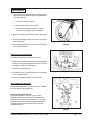
1. Move the machine in a straight direction, forward
and backward.
2. Stop the machine safely.
3. Turn the machine both left and right and return to a
straight direction.
To move the machine, follow this procedure:
1. Release the parking brake (if equipped with
machine).
2. Turn the main switch to the "ON" position
Figure 8
3. Raise the brush to the highest setting.
4. Raise the squeegee.
5. Hold the control handle as shown in figure 8.
6. To reverse the machine, pull the machine backwards. NOTE: Anytime the machine is reversed, the
squeegee must be raised to either of the two up
positions. This will prevent damage to the squeegee.
7.
To turn the machine, push the rear of the machine
to the side.
8.
When you stop the machine, turn the main switch
"OFF" and set the parking brake (if equipped).
How To Clean A Floor
WARNING: Water solutions or cleaning materials used with this type of machine
can leave wet areas on the floor
surfaces. These areas can cause a
dangerous condition for the
operator or other persons. Always
put CAUTION signs near the area
you are cleaning.
To clean a floor follow this procedure:
1. Set the parking brake (if equipped with machine.)
2. Put the water and a cleaning chemical in the
clean solution tank.
3. Release the parking brake (if equipped with
machine.)
4. Turn the main switch "ON".
NOTE: Keep the machine moving when the brush is
rotating on the floor. Pre-wet brush/pad or keep light
pressure on brush until solution flow is adequate to
keep brush/pad from scratching floor.
7. Turn the solution knob to the right to activate the
flow of solution. Adjust the flow of clean solution
to the flow desired.
8. Move the machine across the floor in the forward
direction.
9. Make a 180° turn.
NOTE: When you make more passes across the
floor, let the brush clean approximately 2 inches of the
area already cleaned by the brush.
NOTE: During most cleaning procedures, apply and
remove the solution in one operation.
How To Clean A Very Dirty Floor
To clean a very dirty floor, follow this procedure:
1. Apply solution to the floor.
2. Do not lower the squeegee, which will keep the
vacuum motor off.
3. Lower the brush or pad and scrub the floor.
4. Scrub the floor again with additional solution and
lower the squeegee.
5. Lower the squeegee.
5. Pick up all the solution with the squeegee.
6. Put the brush lever switch in the floating position.
Page
-12-
CLARKE TECHNOLOGY Operator's Manual -Encore S20E
ENCORE
S20E
Section II
Parts and Service Manual
(74839B)
CLARKE TECHNOLOGY Operator's Manual -Encore S20E
Page
-13-
HOW TO CORRECT PROBLEMS IN THE MACHINE
PROBLEM
There is no solution flow.
The solution flow does not stop.
The machine does not remove all the
water from the floor.
Page
-14-
CAUSE
ACTION
The solution valve is closed.
Open the solution valve.
There is an obstruction in the solution hose
or filter.
Remove the obstruction from the hose and the
filter.
The solution valve or electric wiring is
damaged.
Repair or replace the valve and the electric
wiring.
The solution tank is empty.
Fill the solution tank.
The solution module is damaged.
Check solution module
The solution valve is open or dirty.
Close or Clean the solution valve.
The solution valve or wiring is damaged.
Repair or replace the valve and the wiring.
The solution valve is dirty
Clean the solution valve.
There is a damaged seat and washer in the
solution valve.
Replace the seat and washer.
The solution module is damaged.
Check solution module.
The squeegee is up
Lower the squeegee.
The squeegee tilt is not correct.
(See Figure 11, page 23)
The vacuum tank is full.
Drain the tank.
The screen filter is dirty.
Clean the screen filter.
There is an obstruction or damage in the
squeegee, squeegee hose or standpipe.
Remove the obstruction or repair the damage.
The vacuum motor is not running.
Check for tripped breaker. Have an authorized service person make repairs.
The squeegee hose is disconnected, or
damaged
Check and connect hose.
The squeegee blade is damaged, worn, or
incorrectly installed.
Turn or replace the squeegee blade.
Correctly install the squeegee blade.
The squeegee pressure is not correctly
adjusted.
Adjust the pressure of the squeegee.
The gaskets on the cover of the recovery
tank are damaged.
Replace the gaskets.
The recovery tank lid is on wrong.
Rotate lid 180° and replace.
CLARKE TECHNOLOGY Operator's Manual -Encore S20E
PROBLEM
The cleaning is not even.
CAUSE
ACTION
The scrub brush or pad is worn.
Replace the scrub brush or pad.
There is damage to the brush assembly,
caster or the solution valve.
Have an authorized service person make
the needed repairs.
The brush motor is not running
Check for tripped breaker. Reset. Check
for loose connections.
The solution level is low.
Fill the solution tank.
NOTE: If the problem continues consult
an authorized service person.
The machine does not run.
The machine loses power
Reset the circuit breaker.
Do not use an extension cord.
Main switch is off.
Turn main switch on.
Power cord disconnected.
Reconnect power cord.
Wall circuit breaker blown.
Reset wall circuit breaker.
CLARKE TECHNOLOGY Operator's Manual -Encore S20E
Page
-15-
MAINTENANCE
DANGER:
Maintenance and repairs performed
by unauthorized personnel could
result in damage or injury. Maintenance and repairs must be done by
authorized Clarke Technology personnel only.
DANGER:
Operating a machine that is not
completely or fully assembled
could result in injury or property
damage. Do not operate this machine until it is completely assembled. Inspect the machine carefully before operation. Keep all fasteners tight.
DANGER:
Electrocution could occur if maintenance and repairs are performed on
a unit that is not properly disconnected form the power source. Always disconnect the power supply
before attempting any maintenance
or service.
WARNING: Severe injury could occur to your
hands if maintenance or repairs are
performed when the machine is on
or plugged into power supply. Always turn off power and disconnect
machine before attempting any
maintenance.
WARNING: SEVERE bodily injury could occur if
operator leans body under the tank
support to perform maintenance.
Always position the tank support all
the way over and rest it on the floor
before attempting any service and/
or maintenance.
WARNING: Moving parts can cause injury to feet
and hands. Keep feet and hands
clear from under the machine.
WARNING: Attempting maintenance and or repairs to this machine before emptying the solution or recovery tank
could result in machine or property
damage.
WARNING:
Page
-16-
Keep all fasteners tight.
CLARKE TECHNOLOGY Operator's Manual -Encore S20E
MAINTENANCE
Do These Procedures When You Begin Your Work
Period
NOTE: Always engage the parking brake (if equipped)
before servicing the machine.
Keep the machine clean. It will need fewer repairs and
have a longer life.
1. Connect machine power cord to electrical outlet.
2. Make sure the recovery tank lid is on correctly.
See figure 1.
A
3. Make sure the Screen filter over the vacuum motor
is clean and in position. See figure 1 (a)
4. Make sure the valves on the drain hoses are clean.
Tightly close the valves.
5. Make sure brush housing and skirt are in
position on the brush head.
Figure 1
6. Make sure the brush is in position and
installed correctly
7. Check the installation of the squeegee and
squeegee hose.
CLARKE TECHNOLOGY Operator's Manual -Encore S20E
Page
-17-
MAINTENANCE
Do These Procedures When You End Your Work
NOTE: Always engage the parking brake (if equipped)
before servicing the machine.
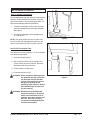
1. Drain the solution tank (Figure 2 ) and the recovery
tank (Figure 3). To drain the tanks , follow this
procedure:
a. Turn the main switch “OFF”.
b. Remove the drain hose from the back of the
machine.
c. Put the end of the hose over a drain or bucket.
Figure 2
d. Turn the valve handle to the left. Pull the handle
out to open the drain. (Figure 4)
NOTE: Have the opening in the side of the valve away
from you when you open the valve.
e. To open the valve completely, turn the handle
to the right. Pull the handle out of valve. (Figure
5)
2. Flush the tanks. To flush the tanks, put clean water in
the tank through the opening on top of the tank.
CAUTION: Make sure water or solution does not
enter the opening for the vacuum
motor. See figure 1, page15.
Figure 3
3. If a tank or drain hose has an obstruction, use a high
pressure water hose to flush the tank or hose. Put the
water hose into the drain hose.
4. Leave the tanks and the drain valves open to dry in the
air.
5. Check the squeegee blade. Use a cloth to clean the
squeegee blade. If the squeegee blade is damaged or
worn, turn or replace the blade.
6. Check and clean the solution lid gasket. Use a mild
cleaning solution and rinse the parts in clean water.
Use a clean cloth and wipe the surface of the machine.
Figure 4
These Maintenance Procedures Must Be Done Every
Week:
WARNING:
Maintenance and repairs must be
done by authorized personnel only.
Always empty the solution tank and
the recovery tank before doing any
maintenance. Keep all fasteners
tight.
1. Check the hoses for leaks, obstructions and other
damages.
Page
-18-
Figure 5
CLARKE TECHNOLOGY Operator's Manual -Encore S20E
MAINTENANCE
2. Check and clean the filter screen in the solution hose.
To clean the screen, follow this procedure: (See figures
11 and 12 page 18)
a. Turn the connector to the left.
b. Remove and clean the filter screen.
c. Install the filter screen in the hose. Turn the
connector to the right to connect the hose.
3. Use a grease gun to lubricate the caster. See figure
6.
4. Check the squeegee and the scrub brush or the pad
driver for damage.
5. Check the squeegee and the vacuum hose for damage,
leaks and obstructions.
Figure 6
Maintenance For The Squeegee
To remove the squeegee, follow this procedure:
1. Remove the squeegee assembly by loosening the two
knobs that attach the squeegee to the machine. Pull the
squeegee assembly off. See figure 7.
2. Inspect the squeegee blade.
3. If the blade is worn, turn the blade so that a new edge
is in the wiping position.
Figure 7
Figure 7
4. Reinstall squeegee assembly on the machine.
How To Adjust The Squeegee
The following adjustments are set at the factory, however
they may require slight adjustment.
Adjusting Squeegee Pressure:
To adjust the pressure, refer to Figure 8. Proper
adjustment will produce a uniform flare along the rear
blade when the machine is moved forward. To increase
pressure, loosen bolt and slide squeegee mount down.
To decrease the pressure, loosen the bolt and slide
squeegee mount up.
Figure
Figure88
CLARKE TECHNOLOGY Operator's Manual -Encore S20E
Page
-19-
MAINTENANCE
How To Adjust The Squeegee cont.
Adjusting Squeegee Tilt:
The tilt of the squeegee causes the rear blade to raise up
in the center or on the ends, depending on which
direction the tilt is changed. For tilt adjustment, refer to
figure 9. Loosen left and right screw "X". In order to
bring the rear blade down in the center, tip "Y" down. To
bring both ends down, tip "Y" up. Make very small
adjustments and try it until a uniform flare is achieved.
Changing the tilt may also require readjusting the squeegee pressure.
Adjusting Squeegee Blades:
When properly installed the front blade should be approximately .06 above the rear blade. See figure 10.
Figure 9
Adjusting Squeegee Support Wheels:
The support wheels should be set at .12 above the floor
with the rear blade touching the floor. See figure 10.
WARNING: Maintenance and repairs must
be done by authorized personnel only .
WARNING: Electrical repairs must be
done by authorized personnel
only.
Consult your Clarke Technology Authorized Service
Person to do the service procedures.
REAR BLADE
.06
Figure 10
Use only genuine Clarke Technology parts.
NOTE: ONLY AUTHORIZED TRAINED PERSONNEL
DO THE FOLLOWING:
How to replace float switch, check ballast tanks,
and vacuum motor. (See Figure 11)
1. Remove the power cord from wall outlet.
2. Open the recovery tank/solution fill lid.
3. Using a Phillips screw driver, remove the retainer and
the screw.
4. Perform the maintenance required.
Figure 11
5. Close recovery tank and reinstall latch and screw.
Page
-20-
CLARKE TECHNOLOGY Operator's Manual -Encore S20E
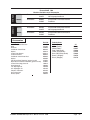
115 Volt
230 Volt
00901A
Encore S20E 7/00
Machine Variables and Accessories
Breakdown:
00900A
Encore S20E 115V Base Machine
51447D
20" Polypropylene Brush
00902A
Breakdown:
00900A
51453D
Encore S20E 115V Base Machine
Pad Driver
00911A
Breakdown:
00910A
51447D
Encore S20E 230V Base Machine
20" Polypropylene Brush
00912A
Breakdown:
00910A
51453D
Encore S20e 230V Base Machine
Pad Driver
Accessories
Description
Part No.
Pad Driver, Dual Direction
Base
Retainer
Pad/Brush Clutch Plate
Spacer
Clutch Plate Screws
Clutch Plate Nuts
Pad/Brush Clutch Plate Dual
Spacer
Poly Brush Dual Direction (general scrub)
Nylon Brush .016 Dual Direction (general scrub)
Clarke Technology Care Kit
Hour Meter Kit
29" Squeegee Kit
32" Squeegee Kit
Polydur, Protectant
Kit, Grease Gun
Brake, Option
51453D
57370A
57369A
66649A
58531A
962819
80084A
30033A
58530A
51447D
51482D
14607A
10656A
18820A
10129A
50478A
55420A
10635A
CLARKE TECHNOLOGY Operator's Manual -Encore S20E
Pads by Case
Color
Yellow (Polish)
White (Polish)
Red, (Light Scrub)
Green, (Light Scrub)
Blue, (Heavy Duty Scrub)
Brown, (Stripper)
Black, (Stripper)
20"
979199
976067
976068
976169
976069
976070
976170
Page
-21-
ALTO® PRODUCT SUPPORT BRANCHES
U. S. A. Locations
CORPORATE OFFICE
ALTO U.S. Inc., St. Louis, Missouri
16253 Swingley Ridge Road, Suite 200
Chesterfield, Missouri 63017-1725
PRODUCTION FACILITIES
ALTO U.S. Inc., Springdale, Arkansas
2100 Highway 265
Springdale, Arkansas 72764
(479) 750-1000
Customer Service - 1-800-253-0367
Technical Service - 1-800-356-7274
ALTO U.S. Inc., Bowling Green, Ohio 43402
1100 Haskins Road
SERVICE FACILITIES
ALTO U.S. Inc., Elk Grove, Illinois 60007
2280 Elmhurst Road
(847) 956-7900
ALTO U.S. Inc., Denver, Colorado 80204
1955 West 13th Ave.
(303) 623-4367
ALTO U.S. Inc., Houston, Texas 77040
7215 North Gessner Road
713-937-7717
SERVICE AND SALES FACILITY
ALTO U.S. Inc., Madison Heights, Michigan 48071-0158
29815 John R.
(810) 544-6300
ALTO U.S. Inc., Marietta, Georgia 30066
1455 Canton Road
(770) 973-5225
SALES AND DISTRIBUTION CENTER
ALTO U.S. Inc., Secaucus, New Jersey 07094
74 Henry Street
(201) 864-5503
CLARKE TECHNOLOGY
AMERICAN SANDERS TECHNOLOGY
A.L. COOK TECHNOLOGY
Customer Service Headquarters and Factory
2100 Highway 265
Springdale, Arkansas 72764
(479) 750-1000
Technical Service
1-800-356-7274
European Locations
PRODUCTION FACILITIES
ALTO Danmark A/S, Aalborg
Blytaekkervej 2
DK-9000 Aalborg
+45 72 18 21 00
ALTO Danmark A/S, Hadsund
Industrikvarteret
DK-9560 Hadsund
+45 72 18 21 00
SALES SUBSIDIARIES
ALTO Canada Ltd., Rexdale Ontario
24 Constellation Ct.
(416) 675-5830
ALTO Overseas Inc., Sydney (Australia)
1B/8 Resolution Drive
Caringbah NSW 2229
+61 2 9524 6122
ALTO Cleaning Systems Asia Pte Ltd., Singapore
No. 17 Link Road
Singapore 619034
+65 268 1006
ALTO Deutschland GmbH, Bellenberg (Germany)
Guido-Oberdorfer-Straße 2-8
89287 Bellenberg
+49 0180 5 37 37 37
ALTO Cleaning Systems (UK) Ltd., Penrith
Gilwilly Industrial Estate
Penrith
Cumbria CA11 9BN
+44 1768 868 995
ALTO France S.A. Strasbourg
B.P. 44, 4 Place d’Ostwald
F-67036 Strasbourg
Cedex 2
+33 3 8828 8400
ALTO Nederland B.V.
Postbus 65
3370 AB Hardinxveld-Giessendam
The Netherlands
+31 184 677 200
ALTO Sverige AB, Molndal (Sweden)
Aminogatan 18
Box 4029
S-431 04 Molndal
+46 31 706 73 00
ALTO Norge A/S, Oslo (Norway)
Bjornerudveien 24
N-1266
+47 2275 1770
CLARKE TECHNOLOGY U.S. WARRANTY
This Clarke Technology Industrial/Commercial Product is warranted to be free from defects in materials
and workmanship under normal use and service for a period of one year from the date of purchase, when
operated and maintained in accordance with Clarke Technology's Maintenance and Operations Instructions.
This warranty is extended only to the original purchaser for use of the product. It does not cover normal
wear parts such as electrical cable, rubber parts, hoses and motor brushes.
If difficulty develops with the product, you should:
(a). Contact the nearest authorized Clarke Technology repair location or contact the Clarke Technology
Service Operations Department, 2100 Highway 265, Springdale, Arkansas 72764, for the nearest authorized
Clarke Technology repair location. Only these locations are authorized to make repairs to the product under
this warranty.
(b). Return the product to the nearest Clarke Technology repair location. Transportation charges to and from
the repair location must be prepaid by the purchaser.
(c). Clarke Technology will repair the product and or replace any defective parts without charge within a
reasonable time after receipt of the product.
Clarke Technology's liability under this warranty is limited to repair of the product and/or replacement of
parts and is given to purchaser in lieu of all other remedies, including INCIDENTAL AND CONSEQUENTIAL
DAMAGES.
THERE ARE NO EXPRESS WARRANTIES OTHER THAN THOSE SPECIFIED HEREIN. THERE ARE NO
WARRANTIES WHICH EXTEND BEYOND THE DESCRIPTION OF THE FACE HEREOF. NO WARRANTIES,
INCLUDING BUT NOT LIMITED TO WARRANTY OF MECHANTABILITY, SHALL BE IMPLIED. A warranty
registration card is provided with your Clarke Technology product. Return the card to assist Clarke Technology in providing the performance you expect from your new floor machine.
ALTO U.S. Inc., 2100 Highway 265, Springdale, Arkansas 72764.
CLARKE TECHNOLOGY POLYDUR TANK
EIGHT YEAR U.S. GUARANTEE
Your new Encore Auto Scrubber has a Polydur Tank. Polydur is a rotationally molded, low-density linear
polyethylene that won't crack or dent, and withstands most corrosives and temperature extremes. Clarke
Technology backs up your Polydur Tank with its eight year guarantee. If a tank breaks, cracks, or leaks, within
eight years, it will be replaced free.
CLARKE TECHNOLOGY reserves the right to make
changes or improvements to its machine without notice.
Always use genuine Clarke Technology Parts for repair.
CLARKE TECHNOLOGY
2100 Highway 265
Springdale, Arkansas, 72764