1
C H A P T E R
3
Installing the Content Engine
This chapter explains how to install CE-511 and CE-566 in an equipment rack. It
also provides general instructions for installing CE-511 and CE-566 on a table or
workbench. This chapter contains the following sections:
•
Tools and Parts Required, page 3-1
•
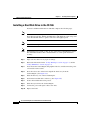
Installing a CE-511 or CE-566 Unit, page 3-2
•
Connecting Cables, page 3-12
•
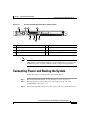
Connecting Power and Booting the System, page 3-13
•
Checking the LEDs, page 3-14
•
Removing or Replacing a Content Engine, page 3-14
Before you begin the installation, read the Regulatory Compliance and Safety
Information for the Cisco Content Networking Product Series document that
shipped with your chassis.
Warning
Read the installation instructions before connecting the system to the power
source. Statement 1004
Tools and Parts Required
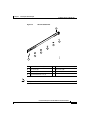
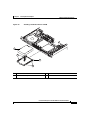
A sliding rail rack-mount kit and cable management assembly is included in your
shipping container accessory box. The rack-mount kit is suitable for mounting
CE-511 and CE-566 units in 19-inch (48.26-cm) 4-post equipment racks.
Cisco Content Engine 511 and 566 Hardware Installation Guide
OL-5756-01
3-1