1
Preparing to Transfer the Printer
Prepare to transfer the printer as follows.
To protect the internal parts in transit, always follow these steps before transferring the printer to a new location.
Refer to the Setup Guide for details on packing the printer and installing it after transfer.
• Be sure to contact your Canon dealer before transferring the printer to a new location. Ink may leak and damage
the printer if you do not prepare the printer correctly and it is tipped or stood on end in transit.
• It is not possible to prepare the printer for transfer if the Display Screen requests you to replace the Maintenance
Cartridge or check the remaining capacity. Replace the Maintenance Cartridge before transfer preparations.
(→ , Replacing the Maintenance Cartridge)
• Depending on the state of the printer, part replacement may be necessary when preparing to transfer the printer
(that is, when you execute the printer menu item to prepare for transfer).
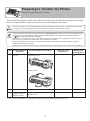
• Ink must be drained before Level 2 or Level 3 printer transfer, as described in the following table. Prepare a
Maintenance Cartridge in advance.
• Always follow the instructions of the service representative when transferring the printer under Level 3 conditions.
Level
1
Shipping Method
(Example)
By truck
Amount of Ink to
Dispose of
Permitted Angle of Inclination
Lengthwise: 0–30º
Required
Maintenance
Cartridges(*1)
0
0 or 1
Rotation: 0–10º
2
By plane
All directions: 0–30º
Approx. 600 ml (20.3 fl oz)
1 or 2
3
Tipping the printer or
holding it upright for
elevators or stairs
Lengthwise: 0–90º
Rotation: 0–30º
Approx. 1.9 L (64.2 fl oz)
2 or 3
*1: The quantity of cartridges required depends on the capacity of the Maintenance Cartridge in use.
2












![4 Fare clic su [OK]](http://vs1.manualzilla.com/store/data/006160518_1-ecbfa5800aa7e22e762bce920beb4116-150x150.png)