1
Preparations
1
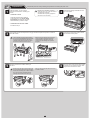
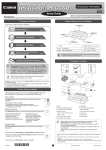
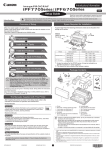
Prepare the printer for use by installing the printer and connecting the power cord.
Install the printer. You can use the
following two methods for installing the
printer.
• Stands may be standard or optional
MEMO depending upon your model and location.
iPF750/iPF755: Standard
iPF650/iPF655: Optional (equipped as
standard in some locations)
• Install with a stand
2
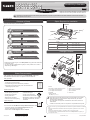
Remove the packing materials from the
top of the printer.
4
Remove the orange tape used to secure
the roll holder to the printer.
6
Plug the power cord into the power supply
connector on the right of the printer and
plug the other end into the outlet.
Assemble the stand and install the
printer referring to the Printer Stand
Setup Guide included with the stand.
After installation, proceed to step 4.
• Install without a stand on a table
Proceed to step 2.
3
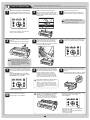
Three people should hold the printer's carrying handles and place the printer on a table or
other flat location.
Caution
5
• The iPF750/iPF755 weighs approximately
52 kg and the iPF650/iPF655 approximately
43 kg by themselves. Moving the printer
requires at least three people. Be careful
to avoid back strain and other injuries.
• When moving the printer, firmly grasp the
carrying handles. Holding the printer at
other positions is dangerous, and may
cause injury and damage if the printer is
dropped.
Move the printer to the location where you
will use it.
Caution
• When moving the stand, lift the support rod
to the position (a) before closing the output
stacker and unlocking the 4 casters. Failure
to do so may lead to scratched flooring,
damage to the basket cloth, and injury.
• After you have moved the stand, be sure to
lock the 4 casters.
a
OFF
ON
2