1
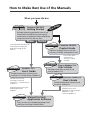
How to Use this Guide
Thank you for purchasing the CanoScan FB1200S color image scanner.
This Getting Started guide explains the necessary steps to connect the scanner to
your computer and begin scanning. We recommend that you carefully read this
entire guide to learn the proper procedures to avoid malfunctions.
Organization of the Guide
The guide is divided into two main sections.
• Setting Up the Scanner
This section provides a step-by-step explanation of how to set up the
scanner for first-time users. Make sure to read this section carefully
and follow the procedures exactly.
• Guide to the Software
This section offers a brief explanation of the features and applications
of the software bundled with the scanner. Read this section as
required.
• References to Windows® in this guide are to Windows® 95, Windows® 98 and
Windows NT® 4.0.
Conventions Used in the Guide
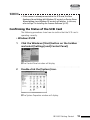
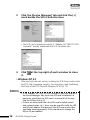
Important information in the guide is indicated by the following symbols.
WARNING
This symbol indicates precautions that must be taken
when operating the equipment. Ensure that you read
all warnings.
• NOTE •
This symbol indicates supplementary operating
procedures and other useful information.