1
LCD screen icons
1.
Selected Effect Indicator (Color/Mono [Black and White])
2.
microSD Card Indicator
3.
Battery Indicator
4.
Selected Resolution Indicator (High 600dpi/Low 300dpi)
5.
Scan Count/Time/Date Indicator
1
2
5
3
4
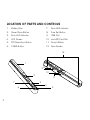
Included accessories
1. Scanner
4. Mini USB Cable
2. White Balance Calibration Sheet
5. Software CD
3. Lens Cleaning Cloth
6. Scanner Drawstring Bag
4