1
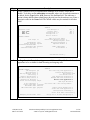
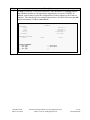
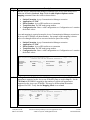
Step 4. Description Map the Avaya Communication Manager extension to the Avaya SES media server extension defined in Section 4, Step 5 with the add off-pbx-telephone stationmapping command. Enter the values as shown below: Station Extension: Avaya Communication Manager extension Application: PVFMC Phone Number: Avaya SES media server extension Trunk Selection: The SIP trunk group number Configuration Set: Enter a valid configuration set. Configuration set 1 contains the default values. A second mapping is required to map the Avaya Communication Manager extension to the Avaya one-X Mobile cell phone number. An example of this mapping is shown below even though cellular access was not checked as part of the testing. Station Extension: Avaya Communication Manager extension Application: PVFMC Phone Number: Avaya SES media server extension Trunk Selection: The SIP trunk group number Configuration Set: Enter a valid configuration set. Configuration set 1 contains the default values. add off-pbx-telephone station-mapping 30115 STATIONS WITH OFF-PBX TELEPHONE INTEGRATION Station Extension 30115 30115 5. Application Dial CC Prefix PVFMC PBFMC - Phone Number 30115 17325552999 Page Trunk Selection 1 ars 1 of 2 Config Set 1 1 On Page 2, set the Call Limit of the PVFMC mapping to the number of WiFi call appearances supported on the Avaya one-X Mobile (same as used in Step 3). Set the Call Limit of the PBFMC mapping to the number of cellular call appearances supported on the Avaya one-X Mobile. This may be different than the number supported for WiFi. Verify that the Mapping Mode is set to both. add off-pbx-telephone station-mapping 30115 STATIONS WITH OFF-PBX TELEPHONE INTEGRATION Station Extension 30115 30115 CTM; Reviewed: SPOC 10/15/2007 Call Limit 3 2 Mapping Mode both both Calls Allowed all all Page 2 of 2 Bridged Calls both both Solution & Interoperability Test Lab Application Notes ©2007 Avaya Inc. All Rights Reserved. 7 of 22 oneXmobileAP8