1
4. Configure Avaya SES
This section covers the configuration of Avaya SES. Avaya SES is configured via an Internet
browser using the administration web interface. It is assumed that the Avaya SES software and the
license file have already been installed on the server. During the software installation, an installation
script is run from the Linux shell of the server to specify the IP network properties of the server
along with other parameters. In addition, it is assumed that the Setup screens of the administration
web interface have been used to initially configure Avaya SES. For additional information on these
installation tasks, refer to [5].
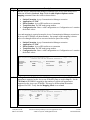
Avaya SES was configured as a combined home/edge server. Each SIP endpoint used in the testing
required that a user and media server extension be created on Avaya SES. The procedure below
shows the configuration necessary for the Avaya one-X Mobile. However, the procedure is the same
for any SIP endpoint.
Step
1.
Description
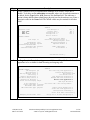
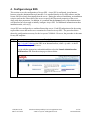
Access the Avaya SES administration web interface by entering
http://<ip-addr>/admin as the URL in an Internet browser, where <ip-addr> is the IP
address of the Avaya SES server.
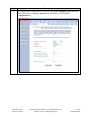
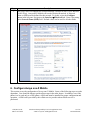
Log in with the appropriate credentials and then select the Launch Administration
Web Interface link from the main page as shown below.
CTM; Reviewed:
SPOC 10/15/2007
Solution & Interoperability Test Lab Application Notes
©2007 Avaya Inc. All Rights Reserved.
8 of 22
oneXmobileAP8