1
2. Equipment and Software Validated
The following equipment and software/firmware were used for the sample configuration provided.
Equipment
Avaya S8300 Server with Avaya G700 Media
Gateway
Avaya SIP Enablement Services (SES)
Avaya AP-8
Avaya one-X Mobile
Nokia E61
Avaya 4602SW IP Telephone
Avaya 4610SW IP Telephones
Avaya 4620SW IP Telephones
Avaya one-X Desktop Edition
Avaya 6408D Digital Telephone
Avaya 6210 Analog Telephone
Analog Telephone
Windows PC (TFTP Server)
Software/Firmware
Avaya Communication Manager 4.0
Service Pack (R014x.00.0.730.5-13566)
with Avaya IA 770 Intuity Audix
3.1.2
v2.5.2
4.2
FW 3.0633.09.04
SIP version 2.2.2
2.1 SP1 (Build 70)
(Windows XP Professional)
Windows XP Professional
Table 1: Equipment Used
3. Configure Avaya Communication Manager
This section describes the Avaya Communication Manager configuration. It assumes the procedures
necessary to support SIP have been performed as described in [3]. This includes the configuration of
a SIP trunk to Avaya SES. It also assumes that an off-PBX station (OPS) has been configured on
Avaya Communication Manager for each SIP endpoint in the configuration (other than the Avaya
one-X Mobile endpoint) as described in [3] and [4]. This section will describe the configuration of
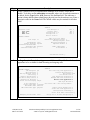
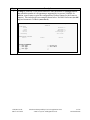
the off-PBX station on Avaya Communication Manager associated with the Avaya one-X Mobile.
The configuration of Avaya Communication Manager was performed using the System Access
Terminal (SAT). After the completion of the configuration in this section, perform a save
translation command to make the changes permanent.
The testing used a single IP region which contained the Avaya S8300 Server, Avaya SES and all the
IP endpoints. Direct IP-IP audio (also known as media shuffling) was enabled for both inter-region
and intra region calls. The authoritative domain was set to business.com. The codec set chosen for
this region contained G.711MU and G.729AB.
CTM; Reviewed:
SPOC 10/15/2007
Solution & Interoperability Test Lab Application Notes
©2007 Avaya Inc. All Rights Reserved.
4 of 22
oneXmobileAP8