1
BayRS Version 15.0
Part No. 308628-15.0 Rev 00
June 2001
600 Technology Park Drive
Billerica, MA 01821-4130
Configuring IP Exterior
Gateway Protocols
(BGP and EGP)
Copyright © 2001 Nortel Networks
All rights reserved. June 2001.
The information in this document is subject to change without notice. The statements, configurations, technical data,
and recommendations in this document are believed to be accurate and reliable, but are presented without express or
implied warranty. Users must take full responsibility for their applications of any products specified in this document.
The information in this document is proprietary to Nortel Networks Inc.
The software described in this document is furnished under a license agreement and may only be used in accordance
with the terms of that license. The software license agreement is included in this document.
Trademarks
Nortel Networks, the Nortel Networks logo, the Globemark, Unified Networks, AN, ARN, ASN, BayRS, BCC, and
Passport are trademarks of Nortel Networks.
Adobe and Acrobat Reader are trademarks of Adobe Systems Incorporated.
Ethernet is a trademark of Xerox Corporation.
Restricted Rights Legend
Use, duplication, or disclosure by the United States Government is subject to restrictions as set forth in subparagraph
(c)(1)(ii) of the Rights in Technical Data and Computer Software clause at DFARS 252.227-7013.
Notwithstanding any other license agreement that may pertain to, or accompany the delivery of, this computer
software, the rights of the United States Government regarding its use, reproduction, and disclosure are as set forth in
the Commercial Computer Software-Restricted Rights clause at FAR 52.227-19.
Statement of Conditions
In the interest of improving internal design, operational function, and/or reliability, Nortel Networks Inc. reserves the
right to make changes to the products described in this document without notice.
Nortel Networks Inc. does not assume any liability that may occur due to the use or application of the product(s) or
circuit layout(s) described herein.
Portions of the code in this software product may be Copyright © 1988, Regents of the University of California. All
rights reserved. Redistribution and use in source and binary forms of such portions are permitted, provided that the
above copyright notice and this paragraph are duplicated in all such forms and that any documentation, advertising
materials, and other materials related to such distribution and use acknowledge that such portions of the software were
developed by the University of California, Berkeley. The name of the University may not be used to endorse or
promote products derived from such portions of the software without specific prior written permission.
SUCH PORTIONS OF THE SOFTWARE ARE PROVIDED “AS IS” AND WITHOUT ANY EXPRESS OR
IMPLIED WARRANTIES, INCLUDING, WITHOUT LIMITATION, THE IMPLIED WARRANTIES OF
MERCHANTABILITY AND FITNESS FOR A PARTICULAR PURPOSE.
In addition, the program and information contained herein are licensed only pursuant to a license agreement that
contains restrictions on use and disclosure (that may incorporate by reference certain limitations and notices imposed
by third parties).
ii
308628-15.0 Rev 00
Nortel Networks Inc. Software License Agreement
NOTICE: Please carefully read this license agreement before copying or using the accompanying software or
installing the hardware unit with pre-enabled software (each of which is referred to as “Software” in this Agreement).
BY COPYING OR USING THE SOFTWARE, YOU ACCEPT ALL OF THE TERMS AND CONDITIONS OF
THIS LICENSE AGREEMENT. THE TERMS EXPRESSED IN THIS AGREEMENT ARE THE ONLY TERMS
UNDER WHICH NORTEL NETWORKS WILL PERMIT YOU TO USE THE SOFTWARE. If you do not accept
these terms and conditions, return the product, unused and in the original shipping container, within 30 days of
purchase to obtain a credit for the full purchase price.
1. License grant. Nortel Networks Inc. (“Nortel Networks”) grants the end user of the Software (“Licensee”) a
personal, nonexclusive, nontransferable license: a) to use the Software either on a single computer or, if applicable, on
a single authorized device identified by host ID, for which it was originally acquired; b) to copy the Software solely
for backup purposes in support of authorized use of the Software; and c) to use and copy the associated user manual
solely in support of authorized use of the Software by Licensee. This license applies to the Software only and does not
extend to Nortel Networks Agent software or other Nortel Networks software products. Nortel Networks Agent
software or other Nortel Networks software products are licensed for use under the terms of the applicable Nortel
Networks Inc. Software License Agreement that accompanies such software and upon payment by the end user of the
applicable license fees for such software.
2. Restrictions on use; reservation of rights. The Software and user manuals are protected under copyright laws.
Nortel Networks and/or its licensors retain all title and ownership in both the Software and user manuals, including
any revisions made by Nortel Networks or its licensors. The copyright notice must be reproduced and included with
any copy of any portion of the Software or user manuals. Licensee may not modify, translate, decompile, disassemble,
use for any competitive analysis, reverse engineer, distribute, or create derivative works from the Software or user
manuals or any copy, in whole or in part. Except as expressly provided in this Agreement, Licensee may not copy or
transfer the Software or user manuals, in whole or in part. The Software and user manuals embody Nortel Networks’
and its licensors’ confidential and proprietary intellectual property. Licensee shall not sublicense, assign, or otherwise
disclose to any third party the Software, or any information about the operation, design, performance, or
implementation of the Software and user manuals that is confidential to Nortel Networks and its licensors; however,
Licensee may grant permission to its consultants, subcontractors, and agents to use the Software at Licensee’s facility,
provided they have agreed to use the Software only in accordance with the terms of this license.
3. Limited warranty. Nortel Networks warrants each item of Software, as delivered by Nortel Networks and properly
installed and operated on Nortel Networks hardware or other equipment it is originally licensed for, to function
substantially as described in its accompanying user manual during its warranty period, which begins on the date
Software is first shipped to Licensee. If any item of Software fails to so function during its warranty period, as the sole
remedy Nortel Networks will at its discretion provide a suitable fix, patch, or workaround for the problem that may be
included in a future Software release. Nortel Networks further warrants to Licensee that the media on which the
Software is provided will be free from defects in materials and workmanship under normal use for a period of 90 days
from the date Software is first shipped to Licensee. Nortel Networks will replace defective media at no charge if it is
returned to Nortel Networks during the warranty period along with proof of the date of shipment. This warranty does
not apply if the media has been damaged as a result of accident, misuse, or abuse. The Licensee assumes all
responsibility for selection of the Software to achieve Licensee’s intended results and for the installation, use, and
results obtained from the Software. Nortel Networks does not warrant a) that the functions contained in the software
will meet the Licensee’s requirements, b) that the Software will operate in the hardware or software combinations that
the Licensee may select, c) that the operation of the Software will be uninterrupted or error free, or d) that all defects
in the operation of the Software will be corrected. Nortel Networks is not obligated to remedy any Software defect that
cannot be reproduced with the latest Software release. These warranties do not apply to the Software if it has been
(i) altered, except by Nortel Networks or in accordance with its instructions; (ii) used in conjunction with another
vendor’s product, resulting in the defect; or (iii) damaged by improper environment, abuse, misuse, accident, or
negligence. THE FOREGOING WARRANTIES AND LIMITATIONS ARE EXCLUSIVE REMEDIES AND ARE
IN LIEU OF ALL OTHER WARRANTIES EXPRESS OR IMPLIED, INCLUDING WITHOUT LIMITATION ANY
WARRANTY OF MERCHANTABILITY OR FITNESS FOR A PARTICULAR PURPOSE. Licensee is responsible
308628-15.0 Rev 00
iii
for the security of its own data and information and for maintaining adequate procedures apart from the Software to
reconstruct lost or altered files, data, or programs.
4. Limitation of liability. IN NO EVENT WILL NORTEL NETWORKS OR ITS LICENSORS BE LIABLE FOR
ANY COST OF SUBSTITUTE PROCUREMENT; SPECIAL, INDIRECT, INCIDENTAL, OR CONSEQUENTIAL
DAMAGES; OR ANY DAMAGES RESULTING FROM INACCURATE OR LOST DATA OR LOSS OF USE OR
PROFITS ARISING OUT OF OR IN CONNECTION WITH THE PERFORMANCE OF THE SOFTWARE, EVEN
IF NORTEL NETWORKS HAS BEEN ADVISED OF THE POSSIBILITY OF SUCH DAMAGES. IN NO EVENT
SHALL THE LIABILITY OF NORTEL NETWORKS RELATING TO THE SOFTWARE OR THIS AGREEMENT
EXCEED THE PRICE PAID TO NORTEL NETWORKS FOR THE SOFTWARE LICENSE.
5. Government licensees. This provision applies to all Software and documentation acquired directly or indirectly by
or on behalf of the United States Government. The Software and documentation are commercial products, licensed on
the open market at market prices, and were developed entirely at private expense and without the use of any U.S.
Government funds. The license to the U.S. Government is granted only with restricted rights, and use, duplication, or
disclosure by the U.S. Government is subject to the restrictions set forth in subparagraph (c)(1) of the Commercial
Computer Software––Restricted Rights clause of FAR 52.227-19 and the limitations set out in this license for civilian
agencies, and subparagraph (c)(1)(ii) of the Rights in Technical Data and Computer Software clause of DFARS
252.227-7013, for agencies of the Department of Defense or their successors, whichever is applicable.
6. Use of software in the European Community. This provision applies to all Software acquired for use within the
European Community. If Licensee uses the Software within a country in the European Community, the Software
Directive enacted by the Council of European Communities Directive dated 14 May, 1991, will apply to the
examination of the Software to facilitate interoperability. Licensee agrees to notify Nortel Networks of any such
intended examination of the Software and may procure support and assistance from Nortel Networks.
7. Term and termination. This license is effective until terminated; however, all of the restrictions with respect to
Nortel Networks’ copyright in the Software and user manuals will cease being effective at the date of expiration of the
Nortel Networks copyright; those restrictions relating to use and disclosure of Nortel Networks’ confidential
information shall continue in effect. Licensee may terminate this license at any time. The license will automatically
terminate if Licensee fails to comply with any of the terms and conditions of the license. Upon termination for any
reason, Licensee will immediately destroy or return to Nortel Networks the Software, user manuals, and all copies.
Nortel Networks is not liable to Licensee for damages in any form solely by reason of the termination of this license.
8. Export and re-export. Licensee agrees not to export, directly or indirectly, the Software or related technical data or
information without first obtaining any required export licenses or other governmental approvals. Without limiting the
foregoing, Licensee, on behalf of itself and its subsidiaries and affiliates, agrees that it will not, without first obtaining
all export licenses and approvals required by the U.S. Government: (i) export, re-export, transfer, or divert any such
Software or technical data, or any direct product thereof, to any country to which such exports or re-exports are
restricted or embargoed under United States export control laws and regulations, or to any national or resident of such
restricted or embargoed countries; or (ii) provide the Software or related technical data or information to any military
end user or for any military end use, including the design, development, or production of any chemical, nuclear, or
biological weapons.
9. General. If any provision of this Agreement is held to be invalid or unenforceable by a court of competent
jurisdiction, the remainder of the provisions of this Agreement shall remain in full force and effect. This Agreement
will be governed by the laws of the state of California.
Should you have any questions concerning this Agreement, contact Nortel Networks Inc., 2375 N. Glenville Dr.,
Richardson, TX 75082.
LICENSEE ACKNOWLEDGES THAT LICENSEE HAS READ THIS AGREEMENT, UNDERSTANDS IT, AND
AGREES TO BE BOUND BY ITS TERMS AND CONDITIONS. LICENSEE FURTHER AGREES THAT THIS
AGREEMENT IS THE ENTIRE AND EXCLUSIVE AGREEMENT BETWEEN NORTEL NETWORKS AND
LICENSEE, WHICH SUPERSEDES ALL PRIOR ORAL AND WRITTEN AGREEMENTS AND
COMMUNICATIONS BETWEEN THE PARTIES PERTAINING TO THE SUBJECT MATTER OF THIS
AGREEMENT. NO DIFFERENT OR ADDITIONAL TERMS WILL BE ENFORCEABLE AGAINST
NORTEL NETWORKS UNLESS NORTEL NETWORKS GIVES ITS EXPRESS WRITTEN CONSENT,
INCLUDING AN EXPRESS WAIVER OF THE TERMS OF THIS AGREEMENT.
iv
308628-15.0 Rev 00
Contents
Preface
Before You Begin ............................................................................................................. xv
Text Conventions .............................................................................................................xvi
Acronyms ....................................................................................................................... xviii
Related Publications ........................................................................................................ xx
How to Get Help ..............................................................................................................xxi
Chapter 1
Exterior Gateway Protocols (BGP and EGP)
Autonomous Systems and Gateway Protocols ...............................................................1-1
Border Gateway Protocol (BGP) ..............................................................................1-3
Exterior Gateway Protocol (EGP) .............................................................................1-3
Classless Interdomain Routing ................................................................................1-4
BGP Concepts and Terminology .....................................................................................1-4
Peer-to-Peer Sessions .............................................................................................1-5
Stub and Multihomed Autonomous Systems ...........................................................1-6
Interior BGP Routing ................................................................................................1-6
IBGP Route Reflector ...............................................................................................1-7
Equal-Cost Multipath ................................................................................................1-8
BGP Updates ...........................................................................................................1-8
Path Attributes ..........................................................................................................1-9
BGP/OSPF Interaction ...........................................................................................1-10
BGP-4 Confederations ...........................................................................................1-11
BGP-4 TCP MD5 Message Authentication ............................................................1-11
BGP Implementation Notes ..........................................................................................1-12
308628-15.0 Rev 00
v
Chapter 2
Starting BGP and EGP Services
Starting BGP with the BCC ............................................................................................2-1
Step 1: Configuring Global BGP ..............................................................................2-1
Step 2: Defining a Peer-to-Peer Connection ............................................................2-2
Starting IP and BGP with Site Manager .........................................................................2-3
Deleting BGP with Site Manager ..............................................................................2-4
Deleting BGP-3 and BGP-4 with Site Manager ........................................................2-5
Starting IP and EGP with Site Manager .........................................................................2-6
Deleting EGP from the Router .................................................................................2-7
Chapter 3
Configuring Global BGP Parameters
Disabling and Reenabling BGP ......................................................................................3-2
Supplying a BGP Router ID ............................................................................................3-4
Identifying the Local AS ..................................................................................................3-5
Disabling and Reenabling IBGP Support .......................................................................3-6
Specifying Route Types for IBGP Advertisements ..........................................................3-7
Enabling BGP Interaction with OSPF and RIP ...............................................................3-9
Setting the Update Interval Timer .................................................................................3-10
Allowing Redundant Connections .................................................................................3-11
Enabling Multihop Connections ....................................................................................3-13
Disabling and Reenabling Dynamic Policy Configuration .............................................3-15
Configuring the BGP Soloist Slot Mask ........................................................................3-16
Disabling and Reenabling Route Aggregation ..............................................................3-17
Enabling and Disabling Black Hole Punching ...............................................................3-18
Disabling and Reenabling the BGP-4 MED Attribute ....................................................3-20
Configuring BGP-4 Confederations ..............................................................................3-21
Disabling BayRS Local Preference Calculation and Route Selection ...........................3-25
Calculating BGP-4 Local Preference Values ..........................................................3-25
Best-Route Selection .............................................................................................3-27
Configuring BGP Message Logging .............................................................................3-29
Configuring EBGP Route Flap Damping ......................................................................3-31
Assigning Weight Classes and Values to an AS ...........................................................3-37
vi
308628-15.0 Rev 00
Chapter 4
Configuring BGP Peers
Defining a Peer-to-Peer Session ....................................................................................4-2
Initiating a Peer-to-Peer Session ....................................................................................4-4
Negotiating the BGP Version ..........................................................................................4-6
Keeping the Connection Alive .........................................................................................4-8
Setting the External Advertisement Timer ......................................................................4-9
Specifying a Holddown Time ........................................................................................4-11
Setting a Minimum AS Origination Interval ...................................................................4-12
Overriding the Local AS Number ..................................................................................4-14
Specifying a Maximum Update Size .............................................................................4-14
Specifying a Time-to-Live Value ...................................................................................4-16
Specifying the Next-Hop Router ...................................................................................4-17
Setting the Route Echo Switch .....................................................................................4-18
Disabling and Reenabling Loop Detection ....................................................................4-20
Configuring Peers over an Unnumbered Point-to-Point Link ........................................4-21
Configuring and Enabling MD5 Authentication .............................................................4-22
Entering and Storing MD5 Authentication Keys .....................................................4-23
Initializing TCP with the MD5 Option ......................................................................4-24
Generating MD5 Signatures on Transmitted BGP TCP Packets ............................4-24
Verifying MD5 Signatures on Received BGP TCP Packets ...................................4-25
Configuring BGP-4 Authentication .........................................................................4-25
Chapter 5
Configuring BGP Accept and Announce Policies
Configuring a BGP Accept Policy ...................................................................................5-2
Specifying Match Criteria for a BGP Accept Policy ..................................................5-6
Supplying Modification Values for a BGP Accept Policy ........................................5-10
Configuring a BGP Announce Policy ............................................................................5-13
Announce Policy Guidelines ...................................................................................5-13
Specifying Match Criteria for a BGP Announce Policy ...........................................5-16
Supplying Modification Values for a BGP Announce Policy ...................................5-22
Configuring BGP-4 AS Path Pattern-Matching .............................................................5-27
308628-15.0 Rev 00
vii
Chapter 6
Configuring a Route Reflector
Configuring a Single Route Reflector in an AS ...............................................................6-3
Configuring a Route Reflector Cluster ............................................................................6-5
Configuring Multiple RR Clusters in an AS .....................................................................6-7
Configuring an RR Client ..............................................................................................6-10
Chapter 7
Configuring Route and Traffic Balancing
Configuring IBGP for Route and Traffic Balancing ..........................................................7-1
Configuring EBGP for Route and Traffic Balancing ........................................................7-5
Chapter 8
Customizing EGP Services
EGP Concepts and Terminology .....................................................................................8-2
EGP Implementation Notes ............................................................................................8-5
Customizing EGP on the Router ....................................................................................8-6
Enabling and Disabling EGP ....................................................................................8-6
Supplying a Local AS Number .................................................................................8-7
Configuring a Neighbor ...................................................................................................8-7
Specifying the Neighbor’s Address ..........................................................................8-8
Specifying the Gateway Mode ..................................................................................8-9
Enabling and Disabling the Neighbor Relationship ................................................8-10
Choosing the Acquisition Mode ..............................................................................8-11
Choosing the Poll Mode .........................................................................................8-12
Setting Neighbor Timers ........................................................................................8-13
Appendix A
Site Manager Parameters
BGP Parameters ............................................................................................................ A-2
BGP Configuration Parameters ............................................................................... A-3
BGP Global Parameters .......................................................................................... A-4
BGP-3 Global Parameter ...................................................................................... A-11
BGP-4 Global Parameter ...................................................................................... A-11
BGP Peer Parameters ........................................................................................... A-11
BGP AS Weight and Weight Class Parameters .................................................... A-20
BGP Event Message Parameters ......................................................................... A-24
viii
308628-15.0 Rev 00
EGP Parameters .......................................................................................................... A-25
EGP Global Parameters ....................................................................................... A-25
EGP Neighbor Parameters .................................................................................... A-26
Routing Policy Parameters .......................................................................................... A-29
Common Accept Policy Parameters ...................................................................... A-29
EGP-Specific Accept Policy Parameters ............................................................... A-34
BGP-3-Specific Accept Policy Parameters ........................................................... A-36
BGP-4-Specific Accept Policy Parameters ............................................................ A-40
Common Announce Policy Parameters ................................................................. A-50
EGP-Specific Announce Policy Parameters .......................................................... A-68
BGP-3-Specific Announce Policy Parameters ....................................................... A-70
BGP-4-Specific Announce Policy Parameters ....................................................... A-74
Appendix B
Converting Cisco to Nortel Networks Equivalents
Configuration Command Equivalents ............................................................................ B-1
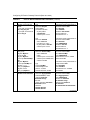
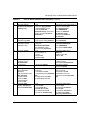
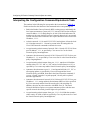
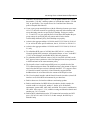
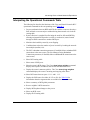
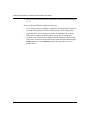
Interpreting the Configuration Command Equivalents Table ......................................... B-6
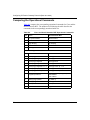
Comparing the Operational Commands ........................................................................ B-8
Interpreting the Operational Commands Table .............................................................. B-9
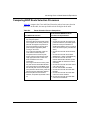
Comparing BGP Route Selection Processes .............................................................. B-11
Regular Expression Symbols ...................................................................................... B-12
Nortel Networks AS Path Pattern-Matching Symbols .................................................. B-13
Index
308628-15.0 Rev 00
ix
Figures
Figure 1-1.
Internetwork Segmented into Three Autonomous Systems .....................1-2
Figure 1-2.
BGP Connecting Two Autonomous Systems Running OSPF ..................1-4
Figure 1-3.
Transit AS .................................................................................................1-7
Figure 3-1.
BGP Confederation ................................................................................3-23
Figure 4-1.
Establishing and Confirming a Connection Between BGP Peers ............4-4
Figure 4-2.
BGP over an Unnumbered Point-to-Point Link .......................................4-21
Figure 6-1.
IBGP Single Route Reflector Topology ....................................................6-2
Figure 7-1.
BGP/OSPF Autonomous System ............................................................7-2
Figure 7-2.
IBGP ECMP Route Balancing ..................................................................7-3
Figure 7-3.
IBGP ECMP Traffic Balancing ..................................................................7-4
Figure 7-4.
ECMP Static Routes ................................................................................7-6
Figure 8-1.
EGP Connection Between Two Autonomous Systems Running RIP .......8-2
308628-15.0 Rev 00
xi
Tables
Table 1-1.
BGP-3 Path Attributes ..............................................................................1-9
Table 1-2.
BGP-4 Mandatory Path Attributes ............................................................1-9
Table 1-3.
BGP-4 Optional Path Attributes .............................................................1-10
Table 3-1.
Route Types for BGP Advertisements ......................................................3-8
Table 3-2.
Slot Mask Parameter Values ..................................................................3-16
Table 3-3.
Black Hole Punching Parameter Settings ..............................................3-19
Table 3-4.
Best-Route Selection Rules ...................................................................3-27
Table 3-5.
Local Preference Calculation Method ....................................................3-28
Table 3-6.
Route Flap Damping Template Parameters ...........................................3-33
Table 4-1.
MD5 Signature Verification Rules on BGP TCP Packets .......................4-25
Table 5-1.
BCC Definition Parameters for BGP Accept Policies ...............................5-4
Table 5-2.
BCC Match Parameters for BGP Accept Policies ....................................5-7
Table 5-3.
BCC Modification Parameters for BGP Accept Policies .........................5-10
Table 5-4.
BCC Definition Parameters for BGP Announce Policies ........................5-14
Table 5-5.
BCC Match Parameters for BGP Announce Policies .............................5-17
Table 5-6.
BCC Modification Parameters for BGP Announce Policies ....................5-22
Table 5-7.
Characters in AS Path Pattern-Matching ...............................................5-27
Table 7-1.
IBGP ECMP Methods ..............................................................................7-4
Table 7-2.
EBGP ECMP Methods .............................................................................7-8
Table 8-1.
Router Mode Determinator ......................................................................8-3
Table B-1.
Cisco to Nortel Networks BGP Translation ............................................. B-2
Table B-2.
Cisco and Nortel Networks BGP Operational Commands ...................... B-8
Table B-3.
Route Selection Process Comparison .................................................. B-11
Table B-4.
Regular Expression Symbols ................................................................ B-12
Table B-5.
Nortel Networks AS Path Pattern-Matching Symbols ........................... B-13
308628-15.0 Rev 00
xiii
Preface
Routers at the borders or edges of autonomous systems are called gateways. These
gateways use exterior gateway protocols to exchange reachability information
with each other and route packets between routing domains. This guide describes
how to configure and use the IP Border Gateway Protocol (BGP) and the Exterior
Gateway Protocol (EGP).
You can use the Bay Command Console (BCC*) or Site Manager to configure
BGP and EGP on a router. In this guide, you will find instructions for using both
the BCC and Site Manager.
Before You Begin
Before using this guide, you must complete the following procedures. For a new
router:
•
Install the router (see the installation guide that came with your router).
•
Connect the router to the network and create a pilot configuration file (see
Quick-Starting Routers, Configuring Remote Access for AN and Passport
ARN Routers, or Connecting ASN Routers to a Network).
Make sure that you are running the latest version of Nortel Networks* BayRS*
and Site Manager software. For information about upgrading BayRS and Site
Manager, see the upgrading guide for your version of BayRS.
308628-15.0 Rev 00
xv
Configuring IP Exterior Gateway Protocols (BGP and EGP)
Text Conventions
This guide uses the following text conventions:
angle brackets (< >)
Indicate that you choose the text to enter based on the
description inside the brackets. Do not type the
brackets when entering the command.
Example: If the command syntax is:
ping <ip_address>, you enter:
ping 192.32.10.12
bold text
Indicates command names and options and text that
you need to enter.
Example: Enter show ip {alerts | routes}.
Example: Use the dinfo command.
braces ({})
Indicate required elements in syntax descriptions
where there is more than one option. You must choose
only one of the options. Do not type the braces when
entering the command.
Example: If the command syntax is:
show ip {alerts | routes}, you must enter either:
show ip alerts or show ip routes, but not both.
brackets ([ ])
Indicate optional elements in syntax descriptions. Do
not type the brackets when entering the command.
Example: If the command syntax is:
show ip interfaces [-alerts], you can enter either:
show ip interfaces or show ip interfaces -alerts.
ellipsis points (. . . )
Indicate that you repeat the last element of the
command as needed.
Example: If the command syntax is:
ethernet/2/1 [<parameter> <value>] . . . , you enter
ethernet/2/1 and as many parameter-value pairs as
needed.
xvi
308628-15.0 Rev 00
Preface
italic text
Indicates new terms, book titles, and variables in
command syntax descriptions. Where a variable is two
or more words, the words are connected by an
underscore.
Example: If the command syntax is:
show at <valid_route>
valid_route is one variable and you substitute one value
for it.
screen text
Indicates system output, for example, prompts and
system messages.
Example: Set Trap Monitor Filters
separator ( > )
Shows menu paths.
Example: Protocols > IP identifies the IP option on the
Protocols menu.
vertical line ( | )
Separates choices for command keywords and
arguments. Enter only one of the choices. Do not type
the vertical line when entering the command.
Example: If the command syntax is:
show ip {alerts | routes}, you enter either:
show ip alerts or show ip routes, but not both.
308628-15.0 Rev 00
xvii
Configuring IP Exterior Gateway Protocols (BGP and EGP)
Acronyms
This guide uses the following acronyms:
xviii
ARP
Address Resolution Protocol
AS
autonomous system
ATM
asynchronous transfer mode
BGP
Border Gateway Protocol
CIDR
classless interdomain routing
DES
data encryption standard
EBGP
Exterior Border Gateway Protocol
ECMP
equal-cost multipath
EGP
Exterior Gateway Protocol
FDDI
Fiber Distributed Data Interface
HSSI
High Speed Serial Interface
IBGP
Interior Border Gateway Protocol
ICMP
Internet Control Message Protocol
IGP
interior gateway protocol
IP
Internet Protocol
ISP
Internet service provider
LAN
local area network
MD5
Message Digest 5
MED
multiexit discriminator
MEK
message encryption key
MIB
management information base
MSS
maximum segment size
NLRI
network layer reachability information
NPK
node protection key
NVRAM
nonvolatile random access memory
OSPF
Open Shortest Path First
308628-15.0 Rev 00
Preface
PPP
Point-to-Point Protocol
PVC
permanent virtual circuit
RARP
Reverse Address Resolution Protocol
RFC
request for comments
RIP
Routing Information Protocol
RR
route reflector
SMDS
Switched Multimegabit Data Service
TCP
Transmission Control Protocol
UDP
User Datagram Protocol
WAN
wide area network
308628-15.0 Rev 00
xix
Configuring IP Exterior Gateway Protocols (BGP and EGP)
Related Publications
For more information about IP services, refer to the following publications:
•
Reference for BCC IP show Commands (part number 308603-14.20 Rev 00)
Provides descriptions of all show commands for IP services, including the
commands that display BGP configuration and statistical data.
•
Configuring IP, ARP, RARP, RIP, and OSPF Services (part number
308627-15.0 Rev 00)
Provides a description of IP, ARP, RARP, RIP, and OSPF services and
instructions for configuring them.
•
Configuring GRE, NAT, RIPSO, and BFE Services (part number
308625-14.20 Rev 00)
Provides a description of Generic Routing Encapsulation (GRE), Network
Address Translation (NAT), Revised IP Security Option (RIPSO), and Blacker
front-end services and instructions for configuring them.
You can print selected technical manuals and release notes free, directly from the
Internet. Go to the www.nortelnetworks.com/documentation URL. Find the
product for which you need documentation. Then locate the specific category and
model or version for your hardware or software product. Use Adobe* Acrobat
Reader* to open the manuals and release notes, search for the sections you need,
and print them on most standard printers. Go to Adobe Systems at the
www.adobe.com URL to download a free copy of the Adobe Acrobat Reader.
You can purchase selected documentation sets, CDs, and technical publications
through the Internet at the www1.fatbrain.com/documentation/nortel/ URL.
xx
308628-15.0 Rev 00
Preface
How to Get Help
If you purchased a service contract for your Nortel Networks product from a
distributor or authorized reseller, contact the technical support staff for that
distributor or reseller for assistance.
If you purchased a Nortel Networks service program, contact one of the following
Nortel Networks Technical Solutions Centers:
Technical Solutions Center
Telephone
Europe, Middle East, and Africa
(33) (4) 92-966-968
North America
(800) 4NORTEL or (800) 466-7835
Asia Pacific
(61) (2) 9927-8800
China
(800) 810-5000
An Express Routing Code (ERC) is available for many Nortel Networks products
and services. When you use an ERC, your call is routed to a technical support
person who specializes in supporting that product or service. To locate an ERC for
your product or service, go to the www12.nortelnetworks.com/ URL and click
ERC at the bottom of the page.
308628-15.0 Rev 00
xxi
Chapter 1
Exterior Gateway Protocols (BGP and EGP)
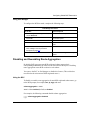
This chapter introduces the concepts and terminology used in this guide.
Topic
Page
Autonomous Systems and Gateway Protocols
1-1
BGP Concepts and Terminology
1-4
BGP Implementation Notes
1-12
Autonomous Systems and Gateway Protocols
LANs and WANs interconnected by IP routers form a group of networks called an
internetwork. For administrative purposes, an internetwork is divided into
autonomous systems. An autonomous system (AS) is a group of routers (called
gateways in IP terminology) and hosts run by a single technical administrator that
has a single, clearly defined routing policy. Each autonomous system has its own
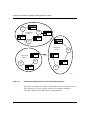
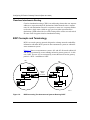
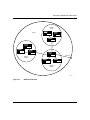
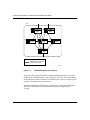
unique AS number assigned by the appropriate Internet Registry entity. Figure 1-1
shows a sample internetwork segmented into three autonomous systems.
308628-15.0 Rev 00
1-1
Configuring IP Exterior Gateway Protocols (BGP and EGP)
Router
2
LAN
A
LAN
B
Autonomous
system 2
Router
1
Router
4
Router
3
LAN
C
Router
5
Autonomous
system 3
Router
8
Autonomous
system 1
Router
7
LAN
G
LAN
F
Router
9
LAN
D
Router
6
LAN
E
IP0006B
Figure 1-1.
Internetwork Segmented into Three Autonomous Systems
The routers at the edges (or borders) of autonomous systems are called gateways.
These gateways use exterior gateway protocols to exchange reachability
information and to route packets between routing domains.
1-2
308628-15.0 Rev 00
Exterior Gateway Protocols (BGP and EGP)
Border Gateway Protocol (BGP)
The Border Gateway Protocol (BGP) is an exterior gateway protocol used by
border routers to exchange network reachability information with other BGP
systems. BGP routers form peer relationships with other BGP routers in other
autonomous systems or within the same autonomous system. BGP peers transmit
and receive current routing information over a reliable transport layer connection,
making periodic updates unnecessary. BGP is designed for inter-AS exchanges,
but can be used between multiple routing domains (for example, RIP to OSPF).
BGP peers exchange complete routing information only after the peer connection
is established. Thereafter, BGP peers exchange routing updates. An update
includes a network number, a list of autonomous systems that the routing
information passed through (the AS path), and other path attributes that describe
the route to a set of destination networks. When multiple paths are available, BGP
compares the path attributes to choose the preferred path.
BGP exchanges information between ASs as well as between routers in the same
AS. To differentiate between these uses, the latter is called interior BGP (IBGP).
Exterior Gateway Protocol (EGP)
You use the Exterior Gateway Protocol to exchange network reachability
information between routers in different autonomous systems. An interior
gateway protocol (IGP), such as RIP or OSPF, is used within an AS to facilitate
the communication of routing information within an autonomous system. The
routers that serve as the end points of a connection between two autonomous
systems also run an exterior gateway protocol, such as EGP-2.
Routers establish EGP neighbor relationships to periodically exchange reliable
network reachability information. EGP neighbors exchange complete reachability
information, not just updates. The router uses this information to maintain a list of
gateways, the networks the gateways can reach, and the corresponding distances.
Chapter 8, “Customizing EGP Services,” describes the use of EGP.
308628-15.0 Rev 00
1-3
Configuring IP Exterior Gateway Protocols (BGP and EGP)
Classless Interdomain Routing
Classless interdomain routing (CIDR) is an addressing scheme that uses supernet
addresses to represent multiple IP destinations. Rather than advertise a separate
route for each destination network in a supernet, a router uses a supernet address
to advertise a single route (called an aggregate route) that represents all the
destinations. CIDR reduces the size of the routing tables used to store advertised
IP routes. BGP-4 supports classless interdomain routing.
BGP Concepts and Terminology
BGP is an exterior gateway protocol designed to exchange network reachability
information with other BGP systems in other autonomous systems or within the
same autonomous system.
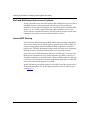
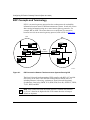
Figure 1-2 shows two autonomous systems: AS1 and AS2. Networks within AS1
and AS2 are connected by routers running an interior gateway protocol—in this
case, OSPF. The two ASs are connected by routers that run an exterior gateway
protocol—BGP—in addition to OSPF.
AS1
AS2
OSPF
OSPF
OSPF
OSPF
OSPF/
BGP
Exterior
BGP
connection
OSPF/
BGP
OSPF
IP00025A
Figure 1-2.
1-4
BGP Connecting Two Autonomous Systems Running OSPF
308628-15.0 Rev 00
Exterior Gateway Protocols (BGP and EGP)
Nortel Networks supports BGP-3 and BGP-4:
•
BGP-3 assumes that each advertised network is a natural class network (A, B,
or C), based on its high-order bits. BGP-3 cannot advertise subnets or
supernets.
•
BGP-4 has no concept of address classes. Each network listed in the network
layer reachability information (NLRI) portion of an update message contains
a prefix length field, which describes the length of the mask associated with
the network. The prefix length field allows for both supernet and subnet
advertisement. The supernet advertisement is what makes classless
interdomain routing (CIDR) possible. See “Classless Interdomain Routing”
on page 1-4.
In addition, BGP-4 supports BGP confederations and TCP MD5 message
authentication.
This section covers the following topics:
Topic
Page
Peer-to-Peer Sessions
1-5
Stub and Multihomed Autonomous Systems
1-6
Interior BGP Routing
1-6
IBGP Route Reflector
1-7
Equal-Cost Multipath
1-8
BGP Updates
1-8
Path Attributes
1-9
BGP/OSPF Interaction
1-10
BGP-4 Confederations
1-11
BGP-4 TCP MD5 Message Authentication
1-11
Peer-to-Peer Sessions
A BGP router employs a BGP speaker, which is an entity within the router that
transmits and receives BGP messages and acts upon them. A BGP speaker forms
a neighbor relationship with another BGP speaker by establishing a peer-to-peer
session. See Chapter 4, “Configuring BGP Peers.”
308628-15.0 Rev 00
1-5
Configuring IP Exterior Gateway Protocols (BGP and EGP)
Stub and Multihomed Autonomous Systems
An AS can include one or more BGP speakers that establish peer-to-peer sessions
with BGP speakers in other autonomous systems to provide external route
information for the networks within the AS. A multihomed AS has multiple BGP
speakers. A stub AS has a single BGP speaker that establishes a peer-to-peer
session with one external BGP speaker. The BGP speaker provides external route
information only for the networks contained within its own AS.
Interior BGP Routing
Nortel Networks implements interior BGP (IBGP) intra-AS routing. With IBGP,
each router in the AS runs an interior gateway protocol (IGP), such as OSPF, for
internal routing updates and also maintains an IBGP connection to each BGP
border router. The IBGP information, along with the IGP route to the originating
BGP border router, determines the next hop to use for external networks.
Some IGPs carry no BGP information. However, an OSPF type 5 LSA can carry
BGP-specific information in its tag field. Each router uses IBGP exclusively to
determine reachability to external networks. When an IBGP update for a network
is received, it is passed to IP for inclusion in the routing table only if a viable IGP
route to the correct border gateway is available.
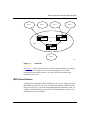
An AS with more than one BGP speaker can use IBGP to provide a transit service
for networks outside the AS. An AS that provides this service is called a transit
AS (Figure 1-3).
1-6
308628-15.0 Rev 00
Exterior Gateway Protocols (BGP and EGP)
AS 50
AS 10
AS 12
AS 11
BGP B
BGP A
IGP
AS 20
BGP C
AS 30
IP0021A
Figure 1-3.
Transit AS
In Figure 1-3, AS 20 is the transit AS. It provides information about its internal
networks, as well as transit networks, to the remaining ASs. The IBGP
connections between BGP routers A, B, and C provide consistent routing
information to the ASs.
IBGP Route Reflector
A BGP router configured for IBGP establishes a peer-to-peer session with every
other IBGP speaker in the AS. In an AS with a large number of IBGP speakers,
this full-mesh topology can result in high bandwidth and maintenance costs. For
example, a full-mesh topology for an AS with 50 IBGP speakers requires 1225
internal peer-to-peer connections.
308628-15.0 Rev 00
1-7
Configuring IP Exterior Gateway Protocols (BGP and EGP)
To avoid the high costs of a full-mesh topology to support IBGP speakers within a
large AS, you can configure a router to function as an IBGP route reflector (RR).
An IBGP speaker that needs to communicate with other BGP speakers in the AS
establishes a single peer-to-peer RR client session with the IBGP route reflector.
For information about the IBGP route reflector, see Chapter 6, “Configuring a
Route Reflector.”
Equal-Cost Multipath
Equal-cost multipath (ECMP) support allows a BGP speaker to perform route or
traffic balancing within an AS by using multiple equal-cost routes submitted to
the routing table by OSPF, RIP, or static routes. For instructions on configuring
route and traffic balancing, see Chapter 7, “Configuring Route and Traffic
Balancing.” For more information about equal-cost multipath, see Configuring IP,
ARP, RARP, RIP, and OSPF Services.
BGP Updates
BGP-3 and BGP-4 speakers exchange routing updates that include a network
number and a list of autonomous systems that the routing information has passed
through (the AS path) as well as a list of unreachable networks. In addition, an
update includes the following:
1-8
•
List of path attributes
•
Local preference value—BGP-4 only. (See “Disabling BayRS Local
Preference Calculation and Route Selection” on page 3-25.)
308628-15.0 Rev 00
Exterior Gateway Protocols (BGP and EGP)
Path Attributes
A BGP-3 update message has a variable-length sequence of path attributes. Each
attribute includes an attribute value and an attribute description. Table 1-1 lists the
mandatory and optional BGP-3 path attributes.
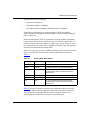
Table 1-1.
BGP-3 Path Attributes
Attribute
Description
AS path
Mandatory attribute containing a list of the ASs that must be traversed
to reach the given destinations
Origin
Mandatory attribute containing one of the following values:
• IGP (the path is valid all the way to the IGP of the originating AS)
• EGP (the path was advertised using EGP by the last AS in the AS
path)
• Incomplete (the path is valid only to the last AS in the AS path)
Next hop
Mandatory attribute that specifies the IP address of the router to use as
a next hop for the advertised destinations
Inter-AS
Optional attribute used to choose between paths to the destinations
listed
Unreachable
Discretionary attribute used to indicate destinations that have become
unreachable
A BGP-4 update message has a variable-length sequence of path attributes. Each
attribute includes an attribute value and an attribute description. Table 1-2 lists the
mandatory BGP-4 path attributes.
Table 1-2.
BGP-4 Mandatory Path Attributes
Attribute
Description
AS path
Contains a list of the ASs that must be traversed to reach the given
destinations
Origin
Contains one of the following values:
• IGP (the path is valid all the way to the IGP of the originating AS)
• EGP (the path was advertised using an EGP by the last AS in the
AS path)
• Incomplete (the path is valid only to the last AS in the AS path)
Next hop
Specifies the IP address of the router to use as a next hop for the
advertised destinations
308628-15.0 Rev 00
1-9
Configuring IP Exterior Gateway Protocols (BGP and EGP)
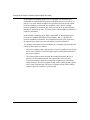
In addition, the BGP-4 update message can include the optional path attributes
listed in Table 1-3.
Table 1-3.
BGP-4 Optional Path Attributes
Attribute
Description
Multiexit discriminator
Chooses between paths to the destinations listed
Local preference
Allows AS border routers to indicate the preference
they assigned to a chosen route when advertising it
to IBGP peers
Atomic aggregate
Ensures that certain network layer reachability
information (NLRI) is not deaggregated
Aggregator
Identifies which AS performed the most recent route
aggregation. This attribute contains the last AS
number that formed the aggregate route followed by
the IP address of the BGP speaker that formed the
aggregate route.
Cluster list
Lists the members of a route reflector cluster
Originator ID
Identifies the originator of the route into a route
reflector cluster
BGP community
Identifies the communities to which the route
belongs. (A community is a group of destinations that
share some common property.)
BGP/OSPF Interaction
RFC 1745 defines the interaction between BGP and OSPF when OSPF is the IGP
within an autonomous system. For routers running both protocols, the OSPF
router ID and the BGP ID must be the same IP address. A BGP route policy must
be configured to allow BGP advertisement of OSPF routes.
Interaction between BGP-4 and OSPF includes the ability to advertise supernets
to support classless interdomain routing (CIDR). BGP-4 allows interdomain
supernet advertisements; OSPF can carry supernet advertisements within a
routing domain.
1-10
308628-15.0 Rev 00
Exterior Gateway Protocols (BGP and EGP)
BGP-4 Confederations
The BGP confederation feature can reduce the size and complexity of an IBGP
mesh by breaking large autonomous systems into a confederation of smaller
subautonomous systems. This division reduces the size of IBGP meshes and the
complexity of the associated configuration management. Other autonomous
systems view the confederation as a single AS with the confederation ID as its AS
number. BGP confederations are available only with BGP-4.
The BGP-4 confederation feature complies with RFC 1965 and provides the
following functions:
•
Lets you configure a confederation ID on the router
•
Implements new AS_PATH segment types
•
Lets you configure new AS_PATH variables, AS_CONFED_SET and
AS_CONFED_SEQUENCE, for specifying confederation parameters
•
Implements correct AS_PATH setting and manipulation to neighboring
autonomous systems that are within and outside the confederation
See “Configuring BGP-4 Confederations” on page 3-21 for a detailed description
of this feature and for configuration information.
BGP-4 TCP MD5 Message Authentication
BGP-4 lets you configure the authentication of BGP messages by TCP MD5
signatures, in compliance with RFC 2385, “Protection of BGP Sessions via the
TCP MD5 Signature Option.” When BGP authentication is enabled, a BGP
speaker can verify that the BGP messages it receives from its peers are actually
from a peer and not from a third party masquerading as a peer.
See “Configuring and Enabling MD5 Authentication” on page 4-22 for a detailed
description of this feature and for configuration information.
308628-15.0 Rev 00
1-11
Configuring IP Exterior Gateway Protocols (BGP and EGP)
BGP Implementation Notes
The following guidelines are crucial to successful BGP configuration.
Caution: If you do not follow these guidelines, BGP either will not work
efficiently or will become disabled on the interfaces involved.
1-12
•
BGP will not operate with an IP router in nonforwarding (host-only) mode.
Make sure that the routers you want BGP to operate with are in forwarding
mode. For instructions on setting the forwarding mode, see Configuring IP,
ARP, RARP, RIP, and OSPF Services.
•
If you are using BGP for a multihomed AS (one that contains more than one
exit point), Nortel Networks strongly encourages you to use OSPF for your
IGP and BGP for your sole exterior gateway protocol, or use intra-AS IBGP
routing. For information about configuring OSPF, see Configuring IP, ARP,
RARP, RIP, and OSPF Services.
•
If OSPF is the IGP, you should use the default OSPF tag construction. Using
EGP or modifying the OSPF tags makes network administration and proper
construction of BGP path attributes more difficult.
•
For any router supporting both BGP and OSPF, the OSPF router ID and the
BGP identifier must be set to the same IP address.
•
For BGP to run as a soloist, Internet service provider (ISP) mode must be
enabled. For instructions on enabling ISP mode, see Configuring IP, ARP,
RARP, RIP, and OSPF Services.
•
In configurations where BGP speakers reside on routers that have multiple
network connections over multiple IP interfaces (the typical case for IBGP
speakers), consider using the address of the router’s circuitless (virtual) IP
interface as the local peer address. In this way, you ensure that BGP is
reachable as long as there is an active circuit on the router. For instructions on
configuring the circuitless (or virtual) IP interface, see Configuring IP, ARP,
RARP, RIP, and OSPF Services.
•
By default, an external BGP speaker will neither advertise any routes to a
peer, nor inject any routes into its IGP. Configure route policies to enable any
route advertisement. For instructions on configuring policies, see Chapter 5,
“Configuring BGP Accept and Announce Policies.”
308628-15.0 Rev 00
Exterior Gateway Protocols (BGP and EGP)
•
Coordinate routing policies among all BGP speakers within an AS so that
every BGP border router within an AS constructs the same path attributes for
an external path.
•
Configure accept and announce policies on all IBGP connections to accept
and propagate all routes. Make consistent routing policy decisions on external
BGP connections.
•
To configure BGP and download full Internet routes on the Passport* 5430
Multiservice Access Switch, you must install the router with 64 MB of
memory.
308628-15.0 Rev 00
1-13
Chapter 2
Starting BGP and EGP Services
This chapter describes how to use the BCC and Site Manager to start BGP
services using default values and how to use Site Manager to start EGP services
using default values. It also describes how to use Site Manager to delete BGP and
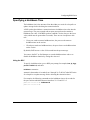
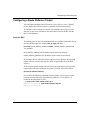
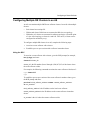
EGP services.
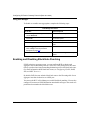
Topic
Page
Starting BGP with the BCC
2-1
Starting IP and BGP with Site Manager
2-3
Starting IP and EGP with Site Manager
2-6
Starting BGP with the BCC
To start BGP using the BCC:
1. Configure BGP on the router.
2. Define a BGP peer-to-peer connection.
Note: Before you configure BGP-4, see “BGP Implementation Notes” on
page 1-12 for information.
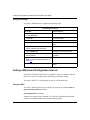
Step 1: Configuring Global BGP
To configure BGP on the router, go to the global IP prompt (for example, box; ip)
and enter:
bgp router-id <router_id>
308628-15.0 Rev 00
2-1
Configuring IP Exterior Gateway Protocols (BGP and EGP)
router_id is the BGP router ID expressed as an octet string. The router ID typically
is a circuitless IP interface used by BGP to communicate with other BGP routers.
If the router is also running OSPF, the BGP ID must match the OSPF ID.
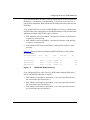
For example, the following command configures global BGP with a router ID
(local IP address) of 2.2.2.2:
ip# bgp router-id 2.2.2.2
bgp#
BGP is now running on the router with default values for all BGP parameters. You
customize BGP by modifying BGP parameters as described in Chapter 3,
“Configuring Global BGP Parameters.”
Step 2: Defining a Peer-to-Peer Connection
For BGP to exchange routing information with BGP peers located in other
autonomous systems or within the same AS, you must configure at least one peer
connection.
To define a peer-to-peer connection, go to the BGP prompt (for example, box; ip;
bgp) and enter:
peer local <local_ip_address> remote <remote_ip_address> as <as_number>
local_ip_address is the address, expressed in dotted-decimal format, of an IP
interface on the local router.
remote_ip_address is the address of an IP interface on the remote peer router.
as_number is the number of the AS in which the remote peer is located.
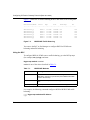
For example, the following command defines a peer-to-peer connection between
local IP interface 2.3.3.3 and remote interface 2.3.3.4. The remote BGP peer is
located in AS 4.
bgp# peer local 2.3.3.3 remote 2.3.3.4 as 4
peer/2.3.3.3/2.3.3.4#
The BGP peer-to-peer relationship is established with default values for all BGP
peer parameters. You customize the peer-to-peer connection by modifying BGP
peer parameters as described in Chapter 4, “Configuring BGP Peers.”
2-2
308628-15.0 Rev 00
Starting BGP and EGP Services
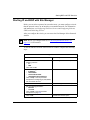
Starting IP and BGP with Site Manager
Before you can select a protocol to run on the router, you must configure a circuit
that the protocol can use as an interface to an attached network. For information
and instructions, see Configuring WAN Line Services and Configuring Ethernet,
FDDI, and Token Ring Services.
After you configure the circuit, you can access the Site Manager Select Protocols
window.
Note: Before you configure BGP-4, see “BGP Implementation Notes” on
page 1-12 for information.
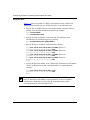
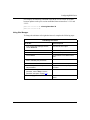
To start IP and BGP from the Select Protocols window, complete the following
steps:
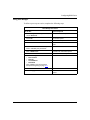
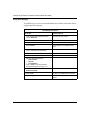
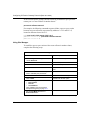
Site Manager Procedure
You do this
System responds
1. In the Select Protocols window, select the
following protocols:
• IP
• BGP
Then click on OK.
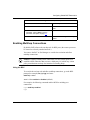
The IP Configuration window opens.
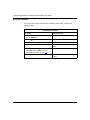
2. Set the following parameters:
• IP Address
• Subnet Mask
• Transmit Bcast Addr
• UnNumbered Assoc Address
Click on Help or see the parameter
descriptions in Configuring IP, ARP, RARP,
RIP, and OSPF Services.
3. Click on OK.
The BGP Configuration window opens.
4. Set the following parameters:
• Identifier
• Local AS
Click on Help or see the parameter
descriptions on page A-3.
5. Click on OK.
The BGP Peer window opens.
(continued)
308628-15.0 Rev 00
2-3
Configuring IP Exterior Gateway Protocols (BGP and EGP)
Site Manager Procedure (continued)
You do this
System responds
6. Set the following parameters:
• Peer Address
• Peer AS
• Local Address
• Peer Mode
Click on Help or see the parameter
descriptions beginning on page A-11.
7. Click on OK.
Site Manager enables default BGP
service and returns you to the
Configuration Manager window.
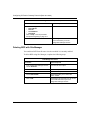
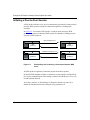
Deleting BGP with Site Manager
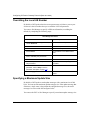
You can delete BGP from all router circuits on which it is currently enabled.
To delete BGP using Site Manager, complete the following steps:
Site Manager Procedure
2-4
You do this
System responds
1. In the Configuration Manager window,
choose Protocols.
The Protocols menu opens.
2. Choose IP.
The IP menu opens.
3. Choose BGP.
The BGP menu opens.
4. Choose Delete BGP.
Site Manager asks you to confirm the
deletion of BGP.
5. Click on OK.
Site Manager removes BGP from all circuits
on the router and returns you to the
Configuration Manager window.
308628-15.0 Rev 00
Starting BGP and EGP Services
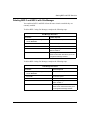
Deleting BGP-3 and BGP-4 with Site Manager
You can delete BGP-3 and BGP-4 from all router circuits on which they are
currently enabled.
To delete BGP-3 using Site Manager, complete the following steps:
Site Manager Procedure
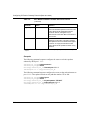
You do this
System responds
1. In the Configuration Manager window, The Protocols menu opens.
choose Protocols.
2. Choose IP.
The IP menu opens.
3. Choose BGP.
The BGP menu opens.
4. Choose Delete BGP-3.
Site Manager asks you to confirm the
deletion of BGP-3.
5. Click on OK.
Site Manager removes BGP-3 from all
circuits on the router and returns you to the
Configuration Manager window.
To delete BGP-4 using Site Manager, complete the following steps:
Site Manager Procedure
You do this
System responds
1. In the Configuration Manager window,
choose Protocols.
The Protocols menu opens.
2. Choose IP.
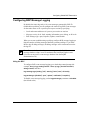
The IP menu opens.
3. Choose BGP.
The BGP menu opens.
4. Choose Delete BGP-4.
Site Manager asks you to confirm the
deletion of BGP-4.
5. Click on OK.
Site Manager removes BGP-4 from all
circuits on the router and returns you to
the Configuration Manager window.
308628-15.0 Rev 00
2-5
Configuring IP Exterior Gateway Protocols (BGP and EGP)
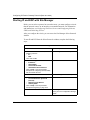
Starting IP and EGP with Site Manager
Before you can select a protocol to run on the router, you must configure a circuit
that the protocol can use as an interface to an attached network. For information
and instructions, see Configuring WAN Line Services and Configuring Ethernet,
FDDI, and Token Ring Services.
After you configure the circuit, you can access the Site Manager Select Protocols
window.
To start IP and EGP from the Select Protocols window, complete the following
steps:
Site Manager Procedure
You do this
System responds
1. In the Select Protocols window, select the
following protocols:
• IP
• EGP
Then click on OK.
The IP Configuration window opens.
2. Set the following parameters:
• IP Address
• Subnet Mask
• Transmit Bcast Addr
• UnNumbered Assoc Address
Click on Help or see the parameter
description in Configuring IP, ARP, RARP,
RIP, and OSPF Services.
3. Click on OK.
The EGP Configuration window opens.
4. Set the following parameters:
• Local Autonomous System ID
(decimal)
• Remote Peer IP Address
• Gateway Mode
Click on Help or see the parameter
descriptions beginning on page A-25.
5. Click on OK.
2-6
Site Manager enables EGP service and
returns you to the Configuration Manager
window.
308628-15.0 Rev 00
Starting BGP and EGP Services
The instructions in this chapter show you how to start EGP using default values.
For information about modifying EGP default values, see Chapter 8,
“Customizing EGP Services.”
Deleting EGP from the Router
You can delete EGP from all router circuits on which it is currently enabled. To
delete EGP, complete the following steps:
Site Manager Procedure
You do this
System responds
1. In the Configuration Manager window,
choose Protocols.
The Protocols menu opens.
2. Choose IP.
The IP menu opens.
3. Choose EGP.
The EGP menu opens.
4. Choose Delete EGP.
Site Manager asks you to confirm the
deletion of EGP.
5. Click on OK.
Site Manager removes EGP from all circuits
on the router and returns you to the
Configuration Manager window.
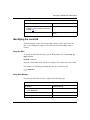
308628-15.0 Rev 00
2-7
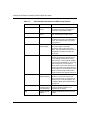
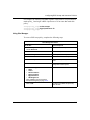
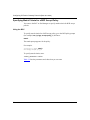
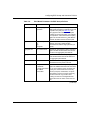
Chapter 3
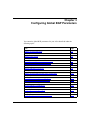
Configuring Global BGP Parameters
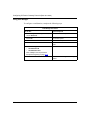
You customize global BGP parameters for your AS as described under the
following topics:
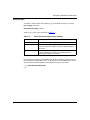
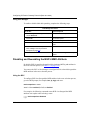
Topic
Page
Disabling and Reenabling BGP
3-2
Supplying a BGP Router ID
3-4
Identifying the Local AS
3-5
Disabling and Reenabling IBGP Support
3-6
Specifying Route Types for IBGP Advertisements
3-7
Enabling BGP Interaction with OSPF and RIP
3-9
Setting the Update Interval Timer
3-10
Allowing Redundant Connections
3-11
Enabling Multihop Connections
3-13
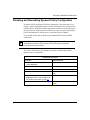
Disabling and Reenabling Dynamic Policy Configuration
3-15
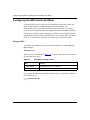
Configuring the BGP Soloist Slot Mask
3-16
Disabling and Reenabling Route Aggregation
3-17
Enabling and Disabling Black Hole Punching
3-18
Disabling and Reenabling the BGP-4 MED Attribute
3-20
Configuring BGP-4 Confederations
3-21
Disabling BayRS Local Preference Calculation and Route Selection
3-25
Configuring BGP Message Logging
3-29
Configuring EBGP Route Flap Damping
3-31
Assigning Weight Classes and Values to an AS
3-37
308628-15.0 Rev 00
3-1
Configuring IP Exterior Gateway Protocols (BGP and EGP)
Disabling and Reenabling BGP
When you start BGP on the router, BGP is automatically enabled for both BGP-3
and BGP-4 peer-to-peer connections.
You can use the BCC and Site Manager to disable and reenable BGP-4 on the
router. You can also use Site Manager to disable and reenable BGP-3 and BGP-4.
Note: BGP will not operate with an IP router in not-forwarding (host-only)
mode. Make sure that the routers you want BGP to operate with are in
forwarding mode. For instructions on configuring the router for forwarding
mode, see Configuring IP, ARP, RARP, RIP, and OSPF Services.
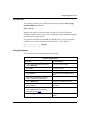
Using the BCC
To disable and reenable BGP, go to the BGP prompt (for example, box; ip; bgp)
and enter:
state <state>
state is either enabled (default) or disabled.
For example, the following command disables BGP:
bgp# state disabled
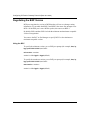
Using Site Manager
To disable and reenable BGP, complete the following steps:
Site Manager Procedure
You do this
System responds
1. In the Configuration Manager window,
choose Protocols.
The Protocols menu opens.
2. Choose IP.
The IP menu opens.
3. Choose BGP.
The BGP menu opens.
4. Choose BGP Global.
The Edit BGP Global Parameters window
opens.
(continued)
3-2
308628-15.0 Rev 00
Configuring Global BGP Parameters
Site Manager Procedure (continued)
You do this
System responds
5. Set the BGP Enable parameter. Click on
Help or see the parameter description on
page A-4.
6. Click on OK.
You return to the Configuration Manager
window.
7. In the Configuration Manager window,
choose Protocols.
The Protocols menu opens.
8. Choose IP.
The IP menu opens.
9. Choose BGP.
The BGP menu opens.
10. Choose BGP-3 Global.
The Edit BGP-3 Global Parameters menu
opens.
11. Set the Enable parameter. Click on Help
or see the parameter description on page
A-11.
12. Click on OK.
You return to the Configuration Manager
window.
13. In the Configuration Manager window,
choose Protocols.
The Protocols menu opens.
14. Choose IP.
The IP menu opens.
15. Choose BGP.
The BGP menu opens.
16. Choose BGP-4 Global.
The Edit BGP-4 Global Parameters
window opens.
17. Set the Enable parameter. Click on Help
or see the parameter description on page
A-11.
18. Click on OK.
308628-15.0 Rev 00
You return to the Configuration Manager
window.
3-3
Configuring IP Exterior Gateway Protocols (BGP and EGP)
Supplying a BGP Router ID
The BGP identifier is the IP address of an interface on the router. When you
enable BGP on the router, you must specify a configured IP address as the router
ID. You can change the router ID to the IP address of another router IP interface.
Note: If both OSPF and BGP are running on the router, the OSPF router ID
and the BGP router ID must be identical. In addition, the router ID must match
one of the IP addresses configured on the router.
You can use the BCC or Site Manager to supply a BGP identifier for the router.
Using the BCC
To change the BGP router ID, go to the BGP prompt (for example, box; ip; bgp)
and enter:
router-id <ip_address>
ip_address is the address of an IP interface on the router.
For example, the following command specifies IP address 2.2.2.2 for the BGP
router ID:
bgp# router-id 2.2.2.2
bgp#
Using Site Manager
To change the BGP router ID, complete the following steps:
Site Manager Procedure
You do this
System responds
1. In the Configuration Manager window,
choose Protocols.
The Protocols menu opens.
2. Choose IP.
The IP menu opens.
3. Choose BGP.
The BGP menu opens.
4. Choose BGP Global.
The Edit BGP Global Parameters window
opens.
(continued)
3-4
308628-15.0 Rev 00
Configuring Global BGP Parameters
Site Manager Procedure (continued)
You do this
System responds
5. Set the BGP Identifier parameter. Click
on Help or see the parameter description
on page A-4.
6. Click on OK.
You return to the Configuration Manager
window.
Identifying the Local AS
Each autonomous system in the Internet has a unique AS ID. You can use the
BCC or Site Manager to supply the ID of the AS in which the BGP router is
located.
Using the BCC
To specify the ID of the local AS, go to the BGP prompt (for example, box; ip;
bgp) and enter:
local-as <local_as>
local_as is the number of the AS (from 0 through 65535) where the router resides.
For example, the following command specifies AS 5 as the local AS:
bgp# local-as 5
bgp#
Using Site Manager
To specify the ID of the local AS, complete the following steps:
Site Manager Procedure
You do this
System responds
1. In the Configuration Manager window,
choose Protocols.
The Protocols menu opens.
2. Choose IP.
The IP menu opens.
3. Choose BGP.
The BGP menu opens.
(continued)
308628-15.0 Rev 00
3-5
Configuring IP Exterior Gateway Protocols (BGP and EGP)
Site Manager Procedure (continued)
You do this
System responds
4. Choose BGP Global.
The Edit BGP Global Parameters window
opens.
5. Set the BGP Local AS parameter. Click
on Help or see the parameter description
on page A-4.
6. Click on OK.
You return to the Configuration Manager
window.
Disabling and Reenabling IBGP Support
By default, BGP supports IBGP intra-AS sessions. (For information, see “BGP
Concepts and Terminology” on page 1-4).
A BGP transit AS should use IBGP intra-AS routing. A stub or multihomed AS
usually does not use IBGP routing.
You can use the BCC or Site Manager to disable and reenable IBGP support.
Using the BCC
To disable and reenable IBGP support, go to the BGP prompt (for example, box;
ip; bgp) and enter:
intra-as-routing <state>
state is either enabled (default) or disabled.
For example, the following command disables IBGP:
bgp# intra-as-routing disabled
bgp#
3-6
308628-15.0 Rev 00
Configuring Global BGP Parameters
Using Site Manager
To disable and reenable IBGP support, complete the following steps:
Site Manager Procedure
You do this
System responds
1. In the Configuration Manager window,
choose Protocols.
The Protocols menu opens.
2. Choose IP.
The IP menu opens.
3. Choose BGP.
The BGP menu opens.
4. Choose BGP Global.
The Edit BGP Global Parameters window
opens.
5. Set the BGP Intra-AS parameter. Click on
Help or see the parameter description on
page A-5.
6. Click on OK.
You return to the Configuration Manager
window.
Specifying Route Types for IBGP Advertisements
If IBGP is enabled, you can specify the types of routes that BGP advertises in
IBGP sessions. By default, IBGP propagates only routes learned from external
BGP peers. You can use the BCC or Site Manager to configure IBGP to propagate
routes learned from all route sources (excluding IBGP and OSPF interarea and
intra-area routes, which IBGP never advertises).
308628-15.0 Rev 00
3-7
Configuring IP Exterior Gateway Protocols (BGP and EGP)
Using the BCC
To specify the types of routes that IBGP advertises, go to the BGP prompt (for
example, box; ip; bgp) and enter:
redistribute-protocols <protocols>
protocols is one of the values listed in Table 3-1.
Table 3-1.
Route Types for BGP Advertisements
Route Type
Meaning
bgp (default)
BGP propagates routes learned from external BGP peers.
all
BGP propagates routes from all route sources.
For example, the following command configures BGP to advertise routes from all
route sources:
bgp# redistribute-protocols all
bgp#
Using Site Manager
To specify the types of routes that BGP advertises in IBGP sessions, complete the
following steps:
Site Manager Procedure
You do this
System responds
1. In the Configuration Manager window,
choose Protocols.
The Protocols menu opens.
2. Choose IP.
The IP menu opens.
3. Choose BGP.
The BGP menu opens.
4. Choose BGP Global.
The Edit BGP Global Parameters window
opens.
5. Set the BGP From Protocols parameter.
Click on Help or see the parameter
description on page A-5.
6. Click on OK.
3-8
You return to the Configuration Manager
window.
308628-15.0 Rev 00
Configuring Global BGP Parameters
Enabling BGP Interaction with OSPF and RIP
By default, BGP does not exchange routes with OSPF or RIP. However, you can
configure the router to allow BGP to advertise BGP-learned routes to OSPF, RIP,
or both OSPF and RIP.
You can use the BCC or Site Manager to configure the router to advertise
BGP-learned routes.
Using the BCC
To configure the router to advertise BGP-learned information to OSPF, RIP, or
both, go to the BGP prompt (for example, box; ip; bgp) and enter:
igp-interaction <protocols>
protocols is one of the following values:
•
none (default): BGP advertises no routes to OSPF or RIP.
•
ospf: BGP advertises BGP-learned routes to OSPF.
•
rip: BGP advertises BGP-learned routes to RIP.
For example, the following command configures BGP to advertise routes to both
RIP and OSPF:
bgp# igp-interaction {ospf rip}
bgp#
Using Site Manager
To configure the router to advertise BGP-learned information to OSPF, RIP, or
both, complete the following steps:
Site Manager Procedure
You do this
System responds
1. In the Configuration Manager window,
choose Protocols.
The Protocols menu opens.
2. Choose IP.
The IP menu opens.
3. Choose BGP.
The BGP menu opens.
(continued)
308628-15.0 Rev 00
3-9
Configuring IP Exterior Gateway Protocols (BGP and EGP)
Site Manager Procedure (continued)
You do this
System responds
4. Choose BGP Global.
The Edit BGP Global Parameters window
opens.
5. Set the BGP/IGP Interaction Control
parameter. Click on Help or see the
parameter description on page A-10.
6. Click on OK.
You return to the Configuration Manager
window.
Setting the Update Interval Timer
BGP periodically injects external BGP routes into the routing table. The default
minimum interval between route injections is 5 seconds.
You can use the BCC or Site Manager to change the minimum number of seconds
between route injections.
Using the BCC
To change the minimum number of seconds between route injections, go to the
BGP prompt (for example, box; ip; bgp) and enter:
inject-time <seconds>
seconds is the minimum interval (from 1 through 2,147,483,647) between route
injections.
For example, the following command causes BGP to inject external BGP routes
into the routing table with a minimum interval of 10 seconds:
bgp# inject-time 10
bgp#
3-10
308628-15.0 Rev 00
Configuring Global BGP Parameters
Using Site Manager
To change the minimum number of seconds between route injections, complete
the following steps:
Site Manager Procedure
You do this
System responds
1. In the Configuration Manager window,
choose Protocols.
The Protocols menu opens.
2. Choose IP.
The IP menu opens.
3. Choose BGP.
The BGP menu opens.
4. Choose BGP Global.
The Edit BGP Global Parameters window
opens.
5. Set the BGP Interval Timer parameter.
Click on Help or see the parameter
description on page A-6.
6. Click on OK.
You return to the Configuration Manager
window.
Allowing Redundant Connections
By default, BGP performs redundancy checking on peer-to-peer TCP sessions.
BGP can maintain only one TCP session with a remote BGP peer. If the remote
peer attempts to establish another session on another physical connection, BGP
rejects the session. BGP uses a collision-detection method based on the router ID
to check for redundant sessions.
You can disable redundancy checking to allow TCP sessions with the same remote
peer on multiple physical connections. The advantage of a peer-to-peer
configuration with multiple sessions on multiple physical connections is
redundancy: if one connection fails, the peers can communicate over another link.
The disadvantage is that such a configuration results in multiple copies of each
route.
You can use the BCC or Site Manager to disable redundancy checking and to
specify the maximum number of redundant routes that BGP allows. By default,
BGP allows up to 255 redundant routes.
308628-15.0 Rev 00
3-11
Configuring IP Exterior Gateway Protocols (BGP and EGP)
Using the BCC
To disable or reenable redundancy checking, go to the BGP prompt (for example,
box; ip; bgp) and enter:
redundant-connection <state>
state is either enabled (default) or disabled.
To specify the maximum number of redundant routes, go to the BGP prompt and
enter:
max-redundant-routes <max_routes>
max_routes is the maximum number of redundant routes (from 0 through 255).
For example, the following command sequence disables BGP redundancy
checking, allowing BGP to establish multiple TCP sessions (on different physical
connections) with the same remote peer and configures BGP to maintain up to 50
redundant routes:
bgp# redundant-connection disabled
bgp# max-redundant-routes 50
bgp#
The following command reenables redundancy checking to allow only one TCP
session with the same remote peer:
bgp# redundant connection enabled
bgp#
Using Site Manager
To disable or reenable redundancy checking, complete the following steps:
Site Manager Procedure
You do this
System responds
1. In the Configuration Manager window,
choose Protocols.
The Protocols menu opens.
2. Choose IP.
The IP menu opens.
3. Choose BGP.
The BGP menu opens.
(continued)
3-12
308628-15.0 Rev 00
Configuring Global BGP Parameters
Site Manager Procedure (continued)
You do this
System responds
4. Choose BGP Global.
The Edit BGP Global Parameters window
opens.
5. Set the Detect Redundant Connections
parameter. Click on Help or see the
parameter description on page A-7.
6. Click on OK.
You return to the Configuration Manager
window.
Enabling Multihop Connections
By default, BGP enforces the one-hop rule for BGP peers (the remote peer must
be located on a directly attached network.)
You can use the BCC or Site Manager to override the restriction and allow
multihop connections.
Caution: Enabling multihop BGP connections can cause EBGP speakers to
establish a BGP connection that traverses a third-party AS, which may violate
policy considerations and may also introduce forwarding loops.
Using the BCC
To override the one-hop rule and allow multihop connections, go to the BGP
prompt (for example, box; ip; bgp) and enter:
multi-hop <state>
state is either enabled or disabled (default).
For example, the following command enables BGP for multihop peer
connections:
bgp# multi-hop enabled
bgp#
308628-15.0 Rev 00
3-13
Configuring IP Exterior Gateway Protocols (BGP and EGP)
Using Site Manager
To override the one-hop rule and allow multihop connections, complete the
following steps:
Site Manager Procedure
You do this
System responds
1. In the Configuration Manager window,
choose Protocols.
The Protocols menu opens.
2. Choose IP.
The IP menu opens.
3. Choose BGP.
The BGP menu opens.
4. Choose BGP Global.
The Edit BGP Global Parameters window
opens.
5. Set the Multi-hop Ebgp Connection
parameter. Click on Help or see the
parameter description on page A-7.
6. Click on OK.
3-14
You return to the Configuration Manager
window.
308628-15.0 Rev 00
Configuring Global BGP Parameters
Disabling and Reenabling Dynamic Policy Configuration
By default, BGP reconfigures IP policies dynamically. This means that if you
modify a policy, BGP dynamically reevaluates all affected routes in light of the
modified policy. BGP then sends the appropriate withdraw or update message to
the affected peers. BGP keeps track of the routes sent to each peer, allowing for
precise determination of which routes to send and which to withdraw.
If you modify an IP policy with this feature disabled, BGP restarts all BGP
connections.
Note: There is no advantage to disabling dynamic policy configuration.
Disabling this parameter will adversely affect BGP protocol operation
overhead and network stability.
You can use the following Site Manager procedure to disable and reenable
dynamic policy configuration:
Site Manager Procedure
You do this
System responds
1. In the Configuration Manager window,
choose Protocols.
The Protocols menu opens.
2. Choose IP.
The IP menu opens.
3. Choose BGP.
The BGP menu opens.
4. Choose BGP Global.
The Edit BGP Global Parameters window
opens.
5. Set the BGP Dynamic Policy Change
Support parameter. Click on Help or see
the parameter description on page A-7.
6. Click on OK.
308628-15.0 Rev 00
You return to the Configuration Manager
window.
3-15
Configuring IP Exterior Gateway Protocols (BGP and EGP)
Configuring the BGP Soloist Slot Mask
By default, BGP runs as a soloist on a slot determined by the BGP soloist slot
mask. Nortel Networks recommends that the slot mask include only
nonforwarding slots, so that BGP operations (route calculation, for example)
occur on one slot while the other slots maintain maximum forwarding capability.
If the slot on which the soloist is running fails, BGP runs on an eligible slot. By
default, BGP considers all slots with IP interfaces to be eligible slots. You can use
the BCC or Site Manager to specify one or more slots for the BGP soloist.
Using the BCC
To configure the BGP slot mask, go to the BGP prompt (for example, box; ip;
bgp) and enter:
slot-mask <slot>
slot is one of the values listed in Table 3-2. To include more than one slot, enclose
the slot numbers in braces.
Table 3-2.
Slot Mask Parameter Values
Value
Meaning
all-slots (default)
The BGP soloist can run on all slots.
1 to 14
The BGP soloist can run only on the specified slots.
For example, the following command configures slots 2, 3, and 4 to be eligible to
run the BGP soloist:
bgp# slot-mask {2 3 4}
bgp#
3-16
308628-15.0 Rev 00
Configuring Global BGP Parameters
Using Site Manager
To configure the BGP slot mask, complete the following steps:
Site Manager Procedure
You do this
System responds
1. In the Configuration Manager window,
choose Protocols.
The Protocols menu opens.
2. Choose IP.
The IP menu opens.
3. Choose BGP.
The BGP menu opens.
4. Choose BGP Global.
The Edit BGP Global Parameters window
opens.
5. Set the BGP Soloist Slots parameter.
Click on Help or see the parameter
description on page A-7.
6. Click on OK.
You return to the Configuration Manager
window.
Disabling and Reenabling Route Aggregation
By default, BGP aggregates non-BGP-originated subnet routes to their
corresponding natural network routes for advertisement to BGP peers. Disabling
route aggregation causes BGP to advertise each subnet.
You can use the BCC or Site Manager to disable this feature. (This switch does
not affect the advertisement of BGP-originated routes.)
Using the BCC
To disable or reenable route aggregation for non-BGP-originated subnet routes, go
to the BGP prompt (for example, box; ip; bgp) and enter:
subnet-aggregation <state>
state is either enabled (default) or disabled.
For example, the following command disables subnet aggregation:
bgp# subnet-aggregation disabled
bgp#
308628-15.0 Rev 00
3-17
Configuring IP Exterior Gateway Protocols (BGP and EGP)
Using Site Manager
To disable or reenable route aggregation, complete the following steps:
Site Manager Procedure
You do this
System responds
1. In the Configuration Manager window,
choose Protocols.
The Protocols menu opens.
2. Choose IP.
The IP menu opens.
3. Choose BGP.
The BGP menu opens.
4. Choose BGP Global.
The Edit BGP Global Parameters window
opens.
5. Set the Aggregate Subnets parameter.
Click on Help or see the parameter
description on page A-8.
6. Click on OK.
You return to the Configuration Manager
window.
Enabling and Disabling Black Hole Punching
If BGP advertises aggregate routes, you can configure BGP to submit each
aggregate route to the routing table as a black hole. This setting forces the router
to drop a packet whose longest matching destination prefix is the black hole route.
(For more information about black hole routes, see Configuring IP, ARP, RARP,
RIP, and OSPF Services.)
By default, BGP does not submit a black hole route to the IP routing table for an
aggregate route that it advertises to a BGP peer.
You can use the BCC or Site Manager to enable black hole punching. You can also
configure IP to return an ICMP destination unreachable message to the sender of a
packet that best matches the black hole route.
3-18
308628-15.0 Rev 00
Configuring Global BGP Parameters
Using the BCC
To enable or disable black hole punching, go to the BGP prompt (for example,
box; ip; bgp) and enter:
black-hole-punching <action>
action is one of the values described in Table 3-3.
Table 3-3.
Black Hole Punching Parameter Settings
Value
Meaning
disabled (default)
Disables black hole punching
drop
Enables black hole punching. IP drops packets for the black
hole route destination without returning an ICMP message to
the sender.
reject
Enables black hole punching. IP drops packets for the black
hole route destination and returns an ICMP destination
unreachable message to the sender.
For example, the following command causes BGP to submit aggregate routes to
the routing table as black hole routes. IP drops packets for the black hole route but
does not return ICMP destination unreachable messages to the sender.
bgp# black-hole-punching drop
bgp#
308628-15.0 Rev 00
3-19
Configuring IP Exterior Gateway Protocols (BGP and EGP)
Using Site Manager
To enable or disable black hole punching, complete the following steps:
Site Manager Procedure
You do this
System responds
1. In the Configuration Manager window,
choose Protocols.
The Protocols menu opens.
2. Choose IP.
The IP menu opens.
3. Choose BGP.
The BGP menu opens.
4. Choose BGP Global.
The Edit BGP Global Parameters window
opens.
5. Set the Black Hole Routes parameter.
Click on Help or see the parameter
description on page A-8.
6. Click on OK.
You return to the Configuration Manager
window.
Disabling and Reenabling the BGP-4 MED Attribute
By default, BGP-4 considers the multiexit discriminator (MED) path attribute in
the route selection process (see Table 1-3 on page 1-10).
You can use the BCC or Site Manager to configure BGP-4 so that it disregards the
MED attribute in the route selection process.
Using the BCC
To configure BGP-4 to disregard the MED attribute in the route selection process,
go to the BGP prompt (for example, box; ip; bgp) and enter:
med-comparison <state>
state is either enabled (default) or disabled.
For example, the following command causes BGP-4 to disregard the MED
attribute in an update when selecting a route:
bgp# med-comparison disabled
bgp#
3-20
308628-15.0 Rev 00
Configuring Global BGP Parameters
Using Site Manager
To configure BGP-4 to disregard the MED attribute in the route selection process,
complete the following steps:
Site Manager Procedure
You do this
System responds
1. In the Configuration Manager window,
choose Protocols.
The Protocols menu opens.
2. Choose IP.
The IP menu opens.
3. Choose BGP.
The BGP menu opens.
4. Choose BGP Global.
The Edit BGP Global Parameters window
opens.
5. Set the Route with MED parameter. Click
on Help or see the parameter description
on page A-9.
6. Click on OK.
You return to the Configuration Manager
window.
Configuring BGP-4 Confederations
If this router is a member of an autonomous system that is a confederation of
sub-ASs, you can configure the confederation ID. You can also specify the list of
this BGP speaker’s peers in other sub-ASs within the same confederation.
If the confederation ID is not configured (nil), this AS is not a member of any
confederation. If the list of confederation peers is empty (nil), no peers to this
speaker exist among the neighbor ASs that are members of this confederation.
You can use the BCC or Site Manager to configure BGP-4 confederations.
308628-15.0 Rev 00
3-21
Configuring IP Exterior Gateway Protocols (BGP and EGP)
Using the BCC
Figure 3-1 shows an example of a BGP-4 confederation. In this example, the
following steps establish sub-ASs 65000 and 65001 as confederation peers.
1.
Specify sub-AS 65002 as the local AS number and the external visible AS
number 20 as the BGP confederation identifier by entering:
bgp# local-as 65002
bgp# confederation-id 20
2.
Specify the local AS numbers of the other sub-ASs within the same
confederation as confederation peers by entering:
bgp# confederation-peers {65000 65001}
3.
Specify BGP peers within the confederation by entering:
bgp# peer 192.32.194.1/192.32.194.2 as 65000
peer/192.32.194.1/192.32.194.2# back
bgp# peer 192.32.194.5/192.32.194.6 as 65001
peer/192.32.194.5/192.32.194.6# back
bgp# peer 192.32.195.2/192.32.195.1 as 65002
peer/192.32.195.2/192.32.195.1# back
bgp# peer 192.32.195.5/192.32.195.6 as 65002
peer/192.32.195.5/192.32.195.6# back
bgp#
4.
(Router 3)
(Router 6)
(Router 8)
(Router 9)
Specify BGP peers in another AS or confederation with their local AS number
(if not a confederation) or their confederation ID (if a confederation) by
entering:
bgp# peer 192.32.195.1/192.32.195.2 as 55
peer/192.32.195.1/192.32.195.2# back
bgp#
Note: A sub-AS number cannot be the same as any external BGP peer AS;
however, internal sub-AS numbers can be assigned to a sub-AS in another
confederation. Suggestion: Use the reserved AS number range. (IANA
reserved numbers are 64512 through 65535.)
3-22
308628-15.0 Rev 00
Configuring Global BGP Parameters
Sub-AS
65001
AS 20
Router 4
Router 5
Router 6
Router 1
Router 2
Router 3
Router 7
To AS 55
Sub-AS
65000
Router 8
Router 9
Sub-AS
65002
IP0107A
Figure 3-1.
BGP Confederation
308628-15.0 Rev 00
3-23
Configuring IP Exterior Gateway Protocols (BGP and EGP)
Using Site Manager
To configure a confederation, complete the following steps:
Site Manager Procedure
You do this
System responds
1. In the Configuration Manager window,
choose Protocols.
The Protocols menu opens.
2. Choose IP.
The IP menu opens.
3. Choose BGP.
The BGP menu opens.
4. Choose BGP Global.
The Edit BGP Global Parameters window
opens.
5. Set the following parameters:
• Confederation ID
• Confederation Peer
Click on Help or see the parameter
descriptions beginning on page A-10.
6. Click on OK.
3-24
You return to the Configuration Manager
window.
308628-15.0 Rev 00
Configuring Global BGP Parameters
Disabling BayRS Local Preference Calculation and Route
Selection
A BGP speaker calculates a local preference value for each route that it receives
from an external peer and passes this value as the local_pref attribute in routing
updates that it announces to its internal BGP (IBGP) peers. A BGP speaker that
receives a routing update from an IBGP peer uses the local_pref attribute in its
best-route selection process.
By default, BGP calculates a local-preference value by using the algorithm
described in “Calculating BGP-4 Local Preference Values” on page 3-25. The
best-route selection process is described in “Best-Route Selection” on page 3-27.
Different implementations of BGP use different methods of arriving at a local
preference value. However, within an AS, all BGP speakers should use the same
method to determine local preference and to select the best routes.
Note: For a comparison of the Nortel Networks and Cisco route selection
processes, see “Comparing BGP Route Selection Processes” on page B-11.
If you are configuring BGP in a network that also includes routers from vendors
other than Nortel Networks, you can disable BayRS local preference calculation
and route selection. Instead, BGP assigns a value of 100 to externally received
routes and uses the rules listed in Table 3-4 on page 3-27 for best-route selection.
Calculating BGP-4 Local Preference Values
BGP-4 update messages contain a local preference value that an AS border router
can assign to a route when advertising it to IBGP peers. The calculation of the
local preference attribute is specific to each implementation. A higher value
indicates that the route is more preferred.
The router uses the following equation to calculate a value for the local preference
attribute:
local_preference = 8191 - origin_value - AS_path_weight
origin_value is 0 for routes with an origin path attribute of IGP or 4096 for other
routes.
308628-15.0 Rev 00
3-25
Configuring IP Exterior Gateway Protocols (BGP and EGP)
AS_path_weight is a sum of weight values associated with AS numbers listed in
the route’s AS Path attribute. These weight values can be configured and default
to 8. For information about configuring AS path weights, contact the Nortel
Networks Technical Solutions Center.
A steep penalty is applied to routes that are advertised with an origin attribute
other than IGP or incomplete.
For an OSPF internal route or a direct route, the local preference attribute is set to:
local_preference = (8191 + 256 - (metric + 255))
metric is the OSPF metric for an OSPF route or the configured cost for a direct
route.
For a RIP route, an EGP route, an OSPF ASE route, or a static route, the local
preference attribute is set to:
local_preference = (256 - metric)
metric is the RIP metric for a RIP route, the EGP metric for an EGP route, the
OSPF metric for an OSPF ASE route, or the configured cost for a static route.
Local preference values for OSPF internal routes and direct routes are higher than
the local preference values calculated for BGP routes.
3-26
308628-15.0 Rev 00
Configuring Global BGP Parameters
Best-Route Selection
BGP uses the rules in Table 3-4 as tie-breakers to select the best BGP route. This
table lists the rules in the order in which they are evaluated.
Table 3-4.
Best-Route Selection Rules
Default Preference Tiebreaker Rules
(local-pref-calculation enabled)
Calculated Preference Tiebreaker Rules
(local-pref-calculation disabled)
1. Choose the route with the lower route weight.
2. Choose the route with the higher local preference
attribute.
3. Choose the route with the shortest AS path.
4. Choose the route with the smallest ORIGIN
(IGP < EGP < INCOMPLETE).
5. Choose the route with the lower multiexit
discriminator (MED) attribute if both routes
include this optional attribute.
6. Choose the route with the lower interior cost to
the next hop.
7. Choose external BGP over IBGP.
8. Choose the route with the lower BGP identifier.
9. Choose the route with the lower BGP connection
remote address.
10. Choose the route with the lower BGP connection
local address.
1. If the next hop is inaccessible, do not consider it.
2. Consider larger BGP administrative weights first.
3. If the routes have the same weight, consider the
route with the highest local preference.
4. If the routes have the same local preference,
prefer the route that the local router originated.
5. If no route was locally originated, prefer the
shorter AS path.
6. If the routes have the same AS path length,
prefer the lowest origin code (IGP is preferred
over EGP, which is preferred over incomplete).
7. If the origin codes are the same and all paths
come from the AS, prefer the path with the lowest
multiexit discriminator (MED) metric. Treat a
missing MED metric as 0.
8. If the MED metrics are the same, prefer external
paths over internal paths.
9. If IGP synchronization is disabled and only
internal paths remain, prefer the path through the
closest neighbor.
10. Prefer the route with the lowest IP address value
for the BGP router ID.
Using the BCC
To configure local preference calculation, go to the BGP prompt (for example,
box; ip; bgp) and enter:
local-pref-calculation <state>
state is one of the values shown in Table 3-5.
308628-15.0 Rev 00
3-27
Configuring IP Exterior Gateway Protocols (BGP and EGP)
Table 3-5.
Local Preference Calculation Method
State
Meaning
enabled (default)
BGP uses the decision rules in the first column of Table 3-4 for
local preference calculation and best-route selection.
disabled
BGP does not perform local preference calculation. Instead, it
assigns a value of 100 to the route and uses a modified formula for
best-route selection.
For example, the following command disables BayRS BGP local preference
calculation and route selection:
bgp# local-pref-calculation disabled
bgp#
Using Site Manager
To disable or reenable local preference calculation, complete the following steps:
Site Manager Procedure
You do this
System responds
1. In the Configuration Manager window,
choose Protocols.
The Protocols menu opens.
2. Choose IP.
The IP menu opens.
3. Choose BGP.
The BGP menu opens.
4. Choose BGP Global.
The Edit BGP Global Parameters window
opens.
5. Set the Local Pref Calculation
parameter. Click on Help or see the
parameter description on page A-9.
6. Click on OK.
3-28
You return to the Configuration Manager
window.
308628-15.0 Rev 00
Configuring Global BGP Parameters
Configuring BGP Message Logging
By default, the router logs only a few event messages generated by BGP. To
troubleshoot a problem, you can configure the router to log BGP event messages
for the entire router or for a specific peer-to-peer session by specifying:
•
Local and remote addresses of a peer-to-peer session or sessions
•
Message severity level: fault, warning, information, trace, debug, or all levels
•
BGP message type: open, keepalive, update, or notification
When you are not troubleshooting a problem, configure BGP message logging to
limit the number of debug messages that BGP generates and logs. If you allow
BGP to log all debug messages, the debug messages will overrun and overwrite
the log file.
Note: For more information about event messages, see the BayRS event
message database at http://www25.nortelnetworks.com/library/tpubs/events.
(You also can access the event message database from the BayRS
documentation CD.)
Using the BCC
To configure BGP event message logging, go to the debug-control prompt (for
example, box; ip; bgp; debug-control or box; ip; bgp; peer/2.2.2.2/2.2.2.4;
debug-control) and enter:
log-message-type {debug | info | warning | fault | trace | all-levels}
log-packet-type {disabled | open | update | notification | keepalive}
To disable event message logging, set the log-packet-type parameter to disabled
(the default value).
308628-15.0 Rev 00
3-29
Configuring IP Exterior Gateway Protocols (BGP and EGP)
For example, the following command sequence configures the router to log BGP
warning, fault, and trace messages for open and keepalive packets for a peer
connection, and then disables message logging:
peer/2.2.2.2/2.2.2.4# debug-control
debug-control/2.2.2.2/2.2.2.4# log-message-type {warning fault trace}
debug-control/2.2.2.2/2.2.2.4# log-packet-type {open keepalive}
debug-control/2.2.2.2/2.2.2.4# log-packet-type disabled
debug-control/2.2.2.2/2.2.2.4# back
peer/2.2.2.2/2.2.2.4#
Using Site Manager
To configure BGP event message logging, complete the following steps:
Site Manager Procedure
You do this
System responds
1. In the Configuration Manager window,
choose Protocols.
The Protocols menu opens.
2. Choose IP.
The IP menu opens.
3. Choose BGP.
The BGP menu opens.
4. Choose BGP DEBUG.
The BGP DEBUG Parameters window
opens.
5. Click on Add.
The NEW BGP DEBUG window opens.
6. Set the following parameters:
• Peer Local/Remote
• Message Level
• Message Trace Switch
Click on Help or see the parameter
descriptions beginning on page A-24.
3-30
7. Click on OK.
You return to the BGP DEBUG
Parameters window.
8. Click on Apply, and then click on Done.
You return to the Configuration Manager
window.
308628-15.0 Rev 00
Configuring Global BGP Parameters
Configuring EBGP Route Flap Damping
The frequent change of network reachability information that can be caused by an
unstable route is commonly referred to as route flap. Route flap damping is a
technique for suppressing information about unstable routes.
When configuring the damping of unstable EBGP routes, the route flap damping
mechanism performs the following functions:
•
Determines the stability of an EBGP route
•
Suppresses the use and advertisement of unstable EBGP routes
•
Unsuppresses a route that has regained stability
To determine the stability of a route in the IP routing table, BGP maintains a
penalty value for the route based on its recent history. Each time the route flaps
(that is, each time it is withdrawn from the routing table), BGP increments this
penalty value. During the period of time that the route does not flap, BGP
decrements the penalty value. In this way, as the instability of the route increases,
the penalty value rises. As the route becomes more stable, the penalty value falls.
To monitor BGP for route flaps, you set the route damping parameter on a BGP
accept policy that matches the route. BGP creates a penalty value for the route and
sets the value to 0. BGP increments the penalty value each time that the route
flaps.
BGP provides a route flap damping template that allows you to control the way
BGP evaluates a route’s penalty and how, based on the penalty, it decides to
suppress or unsuppress the route. The template consists of the following
parameters:
•
Cutoff threshold. If the penalty value rises above the value that you specify as
the cutoff threshold, BGP suppresses the route.
•
Reuse threshold. If the penalty value falls below the value that you specify as
the reuse threshold, BGP unsuppresses the route.
•
Reachable decay. If the route is still reachable after the period of time that you
specify, BGP reduces the penalty value by half. (BGP uses a half-life decay
algorithm to decrement the penalty value.)
•
Unreachable decay. If the route is still unreachable after the period of time
that you specify, BGP reduces the penalty value by half. (BGP uses a half-life
decay algorithm to decrement the penalty value.)
308628-15.0 Rev 00
3-31
Configuring IP Exterior Gateway Protocols (BGP and EGP)
•
Maximum holddown time. If the route remains suppressed after the number of
minutes that you specify, BGP unsuppresses it (even if the penalty value
exceeds the threshold). This action does not change the penalty value.
•
Memory limit. If the status of the route remains unchanged, either reachable
or unreachable, after the number of minutes that you specify, BGP
unsuppresses the route (if it is suppressed) and resets the penalty value and
flap count to 0.
Note: A route that has been suppressed may not be immediately available for
use as soon as the penalty value crosses the configured threshold.
You can also use the BCC or Site Manager to create a route flap damping template
and a BGP accept policy for route flap damping.
Using the BCC
To create a route flap damping template, go to the BGP prompt (for example, box;
ip; bgp) and enter:
damping-template name <name>
name is a unique name identifying the template (from 1 through 20 characters).
A template-specific prompt appears.
For example, the following command creates a route flap damping template
named steady:
bgp# damping-template name steady
damping-template/steady#
To change the default values of the parameters for a template that you created, go
to the template-specific prompt (for example, box; ip; bgp;
damping-template/steady) and enter:
<parameter> <value>
Table 3-6 lists the parameters and values that you can enter.
3-32
308628-15.0 Rev 00
Configuring Global BGP Parameters
Table 3-6.
Route Flap Damping Template Parameters
Parameter
Default Value
Meaning
cutoff-threshold
2000
Specifies a maximum threshold (1 through 20000)
for the route penalty value
reuse-threshold
750
Specifies a minimum threshold (1 through 20000)
for the route penalty value
reachable-decay
5
Specifies the number of minutes (1 through 45)
that the route can remain reachable before BGP
decrements the penalty value by half
unreachable-decay
15
Specifies the number of minutes (1 through 45)
that the route can remain unreachable before BGP
decrements the penalty value by half
max-hold-down
45
Specifies the maximum number of minutes
(1 through 60) that a route can remain suppressed
memory-limit
45
Specifies the maximum number of minutes
(1 through 60) that the status of a route can remain
unchanged—reachable or unreachable—before
BGP resets the penalty value and flap count to 0
and unsuppresses the route
To apply the template to an inbound BGP routing update:
1.
Go to the BGP prompt (for example, box; ip; bgp).
2.
Create and name a BGP accept policy.
For instructions on creating a BGP accept policy, see “Configuring a BGP
Accept Policy” on page 5-2.
An accept policy-specific prompt appears.
308628-15.0 Rev 00
3-33
Configuring IP Exterior Gateway Protocols (BGP and EGP)
3.
Modify the accept policy by entering the following commands:
action accept
route-damping enabled
route-damping-template {default | <name>}
name is the name of the template that you want to apply to the unstable route.
4.
Match the accept policy to the unstable route.
For instructions, see “Specifying Match Criteria for a BGP Accept Policy” on
page 5-6.
For example, the following command sequence creates a BGP accept policy
named fred that causes BGP to apply the route flap damping template steady to
updates for network 3.4.0.0:
bgp# accept fred
accept/fred/bgp# action accept
accept/fred/bgp# route-damping enabled
accept/fred/bgp# route-damping-template steady
accept/fred/bgp# match
match/bgp/accept/fred# network 3.4.0.0/16/exact
network/3.4.0.0/255.255.0.0/exact/bgp/accept/fred#
3-34
308628-15.0 Rev 00
Configuring Global BGP Parameters
Using Site Manager
To create a route flap damping template, complete the following steps:
Site Manager Procedure
You do this
System responds
1. In the Configuration Manager window,
choose Protocols.
The Protocols menu opens.
2. Choose IP.
The IP menu opens.
3. Choose Policy Filters.
The Policy Filters menu opens.
4. Choose BGP-4.
The BGP-4 menu opens.
5. Choose Accept Policies.
The BGP4 Accept Policy Filters window
opens.
6. Click on Route Flap.
The Route Flap Dampening List window
opens.
7. Click on Add.
The Route Flap Dampening
Configuration window opens.
8. Set the following parameters:
• Name
• Cutoff Threshold
• Reuse Threshold
• Reachable Decay
• Unreachable Decay
• Max HoldDown
• Memory Limit
Click on Help or see the parameter
descriptions beginning on page A-47.
9. Click on OK.
You return to the Route Flap Dampening
List window.
10. Click on Done.
You return to the BGP4 Accept Policy
Filters window.
308628-15.0 Rev 00
3-35
Configuring IP Exterior Gateway Protocols (BGP and EGP)
To apply a route flap damping template to an existing BGP accept policy,
complete the following steps:
Site Manager Procedure
You do this
System responds
1. In the Configuration Manager window,
choose Protocols.
The Protocols menu opens.
2. Choose IP.
The IP menu opens.
3. Choose Policy Filters.
The Policy Filters menu opens.
4. Choose BGP-4.
The BGP-4 menu opens.
5. Choose Accept Policies.
The BGP4 Accept Policy Filters window
opens.
6. Click on the accept policy to which you
want to apply route flap damping.
The parameter values for that policy
appear in the window.
7. Set the following parameters:
• BGP Route Flap Dampening
• BGP Route Flap Dampening
Template
Click on Help or see the parameter
descriptions beginning on page A-45.
Note: The BGP Route Flap Dampening
Template parameter is grayed out unless
the BGP Route Flap Dampening
parameter is set to ENABLE.
8. Click on Apply, and then click on Done.
3-36
You return to the Configuration Manager
window.
308628-15.0 Rev 00
Configuring Global BGP Parameters
Assigning Weight Classes and Values to an AS
You can assign a weight class to any AS number and a weight value to a weight
class. Weights provide a way either to prefer or to avoid routes that pass through
certain ASs. The weights of each AS in a path are added, and the path with the
smallest total weight is the preferred path. An assigned weight can range from 1
through 15 plus an infinity value. Any path containing an AS weight of infinity is
avoided.
AS weight classes allow you to assign multiple weight values to the same AS.
This feature allows you to consider an AS path differently for different networks.
For example, consider a situation in which two networks—192.32.1.0 and
192.32.2.0—are both reachable by two paths. The first path to each network
shares a common AS—AS 5. The second path to each network also shares a
common AS—AS 10. If you want to favor AS 5 in the path to 192.32.1.0 and AS
10 in the path to 192.32.2.0, you can assign one weight class to AS 5 in the path to
network 192.32.1.0 and another class to AS 5 in the path to 192.32.2.0.
When a BGP router receives a new route, it evaluates the route against any
existing accept policies. If after this evaluation the path still is to be used, the
router calculates the total weight of the path. Configure the same AS weights on
all BGP routers in an AS.
You can use Site Manager to assign a weight and a weight class to an AS by
completing the following steps:
Site Manager Procedure
You do this
System responds
1. In the Configuration Manager window,
choose Protocols.
The Protocols menu opens.
2. Choose IP.
The IP menu opens.
3. Choose BGP.
The BGP menu opens.
4. Choose Weights.
The BGP AS Weight Parameters window
opens.
5. Click on Add.
The BGP AS Weights window opens.
(continued)
308628-15.0 Rev 00
3-37
Configuring IP Exterior Gateway Protocols (BGP and EGP)
Site Manager Procedure (continued)
You do this
System responds
6. Set the following parameters:
• AS
• Weight Value 1 through 8
Click on Help or see the parameter
descriptions beginning on page A-20.
3-38
7. Click on OK.
You return to the BGP AS Weight
Parameters window.
8. Click on Done.
You return to the Configuration Manager
window.
308628-15.0 Rev 00
Chapter 4
Configuring BGP Peers
A BGP speaker forms a neighbor relationship by establishing a TCP connection to
another BGP speaker or peer, based on local configuration information. You can
configure a BGP peer-to-peer session by setting the BGP parameters described in
the following sections:
Topic
Page
Defining a Peer-to-Peer Session
4-2
Initiating a Peer-to-Peer Session
4-4
Negotiating the BGP Version
4-6
Keeping the Connection Alive
4-8
Setting the External Advertisement Timer
4-9
Specifying a Holddown Time
4-11
Setting a Minimum AS Origination Interval
4-12
Overriding the Local AS Number
4-14
Specifying a Maximum Update Size
4-14
Specifying a Time-to-Live Value
4-16
Specifying the Next-Hop Router
4-17
Setting the Route Echo Switch
4-18
Disabling and Reenabling Loop Detection
4-20
Configuring Peers over an Unnumbered Point-to-Point Link
4-21
Configuring and Enabling MD5 Authentication
4-22
308628-15.0 Rev 00
4-1
Configuring IP Exterior Gateway Protocols (BGP and EGP)
Defining a Peer-to-Peer Session
To define a peer-to-peer session, specify the following:
•
Local IP interface address
•
Remote IP interface address
•
AS number of the autonomous system in which the remote BGP peer is
located
In configurations where BGP speakers reside on routers that have multiple
network connections over multiple IP interfaces (the typical case for IBGP
speakers), consider using the address of the router’s circuitless (virtual) IP
interface as the local peer address. In this way, you ensure that BGP is reachable
as long as there is an active circuit on the router.
If the remote peer is located in a different AS from the local peer, the remote
address must be on the same subnet as the local address. (To override this
restriction, see “Enabling Multihop Connections” on page 3-13.) If the local peer
and the remote peer are located in the same AS, BGP assumes that you are
configuring an IBGP session and does not impose this restriction.
You can use the BCC or Site Manager to specify this information.
Using the BCC
To define a peer-to-peer session, go to the BGP prompt (for example, box; ip;
bgp) and enter:
peer local <local_address> remote <remote_address> as <as_number>
local_address is the IP address of the local interface.
remote_address is the IP address of the remote interface.
as_number is the number of the AS in which the remote peer is located.
For example, the following command defines a session with a remote peer in
AS 5. The local IP interface is 2.2.2.2. The interface for the remote peer is 2.2.2.5.
bgp# peer local 2.2.2.2 remote 2.2.2.5 as 5
peer/2.2.2.2/2.2.2.5#
4-2
308628-15.0 Rev 00
Configuring BGP Peers
Using Site Manager
To define a peer-to-peer session, complete the following steps:
Site Manager Procedure
You do this
System responds
1. In the Configuration Manager window,
choose Protocols.
The Protocols menu opens.
2. Choose IP.
The IP menu opens.
3. Choose BGP.
The BGP menu opens.
4. Choose Peers.
The IP Interface List for BGP window
opens.
5. Click on the IP interface for which you
want to edit BGP peer parameters.
6. Click on BGP Peers.
The BGP Peer List window opens.
7. Click on Add.
The BGP Peer window opens.
8. Set the following parameters:
• Peer Address
• Peer AS
• Local Address
• Peer Mode
Click on Help or see the parameter
descriptions beginning on page A-11.
9. Click on OK.
You return to the BGP Peer List window.
10. Click on Apply, and then click on Done.
You return to the IP Interface List for BGP
window.
308628-15.0 Rev 00
4-3
Configuring IP Exterior Gateway Protocols (BGP and EGP)
Initiating a Peer-to-Peer Session
A BGP speaker initiates a peer-to-peer connection by periodically issuing an open
message. BGP speakers respond to connection requests by returning open
messages.
In Figure 4-1, for example, BGP speaker A sends an open message to BGP
speaker B to request a connection; BGP speaker B responds by sending an open
message to BGP speaker A.
Open message A to B
BGP
speaker AA
Speaker
BGP
speaker B
Speaker
Open message B to A
Keepalive message A to B
BGP
speaker AA
Speaker
BGP
speaker B
Speaker
Keepalive message B to A
IP0022B
Figure 4-1.
Establishing and Confirming a Connection Between BGP
Peers
All BGP speakers respond to connection requests from other speakers.
By default, BGP attempts to initiate a connection on each interface configured for
peer-to-peer communication. If the attempt is unsuccessful, BGP retries every 120
seconds (default interval).
You can use the BCC or Site Manager to change the default retry interval or
disable the initiation function by setting the retry parameter to 0.
4-4
308628-15.0 Rev 00
Configuring BGP Peers
Using the BCC
To set the retry interval, go to a BGP peer prompt (for example, box; ip; bgp;
peer/2.2.2.2/2.2.2.3) and enter:
retry <interval>
interval is the number of seconds (from 1 through 2,147,483,647) between
attempts to initiate a peer-to-peer session. Setting this value to 0 disables attempts
to initiate a peer-to-peer session.
For example, the following command causes BGP to retry every 60 seconds to
establish a peer-to-peer session between IP interfaces 2.2.2.2 and 2.2.2.3:
peer/2.2.2.2/2.2.2.3# retry 60
peer/2.2.2.2/2.2.2.3#
Using Site Manager
To set the retry interval, complete the following steps:
Site Manager Procedure
You do this
System responds
1. In the Configuration Manager window,
choose Protocols.
The Protocols menu opens.
2. Choose IP.
The IP menu opens.
3. Choose BGP.
The BGP menu opens.
4. Choose Peers.
The IP Interface List for BGP window
opens.
5. Click on the IP interface for which you
want to edit BGP peer parameters.
6. Click on BGP Peers.
The BGP Peer List window opens.
7. Click on the peer for which you want to
edit parameters.
The parameters for that peer appear in
the window.
8. Set the Connect Retry Timer parameter.
Click on Help or see the parameter
description on page A-14.
9. Click on Apply, and then click on Done.
308628-15.0 Rev 00
You return to the IP Interface List for BGP
window.
4-5
Configuring IP Exterior Gateway Protocols (BGP and EGP)
Negotiating the BGP Version
BGP peers negotiate the version of BGP that they will use to exchange routing
information. If you enable both BGP-3 and BGP-4, the router first attempts to use
BGP-4. If the BGP peer is not a BGP-4 speaker, the router uses BGP-3.
By default, BGP considers BGP-4 as both the minimum and maximum acceptable
version for negotiation.
You can use the BCC or Site Manager to specify BGP-3 as the minimum or
maximum acceptable version.
Using the BCC
To specify the minimum version, go to a BGP peer prompt (for example, box; ip;
bgp; peer/2.2.2.2/2.2.2.3) and enter:
min-version <version>
version is either bgp3 or bgp4 (default).
To specify the maximum version, go to a BGP peer prompt (for example, box; ip;
bgp; peer/2.2.2.2/2.2.2.3) and enter:
max-version <version>
version is either bgp3 or bgp4 (default).
4-6
308628-15.0 Rev 00
Configuring BGP Peers
Using Site Manager
To specify the minimum and maximum version of BGP, complete the following
steps:
Site Manager Procedure
You do this
System responds
1. In the Configuration Manager window,
choose Protocols.
The Protocols menu opens.
2. Choose IP.
The IP menu opens.
3. Choose BGP.
The BGP menu opens.
4. Choose Peers.
The IP Interface List for BGP window
opens.
5. Click on the IP interface for which you
want to edit BGP peer parameters.
6. Click on BGP Peers.
The BGP Peer List window opens.
7. Click on the peer for which you want to
edit parameters.
The parameters for that peer appear in
the window.
8. Set the following parameters:
• Min BGP Version
• Max BGP Version
Click on Help or see the parameter
descriptions starting on page A-13.
9. Click on Apply, and then click on Done.
308628-15.0 Rev 00
You return to the IP Interface List for BGP
window.
4-7
Configuring IP Exterior Gateway Protocols (BGP and EGP)
Keeping the Connection Alive
After a session is established, BGP peers periodically issue keepalive messages to
maintain the connection. By default, BGP issues a keepalive message every 30
seconds.
You can use the BCC or Site Manager to specify how often BGP issues a
keepalive message on this peer-to-peer session or to disable the keepalive function
by setting the value to 0.
Using the BCC
To set the keepalive interval, go to a BGP peer prompt (for example, box; ip; bgp;
peer/2.2.2.2/2.2.2.3) and enter:
keepalive <seconds>
seconds specifies how often BGP sends a keepalive message (from 1 through
2,147,483,647) on this peer session. Setting this value to 0 disables the sending of
keepalive messages.
For example, the following command causes BGP to send a keepalive message
every 10 seconds on interface 2.2.2.2 to the peer at 2.2.2.5:
peer/2.2.2.2/2.2.2.5/5# keepalive 10
peer/2.2.2.2/2.2.2.5/5#
Using Site Manager
To set the keepalive interval, complete the following steps:
Site Manager Procedure
You do this
System responds
1. In the Configuration Manager window,
choose Protocols.
The Protocols menu opens.
2. Choose IP.
The IP menu opens.
3. Choose BGP.
The BGP menu opens.
4. Choose Peers.
The IP Interface List for BGP window
opens.
(continued)
4-8
308628-15.0 Rev 00
Configuring BGP Peers
Site Manager Procedure (continued)
You do this
System responds
5. Click on the IP interface for which you
want to edit BGP peer parameters.
6. Click on BGP Peers.
The BGP Peer List window opens.
7. Click on the peer for which you want to
edit parameters.
The parameters for that peer appear in
the window.
8. Set the KeepAlive Timer parameter. Click
on Help or see the parameter description
on page A-15.
9. Click on Apply, and then click on Done.
You return to the IP Interface List for BGP
window.
Setting the External Advertisement Timer
After a connection is established, the BGP speaker uses one or more update
messages to send the entire IP routing table (compliant with local BGP announce
policies). BGP, however, does not require the entire routing table to be sent again.
Therefore, the BGP speaker must keep a current version of the routing
information received from all its peers for as long as the connection to each peer is
valid. This information is updated by means of update messages whenever
changes occur.
By default, BGP examines the routing table for changes every 30 seconds. If a
change has occurred, BGP issues an update message on the connection.
You can use the BCC or Site Manager to specify a value for the external
advertisement timer.
Using the BCC
To specify a value for the external advertisement timer, go to a BGP peer prompt
(for example, box; ip; bgp; peer/2.2.2.2/2.2.2.3) and enter:
advertise-time <seconds>
seconds is an integer (from 1 through 2,147,483,647) specifying the minimum
interval at which BGP examines the routing table for changes before issuing an
update message on this peer session.
308628-15.0 Rev 00
4-9
Configuring IP Exterior Gateway Protocols (BGP and EGP)
For example, the following command sets the external advertisement timer to 20
seconds for the peer session established between interfaces 2.2.2.2 and 2.2.2.5:
peer/2.2.2.2/2.2.2.5# advertise-time 20
peer/2.2.2.2/2.2.2.5#
Using Site Manager
To specify a value for the external advertisement timer, complete the following
steps:
Site Manager Procedure
You do this
System responds
1. In the Configuration Manager window,
choose Protocols.
The Protocols menu opens.
2. Choose IP.
The IP menu opens.
3. Choose BGP.
The BGP menu opens.
4. Choose Peers.
The IP Interface List for BGP window
opens.
5. Click on the IP interface for which you
want to edit BGP peer parameters.
6. Click on BGP Peers.
The BGP Peer List window opens.
7. Click on the peer for which you want to
edit parameters.
The parameters for that peer appear in
the window.
8. Set the External Advertisement Timer
parameter. Click on Help or see the
parameter description on page A-14.
9. Click on Apply, and then click on Done.
4-10
You return to the IP Interface List for BGP
window.
308628-15.0 Rev 00
Configuring BGP Peers
Specifying a Holddown Time
The holddown time is the amount of time that either peer waits for a keepalive or
update message before declaring the connection down.
A BGP speaker that initiates a connection inserts a holddown time value into the
open message. The peer responds with an open message that also contains a
holddown time value. If the BGP speakers establish a session, they use the lesser
value (which must be greater than 2 seconds). There are two exceptions to this
rule:
•
If one peer sends a nonzero holddown time, the peers use the nonzero
holddown time on the session.
•
If both peers send zero holddown times, the peers observe no holddown time
on the session.
By default, BGP inserts a value of 90 seconds into the open message.
You can use the BCC or Site Manager to reset the holddown time value or to
disable the holddown function by setting this value to 0.
Using the BCC
To specify a holddown time, go to a BGP peer prompt (for example, box; ip; bgp;
peer/2.2.2.2/2.2.2.3) and enter:
holddown <seconds>
seconds is the number of seconds (from 3 through 2,147,483,647) that BGP waits
for a keepalive or update message before declaring the connection down.
For example, the following command sets the holddown time to 60 seconds for
the peer session established between interfaces 2.2.2.2 and 2.2.2.5:
peer/2.2.2.2/2.2.2.5# holddown 60
peer/2.2.2.2/2.2.2.5#
308628-15.0 Rev 00
4-11
Configuring IP Exterior Gateway Protocols (BGP and EGP)
Using Site Manager
To specify a holddown time, complete the following steps:
Site Manager Procedure
You do this
System responds
1. In the Configuration Manager window,
choose Protocols.
The Protocols menu opens.
2. Choose IP.
The IP menu opens.
3. Choose BGP.
The BGP menu opens.
4. Choose Peers.
The IP Interface List for BGP window
opens.
5. Click on the IP interface for which you
want to edit BGP peer parameters.
6. Click on BGP Peers.
The BGP Peer List window opens.
7. Click on the peer for which you want to
edit parameters.
The parameters for that peer appear in
the window.
8. Set the Holdtime parameter. Click on
Help or see the parameter description on
page A-15.
9. Click on Apply, and then click on Done.
You return to the IP Interface List for BGP
window.
Setting a Minimum AS Origination Interval
By default, a BGP speaker that issues an update to advertise a change in the AS
must wait at least 15 seconds before advertising a subsequent change.
You can use the BCC or Site Manager to specify a different interval.
Using the BCC
To specify a different interval, go to a BGP peer prompt (for example, box; ip;
bgp; peer/2.2.2.2/2.2.2.3) and enter:
min-originate-time <seconds>
seconds is an integer (from 1 through 2,147,483,647) indicating the minimum
number of seconds that BGP waits between advertisements.
4-12
308628-15.0 Rev 00
Configuring BGP Peers
For example, the following command causes BGP to wait at least 30 seconds
between updates on the peer session established between interfaces 2.2.2.2 and
2.2.2.5:
peer/2.2.2.2/2.2.2.5# min-originate-time 30
peer/2.2.2.2/2.2.2.5#
Using Site Manager
To change the minimum AS origination interval, complete the following steps:
Site Manager Procedure
You do this
System responds
1. In the Configuration Manager window,
choose Protocols.
The Protocols menu opens.
2. Choose IP.
The IP menu opens.
3. Choose BGP.
The BGP menu opens.
4. Choose Peers.
The IP Interface List for BGP window
opens.
5. Click on the IP interface for which you
want to edit BGP peer parameters.
6. Click on BGP Peers.
The BGP Peer List window opens.
7. Click on the peer for which you want to
edit parameters.
The parameters for that peer appear in
the window.
8. Set the Min AS Origination Interval
parameter. Click on Help or see the
parameter description on page A-16.
9. Click on Apply, and then click on Done.
308628-15.0 Rev 00
You return to the IP Interface List for BGP
window.
4-13
Configuring IP Exterior Gateway Protocols (BGP and EGP)
Overriding the Local AS Number
By default, a BGP speaker that issues an open message to initiate a peer-to-peer
session uses the AS number that you set with the Local AS parameter.
You can use Site Manager to specify a different AS number (overriding the
default) by completing the following steps:
Site Manager Procedure
You do this
System responds
1. In the Configuration Manager window,
choose Protocols.
The Protocols menu opens.
2. Choose IP.
The IP menu opens.
3. Choose BGP.
The BGP menu opens.
4. Choose Peers.
The IP Interface List for BGP window
opens.
5. Click on the IP interface for which you
want to edit BGP peer parameters.
6. Click on BGP Peers.
The BGP Peer List window opens.
7. Click on the peer for which you want to
edit parameters.
The parameters for that peer appear in
the window.
8. Set the Local AS to Advertise to Peer
parameter. Click on Help or see the
parameter description on page A-16.
9. Click on Apply, and then click on Done.
You return to the IP Interface List for BGP
window.
Specifying a Maximum Update Size
By default, a BGP speaker sends update messages with a maximum size of 800
bytes. You can reset the maximum update message size. If the update message that
advertises a single route is larger than the configured message size, the actual
message size can override the configured value.
You can use the BCC or Site Manager to specify a maximum update message size.
4-14
308628-15.0 Rev 00
Configuring BGP Peers
Using the BCC
To specify a maximum update size, go to a BGP peer prompt (for example, box;
ip; bgp; peer/2.2.2.2/2.2.2.3) and enter:
max-update-size <bytes>
bytes is the maximum size (from 64 through 4096) of updates that BGP sends on
this peer session.
For example, the following command specifies a maximum size of 950 bytes for
updates sent on the peer session established between interfaces 2.2.2.2 and
2.2.2.5:
peer/2.2.2.2/2.2.2.5# max-update-size 950
peer/2.2.2.2/2.2.2.5#
Using Site Manager
To specify a maximum update size, complete the following steps:
Site Manager Procedure
You do this
System responds
1. In the Configuration Manager window,
choose Protocols.
The Protocols menu opens.
2. Choose IP.
The IP menu opens.
3. Choose BGP.
The BGP menu opens.
4. Choose Peers.
The IP Interface List for BGP window
opens.
5. Click on the IP interface for which you
want to edit BGP peer parameters.
6. Click on BGP Peers.
The BGP Peer List window opens.
7. Click on the peer for which you want to
edit parameters.
The parameters for that peer appear in
the window.
8. Set the Peer Max Update Size parameter.
Click on Help or see the parameter
description on page A-16.
9. Click on Apply, and then click on Done.
308628-15.0 Rev 00
You return to the IP Interface List for BGP
window.
4-15
Configuring IP Exterior Gateway Protocols (BGP and EGP)
Specifying a Time-to-Live Value
Each IP data packet includes a time-to-live (TTL) value. The TTL value specifies
the maximum number of hops that the packet is allowed to traverse in the network
before an intermediate router discards the packet. The TTL counter prevents
packets from looping endlessly through the network. For instructions on setting
the global IP TTL value, see Configuring IP, ARP, RARP, RIP, and OSPF Services.
By default, BGP implements a TTL value as follows:
•
IBGP peers use the TTL value set for global IP.
•
BGP enforces the one-hop rule for EBGP peers, that is, the remote peer must
be located on a directly attached network.
If you enable multihop connections for EBGP peers, EBGP peers also use the
TTL value set for global IP (see “Enabling Multihop Connections” on page 3-13).
You can specify a TTL value for a BGP session that overrides the TTL value set
for IP. To specify a TTL value for a BGP peer connection, go to a BGP peer
prompt (for example, box; ip; bgp; peer/2.2.2.2/2.2.2.3) and enter:
ttl <hops>
hops is the time-to-live value (expressed as the number of hops from 1 through
255) that BGP inserts in outbound updates sent on this peer session. The default
value is 0 (to use the same TTL value set for global IP).
For example, the following command sequence enables multihop connections for
all EBGP peers, configures a session with a remote peer in AS 5, and causes BGP
to insert a TTL value of 4 in each outbound update sent over the peer connection:
bgp# multi-hop enabled
bgp# peer local 2.2.2.2 remote 3.3.3.3 as 5
peer/2.2.2.2/3.3.3.3# ttl 4
peer/2.2.2.2/3.3.3.3#
4-16
308628-15.0 Rev 00
Configuring BGP Peers
Specifying the Next-Hop Router
A BGP update message has a path attribute called NEXT_HOP that specifies the
IP address of the router to use as the next hop for the advertised destinations. By
default, the NEXT_HOP attribute can specify the IP address of a router other than
this BGP router.
Configuring the peer to advertise a next hop other than itself can eliminate extra
forwarding hops. However, you can configure the router to always send the local
BGP peer’s IP address as the next hop in all advertisements.
Using the BCC
To specify whether the BGP peer router sends its own address as the next hop in
advertisements, go to a BGP peer prompt (for example, box; ip; bgp;
peer/2.2.2.2/2.2.2.3) and enter:
next-hop-self <state>
state is either enabled or disabled (default).
For example, the following command causes BGP to send the local peer’s IP
address as the next hop in all advertisements:
peer/2.2.2.2/2.2.2.5# next-hop-self enabled
peer/2.2.2.2/2.2.2.5#
Using Site Manager
To specify whether the BGP peer router sends its own address as the next hop in
advertisements, complete the following steps:
Site Manager Procedure
You do this
System responds
1. In the Configuration Manager window,
choose Protocols.
The Protocols menu opens.
2. Choose IP.
The IP menu opens.
3. Choose BGP.
The BGP menu opens.
4. Choose Peers.
The IP Interface List for BGP window
opens.
(continued)
308628-15.0 Rev 00
4-17
Configuring IP Exterior Gateway Protocols (BGP and EGP)
Site Manager Procedure (continued)
You do this
System responds
5. Click on the IP interface for which you
want to edit BGP peer parameters.
6. Click on BGP Peers.
The BGP Peer List window opens.
7. Click on the peer for which you want to
edit parameters.
The parameters for that peer appear in
the window.
8. Set the Next Hop Self parameter. Click on
Help or see the parameter description on
page A-18.
9. Click on Apply, and then click on Done.
You return to the IP Interface List for BGP
window.
Setting the Route Echo Switch
The peer route echo switch controls the way that the router echoes a BGP route
that is chosen for forwarding. Echoing in this case means advertising the route
back to the peer from which it was received.
By default, the router advertises the route back as unreachable. However, you can
configure the router to advertise the route back as reachable and to include the
local AS.
You can use the BCC or Site Manager to set the peer route echo switch.
4-18
308628-15.0 Rev 00
Configuring BGP Peers
Using the BCC
To set the peer route echo switch, go to a BGP peer prompt (for example, box; ip;
bgp; peer/2.2.2.2/2.2.2.3) and enter:
route-echo <state>
state is either enabled or disabled (default).
For example, the following command causes BGP to echo a route as unreachable:
peer/2.2.2.2/2.2.2.5# route-echo enabled
peer/2.2.2.2/2.2.2.5#
Using Site Manager
To set the peer route echo switch, complete the following steps:
Site Manager Procedure
You do this
System responds
1. In the Configuration Manager window,
choose Protocols.
The Protocols menu opens.
2. Choose IP.
The IP menu opens.
3. Choose BGP.
The BGP menu opens.
4. Choose Peers.
The IP Interface List for BGP window
opens.
5. Click on the IP interface for which you
want to edit BGP peer parameters.
6. Click on BGP Peers.
The BGP Peer List window opens.
7. Click on the peer for which you want to
edit parameters.
The parameters for that peer appear in
the window.
8. Set the Peer Route Echo Switch
parameter. Click on Help or see the
parameter description on page A-17.
9. Click on Apply, and then click on Done.
308628-15.0 Rev 00
You return to the IP Interface List for BGP
window.
4-19
Configuring IP Exterior Gateway Protocols (BGP and EGP)
Disabling and Reenabling Loop Detection
By default, BGP resets a peer-to-peer session if it discovers a loop in the AS path.
You can use the BCC or Site Manager to disable and reenable loop detection.
Using the BCC
To disable or reenable loop detection, go to a BGP peer prompt (for example, box;
ip; bgp; peer/2.2.2.2/2.2.2.3) and enter:
detect-as-loop <state>
state is either enabled (default) or disabled.
For example, the following command disables loop detection on peer-to-peer
session 2.2.2.2/2.2.2.4:
peer/2.2.2.2/2.2.2.4# detect-as-loop disabled
peer/2.2.2.2/2.2.2.4#
Using Site Manager
To disable or reenable loop detection, complete the following steps:
Site Manager Procedure
You do this
System responds
1. In the Configuration Manager window,
choose Protocols.
The Protocols menu opens.
2. Choose IP.
The IP menu opens.
3. Choose BGP.
The BGP menu opens.
4. Choose Peers.
The IP Interface List for BGP window
opens.
5. Click on the IP interface for which you
want to edit BGP peer parameters.
6. Click on BGP Peers.
The BGP Peer List window opens.
7. Click on the peer for which you want to
edit parameters.
The parameters for that peer appear in
the window.
(continued)
4-20
308628-15.0 Rev 00
Configuring BGP Peers
Site Manager Procedure (continued)
You do this
System responds
8. Set the Loop Detection parameter. Click
on Help or see the parameter description
on page A-17.
9. Click on Apply, and then click on Done.
You return to the IP Interface List for BGP
window.
Configuring Peers over an Unnumbered Point-to-Point Link
You cannot configure a BGP peer-to-peer session directly on an unnumbered
interface. To establish a connection, each side of the connection must be
associated with a numbered interface.
For example, consider the two routers in Figure 4-2. Routers A and B are
connected by a point-to-point network using unnumbered interfaces. Both routers
are configured with BGP.
Peer-to-Peer
connection
Network 3
Network 1
Point-to-Point
network
Router A
Router B
Key
Numbered IP interface configured for a BGP
peer-to-peer connection
Unnumbered IP interface
IP0049B
Figure 4-2.
308628-15.0 Rev 00
BGP over an Unnumbered Point-to-Point Link
4-21
Configuring IP Exterior Gateway Protocols (BGP and EGP)
To establish a peer-to-peer session between router A and router B:
1.
Select a numbered interface on each router for the peer-to-peer session.
Note the network and subnet that each interface is on.
In Figure 4-2, router A has a numbered interface to network 1. Router B has a
numbered interface to network 3. The network administrator selects these two
interfaces to support the peer-to-peer session.
2.
If the two routers are in different ASs, enable multihop EBGP
connections.
(See “Enabling Multihop Connections” on page 3-13.)
3.
If no interior gateway protocol (RIP or OSPF) is running over the
unnumbered link, configure a static route on each router to the other
router’s network and subnet.
Because the routers do not share a numbered subnet, each BGP peer needs to
know a route to the network and subnet of the interface that the other BGP
peer uses. If an IGP (RIP or OSPF) is running over the unnumbered link, RIP
or OSPF learns the route and stores it in the routing table. Otherwise, you
need to configure a static route on each router to the other BGP peer’s
network/subnet. The route should point to the unnumbered link.
4.
Configure the BGP connection on each router.
Configuring and Enabling MD5 Authentication
BGP-4 TCP MD5 authentication lets you configure BGP peers to ensure secure
message interchange. BGP-4 TCP MD5 message authentication provides the
following features:
4-22
•
A TCP MD5 signature can exist for BGP peers.
•
You can configure authentication and secret keys on a per-peer basis. Peers
configured with common secret keys can authenticate each other and
exchange routing information.
•
Configurations can concurrently have BGP peers with authentication enabled
and authentication disabled.
•
You can store keys as either clear text or encrypted, and you can set this
storage mode on a per-peer basis.
308628-15.0 Rev 00
Configuring BGP Peers
When you enable BGP-4 TCP MD5 authentication, the router computes an MD5
signature for each TCP packet, based on the TCP packet and a per-peer secret key.
The router adds this MD5 signature to the TCP packet containing a BGP message
and sends it with the packet, but it does not send the secret key.
The receiver of the TCP packet also knows the secret key and can verify the MD5
signature. A third party trying to masquerade as the sender, however, cannot
generate an authentic signature because it does not know the secret key.
The per-peer secret keys provide the security. If the keys are compromised (for
example, by transfer of the configuration file), then the authentication itself is
compromised. To prevent this, the secret keys can be stored in encrypted form in
the configuration file and the MIB, using the Technician Interface secure shell to
encrypt the per-peer secret keys. The secure shell uses DES to encrypt the secret
keys, and the DES key (the NPK/MEK) is stored in the router’s nonvolatile RAM
(NVRAM).
Use the Technician Interface secure shell to enter the message encryption key/
node protection key (NPK/MEK) value before you set the MD5 authentication
parameters. For information about the Technician Interface secure shell, see
Configuring IPsec Services. You can enter the authentication keys using the BCC
or Site Manager.
Entering and Storing MD5 Authentication Keys
To configure BGP TCP MD5 authentication, set the wfBgpPeerTcpAuthentication
MIB object to MD5. You can then enter an optional, variable-length ASCII
authentication key for each BGP-4 peer. This key is stored in the
wfBgpPeerTcpMd5Key MIB object. Setting the authentication key also enables
authentication for the peer connection. Both peers must be configured with the
same authentication key.
When an authentication key is stored in the MIB or the configuration file, it can
optionally be encrypted using DES with the NPK/MEK key, as selected by the
wfBgpPeerTcpMd5KeyStorage MIB object.
308628-15.0 Rev 00
4-23
Configuring IP Exterior Gateway Protocols (BGP and EGP)
You can enter the authentication keys using the BCC or Site Manager. Use the
Technician Interface secure shell to enter the NPK/MEK. The BCC, Site Manager,
and secure shell interfaces accept and display the authentication keys as
unencrypted character strings, regardless of whether the underlying storage is
clear or encrypted. That is, these interfaces can encrypt a key before saving it and
decrypt it before displaying it. They also handle the necessary conversion from
character string to octet string. The Technician Interface, however, displays a key
just as it is stored in the MIB. TCP monitors the authentication using the attribute
wfTcpConnMd5Errors in the wfTcpConnEntry record.
Initializing TCP with the MD5 Option
If an MD5 authentication key is configured for a BGP peer that has BGP
authentication enabled, then BGP reads the authentication key from the MIB,
decrypts it if necessary, and passes the unencrypted authentication key to TCP. If
there is no NPK available to decrypt an encrypted authentication key, BGP logs an
event: “BGP TCP MD5 NPK No NPK configured.”
Generating MD5 Signatures on Transmitted BGP TCP Packets
A BGP peer calculates the MD5 signature for a BGP message on the following
elements:
•
TCP pseudo-header
•
TCP header, excluding options
•
TCP segment data
•
TCP MD5 authentication key
If TCP receives an MD5 authentication key, it reduces its maximum segment size
(MSS) by 18 octets, the length of the TCP MD5 option. It also adds an MD5
signature to each transmitted packet. The peer inserts the resulting 16-byte MD5
signature into the following TCP options: kind=19, length=18.
4-24
308628-15.0 Rev 00
Configuring BGP Peers
Verifying MD5 Signatures on Received BGP TCP Packets
Upon receiving a packet, TCP performs three tests.
•
If a packet passes a test, it proceeds to the next test. When a packet has passed
all three tests, TCP accepts the packet and sends it to BGP.
•
If a packet fails a test, TCP logs an event, increments the count of TCP
connection errors (wfTcpConnMd5Errors), and discards the packet. The TCP
connection remains open.
Table 4-1 lists the tests and the event message that TCP logs if a test fails.
Table 4-1.
MD5 Signature Verification Rules on BGP TCP Packets
Condition Tested
Action on Success
Failure Event Message
Is the connection configured for MD5
authentication?
Verify that the packet contains
a kind=19 option.
TCP MD5 No Signature
Is MD5 authentication enabled for this TCP computes the expected
TCP connection?
MD5 signature.*
TCP MD5 Authentication
Disabled
Does the computed MD5 signature
match the received MD5 signature?
TCP MD5 Invalid Signature
TCP sends the packet to BGP.
* For information about signatures, see “Generating MD5 Signatures on Transmitted BGP TCP Packets” on page 4-24.
Configuring BGP-4 Authentication
You can use the BCC or Site Manager to configure BGP-4 authentication.
Note: You must use the Technician Interface secure shell to enter the message
encryption key/node protection key (NPK/MEK) value before you set the
MD5 authentication parameters. For information about the Technician
Interface secure shell, see Configuring IPsec Services.
308628-15.0 Rev 00
4-25
Configuring IP Exterior Gateway Protocols (BGP and EGP)
Using the BCC
To set the BGP-4 authentication parameters, go to the BGP peer prompt (for
example, box; ip; bgp; peer/2.2.2.2/3.3.3.3) and enter:
tcp-authentication <state>
state is either none (default) or md5.
For example, the following command enables BGP-4 MD5 authentication on peer
session 2.2.2.2/3.3.3.3:
peer/2.2.2.2/3.3.3.3# tcp-authentication md5
peer/2.2.2.2/3.3.3.3#
If you do not enable TCP authentication, the other BGP authentication parameters
are irrelevant.
After you enable MD5 authentication, you can configure the other BGP-4
authentication parameters. At the peer prompt, enter:
tcp-md5-key <key>
key is the value assigned to the MD5 key (no default).
For example, the following command sets the BGP-4 MD5 key to corpkey:
peer/2.2.2.2/3.3.3.3# tcp-md5-key corpkey
peer/2.2.2.2/3.3.3.3#
You also can specify whether to store the key as clear text or encrypted. At the
peer prompt, enter:
tcp-md5-key-storage <format>
format is either clear-text (default) or encrypted.
For example, the following command sets the BGP-4 MD5 key storage format to
encrypted:
peer/2.2.2.2/3.3.3.3# tcp-md5-key-storage encrypted
peer/2.2.2.2/3.3.3.3#
4-26
308628-15.0 Rev 00
Configuring BGP Peers
Using Site Manager
To set BGP-4 authentication parameters, complete the following steps:
Site Manager Procedure
You do this
System responds
1. In the Configuration Manager window,
choose Protocols.
The Protocols menu opens.
2. Choose IP.
The IP menu opens.
3. Choose BGP.
The BGP menu opens.
4. Choose Peers.
The IP Interface List for BGP window
opens.
5. Click on the interface that you want to
edit.
The parameter values for that interface
appear in the window.
6. Click on BGP Peers.
The BGP Peer List window opens.
7. Click on the peer that you want to edit.
The parameter values for that peer appear
in the window.
8. Set the following parameters:
• Tcp Authentication
• Tcp Md5 Key Storage
• Node Protection Key
• Tcp Md5 Key
Click on Help or see the parameter
descriptions beginning on page A-18.
Note: The Tcp Md5 Key Storage and
Tcp Md5 Key parameters are grayed out
until you select MD5 as the Tcp
Authentication value.
9. Click on Apply, and then click on Done. You return to the IP Interface List for BGP
window.
10. Click on Done.
308628-15.0 Rev 00
You return to the Configuration Manager
window.
4-27
Chapter 5
Configuring BGP Accept and Announce Policies
Accept and announce policies control the flow of routing information in and out
of the routing table as follows:
•
An accept policy determines the external routes that BGP includes in the IP
routing table.
•
An announce policy determines the routes in the routing table that BGP
advertises to other routers.
Note: By default, an external BGP-3 or BGP-4 speaker will neither advertise
any routes to a peer, nor inject any routes into its IGP. Route policies must be
configured to enable any route advertisement.
To ensure that every BGP border router within an AS comes to the same decision
in constructing path attributes for an external path, routing policies must be
coordinated among all BGP speakers within an AS. Nortel Networks recommends
that the accept and announce policies on all IBGP connections accept and
advertise all routes. On external BGP connections, you must make consistent
routing policy decisions.
Note: In addition to announce and accept policies, Nortel Networks supports
import and export filters for BGP-3. Import and export filters provide a subset
of the parameters provided by the policies. For information about configuring
import and export filters, see Configuring IP, ARP, RARP, RIP, and OSPF
Services.
308628-15.0 Rev 00
5-1
Configuring IP Exterior Gateway Protocols (BGP and EGP)
When a BGP speaker receives a route in an update message, it applies any local
routing policies to determine whether the router will use the route and whether it
will advertise the route to other routers. Then, if the route can be used, it is
compared against routes from other protocols and possibly included in the
forwarding table.
This chapter covers the following topics:
Topic
Page
Configuring a BGP Accept Policy
5-2
Configuring a BGP Announce Policy
5-13
Configuring BGP-4 AS Path Pattern-Matching
5-27
Configuring a BGP Accept Policy
BGP accept policies determine which routes BGP submits to the IP routing table
manager.
To configure a new BGP accept policy, you must do the following:
•
Supply a name for the accept policy.
•
Specify whether BGP ignores or accepts an update that matches the policy.
•
Rank the policy according to preference, precedence, and BGP weight class.
You can use the BCC or Site Manager to define BGP accept policies. You can
configure up to 32 BGP accept policies.
5-2
308628-15.0 Rev 00
Configuring BGP Accept and Announce Policies
Using the BCC
To create a BGP accept policy, go to the BGP prompt (for example, box; ip; bgp)
and enter:
accept <policy_name>
policy_name is a unique name for the BGP accept policy.
For example, the following command creates a BGP accept policy named
accept_pol_1:
bgp# accept accept_pol_1
accept/accept_pol_1/bgp#
To customize the default values for the policy, enter:
<parameter> <value>
Table 5-1 lists the parameters and values that you can enter.
308628-15.0 Rev 00
5-3
Configuring IP Exterior Gateway Protocols (BGP and EGP)
Table 5-1.
BCC Definition Parameters for BGP Accept Policies
Parameter
Values
Function
action
ignore (default)
accept
Specifies whether BGP ignores a route
that matches the policy or forwards the
route to the routing table manager
as-weight-class
class1 (default) to
class 8
Indicates the weight class value to use
when calculating the AS path weight
bgp4-preference
1 (default) to 16
Specifies a value used to compare a route
that matches this policy with other BGP-4
routes. The larger the value, the greater
the preference.
precedence
0 (default) to any
positive integer
Assigns a metric value to this policy (a
policy with a higher value takes
precedence over a policy with a lower
value). This value determines the order of
precedence for policies that match the
same route.
preference
1 (default) to 16
Assigns a metric value (the higher the
number, the greater the preference) to a
route that BGP forwards to the routing
table manager. If confronted with multiple
routes to the same destination, the routing
table manager may use this value to
decide which route to insert. Routes for all
networks (0.0.0.0/0.0.0.0) should have the
lowest preference, and routes for the most
specific networks (longest address and
mask) should have the highest preference.
route-damping
enabled
disabled (default)
Configures BGP to perform route flap
damping on a route that matches this
policy. For instructions on configuring an
accept policy for route flap damping, see
“Configuring EBGP Route Flap Damping”
on page 3-31.
route-damping-template default or a unique Configures BGP to use the default
template name (up route-flap-damping template or the
to 20 characters)
template that you specify
state
5-4
enabled (default)
disabled
Enables and disables the policy that you
created
308628-15.0 Rev 00
Configuring BGP Accept and Announce Policies
For example, the following command sequence causes BGP to accept routes that
match policy_2 and assigns a BGP-4 preference of 10 to routes that match this
policy:
accept/policy_2/bgp# action accept
accept/policy_2/bgp# bgp-4-preference 10
accept/policy_2/bgp#
Using Site Manager
To create a BGP accept policy, complete the following steps:
Site Manager Procedure
You do this
System responds
1. In the Configuration Manager window,
choose Protocols.
The Protocols menu opens.
2. Choose IP.
The IP menu opens.
3. Choose Policy Filters.
The Policy Filters menu opens.
4. Choose BGP-4.
The BGP-4 Policies menu opens.
5. Choose Accept Policies.
The BGP4 Accept Policy Filters window
opens.
6. Click on Add.
The BGP4 Accept IP Policy Filter
Configuration window opens.
7. Set the following parameters:
• Name
• Action
• Route Preference
• Rule Precedence
• Bgp4 Preference
• AS Weight Class
Click on Help or see the parameter
descriptions beginning on page A-30.
8. Click on OK.
308628-15.0 Rev 00
You return to the BGP4 Accept Policy
Filters window.
5-5
Configuring IP Exterior Gateway Protocols (BGP and EGP)
Specifying Match Criteria for a BGP Accept Policy
You can use the BCC or Site Manager to specify match criteria for BGP accept
policies.
Using the BCC
To specify match criteria for a BGP accept policy, go to the BGP policy prompt
(for example, box; ip; bgp; accept policy_1) and enter:
match
The match prompt appears for the policy.
For example:
accept/pol_1/bgp# match
match/bgp/accept/pol_1#
To specify match criteria, enter:
<match_parameter> <value>
Table 5-2 lists the parameters and values that you can enter.
5-6
308628-15.0 Rev 00
Configuring BGP Accept and Announce Policies
Table 5-2.
BCC Match Parameters for BGP Accept Policies
Parameter
Values
Function
as-path-pattern
null or any regular
expression
Allows AS path pattern-matching. Enter a
valid regular expression to indicate an AS and
its position in a path (see Table 5-7). The
policy applies to all routes whose AS path
includes the AS in that position. For example,
the expression * 200 $ means that the policy
applies to all routes whose as_path attribute
contains AS 200 as the last AS in the path.
origin
any (default)
igp
egp
incomplete
Specifies values of the BGP origin path
attribute. This policy applies to BGP
advertisements with the origin path that you
specify.
aggregator-as*
List of AS numbers
Specifies an autonomous system. This policy
applies to BGP advertisements with this AS
number in the aggregator path attribute.
aggregator-router* List of IP addresses
Specifies a BGP router. This policy applies to
BGP advertisements with this IP address in
the aggregator path attribute.
as*
List of AS numbers
Specifies an AS. This policy applies to BGP
advertisements from peers in this AS.
community*
no-export
no-advertise
no-export-subconfed
List of BGP
communities
Specifies a BGP community. This policy
applies to all BGP advertisements that match
one or more members of the community list.
Specify one of the well-known community
names (no-export, no-advertise, no-exportsubconfed) or enter a four-octet community
number in the form AS_number:value.
Entering 0 in the two most significant bits
causes the router to match on the lower 16
bits.
(continued)
308628-15.0 Rev 00
5-7
Configuring IP Exterior Gateway Protocols (BGP and EGP)
Table 5-2.
BCC Match Parameters for BGP Accept Policies (continued)
Parameter
Values
Function
network*
List of IP addresses
Specifies the networks that match this policy.
Each specification consists of a network IP
address, a mask, and a flag (exact or range)
to indicate whether the network address
refers to a specific network or to a range of
networks. Enter a specific encoding of
0.0.0.0/0.0.0.0/exact to match the default
route. Enter a range encoding of 0.0.0.0/
0.0.0.0/range to match any route. Use the
default empty list to match any route.
originating-as*
List of AS numbers
Specifies an autonomous system. This policy
applies to BGP advertisements that originate
from this AS.
peer*
List of IP addresses
Specifies a BGP peer. This policy applies to
BGP advertisements from this peer.
* This item is a BCC object with parameters of its own. To specify multiple items, create multiple
objects.
Examples
The following command sequence configures the router to accept incoming
advertisements from network 128.1.0.0/255.255.0.0 sent by peer 1.1.1.1:
accept/pol_1/bgp# action accept
accept/pol_1/bgp# match
match/bgp/accept/pol_1# network 128.1.0.0/255.255.0.0/range
network/128.1.0.0/255.255.0.0/range/bgp/accept/pol_1# back
match/bgp/accept/pol_1# peer 1.1.1.1
peer/1.1.1.1/bgp/accept/pol_1#
The following command sequence configures the router to accept incoming
advertisements that contain either AS 333 444 or AS 345:
accept/pol_2/bgp# action accept
accept/pol_2/bgp# match
match/bgp/accept/pol_2# as-path-pattern “333 444|345”
match/bgp/accept/pol_2#
5-8
308628-15.0 Rev 00
Configuring BGP Accept and Announce Policies
Using Site Manager
To specify match criteria for a BGP accept policy, complete the following steps:
Site Manager Procedure
You do this
System responds
1. In the Configuration Manager window,
choose Protocols.
The Protocols menu opens.
2. Choose IP.
The IP menu opens.
3. Choose Policy Filters.
The Policy Filters menu opens.
4. Choose BGP-4.
The BGP-4 Policies menu opens.
5. Choose Accept Policies.
The BGP4 Accept Policy Filters window
opens.
6. Click on the policy for which you want to
specify matching criteria.
The parameter values for that policy
appear in the window.
7. Set the following parameters:
• Networks
• Peer As
• Peer Address
• Originating As
• Route Origin
• Aggregator As List
• Aggregator Router List
• As Pattern
• BGP Communities to match
Click on Help or see the parameter
descriptions beginning on page A-31.
8. Click on Apply, and then click on Done.
308628-15.0 Rev 00
You return to the Configuration Manger
window.
5-9
Configuring IP Exterior Gateway Protocols (BGP and EGP)
Supplying Modification Values for a BGP Accept Policy
You can use the BCC or Site Manager to specify override values for fields in
routing updates that match the BGP accept policy.
Using the BCC
To supply values that BGP can use to modify attributes in a BGP update that
matches an accept policy, go to the policy prompt (for example, box; ip; bgp;
accept policy_1) and enter:
modify
The modification prompt appears for the policy. For example:
accept/pol_1/bgp# modify
modify/bgp/accept/pol_1#
To specify an override value, enter:
<parameter> <value>
Table 5-3 lists the parameters and values that you can enter.
Table 5-3.
BCC Modification Parameters for BGP Accept Policies
Parameter
Values
Function
as-path-prepend
List of AS numbers
Specifies AS numbers that BGP adds to the
AS path before it adds the local AS to the
path
local-preference
0 (default) to
4294967295
Specifies an override value for the local
preference attribute
med-method
passthru (default)
override
generate
delete
Indicates whether a multiexit discriminator
(MED) metric is used for a network matching
this policy and what value to use
med
-1, 0, or any positive
integer through
2,147,483,647
Specifies a metric for the MED attribute
(continued)
5-10
308628-15.0 Rev 00
Configuring BGP Accept and Announce Policies
Table 5-3.
BCC Modification Parameters for BGP Accept Policies
(continued)
Parameter
Values
Function
community-method
as-is (default)
remove
append
replace
Specifies the action to take on the
community attribute in updates matching this
policy. If you set this parameter to append or
replace, use the community parameter to
specify one or more communities that will be
appended to, or substituted for, the
communities in the matching update.
community*
no-export
no-advertise
no-export-subconfed
List of BGP
communities
Specifies one or more communities that will
be appended to, or substituted for, the
communities in the matching update. Specify
a well-known community name (no-export,
no-advertise, no-export-subconfed) or enter
a four-octet community number in the form
AS_number:value. Entering 0 in the two
most significant bits causes the router to
match on the lower 16 bits.
inject*
List of IP addresses
Specifies a list of networks that BGP inserts
into the routing table in place of or in addition
to the advertised network
* This item is a BCC object with parameters of its own. To specify multiple items, create multiple
objects.
For example, the following command sequence specifies an override MED value
of 10 for EGP routes that match accept policy pol_1:
accept/pol_1/bgp# action accept
accept/pol_1/bgp# match
match/bgp/accept/pol_1# origin egp
match/bgp/accept/pol_1# modify
modify/bgp/accept/pol_1# med-method override
modify/bgp/accept/pol_1# med 10
modify/bgp/accept/pol_1#
308628-15.0 Rev 00
5-11
Configuring IP Exterior Gateway Protocols (BGP and EGP)
Using Site Manager
To supply modification values for a BGP accept policy, complete the following steps:
Site Manager Procedure
You do this
System responds
1. In the Configuration Manager window,
choose Protocols.
The Protocols menu opens.
2. Choose IP.
The IP menu opens.
3. Choose Policy Filters.
The Policy Filters menu opens.
4. Choose BGP-4.
The BGP-4 Policies menu opens.
5. Choose Accept Policies.
The BGP4 Accept Policy Filters window
opens.
6. Click on the policy that you want to modify. The parameter values for that policy
appear in the window.
7. Edit one or more of the following
parameters:
• Injection List
• Local Preference
• AS Prepend
• BGP Community to accept
• BGP Community attribute action
• Multi-Exit Discriminator
• Multi-Exit Discriminator Value
Click on Help or see the parameter
descriptions beginning on page A-40.
8. Click on Apply, and then click on Done.
5-12
You return to the Configuration Manager
window.
308628-15.0 Rev 00
Configuring BGP Accept and Announce Policies
Configuring a BGP Announce Policy
BGP announce policies determine which routes in the routing table BGP
advertises to other routers.
To configure a BGP announce policy, you must do the following:
•
Supply a name for the new announce policy.
•
Specify whether BGP ignores or advertises an update that matches the policy.
•
Rank the policy according to precedence.
You can use the BCC or Site Manager to configure BGP announce policies. You
can configure up to 32 BGP announce policies.
Announce Policy Guidelines
When you configure an announce policy with an empty network list and you have
multiple policies configured, make sure that you specify the lowest possible value
for the precedence (BCC) or Rule Precedence (Site Manager) parameter in the
policy that has the empty list. Specifying the lowest precedence value for this
policy ensures that this policy is always the last policy to be used when there are
multiple matching policies.
If your network includes routers from vendors other than Nortel Networks, when
you configure announce policies, make sure that the network list has at least one
entry. Otherwise, announcements will be made to all routers, which may cause
routing problems for BGP configurations on routers supplied by vendors that do
not implement the extended AS field correctly.
To optimize the use of announce policies, we recommend that you use contiguous
blocks of addresses in network lists and that the network list for each policy
contains the largest contiguous block of addresses possible.
308628-15.0 Rev 00
5-13
Configuring IP Exterior Gateway Protocols (BGP and EGP)
Using the BCC
To create a BGP announce policy, go to the BGP prompt (for example, box; ip;
bgp) and enter:
announce <policy_name>
policy_name is a unique name for the BGP announce policy.
For example, the following command creates a BGP announce policy named
pol_1:
bgp# announce pol_1
announce/pol_1/bgp#
To customize the default policy parameters, enter:
<parameter> <value>
Table 5-4 lists the parameters and values that you can enter.
Table 5-4.
BCC Definition Parameters for BGP Announce Policies
Parameter
Values
Function
action
ignore (default)
announce
Specifies whether or not to advertise a route that
matches this policy
precedence
0 (default) to any
metric value
Specifies a metric value to be used to compare this
policy with other policies that a route may match. A
policy with a higher metric takes precedence over a
policy with a lower metric. In case of a tie, the
protocol uses an internal index value assigned to the
policy by IP software.
state
enabled (default)
disabled
Enables or disables this policy
For example, the following command sequence causes BGP to announce routes
that match policy_2 and sets the precedence of this policy to 5:
announce/policy_2/bgp# action announce
announce/policy_2/bgp# precedence 5
announce/policy_2/bgp#
5-14
308628-15.0 Rev 00
Configuring BGP Accept and Announce Policies
Using Site Manager
To create a BGP announce policy, complete the following steps:
Site Manager Procedure
You do this
System responds
1. In the Configuration Manager window,
choose Protocols.
The Protocols menu opens.
2. Choose IP.
The IP menu opens.
3. Choose Policy Filters.
The Policy Filters menu opens.
4. Choose BGP-4.
The BGP-4 Policies menu opens.
5. Choose Announce Policies.
The BGP4 Announce Policy Filters
window opens.
6. Click on Add.
The BGP4 Announce IP Policy Filter
Configuration window opens.
7. Set the following parameters:
• Name
• Action
• Rule Precedence
Click on Help or see the parameter
descriptions beginning on page A-51.
8. Click on OK.
You return to the BGP4 Announce Policy
Filters window.
9. Click on Done.
You return to the Configuration Manager
window.
308628-15.0 Rev 00
5-15
Configuring IP Exterior Gateway Protocols (BGP and EGP)
Specifying Match Criteria for a BGP Announce Policy
You can use the BCC or Site Manager to specify match criteria for a BGP
announce policy.
Using the BCC
To specify match criteria for a BGP announce policy, go to the policy prompt (for
example, box; ip; bgp; announce pol_1) and enter:
match
For example, the following command invokes the match prompt for BGP
announce policy pol_1:
announce/pol_1/bgp# match
match/bgp/announce/pol_1#
To specify match criteria, enter:
<match_criterion> <value>
Table 5-5 lists the criteria and values that you can enter.
5-16
308628-15.0 Rev 00
Configuring BGP Accept and Announce Policies
Table 5-5.
BCC Match Parameters for BGP Announce Policies
Parameter
Values
Function
as-path-pattern
Empty string
(default) or
any regular
expression
Allows AS path pattern matching. Enter a valid
regular expression to indicate an AS and its
position in a path (see Table 5-7). The policy
applies to all routes whose AS path includes
the AS in that position. For example, the
expression * 200 $ means that the policy
applies to all routes whose as_path attribute
contains AS 200 as the last AS in the path.
external-source
any (default)
direct
static
rip
ospf
egp
bgp
Specifies one or more external route source
identifiers. This parameter applies only to
OSPF routes that use the ASE type 2 metric.
The protocol from which OSPF received the
route is encoded in the ASE metric, along with
the route’s metric. If you specify an external
route source, a route from that source that
meets the other criteria of this policy matches
the policy. To specify any external route source,
use the default value.
ospf-type
any (default)
type1
type2
external
internal
Specifies which types of OSPF routes match
this policy, and applies only to OSPF-sourced
routes when OSPF is included as a route
source
protocol-source
any (default)
direct
static
rip
ospf
egp
bgp
Specifies one or more route source identifiers.
If you select a route source ID, a route from
that source that meets the other criteria of this
policy matches the policy.
(continued)
308628-15.0 Rev 00
5-17
Configuring IP Exterior Gateway Protocols (BGP and EGP)
Table 5-5.
BCC Match Parameters for BGP Announce Policies
(continued)
Parameter
Values
Function
community*
no-export
no-advertise
no-export-subconfed
List of BGP
communities
Specifies a BGP community. This policy
applies to all BGP advertisements that match
one or more communities in the list. Specify
one of the well-known community names
(no-export, no-advertise, no-export-subconfed)
or enter a four-octet community number in the
form AS_number:value. Entering 0 in the two
most significant bits causes the router to match
on the lower 16 bits.
egp-as*
List of AS numbers
Specifies one or more autonomous system
numbers. This policy applies to EGP
advertisements received from EGP peers in an
AS on this list and applies only to EGP-sourced
routes when EGP is included as a route
source.
egp-gateway*
List of IP addresses
Specifies the IP address of one or more EGP
gateways. This policy applies to EGP
advertisements that use a gateway on this list
as the next hop, and applies only to
EGP-sourced routes when EGP is included as
a route source.
egp-peer*
List of IP addresses
Specifies the IP address of one or more EGP
peers. This policy applies to EGP
advertisements authored by a router on this
list, and applies only to EGP-sourced routes
when EGP is included as a route source.
inbound-as*
List of AS numbers
Specifies a list of AS numbers. If an AS
number is included in this list, this policy
applies to BGP advertisements received from
BGP peers in that AS.
inbound-peer*
List of IP addresses
Specifies the IP address of one or more BGP
peers. This policy applies to BGP
advertisements authored by a router on this
list, and applies only to BGP-sourced routes
when BGP is included as a route source.
(continued)
5-18
308628-15.0 Rev 00
Configuring BGP Accept and Announce Policies
Table 5-5.
BCC Match Parameters for BGP Announce Policies
(continued)
Parameter
Values
Function
network*
List of IP addresses
Specifies which networks will match this policy.
Each identifier consists of a network number, a
mask, and a flag to indicate whether the
address refers to a specific network or to a
range of networks. Enter a specific encoding of
0.0.0.0/0.0.0.0/exact to match the default
route. Enter a range encoding of 0.0.0.0/
0.0.0.0/range to match any route. Use the
default empty list to match any route.
next-hop*
List of IP addresses
Specifies one or more IP addresses. This
policy applies to BGP advertisements whose
Next Hop attribute matches an IP address on
this list, and applies only to BGP-sourced
routes when BGP is included as a route
source.
ospf-router-id*
List of IP addresses
Specifies the IDs of one or more OSPF routers.
This policy applies to OSPF advertisements
authored by a router on this list, and applies
only to OSPF-sourced routes when OSPF is
included as a route source.
ospf-tag*
List of OSPF ASE
tag values
Specifies tag values that could be present in an
OSPF ASE advertisement. This policy applies
to OSPF ASE advertisements that contain tag
values in this list, and applies only to
OSPF-sourced ASE routes when OSPF is
included as a route source.
outbound-as*
List of AS numbers
Specifies a list of AS numbers. If an AS
number is included in this list, this policy
applies to BGP advertisements being sent to
BGP peers in that AS.
outbound-peer*
List of IP addresses
Specifies the IP address of one or more BGP
peers. If a BGP peer is included in this list, this
policy applies to BGP advertisements being
sent to that BGP peer.
(continued)
308628-15.0 Rev 00
5-19
Configuring IP Exterior Gateway Protocols (BGP and EGP)
Table 5-5.
BCC Match Parameters for BGP Announce Policies
(continued)
Parameter
Values
Function
rip-gateway*
List of IP addresses
Specifies the addresses of one or more routers
that could send RIP updates to this router. This
policy applies to RIP advertisements from
routers on this list, and applies only to
RIP-sourced routes when RIP is included as a
route source.
rip-interface*
List of IP addresses
Specifies the IP addresses of one or more
interfaces on this router. This policy matches
RIP updates received on interfaces that appear
in this list. An empty list indicates that this
policy applies to RIP updates received on any
interface.
* This item is a BCC object with parameters of its own. To specify multiple items, create multiple
objects.
Examples
The following command sequence configures the router to advertise updates
authored by BGP peer 1.1.1.1:
announce/pol_3/bgp# action announce
announce/pol_3/bgp# match
match/bgp/announce/pol_3# inbound-peer 1.1.1.1
inbound-peer/1.1.1.1/bgp/announce/pol_3#
The following command sequence configures the router to drop advertisements to
peer 1.1.1.1 if the update includes an AS path that matches 350 or 400:
announce/pol_4/bgp# action ignore
announce/pol_4/bgp# match
match/bgp/announce/pol_4# as-path-pattern “350 400”
match/bgp/announce/pol_4# outbound-peer 1.1.1.1
outbound-peer/1.1.1.1./bgp/announce/pol_4#
5-20
308628-15.0 Rev 00
Configuring BGP Accept and Announce Policies
Using Site Manager
To specify match criteria for a BGP-4 announce policy, complete the following
steps:
Site Manager Procedure
You do this
System responds
1. In the Configuration Manager window,
choose Protocols.
The Protocols menu opens.
2. Choose IP.
The IP menu opens.
3. Choose Policy Filters.
The Policy Filters menu opens.
4. Choose BGP-4.
The BGP-4 Policies menu opens.
5. Choose Announce Policies.
The BGP4 Announce Policy Filters
window opens.
6. Click on the policy that you want to edit.
The parameter values for that policy
appear in the window.
7. Set the following parameters:
• Networks
• Route Source
• External Route Source
• From Rip Gateway
• Received on Rip Interface
• From Ospf Router Id
• Received Ospf Type
• Received Ospf Tag
• From Egp Peer
• From Egp As
• Received Egp Gateway
• From Bgp Peer
• From Bgp Peer As
• Received Bgp Next Hop
• Outbound Peer As
• Outbound Peers
• As Pattern
• BGP Communities to match
Click on Help or see the parameter
descriptions beginning on page A-52.
8. Click on Apply, and then click on Done.
308628-15.0 Rev 00
You return to the Configuration Manager
window.
5-21
Configuring IP Exterior Gateway Protocols (BGP and EGP)
Supplying Modification Values for a BGP Announce Policy
You can use the BCC or Site Manager to supply values that BGP uses to modify
fields in an update that matches the policy.
Using the BCC
To supply override values for routes that match a BGP announce policy, go to the
announce policy prompt (for example, box; ip; bgp; announce policy_1) and
enter:
modify
For example, the following command invokes the modification prompt for BGP
announce policy pol_1:
announce/pol_1/bgp# modify
modify/bgp/announce/pol_1#
To supply an override value, enter:
<parameter> <value>
Table 5-6 lists the parameters and values that you can enter.
Table 5-6.
BCC Modification Parameters for BGP Announce Policies
Parameter
Values
Function
as-path
null (default) or an
AS path
Specifies an AS path that overrides the
AS-path attribute of a route matching this
policy. An AS path is composed of AS path
segments. Each path segment includes a
path segment type, a path segment length
specifying the number of ASs in the
segment, and a path segment value
containing one or more AS numbers. There
are two AS path segment types: type 1, an
unordered set of ASs that a route in the
update message has traversed; and type 2,
an ordered set of ASs that a route in the
update message has traversed.
(continued)
5-22
308628-15.0 Rev 00
Configuring BGP Accept and Announce Policies
Table 5-6.
BCC Modification Parameters for BGP Announce Policies
(continued)
Parameter
Values
Function
as-path-prepend
null (default)
List of AS numbers
Specifies AS numbers that BGP adds to an
AS path before it adds the current AS to the
path
atomic-aggregate
default (default)
force
ignore
Allows control over the atomic path attribute.
By default, the router automatically sets this
attribute if it knows that certain networks in
an aggregate range have not been included
in an aggregate advertisement.
local-pref-override
false (default)
true
Indicates whether you are supplying an
override value for the local preference path
attribute in the routing update message. (The
local preference attribute is valid only in an
update advertised to an IBGP peer.) If you
select false, the router uses the IP route
weight value to calculate the local preference
path attribute.
local-preference
0 (default)
route weight value
Specifies an override value for the local
preference attribute
med
0 (default) to 65535
Specifies a metric for the multiexit
discriminator attribute
med-method
none (default)
specified
originating
Indicates whether a multiexit discriminator
metric is to be advertised for a network
matching this policy and, if advertised, what
value to use. Select one of the following:
• none to indicate that no value is to be
advertised.
• specified to indicate that the value you
specify for the med parameter is to be
used.
• originating to indicate that the metric
from the originating protocol is to be
used.
This parameter is valid only if the action
parameter is set to announce.
next-hop
0.0.0.0 (default)
IP address
Overrides the next-hop path attribute with the
IP address that you specify
(continued)
308628-15.0 Rev 00
5-23
Configuring IP Exterior Gateway Protocols (BGP and EGP)
Table 5-6.
BCC Modification Parameters for BGP Announce Policies
(continued)
Parameter
Values
Function
origin
none (default)
igp
egp
incomplete
Specifies an origin attribute override. The
origin attribute of a route matching this policy
is replaced with the indicated value.
community-method
as-is (default)
remove
append
replace
Specifies the action to take on the
community attribute in updates matching this
policy. If you set this parameter to append or
replace, use the community parameter to
specify one or more communities that will be
appended to, or substituted for, the
communities in the matching update.
community*
no-export
no-advertise
no-export-subconfed
List of BGP
communities
Specifies one or more communities that will
be appended to, or substituted for, the
communities in the update. Specify a
well-known community name (no-export,
no-advertise, no-export-subconfed) or enter
a four-octet community number in the form
AS_number:value. Entering 0 in the two
most significant bits causes the router to
match on the lower 16 bits.
advertise*
List of IP addresses
Specifies a list of networks that BGP
advertises instead of the networks in the
routing table. If you supply a list that includes
the encoding 255.255.255.255/
255.255.255.255, the actual network IDs are
advertised along with the other IDs in the
advertise list. This allows advertisement of
an aggregate or default route along with the
actual network. If the actual network is a
subnet (and the advertising protocol
supports subnet advertisements), the subnet
is advertised.
* This item is a BCC object with parameters of its own. To specify multiple items, create multiple
objects.
5-24
308628-15.0 Rev 00
Configuring BGP Accept and Announce Policies
For example, the following command sequence configures the router to advertise
network 192.10.20.0/255.255.255.0 and sets the MED to 100:
announce/pol_1/bgp# action announce
announce/pol_1/bgp# modify
modify/bgp/announce/pol_1# advertise 192.10.20.0/24
advertise/192.10.20.0/255.255.255.0/bgp/announce/pol_1# back
modify/bgp/announce/pol_1# med-method specified
modify/bgp/announce/pol_1# med 100
modify/bgp/announce/pol_1#
Using Site Manager
To supply override values for routes that match a BGP announce policy, complete the
following steps:
Site Manager Procedure
You do this
System responds
1. In the Configuration Manager window,
choose Protocols.
The Protocols menu opens.
2. Choose IP.
The IP menu opens.
3. Choose Policy Filters.
The Policy Filters menu opens.
4. Choose BGP-4.
The BGP-4 Policies menu opens.
5. Choose Announce Policies.
The BGP4 Announce Policy Filters
window opens.
6. Click on the policy that you want to edit.
The parameter values for that policy
appear in the window.
(continued)
308628-15.0 Rev 00
5-25
Configuring IP Exterior Gateway Protocols (BGP and EGP)
Site Manager Procedure (continued)
You do this
System responds
7. Set the following parameters:
• Advertise
• Multi-Exit Discriminator
• Multi-Exit Discriminator Value
• Origin
• Replace As Path
• Local Preference Override
• Local Preference Override Value
• Override Next Hop
• Atomic
• BGP Community to announce
• BGP Community attribute action
• As Prepend
Click on Help or see the parameter
descriptions beginning on pages A-56.
8. Click on Apply, and then click on Done.
5-26
You return to the Configuration Manager
window.
308628-15.0 Rev 00
Configuring BGP Accept and Announce Policies
Configuring BGP-4 AS Path Pattern-Matching
Table 5-7 describes the special characters used in the Nortel Networks
implementation of AS path pattern-matching.
Table 5-7.
Characters in AS Path Pattern-Matching
Symbol or
Operator
Meaning
<
Denotes the beginning of an AS SEQUENCE segment
>
Denotes the end of an AS SEQUENCE segment
{
Denotes the beginning of an AS SET segment
}
Denotes the end of an AS SET segment
. (period)
Matches any single character, including white space
<seq>{set}
Denotes an AS path containing a sequence in the first segment and
a set in the second segment
^
Denotes the following pattern occurs at the beginning of the AS path
$
Denotes the preceding pattern occurs at the end of the AS path
|
Denotes logical OR - match this or that
_X_
Matches exactly the AS specified by X
_X
Matches the AS pattern beginning with X (for example, “_99”
matches 99, 991, 9934)
X_
Matches the AS pattern ending with X (for example, “99_” matches
99,199, 23299)
308628-15.0 Rev 00
5-27
Chapter 6
Configuring a Route Reflector
To avoid the resource cost of a full-mesh topology to support IBGP speakers
within a large AS, you can configure a router to function as an IBGP route
reflector (RR). An IBGP speaker that needs to communicate with other BGP
speakers in the AS establishes a single peer-to-peer RR client session with the
IBGP route reflector.
A route reflector does the following:
•
Receives route advertisements from RR clients and other reflectors
•
Forwards best-route advertisements to RR clients and other reflectors
You configure an IBGP speaker to be a route reflector or RR client and establish
peer-to-peer connections between reflectors and clients as described in the
following topics:
Topic
Page
Configuring a Single Route Reflector in an AS
6-3
Configuring a Route Reflector Cluster
6-5
Configuring Multiple RR Clusters in an AS
6-7
Configuring an RR Client
6-10
Note: When you configure a session between two IBGP route reflectors or
between an RR and an RR client, you must configure both ends of the session.
308628-15.0 Rev 00
6-1
Configuring IP Exterior Gateway Protocols (BGP and EGP)
Figure 6-1, for example, shows an AS with a single route reflector connected to
five IBGP speakers configured as RR clients. The RR receives a route
advertisement from RR client 1, determines that the route is the best route to the
external destination, and forwards the route to RR clients 2, 3, 4, and 5.
RR client 2
RR client 1
Route
reflector
RR client 3
RR client 5
RR client 4
Autonomous system
Key
Peer-to-peer session
BGP route advertisement
IP0065B
Figure 6-1.
6-2
IBGP Single Route Reflector Topology
308628-15.0 Rev 00
Configuring a Route Reflector
Configuring a Single Route Reflector in an AS
An IBGP route reflector (RR) is an IBGP speaker that has established a
peer-to-peer session with an IBGP speaker configured as an RR client. You
configure an IBGP speaker as a route reflector by establishing a peer-to-peer
session with an RR client. You can do this with the BCC or Site Manager.
Using the BCC
To configure an IBGP speaker as a route reflector, go to the BGP prompt (for
example, box; ip; bgp) and enter:
peer local <reflector_address> remote <client_address> as <as_number>
reflector_address is the IP address of the local route reflector.
client_address is the IP address of the remote RR client.
as_number is an integer identifying the AS in which the remote client is located.
(Because the reflector and the client are located in the same AS, BGP recognizes
that this is an IBGP session.)
For more information, see Chapter 4, “Configuring BGP Peers.”
At the session-specific prompt, enter the following command to specify that the
remote client is an internal peer (that is, located in the same cluster):
peer-mode reflector-internal
For example, the following command sequence defines a peer-to-peer session
between the route reflector (2.2.2.2) and an RR client (2.2.2.3):
bgp# peer local 2.2.2.2 remote 2.2.2.3 as 2
peer/2.2.2.2/2.2.2.3# peer-mode reflector-internal
peer/2.2.2.2/2.2.2.3#
308628-15.0 Rev 00
6-3
Configuring IP Exterior Gateway Protocols (BGP and EGP)
Using Site Manager
To configure an IBGP speaker as a route reflector, complete the following steps:
Site Manager Procedure
You do this
System responds
1. In the Configuration Manager window,
choose Protocols.
The Protocols menu opens.
2. Choose IP.
The IP menu opens.
3. Choose BGP.
The BGP menu opens.
4. Choose Peers.
The IP Interface List for BGP window
opens.
5. Click on the IP interface for which you
want to edit BGP peer parameters.
6. Click on BGP Peers.
The BGP Peer List window opens.
7. Click on Add.
The BGP Peer window opens.
8. Set the following parameters:
• Peer Address
• Peer AS
• Local Address
Click on Help or see the parameter
descriptions beginning on page A-11.
9. Set the Peer Mode parameter to
Reflector Internal.
6-4
10. Click on OK.
You return to the BGP Peer List window.
11. Click on Apply, and then click on Done.
You return to the IP Interface List for BGP
window.
308628-15.0 Rev 00
Configuring a Route Reflector
Configuring a Route Reflector Cluster
You can connect multiple route reflectors in a route reflector cluster. Within a
cluster, IBGP route reflectors must be connected in a full-mesh topology.
To configure a route reflector in a cluster, you establish a peer-to-peer session
with one or more route reflectors in the same cluster. You can do this with the
BCC or Site Manager.
Using the BCC
To establish a peer-to-peer session with another route reflector in the same cluster,
go to the BGP prompt (for example, box; ip; bgp) and enter:
peer local <local_reflector_address> remote <remote_reflector_address> as
<as_number>
local_reflector_address is the IP address on the local route reflector.
remote_reflector_address is the IP address on the remote route reflector.
as_number is the AS where the remote reflector resides. (Because the local and
remote reflectors reside in the same AS, BGP recognizes that this is an IBGP
session.)
At the session-specific prompt, enter the following command to specify that the
remote route reflector is an internal peer (that is, located in the same cluster):
peer-mode reflector-internal
For example, the following command sequence defines a peer-to-peer session
between two route reflectors (represented by addresses 2.2.2.2 and 2.2.2.3)
located in the same cluster in AS 2:
bgp# peer local 2.2.2.2 remote 2.2.2.3 as 2
peer/2.2.2.2/2.2.2.3# peer-mode reflector-internal
peer/2.2.2.2/2.2.2.3#
308628-15.0 Rev 00
6-5
Configuring IP Exterior Gateway Protocols (BGP and EGP)
Using Site Manager
To establish a peer-to-peer session with another route reflector in the same cluster,
complete the following steps:
Site Manager Procedure
You do this
System responds
1. In the Configuration Manager window,
choose Protocols.
The Protocols menu opens.
2. Choose IP.
The IP menu opens.
3. Choose BGP.
The BGP menu opens.
4. Choose Peers.
The IP Interface List for BGP window
opens.
5. Click on the IP interface for which you
want to edit BGP peer parameters.
6. Click on BGP Peers.
The BGP Peer List window opens.
7. Click on Add.
The BGP Peer window opens.
8. Set the following parameters:
• Peer Address
• Peer AS
• Local Address
Click on Help or see the parameter
descriptions beginning on page A-11.
9. Set the Peer Mode parameter to
Reflector Internal.
6-6
10. Click on OK.
You return to the BGP Peer List window.
11. Click on Apply, and then click on Done.
You return to the IP Interface List for BGP
window.
308628-15.0 Rev 00
Configuring a Route Reflector
Configuring Multiple RR Clusters in an AS
An AS can contain multiple IBGP route reflector clusters. In an AS with multiple
clusters:
•
Each cluster has a unique ID.
•
Within each cluster, RR clients are connected to RRs in a tree topology.
•
Within the AS, clusters are connected in arbitrary topologies. (From the point
of view of the topology, a cluster is a mini-AS. Like an AS, a cluster can be
configured in an arbitrary way.)
To configure multiple RR clusters in an AS, complete the following steps:
1.
Associate a route reflector with a cluster.
2.
Establish a peer-to-peer session with a reflector in another cluster.
Using the BCC
To associate a route reflector with a cluster, go to the BGP prompt (for example,
box; ip; bgp) and enter:
cluster-id <cluster_id>
cluster_id is the ID number (from 0 through 4,294,967,295) of the cluster where
the route reflector resides.
For example, the following command associates the route reflector with cluster 5:
bgp# cluster-id 5
bgp#
To establish a peer-to-peer session with a route reflector in another cluster, go to
the BGP prompt and enter:
peer local <local_reflector_address> remote <remote_reflector_address>
as <as_number>
local_reflector_address is the IP address on the local route reflector.
remote_reflector_address is the IP address on the remote reflector in another
cluster.
as_number is the AS where the remote reflector resides.
308628-15.0 Rev 00
6-7
Configuring IP Exterior Gateway Protocols (BGP and EGP)
At the session-specific prompt, enter the following command to specify that the
remote peer is a route reflector in another cluster:
peer-mode reflector-external
For example, the following command sequence defines a peer-to-peer session
between two route reflectors (represented by addresses 2.2.2.2 and 2.2.2.3)
located in different clusters in AS 2:
bgp# peer local 2.2.2.2 remote 2.2.2.3 as 2
peer/2.2.2.2/2.2.2.3# peer-mode reflector-external
peer/2.2.2.2/2.2.2.3#
Using Site Manager
To establish a peer-to-peer session with a route reflector in another cluster,
complete the following steps:
Site Manager Procedure
You do this
System responds
1. In the Configuration Manager window,
choose Protocols.
The Protocols menu opens.
2. Choose IP.
The IP menu opens.
3. Choose BGP.
The BGP menu opens.
4. Choose Peers.
The IP Interface List for BGP window
opens.
5. Click on the IP interface for which you
want to edit BGP peer parameters.
6. Click on BGP Peers.
The BGP Peer List window opens.
7. Click on Add.
The BGP Peer window opens.
8. Set the following parameters:
• Peer Address
• Peer AS
• Local Address
Click on Help or see the parameter
descriptions beginning on page A-11.
9. Set the Peer Mode parameter to
Reflector External.
(continued)
6-8
308628-15.0 Rev 00
Configuring a Route Reflector
Site Manager Procedure (continued)
You do this
System responds
10. Click on OK.
You return to the BGP Peer List window.
11. Click on Apply, and then click on Done.
You return to the IP Interface List for BGP
window.
To associate a route reflector with a cluster, complete the following steps:
Site Manager Procedure
You do this
System responds
1. In the Configuration Manager window,
choose Protocols.
The Protocols menu opens.
2. Choose IP.
The IP menu opens.
3. Choose BGP.
The BGP menu opens.
4. Choose BGP Global.
The Edit BGP Global Parameters window
opens.
5. Set the Cluster Identifier parameter. Click
on Help or see the parameter description
on page A-8.
6. Click on OK.
308628-15.0 Rev 00
You return to the Configuration Manager
window.
6-9
Configuring IP Exterior Gateway Protocols (BGP and EGP)
Configuring an RR Client
An RR client is a BGP/IBGP speaker with a peer-to-peer session with a route
reflector and one or more peer-to-peer sessions with external BGP speakers.
You can use the BCC or Site Manager to establish a peer-to-peer session with one
or more route reflectors in the same cluster.
Using the BCC
To establish a peer-to-peer session between an RR client and a route reflector in
the same cluster, go to the BGP prompt (for example, box; ip; bgp) and enter:
peer local <client_address> remote <reflector_address> as <as_number>
client_address is the IP address on the local client.
reflector_address is the IP address on the remote reflector.
as_number is the AS where the client and the server reside.
At the session-specific prompt, enter:
peer-mode none
For example, the following command sequence defines a peer-to-peer session
between an RR client and a route reflector (represented by addresses 2.2.2.2 and
2.2.2.3):
bgp# peer local 2.2.2.2 remote 2.2.2.3 as 2
peer/2.2.2.2/2.2.2.3# peer-mode none
peer/2.2.2.2/2.2.2.3#
6-10
308628-15.0 Rev 00
Configuring a Route Reflector
Using Site Manager
To establish a peer-to-peer session between an RR client and a route reflector,
complete the following steps:
Site Manager Procedure
You do this
System responds
1. In the Configuration Manager window,
choose Protocols.
The Protocols menu opens.
2. Choose IP.
The IP menu opens.
3. Choose BGP.
The BGP menu opens.
4. Choose Peers.
The IP Interface List for BGP window
opens.
5. Click on the IP interface for which you
want to edit BGP peer parameters.
6. Click on BGP Peers.
The BGP Peer List window opens.
7. Click on Add.
The BGP Peer window opens.
8. Set the following parameters:
• Peer Address
• Peer AS
• Local Address
Click on Help or see the parameter
descriptions beginning on page A-11.
9. Set the Peer Mode parameter to None
(the default value).
10. Click on OK.
You return to the BGP Peer List window.
11. Click on Apply, and then click on Done.
You return to the IP Interface List for BGP
window.
308628-15.0 Rev 00
6-11
Chapter 7
Configuring Route and Traffic Balancing
BGP route balancing and traffic balancing are two techniques that allow a BGP
speaker to distribute routes to the same destination among multiple equal-cost
paths. This chapter describes how to configure route and traffic balancing for
IBGP and EBGP.
In both techniques, BGP uses equal-cost multipath (ECMP) routes submitted to
the IP routing table by the IGP (OSPF or RIP) in the AS. The ECMP routes could
also be static routes. For information about configuring ECMP for OSPF and RIP,
see Configuring IP, ARP, RARP, RIP, and OSPF Services.
Configuring IBGP for Route and Traffic Balancing
To configure an IBGP speaker for route balancing and traffic balancing, the IGP
used in the AS (OSPF, for example) should be configured for ECMP on all
routers. An IBGP speaker must be configured for ECMP on OSPF/BGP routers.
For instructions on configuring ECMP, see Configuring IP, ARP, RARP, RIP, and
OSPF Services.
Figure 7-1 shows an AS containing six IP routers. The routers with interfaces to
internal links only are running OSPF. The routers with interfaces to both internal
and external links are running OSPF and BGP.
308628-15.0 Rev 00
7-1
Configuring IP Exterior Gateway Protocols (BGP and EGP)
AS
1
A
1
OSPF
BGP
B
OSPF
BGP
3
2
2
3
1
1
D
C
E
OSPF
2
3
OSPF
3
OSPF
2
4
1
2
F
OSPF
BGP
3
Key
ECMP OSPF routes from
router F to router A
IP0089B
Figure 7-1.
BGP/OSPF Autonomous System
Assume for this example that OSPF is configured throughout the AS to support
ECMP routes, and that all links in the AS have the same cost. This means that the
IP routing table on router F includes two ECMP routes to router A. One route uses
interface 1; the other route uses interface 4.
Assume as well that the BGP speakers on routers A, B, and F have established a
full mesh of IBGP peer-to-peer sessions with each other, using routers C,
D, and E.
7-2
308628-15.0 Rev 00
Configuring Route and Traffic Balancing
Now consider that BGP on router F receives advertisements to three destinations
(destination_1, destination_2, and destination_3) from its peer on router A. For
each of these destinations, BGP consults the IP routing table to determine the next
OSPF hop.
If you configure BGP on router F for IBGP ECMP route balancing, BGP submits
one BGP route to the routing table for each BGP destination, using in round-robin
fashion the available OSPF ECMP routes, as follows:
1.
BGP submits a route to destination_1 and specifies interface 1 (the interface
to router D) as the next hop.
2.
BGP submits a route to destination_2 and specifies interface 4 (the interface
to router C) as the next hop.
3.
BGP submits a BGP route to destination_3 and specifies interface 1 as the
next hop.
Figure 7-2 shows the three route-balancing BGP ECMP entries to the routing
table on router F.
Destination/Mask
Proto
Age
Cost
Next Hop
AS
..................................................................
destination_1
destination_2
destination_3
Figure 7-2.
BGP-4
BGP-4
BGP-4
577438
577438
577438
126992
126992
126992
F-1
F-4
F-1
764
764
764
IBGP ECMP Route Balancing
If you configure BGP for traffic balancing, BGP submits multiple BGP routes,
one for each OSPF ECMP route, as follows:
1.
BGP submits two IP routes to destination_1. One route specifies interface 1;
the second route specifies interface 4.
2.
BGP submits two IP routes to destination_2. One route specifies interface 1;
the second route specifies interface 4.
3.
BGP submits two IP routes to destination_3. One route specifies interface 1;
the second route specifies interface 4.
308628-15.0 Rev 00
7-3
Configuring IP Exterior Gateway Protocols (BGP and EGP)
Figure 7-3 shows the six traffic-balancing BGP ECMP entries to the routing table
on router F.
Destination/Mask
Proto
Age
Cost
Next Hop
AS
..................................................................
destination_1
destination_1
destination_2
destination_2
destination_3
destination_3
Figure 7-3.
BGP-4
BGP-4
BGP-4
BGP-4
BGP-4
BGP-4
577438
577438
577438
577438
577438
577438
126992
126992
126992
126992
126992
126992
F-1
F-4
F-1
F-4
F-1
F-4
764
764
764
764
764
764
IBGP ECMP Traffic Balancing
You can use the BCC or Site Manager to configure IBGP for ECMP route
balancing and traffic balancing.
Using the BCC
To configure IBGP for ECMP route or traffic balancing, go to the BGP prompt
(for example, box; ip; bgp) and enter:
ibgp-ecmp-method <method>
method is one of the values described in Table 7-1.
Table 7-1.
IBGP ECMP Methods
Method
Meaning
route-balance
BGP submits one BGP route to the IP routing table for each BGP
destination, using in turn (round-robin) the available IGP ECMP
routes to the next hop.
traffic-balance
BGP submits multiple routes to IP, using all known IGP ECMP next
hops.
disabled (default)
IBGP implements neither route nor traffic balancing.
For example, the following command configures BGP for IBGP ECMP traffic
balancing:
bgp# ibgp-ecmp-method traffic-balance
bgp#
7-4
308628-15.0 Rev 00
Configuring Route and Traffic Balancing
Using Site Manager
To configure IBGP for ECMP route or traffic balancing, complete the following
steps:
Site Manager Procedure
You do this
System responds
1. In the Configuration Manager window,
choose Protocols.
The Protocols menu opens.
2. Choose IP.
The IP menu opens.
3. Choose BGP.
The BGP menu opens.
4. Choose BGP Global.
The Edit BGP Global Parameters window
opens.
5. Set the IBGP ECMP Method parameter.
Click on Help or see the parameter
description on page A-9.
6. Click on OK.
You return to the Configuration Manager
window.
Configuring EBGP for Route and Traffic Balancing
EBGP route balancing and traffic balancing are two techniques that allow an
EBGP speaker to distribute routes to the same destination among multiple
equal-cost paths.
In both techniques, EBGP uses equal-cost multipath (ECMP) routes submitted
statically to the IP routing table. (Although unusual for EBGP connections, the
ECMP routes could also be submitted by OSPF or RIP.) For information about
configuring ECMP for OSPF and RIP, see Configuring IP, ARP, RARP, RIP, and
OSPF Services.
You can configure an EBGP speaker to use ECMP static routes in the IP routing
table for route balancing and traffic balancing.
308628-15.0 Rev 00
7-5
Configuring IP Exterior Gateway Protocols (BGP and EGP)
The following conditions must apply:
•
The local BGP router and the remote BGP router must be connected by
multiple links.
•
IP must be configured on a circuitless (virtual) interface on both the local and
remote routers.
•
The EBGP speaker on the local router and the EBGP speaker on the remote
router must establish a peer-to-peer session using their circuitless (virtual) IP
interfaces. For information, see Chapter 4, “Configuring BGP Peers.”
•
The local IP routing table must contain multiple equal-cost routes to the
circuitless interface of the router in the remote AS. These ECMP routes are
typically submitted statically, but they could also be submitted by OSPF or
RIP.
In Figure 7-4, for example, two BGP routers located in different ASs are
connected by two physical links.
Peer-to-Peer Session
IP circuitless interface
Local AS
Remote AS
1
1
2
2
EBGP
EBGP
Key
ECMP static routes
IP0090B
Figure 7-4.
7-6
ECMP Static Routes
308628-15.0 Rev 00
Configuring Route and Traffic Balancing
Assume that the IP routing table on the BGP router in the local AS contains two
ECMP static routes to the circuitless (virtual) interface of the BGP router in the
remote AS. One ECMP route uses interface 1; the other route uses interface 2.
Assume also that the two EBGP speakers have established a peer-to-peer session
using their circuitless (virtual) IP interfaces.
Now assume that the local EBGP speaker has received from its remote peer
advertisements for routes to three destinations: destination_1, destination_2, and
destination_3.
If you configure the local EBGP speaker for ECMP route balancing, BGP submits
one BGP route to the routing table for each BGP destination, using in turn
(round-robin) the available ECMP routes, as follows:
1.
BGP submits a BGP route to destination_1 and specifies interface 1 as the
next hop.
2.
BGP submits a BGP route to destination_2 and specifies interface 2 as the
next hop.
3.
BGP submits a BGP route to destination_3 and specifies interface 1 as the
next hop.
If you configure EBGP for traffic balancing, BGP submits multiple BGP routes,
one for each static ECMP route, as follows:
1.
BGP submits two IP routes to destination_1. One route specifies interface 1;
the second route specifies interface 2.
2.
BGP submits two IP routes to destination_2. One route specifies interface 1;
the second route specifies interface 2.
3.
BGP submits two IP routes to destination_3. One route specifies interface 1;
the second route specifies interface 2.
You can use the BCC or Site Manager to configure EBGP ECMP for route and
traffic balancing.
308628-15.0 Rev 00
7-7
Configuring IP Exterior Gateway Protocols (BGP and EGP)
Using the BCC
To configure EBGP ECMP for route balancing or traffic balancing, go to the BGP
peer prompt (for example, box; ip; bgp; peer/2.2.2.2/2.2.2.3) and enter:
ebgp-ecmp-method <method>
method is one of the values shown in Table 7-2.
Table 7-2.
EBGP ECMP Methods
Method
Meaning
route-balance
BGP submits one BGP route to the IP routing table for each BGP
destination, using in turn (round-robin) the available ECMP routes
to the next hop.
traffic-balance
BGP submits multiple routes to IP, using all known ECMP IP next
hops.
disabled (default)
BGP implements neither route nor traffic balancing.
For example, the following sequence of BCC commands does the following:
1.
Configures an IP circuitless (virtual) interface (201.1.1.1) on the local router’s
virtual circuit.
2.
Configures two static routes to destination 201.1.1.4, the IP virtual interface
on the remote router.
3.
Assigns router ID 201.1.1.1 to BGP on the local router.
4.
Associates local BGP with AS 11.
5.
Configures local BGP for multihop peer-to-peer sessions.
6.
Establishes a BGP peer-to-peer session between virtual interface 201.1.1.1 on
the local router and virtual interface 201.1.1.4 on the remote router.
7.
Configures the peer-to-peer session for route balancing.
box# virtual
virtual# ip address 201.1.1.1 mask 255.255.0.0
ip/201.1.1.1/255.255.0.0# box
box# ip
ip# static-route 201.1.1.4/30/198.2.1.1
static-route/201.1.1.4/255.255.255.252/198.2.1.1# back
ip# static-route 201.1.1.4/30/192.32.28.51
static-route/201.1.1.4/255.255.255.252/192.32.28.51# back
7-8
308628-15.0 Rev 00
Configuring Route and Traffic Balancing
ip# bgp
bgp# router-id 201.1.1.1
bgp# local-as 11
bgp# multi-hop enabled
bgp# peer 201.1.1.1/201.1.1.4 as 12
peer/201.1.1.1/201.1.1.4# ebgp-ecmp-method route-balance
peer/201.1.1.1/201.1.1.4# back
bgp#
Using Site Manager
To configure EBGP ECMP for route or traffic balancing, complete the following
steps:
Site Manager Procedure
You do this
System responds
1. In the Configuration Manager window,
choose Protocols.
The Protocols menu opens.
2. Choose IP.
The IP menu opens.
3. Choose BGP.
The BGP menu opens.
4. Choose Peers.
The IP Interface List for BGP window
opens.
5. Click on the IP interface for which you
want to edit BGP peer parameters.
6. Click on BGP Peers.
The BGP Peer List window opens.
7. Click on the peer for which you want to
edit parameters.
The parameters for that peer appear in
the window.
8. Set the Peer EBGP ECMP Method
parameter. Click on Help or see the
parameter description on page A-18.
9. Click on Apply, and then click on Done.
You return to the IP Interface List for BGP
window.
10. Click on Done.
You return to the Configuration Manager
window.
308628-15.0 Rev 00
7-9
Chapter 8
Customizing EGP Services
This chapter explains how to configure the Exterior Gateway Protocol (EGP).
Topic
Page
EGP Concepts and Terminology
8-2
EGP Implementation Notes
8-5
Customizing EGP on the Router
8-6
Configuring a Neighbor
8-7
308628-15.0 Rev 00
8-1
Configuring IP Exterior Gateway Protocols (BGP and EGP)
EGP Concepts and Terminology
EGP-2 is an exterior gateway protocol used to exchange network reachability
information between routers in different autonomous systems. In each AS, routers
share routing information using one or more interior gateway protocols—for
example, RIP or OSPF. The routers that serve as end points of a connection
between two ASs run an exterior gateway protocol, such as EGP-2 (Figure 8-1).
AS1
AS2
RIP
RIP
RIP
RIP
RIP/
EGP
BGP
connection
RIP/
EGP
RIP
IP00026A
Figure 8-1.
EGP Connection Between Two Autonomous Systems Running RIP
The Nortel Networks implementation of EGP complies with RFCs 827 and 904.
EGP runs over the same LAN and WAN media/protocols that IP runs over,
including Ethernet*, token ring, synchronous, Nortel Networks Proprietary
Synchronous, frame relay, SMDS, X.25 (DDN, PDN, Pt-to-Pt), ATM PVC, FDDI,
T1, E1, HSSI, and PPP.
Note: EGP assumes that each advertised network is a natural class network
(A, B, or C) based on its high-order bits. EGP cannot advertise or interpret
subnets or supernets.
8-2
308628-15.0 Rev 00
Customizing EGP Services
An EGP router does the following:
•
Acquires EGP neighbors
•
Determines neighbor reachability
•
Exchanges network reachability information with its neighbors
Each of these capabilities has an associated phase in EGP: the neighbor
acquisition phase, the neighbor reachability phase, and the network reachability
phase, respectively.
In the acquisition phase, EGP is responsible for forming neighbor relationships
between routers that are peers. Routers that are peers each have an interface to a
common network. One router attempts to acquire a peer router. If the peer agrees
to be acquired, the two routers form a neighbor relationship. They then negotiate
the mode of operation and the polling modes.
After two routers agree to form a neighbor relationship, they must then negotiate
modes. According to EGP, the routers’ modes are determined as shown in
Table 8-1.
Table 8-1.
Router Mode Determinator
Router A
Router B
Resulting Modes
Active
Passive
Router A is active; Router B is passive.
Passive
Passive
Not allowed; at least one router must be active.
Active
Active
The router with the lower autonomous system
number becomes active; the other becomes the
passive router.
Both
Active
Router A is passive; Router B is active.
Both
Passive
Router A is active; Router B is passive.
Both
Both
The router with the lower autonomous system
number becomes active; the other becomes the
passive router.
Table 8-1 shows all possible acquisition mode combinations that are available
when you configure the EGP neighbors at each end of a connection. However,
Nortel Networks recommends that one router be configured in the active
acquisition mode and the other in the passive acquisition mode.
308628-15.0 Rev 00
8-3
Configuring IP Exterior Gateway Protocols (BGP and EGP)
In the neighbor reachability phase, EGP is responsible for monitoring and
maintaining an established EGP neighbor relationship between two routers. Its
purpose is to ensure that the neighbors are operational and can provide reliable
network reachability information. Two neighbors will be able to exchange
network reachability information only if they are both in the up state and know
that they are both in the up state. This is the point at which neighbor reachability is
positively determined.
In the network reachability phase, EGP is responsible for determining which
networks are reachable through two EGP neighbors; that is, it provides the
network reachability information. This information provides a list of gateways,
the networks those gateways can reach, and their associated distances.
Two neighbors determine network reachability by exchanging poll messages and
routing update responses as follows:
8-4
•
The active neighbor sends a poll message to a passive neighbor that it already
knows to be reachable. The poll message requests routing information from
the passive neighbor.
•
The routing update response contains the routing information (the list of
gateways on the common network, the networks they can reach, and
associated distances). Both active and passive neighbors can send routing
update messages. The active neighbor usually sends a routing update response
after it sends a poll message. The passive neighbor usually sends a routing
update response in response to a poll message.
308628-15.0 Rev 00
Customizing EGP Services
EGP Implementation Notes
This section provides you with some important guidelines to follow when you
configure EGP. If you do not follow these guidelines, EGP will become disabled
on the interfaces involved.
•
Autonomous system numbers must be from 1 through 65,535.
•
Two autonomous systems connected by an EGP link must have different
autonomous system numbers.
•
The remote IP address cannot be the same as any local IP interface address.
•
The remote IP address must be on the same subnet as one of the local IP
interfaces.
•
EGP does not have any loop avoidance techniques—avoid loop topologies;
otherwise, you will have to configure EGP route filters to counter the
redundancies.
•
An EGP configuration between two ASs, each using a subnetted interface to a
class A network, results in a routing black hole. RIP Version 1 aggregates the
single subnet into the natural network, but the gateway router does not have
complete subnet information or a natural network route to match the one
being advertised by RIP Version 1. This black hole is not an EGP or RIP
defect: rather, it is caused by the way RIP aggregates subnets into natural
networks.
EGP will operate over a subnetted interface between two Nortel Networks
routers if a static route is implemented. The router accepting the subnet from
the remote network must augment the single subnet information with a static
route for the entire remote network.
308628-15.0 Rev 00
8-5
Configuring IP Exterior Gateway Protocols (BGP and EGP)
Customizing EGP on the Router
You customize EGP on the router by setting EGP global parameters as described
under the following topics:
Topic
Page
Enabling and Disabling EGP
8-6
Supplying a Local AS Number
8-7
Enabling and Disabling EGP
When you start EGP on the router, EGP is automatically enabled for operation.
To disable and reenable EGP, complete the following steps:
Site Manager Procedure
You do this
System responds
1. In the Configuration Manager window,
choose Protocols.
The Protocols menu opens.
2. Choose IP.
The IP menu opens.
3. Choose EGP.
The EGP menu opens.
4. Choose Global.
The Edit EGP Global Parameters window
opens.
5. Set the Enable parameter. Click on Help
or see the parameter description on page
A-25.
6. Click on OK.
8-6
You return to the Configuration Manager
window.
308628-15.0 Rev 00
Customizing EGP Services
Supplying a Local AS Number
Each autonomous system has a NIC-assigned decimal number ID. You must
supply the AS ID for the local autonomous system (the AS to which this router
belongs).
To supply or change the local AS number, complete the following steps:
Site Manager Procedure
You do this
System responds
1. In the Configuration Manager window,
choose Protocols.
The Protocols menu opens.
2. Choose IP.
The IP menu opens.
3. Choose EGP.
The EGP menu opens.
4. Choose Global.
The Edit EGP Global Parameters window
opens.
5. Set the Local Autonomous System ID
parameter. Click on Help or see the
parameter description on page A-25.
6. Click on OK.
You return to the Configuration Manager
window.
Configuring a Neighbor
You define a neighbor-to-neighbor relationship by setting EGP neighbor
parameters as described under the following topics:
Topic
Page
Specifying the Neighbor’s Address
8-8
Specifying the Gateway Mode
8-9
Enabling and Disabling the Neighbor Relationship
8-10
Choosing the Acquisition Mode
8-11
Choosing the Poll Mode
8-12
Setting Neighbor Timers
8-13
308628-15.0 Rev 00
8-7
Configuring IP Exterior Gateway Protocols (BGP and EGP)
Specifying the Neighbor’s Address
You define the neighbor-to-neighbor relationship by specifying the IP address of
the router that is to be the remote neighbor.
To supply the address of the remote neighbor, complete the following steps:
Site Manager Procedure
You do this
System responds
1. In the Configuration Manager window,
choose Protocols.
The Protocols menu opens.
2. Choose IP.
The IP menu opens.
3. Choose EGP.
The EGP menu opens.
4. Choose Neighbors.
The IP Interface List for EGP window
opens.
5. Click on the IP interface for which you
want to specify the neighbor’s address.
The parameter values for that interface
appear in the window.
6. Click on EGP Neighbor.
The EGP Neighbors List window opens.
7. Click on Add.
The EGP Neighbor window opens.
8. Set the Remote Autonomous System IP
Address parameter. Click on Help or see
the parameter description on page A-26.
8-8
9. Click on OK.
You return to the EGP Neighbors List
window.
10. Click on Apply, and then click on Done.
You return to the IP Interface List for EGP
window.
11. Click on Done.
You return to the Configuration Manager
window.
308628-15.0 Rev 00
Customizing EGP Services
Specifying the Gateway Mode
You can configure the EGP router to operate in one of two gateway modes for any
given IP interface:
•
Noncore. When the router is configured as a noncore gateway, the AS to
which it belongs acts as a stub AS. It advertises and forwards only traffic that
originated or is destined for a network within its AS.
•
Core. When the router is configured as a core gateway, the AS to which it
belongs acts as a transit AS. In core mode, the router can advertise and
forward traffic to networks that are reachable inside or outside its local AS.
If you choose noncore mode, the AS to which this EGP neighbor belongs will act
as a stub AS. That is, it will advertise only networks that reside within the AS.
The default gateway mode is core mode. If the EGP router is reconfigured to run
in noncore mode, Site Manager automatically configures EGP export route filters
on that IP interface. This action suppresses OSPF external routes to EGP and the
advertisement of any networks learned by EGP.
To specify the gateway mode of this EGP neighbor, complete the following steps:
Site Manager Procedure
You do this
System responds
1. In the Configuration Manager window,
choose Protocols.
The Protocols menu opens.
2. Choose IP.
The IP menu opens.
3. Choose EGP.
The EGP menu opens.
4. Choose Neighbors.
The IP Interface List for EGP window
opens.
5. Click on the IP interface that you want to
edit.
The parameter values for that interface
appear in the window.
6. Click on EGP Neighbor.
The EGP Neighbors List window opens.
7. Click on the address of the EGP neighbor
that you want to edit.
The parameter values for that neighbor
appear in the window.
8. Set the Gateway Mode parameter. Click
on Help or see the parameter description
on page A-26.
(continued)
308628-15.0 Rev 00
8-9
Configuring IP Exterior Gateway Protocols (BGP and EGP)
Site Manager Procedure (continued)
You do this
System responds
9. Click on Apply, and then click on Done.
You return to the IP Interface List for EGP
window.
10. Click on Done.
You return to the Configuration Manager
window.
Enabling and Disabling the Neighbor Relationship
When you establish a neighbor-to-neighbor relationship on an interface, the
relationship is automatically enabled.
To temporarily disable this neighbor relationship rather than delete it, complete
the following steps:
Site Manager Procedure
You do this
System responds
1. In the Configuration Manager window,
choose Protocols.
The Protocols menu opens.
2. Choose IP.
The IP menu opens.
3. Choose EGP.
The EGP menu opens.
4. Choose Neighbors.
The IP Interface List for EGP window
opens.
5. Click on the IP interface that you want to
edit.
The parameter values for that interface
appear in the window.
6. Click on EGP Neighbor.
The EGP Neighbors List window opens.
7. Click on the address of the EGP neighbor
that you want to edit.
The parameter values for that neighbor
appear in the window.
8. Set the Enable parameter. Click on Help
or see the parameter description on page
A-27.
9. Click on Apply, and then click on Done.
8-10
You return to the Configuration Manager
window.
308628-15.0 Rev 00
Customizing EGP Services
Choosing the Acquisition Mode
In an EGP neighbor relationship, one router is the active neighbor and the other
router is the passive neighbor. The router in the active mode is the initiator.
By default, EGP assumes that the remote router is the active neighbor.
To identify the remote router as the passive neighbor, complete the following
steps:
Site Manager Procedure
You do this
System responds
1. In the Configuration Manager window,
choose Protocols.
The Protocols menu opens.
2. Choose IP.
The IP menu opens.
3. Choose EGP.
The EGP menu opens.
4. Choose Neighbors.
The IP Interface List for EGP window
opens.
5. Click on the IP interface that you want to
edit.
The parameter values for that interface
appear in the window.
6. Click on EGP Neighbor.
The EGP Neighbors List window opens.
7. Click on the address of the EGP neighbor
that you want to edit.
The parameter values for that neighbor
appear in the window.
8. Set the Acquisition Mode parameter.
Click on Help or see the parameter
description on page A-27.
9. Click on Apply, and then click on Done.
You return to the IP Interface List for EGP
window.
10. Click on Done.
You return to the Configuration Manager
window.
308628-15.0 Rev 00
8-11
Configuring IP Exterior Gateway Protocols (BGP and EGP)
Choosing the Poll Mode
The type of neighbor reachability algorithm executed by the local EGP neighbor
is called the poll mode. There are two poll modes: active and passive. In the active
mode, a router sends Hello and poll messages to request reachability status from
its neighbor. In the passive mode, a router responds to Hello and poll messages
with I-H-U and update messages.
By default, EGP is configured to execute both the active and passive poll modes.
To execute the active or passive mode only, complete the following steps:
Site Manager Procedure
You do this
System responds
1. In the Configuration Manager window,
choose Protocols.
The Protocols menu opens.
2. Choose IP.
The IP menu opens.
3. Choose EGP.
The EGP menu opens.
4. Choose Neighbors.
The IP Interface List for EGP window
opens.
5. Click on the IP interface that you want to
edit.
The parameter values for that interface
appear in the window.
6. Click on EGP Neighbor.
The EGP Neighbors List window opens.
7. Click on the address of the EGP neighbor
that you want to edit.
The parameter values for that neighbor
appear in the window.
8. Set the Poll Mode parameter. Click on
Help or see the parameter description on
page A-27.
8-12
9. Click on Apply, and then click on Done.
You return to the IP Interface List for EGP
window.
10. Click on Done.
You return to the Configuration Manager
window.
308628-15.0 Rev 00
Customizing EGP Services
Setting Neighbor Timers
EGP uses two configurable timers: the Hello timer and the poll timer.
The Hello timer determines the number of seconds between the local EGP
neighbor’s EGP Hello message retransmissions. This variable represents the RFC
904 T1 timer. By default, EGP sends a Hello message every 60 seconds. You can
supply a value from 30 through 120 seconds.
The poll timer determines the interval between the local EGP neighbor’s EGP poll
message retransmissions. This variable represents the RFC 904 T2 timer. By
default, EGP retransmits a poll message every 180 seconds. You can specify a
value from 120 through 480 seconds.
To set the local EGP neighbor’s Hello or poll timer, complete the following steps:
Site Manager Procedure
You do this
System responds
1. In the Configuration Manager window,
choose Protocols.
The Protocols menu opens.
2. Choose IP.
The IP menu opens.
3. Choose EGP.
The EGP menu opens.
4. Choose Neighbors.
The IP Interface List for EGP window
opens.
5. Click on the IP interface that you want to
edit.
The parameter values for that interface
appear in the window.
6. Click on EGP Neighbor.
The EGP Neighbors List window opens.
7. Click on the address of the EGP neighbor
that you want to edit.
The parameter values for that neighbor
appear in the window.
8. Set the following parameters:
• Hello Timer
• Poll Timer
Click on Help or see the parameter
descriptions beginning on page A-28.
9. Click on Apply, and then click on Done.
You return to the IP Interface List for EGP
window.
10. Click on Done.
You return to the Configuration Manager
window.
308628-15.0 Rev 00
8-13
Appendix A
Site Manager Parameters
This appendix contains the Site Manager parameter descriptions for BGP and
EGP services. Parameter descriptions are also provided for accept and announce
policies. You can display the same information using Site Manager online Help.
For information about the IP parameters that you set when enabling BGP and
EGP, see Configuring IP, ARP, RARP, RIP, and OSPF Services.
This appendix contains the following information:
Topic
Page
BGP Parameters
A-2
EGP Parameters
A-25
Routing Policy Parameters
A-29
For each parameter, this appendix provides the following information:
•
Parameter name
•
Configuration Manager menu path
•
Default setting
•
Valid parameter options
•
Parameter function
•
Instructions for setting the parameter
•
Management information base (MIB) object ID
308628-15.0 Rev 00
A-1
Configuring IP Exterior Gateway Protocols (BGP and EGP)
The Technician Interface allows you to modify parameters by issuing set and
commit commands with the MIB object ID. This process is equivalent to
modifying parameters using Site Manager. For more information about using the
Technician Interface to access the MIB, see Using Technician Interface Software.
Caution: The Technician Interface does not verify the validity of your
parameter values. Entering an invalid value can corrupt your configuration.
BGP Parameters
A-2
Topic
Page
BGP Configuration Parameters
A-3
BGP Global Parameters
A-4
BGP-3 Global Parameter
A-11
BGP-4 Global Parameter
A-11
BGP Peer Parameters
A-11
BGP AS Weight and Weight Class Parameters
A-20
BGP Event Message Parameters
A-24
308628-15.0 Rev 00
Site Manager Parameters
BGP Configuration Parameters
Parameter: Identifier
Path:
Default:
Options:
Function:
Choose BGP in the Select Protocols window.
None
An IP address of an IP interface on this router
Identifies the BGP router. There is no default for this parameter. You must use
an IP address of one of the router’s IP interfaces.
Instructions: Either accept the current BGP identifier or enter a new IP address. The BGP
identifier must be one of the router’s IP interfaces. If both BGP and OSPF are
running on the router, then the BGP and OSPF router IDs must be set to the
same IP interface.
MIB Object ID: 1.3.6.1.4.1.18.3.5.3.2.5.1.1.4
Parameter: Local AS
Path:
Default:
Options:
Function:
Instructions:
MIB Object ID:
Select BGP in the Select Protocols window.
None
1 to 65535
Identifies the autonomous system to which this BGP router belongs.
Enter a value from 1 to 65,535.
1.3.6.1.4.1.18.3.5.3.2.5.1.1.5
308628-15.0 Rev 00
A-3
Configuring IP Exterior Gateway Protocols (BGP and EGP)
BGP Global Parameters
Parameter: BGP Enable
Path:
Default:
Options:
Function:
Instructions:
Configuration Manager > Protocols > IP > BGP > BGP Global
Enable
Enable | Disable
Globally enables or disables BGP on all router interfaces.
Set to Disable if you want to disable BGP for the entire router. Set to Enable if
you previously disabled BGP and now want to reenable it.
MIB Object ID: 1.3.6.1.4.1.18.3.5.3.2.5.1.1.2
Parameter: BGP Identifier
Path:
Default:
Options:
Function:
Configuration Manager > Protocols > IP > BGP > BGP Global
None
An IP address of an IP interface on this router
Identifies the BGP router. There is no default for this parameter. You must use
an IP address of one of the router’s IP interfaces.
Instructions: Either accept the current BGP identifier or enter a new IP address. The BGP
identifier must be one of the router’s IP interfaces. If both BGP and OSPF are
running on the router, then the BGP and OSPF router IDs must be set to the
same IP interface.
MIB Object ID: 1.3.6.1.4.1.18.3.5.3.2.5.1.1.4
Parameter: BGP Local AS
Path:
Default:
Options:
Function:
Instructions:
Configuration Manager > Protocols > IP > BGP > BGP Global
The current BGP Local AS value
1 to 65535
Identifies the autonomous system to which this BGP router belongs.
Either accept the current BGP Local AS value or enter a new value for this
parameter.
MIB Object ID: 1.3.6.1.4.1.18.3.5.3.2.5.1.1.5
A-4
308628-15.0 Rev 00
Site Manager Parameters
Parameter: BGP Intra-AS
Path:
Default:
Options:
Function:
Instructions:
Configuration Manager > Protocols > IP > BGP > BGP Global
Enable
Enable | Disable
Specifies whether BGP will perform intra-AS IBGP routing.
Transit ASs should use intra-AS routing. Stub or multihomed ASs usually do
not use IBGP intra-AS routing.
MIB Object ID: 1.3.6.1.4.1.18.3.5.3.2.5.1.1.8
Parameter: BGP From Protocols
Path:
Default:
Options:
Function:
Configuration Manager > Protocols > IP > BGP > BGP Global
BGP
BGP | All
Controls (if intra-AS routing is enabled) the types of routes that BGP advertises
in any IBGP sessions.
Instructions: Select BGP to propagate only advertised routes learned from external BGP
peers. Select All to propagate routes learned from all route sources (excluding
IBGP and OSPF interarea and intra-area routes, which are never advertised with
IBGP).
MIB Object ID: 1.3.6.1.4.1.18.3.5.3.2.5.1.1.9
Parameter: BGP Interval Timer
Path:
Default:
Options:
Function:
Configuration Manager > Protocols > IP > BGP > BGP Global
5 seconds
1 to 2,147,483,647
Specifies the minimum time interval, in seconds, between injections of external
BGP routes into the IP routing table.
Instructions: Accept the default or enter a nonzero value.
MIB Object ID: 1.3.6.1.4.1.18.3.5.3.2.5.1.1.10
308628-15.0 Rev 00
A-5
Configuring IP Exterior Gateway Protocols (BGP and EGP)
Parameter: Max Redundant Routes
Path:
Default:
Options:
Function:
Configuration Manager > Protocols > IP > BGP > BGP Global
255
0 to 255
Specifies the maximum number of IBGP routes to the same destination to be
stored. At least one route is stored, even if 0 is specified.
Instructions: Accept the default value, 255, or enter an integer from 1 through 255.
MIB Object ID: 1.3.6.1.4.1.18.3.5.3.2.5.1.1.14
Parameter: Detect Redundant Connections
Path:
Default:
Options:
Function:
Configuration Manager > Protocols > IP > BGP > BGP Global
Enable
Enable | Disable
Specifies whether redundant BGP connections to the same router will be
detected and disallowed. Collision detection (that is, detecting the existence of
redundant connections) is based on router ID. If two BGP peers have multiple
physical connections and want to establish a BGP session across each physical
connection, you must disable this parameter. The advantage of a configuration
with multiple physical connections is redundancy. The disadvantage is that such
a configuration results in multiple copies of each route.
Instructions: If you want only one BGP connection to the same router to be maintained, use
the default. If you want to allow redundant connections, enter Disable.
MIB Object ID: 1.3.6.1.4.1.18.3.5.3.2.5.1.1.16
A-6
308628-15.0 Rev 00
Site Manager Parameters
Parameter: Multi-hop EBGP Connection
Path:
Default:
Options:
Function:
Instructions:
Configuration Manager > Protocols > IP > BGP > BGP Global
Disable
Enable | Disable
Specifies whether BGP allows multihop connections to an external BGP peer.
By default, BGP enforces the rule that requires an external BGP peer to be
located on a directly attached network. Use this parameter to override the
restriction. Enabling multihop BGP connections is dangerous because it can
cause BGP speakers to establish BGP connections that traverse a third-party AS,
possibly violating policy considerations and introducing forwarding loops.
MIB Object ID: 1.3.6.1.4.1.18.3.5.3.2.5.1.1.6
Parameter: BGP Dynamic Policy Change Support
Path:
Default:
Options:
Function:
Configuration Manager > Protocols > IP > BGP > BGP Global
Enable
Enable | Disable
Specifies whether BGP dynamically reevaluates all routes affected by a policy
when you modify the policy.
Instructions: Select Disable if you want BGP to restart all connections when you modify a
policy.
MIB Object ID: 1.3.6.1.4.1.18.3.5.3.2.5.1.1.19
Parameter: BGP Soloist Slots
Path:
Default:
Options:
Function:
Instructions:
Configuration Manager > Protocols > IP > BGP > BGP Global
All slots
Slots 1 to 14
Specifies slots on which the BGP soloist is eligible to run.
Accept the default, All slots, to enable BGP to run on all slots. To configure
BGP to run as a soloist on a particular slot, click on Values and specify the slot
numbers.
MIB Object ID: 1.3.6.1.4.1.18.3.5.3.2.5.1.1.20
308628-15.0 Rev 00
A-7
Configuring IP Exterior Gateway Protocols (BGP and EGP)
Parameter: Cluster Identifier
Path:
Default:
Options:
Function:
Instructions:
Configuration Manager > Protocols > IP > BGP > BGP Global
0
0 to 4294967295
Associates the IBGP route reflector with a cluster.
If this BGP router is configured as an IBGP route reflector in a cluster, you must
specify a cluster ID. All IBGP route reflectors in the same cluster must have the
same cluster ID.
MIB Object ID: 1.3.6.1.4.1.18.3.5.3.2.5.1.1.18
Parameter: Aggregate Subnets
Path:
Default:
Options:
Function:
Configuration Manager > Protocols > IP > BGP > BGP Global
Enable
Enable | Disable
Specifies whether subnet routes from non-BGP sources are aggregated to their
corresponding natural network routes for advertisement to BGP peers.
Advertisement of BGP-originated routes is not affected by this switch.
Instructions: Set this parameter as required.
MIB Object ID: 1.3.6.1.4.1.18.3.5.3.2.5.1.1.22
Parameter: Black Hole Routes
Path:
Default:
Options:
Function:
Configuration Manager > Protocols > IP > BGP > BGP Global
Disabled
Disabled | Drop | Reject
Specifies whether BGP submits a black hole route to the routing table for an
aggregate route advertised to a BGP peer.
Instructions: To prevent BGP from submitting a black hole route to the IP routing table for a
route advertised to a BGP peer, set this parameter to Disabled. To drop a packet
for an unknown destination, set this parameter to Drop. To configure BGP to
return an ICMP destination unreachable message to the sender, set this
parameter to Reject.
MIB Object ID: 1.3.6.1.4.1.18.3.5.3.2.5.1.1.23
A-8
308628-15.0 Rev 00
Site Manager Parameters
Parameter: Route with MED
Path:
Default:
Options:
Function:
Configuration Manager > Protocols > IP > BGP > BGP Global
Enable
Enable | Disable
Specifies whether BGP considers the multiexit discriminator path attribute in
the route selection process.
Instructions: Set this parameter as required.
MIB Object ID: 1.3.6.1.4.1.18.3.5.3.2.5.1.1.24
Parameter: IBGP ECMP Method
Path:
Default:
Options:
Function:
Configuration Manager > Protocols > IP > BGP > BGP Global
Disabled
Disabled | Route Balance | Traffic Balance
Specifies whether IBGP uses ECMP paths provided by the IGP for route
balancing or traffic-load balancing.
Instructions: To configure IBGP to use IGP ECMP routes for route balancing, set this
parameter to Route Balance. To configure IBGP to use IGP ECMP routes for
traffic-load balancing, set this parameter to Traffic Balance.
MIB Object ID: 1.3.6.1.4.1.18.3.5.3.2.5.1.1.26
Parameter: Local Pref Calculation
Path:
Default:
Options:
Function:
Instructions:
MIB Object ID:
Configuration Manager > Protocols > IP > BGP > BGP Global
Enabled
Enabled | Disabled
Disables BayRS local preference calculation of received EBGP routes.
Set this parameter as required.
1.3.6.1.4.1.18.3.5.3.2.5.1.1.27
308628-15.0 Rev 00
A-9
Configuring IP Exterior Gateway Protocols (BGP and EGP)
Parameter: Confederation ID
Path:
Default:
Options:
Function:
Instructions:
Configuration Manager > Protocols > IP > BGP > BGP Global
0
0 to 65535
Specifies the BGP confederation identifier for this router.
Set this parameter to the confederation identifier of this router. Specify a value
of 0 if this autonomous system (AS) is not a member of any confederation.
MIB Object ID: 1.3.6.1.4.1.18.3.5.3.2.5.1.1.28
Parameter: Confederation Peer
Path: Configuration Manager > Protocols > IP > BGP > BGP Global
Default: List
Options: The peer list of this BGP speaker to other member sub-ASs within the same
confederation. If this value is unavailable (nil), no peer exists from this speaker
to neighbor ASs that are members of this local confederation.
Function: Specifies the peer list of this BGP speaker, that is, its peers in other member
sub-ASs within the same confederation.
Instructions: Set this parameter as required.
MIB Object ID: 1.3.6.1.4.1.18.3.5.3.2.5.1.1.29
Parameter: BGP/IGP Interaction Control
Path:
Default:
Options:
Function:
Configuration Manager > Protocols > IP > BGP > BGP Global
No Interaction
No Interaction | BGP to OSPF | BGP to RIP | BGP to OSPF and RIP
Specifies whether you want to import EBGP routes into an OSPF domain, a RIP
domain, or into both an OSPF domain and a RIP domain.
Instructions: Select the appropriate option. If you specify a value of No Interaction, there is
no BGP/IGP interaction.
MIB Object ID: 1.3.6.1.4.1.18.3.5.3.2.5.1.1.30
A-10
308628-15.0 Rev 00
Site Manager Parameters
BGP-3 Global Parameter
Parameter: Enable
Path:
Default:
Options:
Function:
Instructions:
MIB Object ID:
Configuration Manager > Protocols > IP > BGP > BGP-3 Global
Enable
Enable | Disable
Globally enables or disables BGP-3 on all router interfaces.
Set to Disable if you want to disable BGP-3 for the entire router.
1.3.6.1.4.1.18.3.5.3.2.5.2.1.2
BGP-4 Global Parameter
Parameter: Enable
Path:
Default:
Options:
Function:
Instructions:
MIB Object ID:
Configuration Manager > Protocols > IP > BGP > BGP-4 Global
Enable
Enable | Disable
Globally enables or disables BGP-4 on all router interfaces.
Set to Disable if you want to disable BGP-4 for the entire router.
1.3.6.1.4.1.18.3.5.3.2.5.3.1.2
BGP Peer Parameters
Parameter: Peer Address
Path:
Default:
Options:
Function:
Configuration Manager > Protocols > IP > BGP > Peers > BGP Peers > Add
None
Any IP address
Specifies the IP address of the interface on the remote side of this BGP peer
connection.
Instructions: Enter the IP address in dotted-decimal notation. If the peer is in a remote AS,
the address must be on the same subnet as the local interface.
MIB Object ID: 1.3.6.1.4.1.18.3.5.3.2.5.1.2.1.6
308628-15.0 Rev 00
A-11
Configuring IP Exterior Gateway Protocols (BGP and EGP)
Parameter: Peer AS
Path:
Default:
Options:
Function:
Configuration Manager > Protocols > IP > BGP > Peers > BGP Peers
None
1 to 65535
Identifies the autonomous system to which the BGP router at the remote end of
this BGP peer connection belongs.
Instructions: Enter the appropriate AS number.
MIB Object ID: 1.3.6.1.4.1.18.3.5.3.2.5.1.2.1.10
Parameter: Local Address
Path:
Default:
Options:
Function:
Configuration Manager > Protocols > IP > BGP > Peers > BGP Peers > Add
None
Any IP address
Specifies the IP address of the interface on the local side of this BGP peer
connection.
Instructions: Enter the appropriate address.
MIB Object ID: 1.3.6.1.4.1.18.3.5.3.2.5.1.2.1.4
Parameter: Peer Mode
Path:
Default:
Options:
Function:
Instructions:
Configuration Manager > Protocols > IP > BGP > Peers > BGP Peers
None
None | Reflector Internal | Reflector External
Indicates the route reflector mode of the remote BGP peer.
If the peer is a node, use the default, None.
If the peer is a route reflector in the same cluster, specify Reflector Internal.
If the peer is a route reflector in a different cluster, specify Reflector External.
MIB Object ID: 1.3.6.1.4.1.18.3.5.3.2.5.1.2.1.35
A-12
308628-15.0 Rev 00
Site Manager Parameters
Parameter: Enable
Path:
Default:
Options:
Function:
Instructions:
Configuration Manager > Protocols > IP > BGP > Peers > BGP Peers
Enabled
Enabled | Disabled
Enables or disables a BGP peer relationship with the specified IP address.
Set this parameter to Disabled if you want to temporarily disable this peer
relationship rather than delete it. Or set it to Enabled if you previously disabled
this peer relationship and now want to reenable it.
MIB Object ID: 1.3.6.1.4.1.18.3.5.3.2.5.1.2.1.2
Parameter: Min BGP Version
Path:
Default:
Options:
Function:
Instructions:
MIB Object ID:
Configuration Manager > Protocols > IP > BGP > Peers > BGP Peers
4
3 or 4
Specifies the minimum acceptable BGP version to run on this peer connection.
Specify BGP-3 or BGP-4.
1.3.6.1.4.1.18.3.5.3.2.5.1.2.1.8
Parameter: Max BGP Version
Path:
Default:
Options:
Function:
Instructions:
MIB Object ID:
Configuration Manager > Protocols > IP > BGP > Peers > BGP Peers
4
3 or 4
Specifies the maximum acceptable BGP version to run on this peer connection.
Specify BGP-3 or BGP-4.
1.3.6.1.4.1.18.3.5.3.2.5.1.2.1.9
308628-15.0 Rev 00
A-13
Configuring IP Exterior Gateway Protocols (BGP and EGP)
Parameter: External Advertisement Timer
Path:
Default:
Options:
Function:
Configuration Manager > Protocols > IP > BGP > Peers > BGP Peers
30 seconds
1 to 2,147,483,647
Specifies the minimum number of seconds allowed between BGP updates for
this peer connection. The external advertisement interval controls how often the
IP routing table is examined for changes. BGP update messages for routes that
originate outside this AS will be issued no faster than the number of seconds
you specify with this parameter.
Instructions: Either accept the current value or enter a value greater than 0.
MIB Object ID: 1.3.6.1.4.1.18.3.5.3.2.5.1.2.1.11
Parameter: Connect Retry Timer
Path:
Default:
Options:
Function:
Configuration Manager > Protocols > IP > BGP > Peers > BGP Peers
120 seconds
0 to 2,147,483,647
Specifies the maximum number of seconds allowed between TCP connection
attempts for this peer connection.
Instructions: Either accept the current value or set this parameter to some other value. A value
of 0 indicates that no active attempt to establish a BGP connection to the peer is
to be done. Incoming calls from the peers will be accepted.
MIB Object ID: 1.3.6.1.4.1.18.3.5.3.2.5.1.2.1.12
A-14
308628-15.0 Rev 00
Site Manager Parameters
Parameter: Holdtime
Path:
Default:
Options:
Function:
Configuration Manager > Protocols > IP > BGP > Peers > BGP Peers
90 seconds
0 or any decimal number greater than 2
Specifies the holdtime that will be inserted into an open message. Upon receipt
of the peer’s open message, the lesser of the two holdtimes will be used (this
must be at least 3 seconds). There are two exceptions. If one peer sends a zero
holdtime, then the nonzero holdtime is used. If both peers send zero holdtimes,
then no holdtime is used and no periodic keepalive message is sent. The
calculated holdtime is the amount of time either peer will wait for a keepalive or
update message before declaring the connection down.
Instructions: Either accept the current value or set the parameter to 0 or some value greater
than 2.
MIB Object ID: 1.3.6.1.4.1.18.3.5.3.2.5.1.2.1.13
Parameter: KeepAlive Timer
Path:
Default:
Options:
Function:
Instructions:
Configuration Manager > Protocols > IP > BGP > Peers > BGP Peers
30 seconds
Any decimal number in the range 1 to 2147483647
Specifies how often keepalive messages will be sent across this peer connection.
If a holdtime of 0 is negotiated, no periodic keepalive messages are sent.
Otherwise, the keepalive timer is set to the smaller of this configured value and
one-third of the holdtime. Either accept the current keepalive value or set this
parameter to some value greater than 0.
MIB Object ID: 1.3.6.1.4.1.18.3.5.3.2.5.1.2.1.15
308628-15.0 Rev 00
A-15
Configuring IP Exterior Gateway Protocols (BGP and EGP)
Parameter: Min AS Origination Interval
Path:
Default:
Options:
Function:
Configuration Manager > Protocols > IP > BGP > Peers > BGP Peers
15 seconds
A value greater than 0
Determines the minimum amount of time that must elapse between successive
advertisements of update messages that report changes within the advertising
BGP speaker’s own autonomous system.
Instructions: Enter a value greater than 0 seconds.
MIB Object ID: 1.3.6.1.4.1.18.3.5.3.2.5.1.2.1.30
Parameter: Local AS to Advertise to Peer
Path:
Default:
Options:
Function:
Instructions:
Configuration Manager > Protocols > IP > BGP > Peers > BGP Peers
0
0 to 65535
Specifies the AS number that is sent in an open message to this peer.
Enter an AS number. To specify the AS number that you set with the BGP Local
AS parameter, use the default.
MIB Object ID: 1.3.6.1.4.1.18.3.5.3.2.5.1.2.1.31
Parameter: Peer Max Update Size
Path:
Default:
Options:
Function:
Configuration Manager > Protocols > IP > BGP > Peers > BGP Peers
800 bytes
64 to 4096
Specifies the maximum size (in bytes) of update messages that are sent to this
peer.
Instructions: Accept the default or specify a size. If the size of the update message that
advertises a single route is greater than the configured message size, the actual
message size can exceed the configured value.
MIB Object ID: 1.3.6.1.4.1.18.3.5.3.2.5.1.2.1.32
A-16
308628-15.0 Rev 00
Site Manager Parameters
Parameter: Peer Route Echo Switch
Path:
Default:
Options:
Function:
Configuration Manager > Protocols > IP > BGP > Peers > BGP Peers
Disabled
Enabled | Disabled
Controls the way the router echoes a BGP route that is selected for forwarding.
(Echoing in this case means advertising the route back to the peer from which it
was received.) If this parameter is enabled, the router advertises the route back
as reachable and includes the local AS. If this parameter is disabled, the router
echoes the route as unreachable/withdrawn.
A BGP speaker that participates in inter-AS multicast routing must advertise a
route it receives from one of its external peers. If the router stores the route in its
routing table, it must also advertise it back to the peer from which the route was
received.
Instructions: If the peer router saves routes that contain its own AS number and is running
short of memory, send an unreachable echo.
MIB Object ID: 1.3.6.1.4.1.18.3.5.3.2.5.1.2.1.33
Parameter: Loop Detection
Path:
Default:
Options:
Function:
Configuration Manager > Protocols > IP > BGP > Peers > BGP Peers
Enabled
Enabled | Disabled
Specifies whether BGP terminates a peer-to-peer session if it discovers a loop in
the AS path.
Instructions: Set this parameter as required.
MIB Object ID: 1.3.6.1.4.1.18.3.5.3.2.5.1.2.1.41
308628-15.0 Rev 00
A-17
Configuring IP Exterior Gateway Protocols (BGP and EGP)
Parameter: Next Hop Self
Path:
Default:
Options:
Function:
Instructions:
Configuration Manager > Protocols > IP > BGP > Peers > BGP Peers
Disable
Enable | Disable
Enables or disables the use of third-party advertisements.
Specify Enable to send the local peer’s address as the next hop in all
advertisements. Accept the default, Disable, to allow third-party advertisements.
MIB Object ID: 1.3.6.1.4.1.18.3.5.3.2.5.1.2.1.40
Parameter: Peer EBGP ECMP Method
Path:
Default:
Options:
Function:
Configuration Manager > Protocols > IP > BGP > Peers > BGP Peers
Disabled
Disabled | Route Balance | Traffic Balance
Configures BGP to use ECMP routes in the routing table for route balancing or
traffic-load balancing.
Instructions: To configure BGP to use ECMP routes for route balancing, set this parameter to
Route Balance. To configure BGP to use ECMP routes for traffic-load
balancing, set this parameter to Traffic Balance.
MIB Object ID: 1.3.6.1.4.1.18.3.5.3.2.5.1.2.1.42
Parameter: Tcp Authentication
Path:
Default:
Options:
Function:
Instructions:
Configuration Manager > Protocols > IP > BGP > Peers > BGP Peers
None
None | MD5
Specifies whether to use MD5 authentication for this connection.
Specify MD5 to enable BGP TCP MD5 authentication for this connection. This
also makes Tcp Md5 Key Storage and Tcp Md5 Key parameters accessible.
Accept the default, None, to disable BGP TCP MD5 authentication for this
connection.
MIB Object ID: 1.3.6.1.4.1.18.3.5.3.2.5.1.2.1.45
A-18
308628-15.0 Rev 00
Site Manager Parameters
Parameter: Tcp Md5 Key Storage
Path: Configuration Manager > Protocols > IP > BGP > Peers > BGP Peers
Default: None if TCP Authentication is None.
Clear Text if TCP Authentication is MD5.
Options: Clear Text | Encrypted
Function: Specifies whether the MD5 authentication key is stored as clear text or
encrypted.
Instructions: Accept the default value, Clear Text, to specify no encryption for the stored key.
Set this parameter to Encrypted to store the MD5 key in encrypted form. Setting
this parameter to Encrypted also makes the NPK parameter visible.
MIB Object ID: 1.3.6.1.4.1.18.3.5.3.2.5.1.2.1.46
Parameter: Node Protection Key
Path: Configuration Manager > Protocols > IP > BGP > Peers > BGP Peers
Default: An 8-byte value. If TCP Authentication is MD5 and Tcp Md5 Key Storage is
Encrypted, this value is the one configured as the node protection key in the
wf_key_file_path environment variable.
Not used if TCP Authentication is None.
Options: ASCII character string
Function: Used as a cryptographic key for protecting sensitive MIB objects. The NPK
value is stored in nonvolatile memory (NVRAM). The IP security software
performs a hash of the NPK value, which it places in a special MIB attribute.
The NPK value stored in NVRAM is unique to the router. It is used to encrypt
the cipher and integrity keys before they are stored in the router MIB. In the
context of BGP-4, if the Tcp Authentication parameter is MD5 and the Tcp Md5
Key Storage parameter is Encrypted, the value of the NPK is used to encrypt the
Tcp Md5 Key value.
Instructions: Enter a 16-digit hexadecimal value. (Enter the prefix 0x before the 16 digits.)
This value is configurable with the secure shell of the Technician Interface, as
described in Configuring IPsec Services.
MIB Object ID: None Available
308628-15.0 Rev 00
A-19
Configuring IP Exterior Gateway Protocols (BGP and EGP)
Parameter: Tcp Md5 Key
Path: Configuration Manager > Protocols > IP > BGP > Peers > BGP Peers
Default: Not used if the Tcp Authentication parameter is None or if Tcp Md5 Key
Storage parameter is Clear Text. No default if the Tcp Md5 Key Storage
parameter is Encrypted.
Options: ASCII character string
Function: Specifies the key to use for MD5 authentication. The parameter value you
specify is stored in the format specified by the Tcp Md5 Key Storage parameter.
Instructions: Specify the value that you want to use for the MD5 authentication key.
MIB Object ID: 1.3.6.1.4.1.18.3.5.3.2.5.1.2.1.47
BGP AS Weight and Weight Class Parameters
Parameter: AS
Path:
Default:
Options:
Function:
Instructions:
MIB Object ID:
Configuration Manager > Protocols > IP > BGP > Weights > Add
Null
1 to 65535
Identifies the autonomous system to which you want to assign a weight.
Enter the appropriate AS number.
1.3.6.1.4.1.18.3.5.3.2.5.1.3.1.4
Parameter: Weight Value 1
Path:
Default:
Options:
Function:
Configuration Manager > Protocols > IP > BGP > Weights
8
1 to 15, plus the infinity value of 16
Specifies the class 1 weight value to add to this AS. This weight value is added
to the other AS weight values in a route to determine the preference of the route
and aid in route selection.
Instructions: Either accept the current AS weight value or enter a new value. Any route that
traverses an AS with an AS weight of 16 (infinity) will not be used.
MIB Object ID: 1.3.6.1.4.1.18.3.5.3.2.5.1.3.1.5
A-20
308628-15.0 Rev 00
Site Manager Parameters
Parameter: Weight Value 2
Path:
Default:
Options:
Function:
Configuration Manager > Protocols > IP > BGP > Weights
8
1 to 15, plus the infinity value of 16
Specifies the class 2 weight value to add to this AS. This weight value is added
to the other AS weight values in a route to determine the preference of the route
and aid in route selection.
Instructions: Either accept the current AS weight value or enter a new value. Any route that
traverses an AS with an AS weight of 16 (infinity) will not be used.
MIB Object ID: 1.3.6.1.4.1.18.3.5.3.2.5.1.3.1.5
Parameter: Weight Value 3
Path:
Default:
Options:
Function:
Configuration Manager > Protocols > IP > BGP > Weights
8
1 to 15, plus the infinity value of 16
Specifies the class 3 weight value to add to this AS. This weight value is added
to the other AS weight values in a route to determine the preference of the route
and aid in route selection.
Instructions: Either accept the current AS weight value or enter a new value. Any route that
traverses an AS with an AS weight of 16 (infinity) will not be used.
MIB Object ID: 1.3.6.1.4.1.18.3.5.3.2.5.1.3.1.5
Parameter: Weight Value 4
Path:
Default:
Options:
Function:
Configuration Manager > Protocols > IP > BGP > Weights
8
1 to 15, plus the infinity value of 16
Specifies the class 4 weight value to add to this AS. This weight value is added
to the other AS weight values in a route to determine the preference of the route
and aid in route selection.
Instructions: Either accept the current AS weight value or enter a new value. Any route that
traverses an AS with an AS weight of 16 (infinity) will not be used.
MIB Object ID: 1.3.6.1.4.1.18.3.5.3.2.5.1.3.1.5
308628-15.0 Rev 00
A-21
Configuring IP Exterior Gateway Protocols (BGP and EGP)
Parameter: Weight Value 5
Path:
Default:
Options:
Function:
Configuration Manager > Protocols > IP > BGP > Weights
8
1 to 15, plus the infinity value of 16
Specifies the class 5 weight value to add to this AS. This weight value is added
to the other AS weight values in a route to determine the preference of the route
and aid in route selection.
Instructions: Either accept the current AS weight value or enter a new value. Any route that
traverses an AS with an AS weight of 16 (infinity) will not be used.
MIB Object ID: 1.3.6.1.4.1.18.3.5.3.2.5.1.3.1.5
Parameter: Weight Value 6
Path:
Default:
Options:
Function:
Configuration Manager > Protocols > IP > BGP > Weights
8
1 to 15, plus the infinity value of 16
Specifies the class 6 weight value to add to this AS. This weight value is added
to the other AS weight values in a route to determine the preference of the route
and aid in route selection.
Instructions: Either accept the current AS weight value or enter a new value. Any route that
traverses an AS with an AS weight of 16 (infinity) will not be used.
MIB Object ID: 1.3.6.1.4.1.18.3.5.3.2.5.1.3.1.5
Parameter: Weight Value 7
Path:
Default:
Options:
Function:
Configuration Manager > Protocols > IP > BGP > Weights
8
1 to 15, plus the infinity value of 16
Specifies the class 7 weight value to add to this AS. This weight value is added
to the other AS weight values in a route to determine the preference of the route
and aid in route selection.
Instructions: Either accept the current AS weight value or enter a new value. Any route that
traverses an AS with an AS weight of 16 (infinity) will not be used.
MIB Object ID: 1.3.6.1.4.1.18.3.5.3.2.5.1.3.1.5
A-22
308628-15.0 Rev 00
Site Manager Parameters
Parameter: Weight Value 8
Path:
Default:
Options:
Function:
Configuration Manager > Protocols > IP > BGP > Weights
8
1 to 15, plus the infinity value of 16
Specifies the class 8 weight value to add to this AS. This weight value is added
to the other AS weight values in a route to determine the preference of the route
and aid in route selection.
Instructions: Either accept the current AS weight value or enter a new value. Any route that
traverses an AS with an AS weight of 16 (infinity) will not be used.
MIB Object ID: 1.3.6.1.4.1.18.3.5.3.2.5.1.3.1.5
Parameter: Enable
Path:
Default:
Options:
Function:
Instructions:
Configuration Manager > Protocols > IP > BGP > Weights
Enable
Enable | Disable
Enables or disables a weight assignment for a particular AS.
Set to Disable to disable the weight assignment for this AS; set to Enable if you
previously disabled this weight assignment and now want to reenable it.
MIB Object ID: 1.3.6.1.4.1.18.3.5.3.2.5.1.3.1.2
308628-15.0 Rev 00
A-23
Configuring IP Exterior Gateway Protocols (BGP and EGP)
BGP Event Message Parameters
Parameter: Peer Local/Remote
Path:
Default:
Options:
Function:
Instructions:
Configuration Manager > Protocols > IP > BGP > BGP Debug
0.0.0.0/0.0.0.0
The IP addresses for the BGP local peer and remote peer
Specifies the IP address of the BGP local peer and the remote peer.
To obtain event messages about all connections between all BGP peers, accept
the default value, 0.0.0.0/0.0.0.0. Enter a specific pair of IP addresses to obtain
event messages about connections between the peers with that IP address
combination. To limit the application of the debug attributes to the BGP-4
gateway connections, enter 255.255.255.255 for the remote IP address.
MIB Object ID: 1.3.6.1.4.1.18.3.5.3.2.5.1.5.1.2
Parameter: Message Level
Path:
Default:
Options:
Function:
Instructions:
Configuration Manager > Protocols > IP > BGP > BGP Debug
All
All | Debug | Info | Warning | Fault | Trace
Specifies the severity level of event messages received.
Accept the default to obtain event messages of all levels. To select one or more
levels, click on Values.
MIB Object ID: 1.3.6.1.4.1.18.3.5.3.2.5.1.5.1.4
Parameter: Message Trace Switch
Path:
Default:
Options:
Function:
Instructions:
MIB Object ID:
A-24
Configuration Manager > Protocols > IP > BGP > BGP Debug
Disable
Disable | Open | Update | Notification | Keepalive
Specifies which BGP messages on the specified connection are logged.
Use the default or select one or more BGP message types by clicking on Values.
1.3.6.1.4.1.18.3.5.3.2.5.1.5.1.5
308628-15.0 Rev 00
Site Manager Parameters
EGP Parameters
Topic
Page
EGP Global Parameters
A-25
EGP Neighbor Parameters
A-26
EGP Global Parameters
Parameter: Enable
Path:
Default:
Options:
Function:
Instructions:
Configuration Manager > Protocols > IP > EGP > Global
Enable
Enable | Disable
Globally enables or disables EGP on all router interfaces.
Set to Disable if you want to disable EGP for the entire router. Set to Enable if
you previously disabled EGP and now want to reenable it.
MIB Object ID: 1.3.6.1.4.1.18.3.5.3.2.4.1.2
Parameter: Local Autonomous System ID
Path:
Default:
Options:
Function:
Configuration Manager > Protocols > IP > EGP > Global
1
1 to 65535
Identifies the local autonomous system (the AS to which this router belongs) by
the NIC-assigned decimal number.
Instructions: Either accept the current value for this parameter or enter a new value.
MIB Object ID: 1.3.6.1.4.1.18.3.5.3.2.4.1.7
308628-15.0 Rev 00
A-25
Configuring IP Exterior Gateway Protocols (BGP and EGP)
EGP Neighbor Parameters
Parameter: Remote Peer IP Address
Path:
Default:
Options:
Function:
Configuration Manager > Protocols > IP > EGP
None
Any IP address
Specifies the IP address of the remote router that will form an EGP neighbor
relationship with this router.
Instructions: Enter the IP address in dotted-decimal notation.
MIB Object ID: 1.3.6.1.4.1.18.3.5.3.2.4.3.1.5
Parameter: Remote Autonomous System IP Address
Path: Configuration Manager > Protocols > IP > EGP > Neighbors > EGP Neighbor >
Add
Default: None
Options: Any IP address
Function: Specifies the IP address of the remote router that will form an EGP neighbor
relationship with this router.
Instructions: Enter the IP address in dotted-decimal notation.
MIB Object ID: 1.3.6.1.4.1.18.3.5.3.2.4.3.1.5
Parameter: Gateway Mode
Path:
Default:
Options:
Function:
Configuration Manager > Protocols > IP > EGP > Neighbors > EGP Neighbor
Core
Core | Non Core
Specifies the gateway mode for this EGP neighbor. If you choose Core (the
default), the local AS to which this EGP neighbor belongs will act as a transit
AS. That is, it will advertise networks that reside within the AS as well as within
external networks. If you choose Non Core, the AS to which this EGP neighbor
belongs will act as a stub AS. That is, it will advertise only networks that reside
within the AS.
Instructions: Set this parameter to Core or Non Core, depending on how you want this EGP
neighbor to function.
MIB Object ID: 1.3.6.1.4.1.18.3.5.3.2.4.3.1.6
A-26
308628-15.0 Rev 00
Site Manager Parameters
Parameter: Enable
Path:
Default:
Options:
Function:
Instructions:
Configuration Manager > Protocols > IP > EGP > Neighbors > EGP Neighbor
Enable
Enable | Disable
Enables or disables an EGP neighbor relationship with the specified IP address.
Set this parameter to Disable if you want to temporarily disable this neighbor
relationship rather than delete it. Or set it to Enable if you previously disabled
this neighbor relationship, and now want to reenable it.
MIB Object ID: 1.3.6.1.4.1.18.3.5.3.2.4.3.1.2
Parameter: Acquisition Mode
Path:
Default:
Options:
Function:
Configuration Manager > Protocols > IP > EGP > Neighbors > EGP Neighbor
Passive
Passive | Active
Specifies which of the two neighbors initiates EGP connections. The router in
the active mode is the initiator.
Instructions: Set this parameter to Active if you want the local EGP neighbor to be the
initiator of EGP connections. Otherwise, accept the default value, Passive.
MIB Object ID: 1.3.6.1.4.1.18.3.5.3.2.4.3.1.7
Parameter: Poll Mode
Path:
Default:
Options:
Function:
Configuration Manager > Protocols > IP > EGP > Neighbors > EGP Neighbor
Both
Active | Passive | Both
Specifies the type of neighbor reachability algorithm that this local EGP
neighbor executes. In active mode, a router sends Hello and poll messages to
request reachability status from its neighbor. In passive mode, a router responds
to Hello and poll messages with I-H-U and update messages.
Instructions: Accept the default value, Both, or set to either Active or Passive (depending on
the neighbor reachability algorithm that you want this router to execute).
MIB Object ID: 1.3.6.1.4.1.18.3.5.3.2.4.3.1.8
308628-15.0 Rev 00
A-27
Configuring IP Exterior Gateway Protocols (BGP and EGP)
Parameter: Hello Timer
Path:
Default:
Options:
Function:
Configuration Manager > Protocols > IP > EGP > Neighbors > EGP Neighbor
60 seconds
30 to 120 seconds
Specifies the number of seconds between the local EGP neighbor’s EGP Hello
message retransmissions. This variable represents the RFC 904 T1 timer.
Instructions: Accept the default value of 60 seconds for this parameter or set it to a value
from 30 through 120 seconds.
MIB Object ID: 1.3.6.1.4.1.18.3.5.3.2.4.3.1.9
Parameter: Poll Timer
Path:
Default:
Options:
Function:
Configuration Manager > Protocols > IP > EGP > Neighbors > EGP Neighbor
180 seconds
120 to 480 seconds
Specifies the time period, in seconds, between the local EGP neighbor’s EGP
poll message retransmissions. This variable represents the RFC 904 T2 timer.
Instructions: Accept the default value of 180 seconds for this parameter or set it to a value
from 120 through 480 seconds.
MIB Object ID: 1.3.6.1.4.1.18.3.5.3.2.4.3.1.10
A-28
308628-15.0 Rev 00
Site Manager Parameters
Routing Policy Parameters
Topic
Page
Accept Policies
Common Accept Policy Parameters
A-29
EGP-Specific Accept Policy Parameters
A-34
BGP-3-Specific Accept Policy Parameters
A-36
BGP-4-Specific Accept Policy Parameters
A-40
Announce Policies
Common Announce Policy Parameters
A-50
EGP-Specific Announce Policy Parameters
A-68
BGP-3-Specific Announce Policy Parameters
A-70
BGP-4-Specific Announce Policy Parameters
A-74
Common Accept Policy Parameters
Parameter: Enable
Path: Configuration Manager > Protocols > IP > Policy Filters > EGP > Accept
Policies
Path: Configuration Manager > Protocols > IP > Policy Filters > BGP-3 > Accept
Policies
Path: Configuration Manager > Protocols > IP > Policy Filters > BGP-4 > Accept
Policies
Default: Enable
Options: Enable | Disable
Function: Enables or disables this policy.
Instructions: Set to Disable to disable the policy.
MIB Object ID: EGP: 1.3.6.1.4.1.18.3.5.3.2.6.5.1.2
MIB Object ID: BGP-3: 1.3.6.1.4.1.18.3.5.3.2.6.7.1.2
MIB Object ID: BGP-4: 1.3.6.1.4.1.18.3.5.3.2.6.9.1.2
308628-15.0 Rev 00
A-29
Configuring IP Exterior Gateway Protocols (BGP and EGP)
Parameter: Name
Path: Configuration Manager > Protocols > IP > Policy Filters > EGP > Accept
Policies
Path: Configuration Manager > Protocols > IP > Policy Filters > BGP-3 > Accept
Policies
Path: Configuration Manager > Protocols > IP > Policy Filters > BGP-4 > Accept
Policies
Default: None
Options: Any alphanumeric character string
Function: Identifies this accept policy.
Instructions: Specify a name for the policy.
MIB Object ID: EGP: 1.3.6.1.4.1.18.3.5.3.2.6.5.1.4
MIB Object ID: BGP-3: 1.3.6.1.4.1.18.3.5.3.2.6.7.1.4
MIB Object ID: BGP-4: 1.3.6.1.4.1.18.3.5.3.2.6.9.1.4
A-30
308628-15.0 Rev 00
Site Manager Parameters
Parameter: Networks
Path: Configuration Manager > Protocols > IP > Policy Filters > EGP > Accept
Policies
Path: Configuration Manager > Protocols > IP > Policy Filters > BGP-3 > Accept
Policies
Path: Configuration Manager > Protocols > IP > Policy Filters > BGP-4 > Accept
Policies
Default: An empty list
Options: A list of network identifiers. Each entry consists of a network number, a mask,
and a flag to indicate whether the ID refers to a specific network or a range of
networks.
Function: Specifies the networks to which this policy applies.
Instructions: Enter a specific encoding of 0.0.0.0/0.0.0.0 to match the default route. Enter a
range encoding of 0.0.0.0/0.0.0.0 to match any route. Use the default empty
list to match any route.
MIB Object ID: EGP: 1.3.6.1.4.1.18.3.5.3.2.6.5.1.5
MIB Object ID: BGP-3: 1.3.6.1.4.1.18.3.5.3.2.6.7.1.5
MIB Object ID: BGP-4: 1.3.6.1.4.1.18.3.5.3.2.6.9.1.5
308628-15.0 Rev 00
A-31
Configuring IP Exterior Gateway Protocols (BGP and EGP)
Parameter: Action
Path: Configuration Manager > Protocols > IP > Policy Filters > EGP > Accept
Policies
Path: Configuration Manager > Protocols > IP > Policy Filters > BGP-3 > Accept
Policies
Path: Configuration Manager > Protocols > IP > Policy Filters > BGP-4 > Accept
Policies
Default: EGP: Accept; BGP-3, BGP-4: Ignore
Options: Accept | Ignore
Function: Specifies whether the protocol ignores a route that matches the policy or
forwards the route to the routing table manager.
Instructions: Specify Accept to consider the route for insertion in the routing table. To drop the
route, specify Ignore.
MIB Object ID: EGP: 1.3.6.1.4.1.18.3.5.3.2.6.5.1.6
MIB Object ID: BGP-3: 1.3.6.1.4.1.18.3.5.3.2.6.7.1.6
MIB Object ID: BGP-4: 1.3.6.1.4.1.18.3.5.3.2.6.9.1.6
A-32
308628-15.0 Rev 00
Site Manager Parameters
Parameter: Route Preference
Path: Configuration Manager > Protocols > IP > Policy Filters > EGP > Accept
Policies
Path: Configuration Manager > Protocols > IP > Policy Filters > BGP-3 > Accept
Policies
Path: Configuration Manager > Protocols > IP > Policy Filters > BGP-4 > Accept
Policies
Default: 1
Options: 1 to 16
Function: Assigns a metric value (the higher the number, the greater the preference) to a
route that the protocol forwards to the routing table manager. If confronted with
multiple routes to the same destination, the routing table manager may need to
use this value to decide which route to insert.
Instructions: Either accept the default value, 1, or enter a new value. Routes for all networks
(0.0.0.0/0.0.0.0) should have the lowest preference and routes for the most
specific networks (longest address and mask) should have the highest
preference.
MIB Object ID: EGP: 1.3.6.1.4.1.18.3.5.3.2.6.5.1.7
MIB Object ID: BGP-3: 1.3.6.1.4.1.18.3.5.3.2.6.7.1.7
MIB Object ID: BGP-4: 1.3.6.1.4.1.18.3.5.3.2.6.9.1.7
308628-15.0 Rev 00
A-33
Configuring IP Exterior Gateway Protocols (BGP and EGP)
Parameter: Rule Precedence
Path: Configuration Manager > Protocols > IP > Policy Filters > EGP > Accept
Policies
Path: Configuration Manager > Protocols > IP > Policy Filters > BGP-3 > Accept
Policies
Path: Configuration Manager > Protocols > IP > Policy Filters > BGP-4 > Accept
Policies
Default: 0
Options: A metric value
Function: Assigns a metric value to this policy (a policy with a higher value takes
precedence over a policy with a lower value).
Instructions: Use this value to specify the order of precedence for policies that match the
same route.
MIB Object ID: EGP: 1.3.6.1.4.1.18.3.5.3.2.6.5.1.8
MIB Object ID: BGP-3: 1.3.6.1.4.1.18.3.5.3.2.6.7.1.8
MIB Object ID: BGP-4: 1.3.6.1.4.1.18.3.5.3.2.6.9.1.8
EGP-Specific Accept Policy Parameters
Parameter: Peer List
Path: Configuration Manager > Protocols > IP > Policy Filters > EGP > Accept
Policies
Default: An empty list
Options: A list of IP addresses
Function: Specifies the IP addresses of one or more EGP peers. This policy applies to
EGP advertisements from the peers on this list.
Instructions: Use the default empty list to indicate that this policy applies to EGP
advertisements from any EGP peer.
MIB Object ID: 1.3.6.1.4.1.18.3.5.3.2.6.5.1.10
A-34
308628-15.0 Rev 00
Site Manager Parameters
Parameter: AS List
Path: Configuration Manager > Protocols > IP > Policy Filters > EGP > Accept
Policies
Default: An empty list
Options: A list of autonomous system numbers
Function: Specifies one or more autonomous system numbers. This policy applies to
EGP advertisements from peers located in the autonomous systems on this list.
Instructions: Use the default empty list to indicate that this policy applies to EGP
advertisements from peers in any AS.
MIB Object ID: 1.3.6.1.4.1.18.3.5.3.2.6.5.1.11
Parameter: Gateway List
Path: Configuration Manager > Protocols > IP > Policy Filters > EGP > Accept
Policies
Default: An empty list
Options: A list of IP addresses
Function: Specifies the IP address of one or more EGP gateways. This policy applies to
EGP advertisements that use these gateways as the next hop.
Instructions: Use the default empty list to indicate that this policy applies to EGP
advertisements with any gateway address.
MIB Object ID: 1.3.6.1.4.1.18.3.5.3.2.6.5.1.12
308628-15.0 Rev 00
A-35
Configuring IP Exterior Gateway Protocols (BGP and EGP)
BGP-3-Specific Accept Policy Parameters
Parameter: Injection List
Path: Configuration Manager > Protocols > IP > Policy Filters > BGP-3 > Accept
Policies
Default: An empty list
Options: A list of network identifiers
Function: Specifies network IDs to be included in the routing table in place of the network
IDs listed in the received advertisement.
Instructions: Specify a non-null value only if the Action parameter is set to Accept. The
values you enter in the injection list determine the action taken.
If you supply a list of network IDs or the default network ID (0.0.0.0/0.0.0.0),
these IDs are injected into the routing table instead of the actual received IDs.
If you use the default value (an empty list), the actual received network IDs are
injected into the routing table.
The Injection List parameter does not perform route aggregation as defined in
RFC 1654. To aggregate routes in a transit AS, you must construct an announce
policy and use the announce Advertise parameter.
MIB Object ID: 1.3.6.1.4.1.18.3.5.3.2.6.7.1.9
A-36
308628-15.0 Rev 00
Site Manager Parameters
Parameter: Peer AS
Path: Configuration Manager > Protocols > IP > Policy Filters > BGP-3 > Accept
Policies
Default: An empty list
Options: A list of autonomous system numbers (1 through 65,535)
Function: Specifies one or more autonomous systems. This policy applies to BGP
advertisements from peers in those ASs.
Instructions: Use the default empty list to indicate that this policy applies to BGP
advertisements from peers in any AS.
MIB Object ID: 1.3.6.1.4.1.18.3.5.3.2.6.7.1.10
Parameter: Peer Address
Path: Configuration Manager > Protocols > IP > Policy Filters > BGP-3 > Accept
Policies
Default: An empty list
Options: A list of IP addresses
Function: Specifies one or more BGP peers. This policy applies to BGP advertisements
from the peers on this list.
Instructions: To indicate that this policy applies to BGP advertisements from any BGP peer,
use the default empty list.
MIB Object ID: 1.3.6.1.4.1.18.3.5.3.2.6.7.1.11
Parameter: Originating AS
Path: Configuration Manager > Protocols > IP > Policy Filters > BGP-3 > Accept
Policies
Default: An empty list
Options: A list of autonomous system numbers
Function: Specifies one or more autonomous systems. This policy applies to BGP
advertisements that originate from the ASs on this list.
Instructions: To indicate that the policy applies to BGP advertisements originating from any
AS, use the default empty list.
MIB Object ID: 1.3.6.1.4.1.18.3.5.3.2.6.7.1.12
308628-15.0 Rev 00
A-37
Configuring IP Exterior Gateway Protocols (BGP and EGP)
Parameter: Route Origin
Path: Configuration Manager > Protocols > IP > Policy Filters > BGP-3 > Accept
Policies
Default: Any
Options: Any | IGP | EGP | IGP or EGP | Incomplete | Incomplete or IGP | Incomplete
or EGP
Function: Specifies the values of the BGP origin path attribute that apply to this policy.
Instructions: Select the origin values you want to accept for this policy.
MIB Object ID: 1.3.6.1.4.1.18.3.5.3.2.6.7.1.13
Parameter: BGP-3 Route Preference
Path: Configuration Manager > Protocols > IP > Policy Filters > BGP-3 > Accept
Policies
Default: 1
Options: 1 to 16
Function: Specifies a value that is used to compare a route that matches this policy with
other BGP-3 routes that match the policy. The larger the value, the greater the
preference.
Instructions: To specify maximum preference, enter 16. This parameter is valid only if the
Action parameter is set to Accept.
MIB Object ID: 1.3.6.1.4.1.18.3.5.3.2.6.7.1.14
Parameter: Weight Class
Path: Configuration Manager > Protocols > IP > Policy Filters > BGP-3 > Accept
Policies
Default: Weight class 1
Options: Weight class 1 to weight class 8
Function: Indicates which weight class should be used when calculating the AS path
weight.
Instructions: Set the Action parameter to Accept and supply a valid BGP-3 weight class.
MIB Object ID: 1.3.6.1.4.1.18.3.5.3.2.6.7.1.15
A-38
308628-15.0 Rev 00
Site Manager Parameters
Parameter: BGP Communities to match
Path: Configuration Manager > Protocols > IP > Policy Filters > BGP-3 > Accept
Policies
Default: An empty list
Options: A list of BGP communities
Function: Specifies one or more BGP communities. This policy applies to all BGP
advertisements that match the list.
Instructions: Supply an octet string using the following format: each community ID is 4 bytes
long; 0 in the two most significant bits causes the router to perform the match on
the lower 16 bits; the default empty list means match any list.
MIB Object ID: 1.3.6.1.4.1.18.3.5.3.2.6.7.1.16
308628-15.0 Rev 00
A-39
Configuring IP Exterior Gateway Protocols (BGP and EGP)
BGP-4-Specific Accept Policy Parameters
Parameter: Injection List
Path: Configuration Manager > Protocols > IP > Policy Filters > BGP-4 > Accept
Policies
Default: An empty list
Options: A list of network identifiers
Function: Specifies network IDs to be included in the routing table in place of the
network IDs listed in the received advertisement.
Instructions: Specify a non-null value only if the Action parameter is set to Accept. The
values you enter in the injection list determine the action taken.
If you supply a list of network IDs or the default network ID (0.0.0.0/0.0.0.0),
these IDs are injected into the routing table instead of the actual received IDs.
If you use the default value (an empty list), the actual received network IDs
are injected into the routing table.
The Injection List parameter does not perform route aggregation as defined in
RFC 1654. To aggregate routes in a transit AS, you must construct an
announce policy and use the announce Advertise parameter.
MIB Object ID: 1.3.6.1.4.1.18.3.5.3.2.6.9.1.9
Parameter: Peer AS
Path: Configuration Manager > Protocols > IP > Policy Filters > BGP-4 > Accept
Policies
Default: An empty list
Options: A list of autonomous system numbers (1 through 65,535)
Function: Specifies one or more ASs. This policy applies to BGP advertisements from
peers in the autonomous systems on this list.
Instructions: Use the default empty list to indicate that this policy applies to BGP
advertisements from peers in any AS.
MIB Object ID: 1.3.6.1.4.1.18.3.5.3.2.6.9.1.10
A-40
308628-15.0 Rev 00
Site Manager Parameters
Parameter: Peer Address
Path: Configuration Manager > Protocols > IP > Policy Filters > BGP-4 > Accept
Policies
Default: An empty list
Options: A list of IP addresses
Function: Specifies one or more BGP peers. This policy applies to BGP advertisements
from the peers on this list.
Instructions: To indicate that this policy applies to BGP advertisements from any BGP peer,
use the default empty list.
MIB Object ID: 1.3.6.1.4.1.18.3.5.3.2.6.9.1.11
Parameter: Originating AS
Path: Configuration Manager > Protocols > IP > Policy Filters > BGP-4 > Accept
Policies
Default: An empty list
Options: A list of autonomous system numbers
Function: Specifies one or more autonomous systems. This policy applies to BGP
advertisements that originate from the ASs on this list.
Instructions: To indicate that the policy applies to BGP advertisements originating from any
AS, use the default empty list.
MIB Object ID: 1.3.6.1.4.1.18.3.5.3.2.6.9.1.12
Parameter: Route Origin
Path: Configuration Manager > Protocols > IP > Policy Filters > BGP-4 > Accept
Policies
Default: Any
Options: Any | IGP | EGP | IGP or EGP | Incomplete | Incomplete Orig IGP |
Incomplete Orig EGP
Function: Specifies which values of the BGP origin attribute apply to this policy.
Instructions: Select the origin values that you want to accept for this policy.
MIB Object ID: 1.3.6.1.4.1.18.3.5.3.2.6.9.1.13
308628-15.0 Rev 00
A-41
Configuring IP Exterior Gateway Protocols (BGP and EGP)
Parameter: Aggregator AS List
Path: Configuration Manager > Protocols > IP > Policy Filters > BGP-4 > Accept
Policies
Default: An empty list
Options: A list of AS numbers
Function: Specifies one or more autonomous systems. This policy applies to BGP
advertisements that contain in their Aggregator path attribute an AS number on
this list.
Instructions: To specify that the policy applies to BGP advertisements with any AS number
in the Aggregator path attribute, use the default empty list.
MIB Object ID: 1.3.6.1.4.1.18.3.5.3.2.6.9.1.14
Parameter: Aggregator Router List
Path: Configuration Manager > Protocols > IP > Policy Filters > BGP-4 > Accept
Policies
Default: An empty list
Options: A list of IP addresses
Function: Specifies one or more BGP routers. This policy applies to BGP advertisements
that contain in their Aggregator path attribute an IP address on this list.
Instructions: To specify that this policy applies to BGP advertisements with any router
address in the Aggregator path attribute, use the default empty list.
MIB Object ID: 1.3.6.1.4.1.18.3.5.3.2.6.9.1.15
Parameter: Local Preference
Path: Configuration Manager > Protocols > IP > Policy Filters > BGP-4 > Accept
Policies
Default: 0
Options: 0 to 2147483647
Function: Assigns a local preference value to a route matching this policy. This value
overrides the calculated value for EBGP routes or the Local Preference path
attribute for IBGP routes.
Instructions: To indicate a preference, enter a value from 1 through 2147483647.
MIB Object ID: 1.3.6.1.4.1.18.3.5.3.2.6.9.1.16
A-42
308628-15.0 Rev 00
Site Manager Parameters
Parameter: BGP-4 Preference
Path: Configuration Manager > Protocols > IP > Policy Filters > BGP-4 > Accept
Policies
Default: 1
Options: 1 to 16
Function: Specifies a value that can be used to compare a route that matches this policy
with other BGP-4 routes. The larger the value, the greater the preference.
Instructions: To indicate maximum preference, enter 16. This parameter is valid only if the
Action parameter is set to Accept.
MIB Object ID: 1.3.6.1.4.1.18.3.5.3.2.6.9.1.17
Parameter: AS Weight Class
Path: Configuration Manager > Protocols > IP > Policy Filters > BGP-4 > Accept
Policies
Default: Class 1
Options: Class 1 to Class 8
Function: Indicates which weight class value should be used when calculating the AS
path weight.
Instructions: Enter a valid BGP-4 weight class. This parameter is valid only if the Action
parameter is set to Accept.
MIB Object ID: 1.3.6.1.4.1.18.3.5.3.2.6.9.1.18
Parameter: AS Pattern
Path: Configuration Manager > Protocols > IP > Policy Filters > BGP-4 > Accept
Policies
Default: Empty string
Options: Any regular expression or empty string
Function: Allows AS_PATH pattern matching
Instructions: Enter a valid regular expression to indicate an AS and its position in a path.
The policy applies to all routes whose AS path includes the AS in that position.
For example, the expression * 200 $ means that the policy applies to all routes
whose AS_PATH attribute contains AS 200 as the last AS in the path.
MIB Object ID: 1.3.6.1.4.1.18.3.5.3.2.6.9.1.19
308628-15.0 Rev 00
A-43
Configuring IP Exterior Gateway Protocols (BGP and EGP)
Parameter: BGP Communities to Match
Path: Configuration Manager > Protocols > IP > Policy Filters > BGP-4 > Accept
Policies
Default: An empty list
Options: A list of BGP communities
Function: Specifies one or more BGP communities. This policy applies to all BGP
advertisements that match the list.
Instructions: Supply an octet string using the following format: each community ID is 4 bytes
long; 0 in the two most significant bits causes the router to perform the match on
the lower 16 bits; the default empty list means “match any list.”
MIB Object ID: 1.3.6.1.4.1.18.3.5.3.2.6.9.1.20
Parameter: AS Prepend
Path: Configuration Manager > Protocols > IP > Policy Filters > BGP-4 > Accept
Policies
Default: An empty list
Options: A list of autonomous systems
Function: Specifies one or more AS numbers to be added as a SEQUENCE to AS Path.
Instructions: Supply an octet string containing AS numbers to be added as a SEQUENCE to
AS Path.
MIB Object ID: 1.3.6.1.4.1.18.3.5.3.2.6.9.1.23
Parameter: BGP Community to accept
Path: Configuration Manager > Protocols > IP > Policy Filters > BGP-4 > Accept
Policies
Default: An empty list
Options: A list of BGP communities
Function: Specifies one or more BGP communities. This list identifies which communities
are associated with this rule.
Instructions: Supply an octet string using the following format: each community ID is 4 bytes
long; 0 in the two most significant bits causes the router to perform the match on
the lower 16 bits; the default empty list means “accept any list.”
MIB Object ID: 1.3.6.1.4.1.18.3.5.3.2.6.9.1.24
A-44
308628-15.0 Rev 00
Site Manager Parameters
Parameter: BGP Community attribute action
Path: Configuration Manager > Protocols > IP > Policy Filters > BGP-4 > Accept
Policies
Default: As Is
Options: As Is | Remove | Append | Replace
Function: Specifies the action to take regarding BGP communities specified in an update.
Instructions: Specify one of the following actions:
• As Is (the default): leave the existing BGP community attribute unchanged.
• Remove: delete all BGP communities from an update.
• Append: append to the existing BGP communities the list of communities
specified in the BGP Community to accept parameter.
• Replace: replace existing BGP communities with those specified in the BGP
Community to accept parameter.
MIB Object ID: 1.3.6.1.4.1.18.3.5.3.2.6.9.1.25
Parameter: BGP Route Flap Dampening
Path: Configuration Manager > Protocols > IP > Policy Filters > BGP-4 > Accept
Policies
Default: Disable
Options: Enable | Disable
Function: Enables or disables route flap dampening. Route flap dampening applies only to
EBGP learned routes.
Instructions: Accept the default, Disable, or specify Enable to enable route flap dampening.
MIB Object ID: 1.3.6.1.4.1.18.3.5.3.2.6.9.1.26
308628-15.0 Rev 00
A-45
Configuring IP Exterior Gateway Protocols (BGP and EGP)
Parameter: BGP Route Flap Dampening Template
Path: Configuration Manager > Protocols > IP > Policy Filters > BGP-4 > Accept
Policies
Default: default (when the Route Flap Dampening parameter is set to Enable)
Options: Name of a configured route flap dampening template
Function: Specifies the name of the configured route flap dampening template to apply to
the routes specified by this accept policy.
Instructions: Enter the name of a configured route flap dampening template, or accept the
default template.
MIB Object ID: 1.3.6.1.4.1.18.3.5.3.2.6.9.1.27
Parameter: Multi-Exit Discriminator
Path: Configuration Manager > Protocols > IP > Policy Filters > BGP-4 > Accept
Policies
Default: Passthru
Options: Passthru | Override | Generate | Delete
Function: Indicates whether to accept a multiexit discriminator value for a network
matching this filter, and, if accepted, what value to use. This parameter is valid
only if the value of the Action parameter is set to Accept.
Instructions: Specify one of the following values:
• Passthru (default): the value will be advertised as received.
• Override: the value of the Multi-Exit Discriminator parameter will be used.
• Generate: the value of the Multi-Exit Discriminator parameter will be used if
a MED attribute is not present in the BGP-4 update message.
• Delete: the MED metric will be removed if present in the attribute list.
MIB Object ID: 1.3.6.1.4.1.18.3.5.3.2.6.9.1.27
A-46
308628-15.0 Rev 00
Site Manager Parameters
Parameter: Multi-Exit Discriminator Value
Path: Configuration Manager > Protocols > IP > Policy Filters > BGP-4 > Accept
Policies
Default: -1
Options: -1, 0, or a positive number
Function: Specifies the value to use as the multiexit discriminator. This parameter is valid
only if the Action parameter value is Accept and if the Multi-Exit Discriminator
parameter is set to Override or Generate and there is a MED present in the
update.
Instructions: Enter the MED value.
MIB Object ID: 1.3.6.1.4.1.18.3.5.3.2.6.9.1.22
Parameter: Name
Path: Configuration Manager > Protocols > IP > Policy Filters > BGP-4 > Accept
Policies > Route Flap
Default: None
Options: An alphanumeric string up to 20 characters
Function: Identifies the name of the route flap dampening template.
Instructions: Enter a string that uniquely identifies the route flap dampening template.
MIB Object ID: 1.3.6.1.4.1.18.3.5.3.2.5.1.8.1.3
Parameter: Cutoff Threshold
Path: Configuration Manager > Protocols > IP > Policy Filters > BGP-4 > Accept
Policies > Route Flap
Default: 2000
Options: 1 to 20000
Function: Specifies the maximum threshold for the route penalty value. If the penalty
value rises above the value for this parameter, BGP suppresses the route. The
router increments the penalty value by 1000 for each withdrawal and increments
it by 500 for each reachable announcement.
Instructions: Enter a number for the cutoff penalty value.
MIB Object ID: 1.3.6.1.4.1.18.3.5.3.2.5.1.8.1.4
308628-15.0 Rev 00
A-47
Configuring IP Exterior Gateway Protocols (BGP and EGP)
Parameter: Reuse Threshold
Path: Configuration Manager > Protocols > IP > Policy Filters > BGP-4 > Accept
Policies > Route Flap
Default: 750
Options: 1 to 20000
Function: Specifies the minimum threshold for the route penalty value. If the penalty value
falls below the value you enter for this parameter, BGP no longer suppresses the
route. The penalty value decreases over time based on the values you set for the
Reachable Decay and Unreachable Decay parameters.
Instructions: Enter a number for the reuse penalty value.
MIB Object ID: 1.3.6.1.4.1.18.3.5.3.2.5.1.8.1.5
Parameter: Reachable Decay
Path: Configuration Manager > Protocols > IP > Policy Filters > BGP-4 > Accept
Policies > Route Flap
Default: 5
Options: 1 to 45 minutes
Function: Specifies the amount of time, in minutes, before BGP decrements the penalty
value of a reachable route by half. BGP uses a half-life decay algorithm to
decrement the penalty value.
Instructions: Enter a value for the half-life decay for reachable routes.
MIB Object ID: 1.3.6.1.4.1.18.3.5.3.2.5.1.8.1.6
A-48
308628-15.0 Rev 00
Site Manager Parameters
Parameter: Unreachable Decay
Path: Configuration Manager > Protocols > IP > Policy Filters > BGP-4 > Accept
Policies > Route Flap
Default: 15
Options: 1 to 45 minutes
Function: Specifies the amount of time, in minutes, before BGP decrements the penalty
value of an unreachable route by half. BGP uses a half-life decay algorithm to
decrement the penalty value.
Instructions: Enter a value for the half-life decay for an unreachable route.
MIB Object ID: 1.3.6.1.4.1.18.3.5.3.2.5.1.8.1.7
Parameter: Max HoldDown
Path: Configuration Manager > Protocols > IP > Policy Filters > BGP-4 > Accept
Policies > Route Flap
Default: 45
Options: 1 to 60 minutes
Function: Specifies the maximum amount of time that a route can remain suppressed. If
the route remains suppressed after the number of minutes you specify, BGP
unsuppresses it, even if the penalty value exceeds the threshold.
Instructions: Enter the maximum amount of time, in minutes, that the route should be
suppressed.
MIB Object ID: 1.3.6.1.4.1.18.3.5.3.2.5.1.8.1.8
308628-15.0 Rev 00
A-49
Configuring IP Exterior Gateway Protocols (BGP and EGP)
Parameter: Memory Limit
Path: Configuration Manager > Protocols > IP > Policy Filters > BGP-4 > Accept
Policies > Route Flap
Default: 45
Options: 1 to 60 minutes
Function: Specifies the maximum amount of time that the status of a route can remain
unchanged, reachable or unreachable, before BGP unsuppresses the route. If the
status of the route remains unchanged, after the number of minutes you specify,
BGP unsuppresses the route and sets the penalty value to 0.
Instructions: Enter the maximum amount of time, in minutes, that the status of a route can
remain unchanged, reachable or unreachable.
If the status of the route remains unchanged for the specified number of
minutes, BGP resets the penalty value and flap count to 0. If the route is
currently suppressed, BGP unsuppresses it.
MIB Object ID: 1.3.6.1.4.1.18.3.5.3.2.5.1.8.1.9
Common Announce Policy Parameters
Parameter: Enable
Path: Configuration Manager > Protocols > IP > Policy Filters > EGP > Announce
Policies
Path: Configuration Manager > Protocols > IP > Policy Filters > BGP-3 >
Announce Policies
Path: Configuration Manager > Protocols > IP > Policy Filters > BGP-4 >
Announce Policies
Default: Enable
Options: Enable | Disable
Function: Enables or disables this policy.
Instructions: Set to Disable to disable the policy.
MIB Object ID: EGP: 1.3.6.1.4.1.18.3.5.3.2.6.6.1.2
MIB Object ID: BGP-3: 1.3.6.1.4.1.18.3.5.3.2.6.8.1.2
MIB Object ID: BGP-4: 1.3.6.1.4.1.18.3.5.3.2.6.10.1.2
A-50
308628-15.0 Rev 00
Site Manager Parameters
Parameter: Name
Path: Configuration Manager > Protocols > IP > Policy Filters > EGP > Announce
Policies
Path: Configuration Manager > Protocols > IP > Policy Filters > BGP-3 > Announce
Policies
Path: Configuration Manager > Protocols > IP > Policy Filters > BGP-4 > Announce
Policies
Default: None
Options: Any alphanumeric character string
Function: Identifies this policy.
Instructions: Enter a unique name for the policy.
MIB Object ID: EGP: 1.3.6.1.4.1.18.3.5.3.2.6.6.1.4
MIB Object ID: BGP-3: 1.3.6.1.4.1.18.3.5.3.2.6.8.1.4
MIB Object ID: BGP-4: 1.3.6.1.4.1.18.3.5.3.2.6.10.1.4
308628-15.0 Rev 00
A-51
Configuring IP Exterior Gateway Protocols (BGP and EGP)
Parameter: Networks
Path: Configuration Manager > Protocols > IP > Policy Filters > EGP > Announce
Policies
Path: Configuration Manager > Protocols > IP > Policy Filters > BGP-3 > Announce
Policies
Path: Configuration Manager > Protocols > IP > Policy Filters > BGP-4 > Announce
Policies
Default: An empty list
Options: A list of network identifiers. Each identifier consists of a network number, a
mask, and a flag to indicate whether the ID refers to a specific network or a
range of networks
Function: Specifies which networks will match this policy.
Instructions: Enter a specific encoding of 0.0.0.0/0.0.0.0 to match the default route. Enter a
range encoding of 0.0.0.0/0.0.0.0 to match any route. Enter an empty list to
match any route.
MIB Object ID: EGP: 1.3.6.1.4.1.18.3.5.3.2.6.6.1.5
MIB Object ID: BGP-3: 1.3.6.1.4.1.18.3.5.3.2.6.8.1.5
MIB Object ID: BGP-4: 1.3.6.1.4.1.18.3.5.3.2.6.10.1.5
A-52
308628-15.0 Rev 00
Site Manager Parameters
Parameter: Action
Path: Configuration Manager > Protocols > IP > Policy Filters > EGP > Announce
Policies
Path: Configuration Manager > Protocols > IP > Policy Filters > BGP-3 >
Announce Policies
Path: Configuration Manager > Protocols > IP > Policy Filters > BGP-4 >
Announce Policies
Default: EGP: Announce
Default: BGP-3 and BGP-4: Ignore
Options: Announce | Ignore
Function: Specifies whether or not to advertise a route that matches this policy.
Instructions: To advertise the route, specify Announce. To drop the route, specify Ignore.
MIB Object ID: EGP: 1.3.6.1.4.1.18.3.5.3.2.6.6.1.6
MIB Object ID: BGP-3: 1.3.6.1.4.1.18.3.5.3.2.6.8.1.6
MIB Object ID: BGP-4: 1.3.6.1.4.1.18.3.5.3.2.6.10.1.6
308628-15.0 Rev 00
A-53
Configuring IP Exterior Gateway Protocols (BGP and EGP)
Parameter: Rule Precedence
Path: Configuration Manager > Protocols > IP > Policy Filters > EGP > Announce
Policies
Path: Configuration Manager > Protocols > IP > Policy Filters > BGP-3 >
Announce Policies
Path: Configuration Manager > Protocols > IP > Policy Filters > BGP-4 >
Announce Policies
Default: 0
Options: A metric value
Function: Specifies a metric value to be used to compare this policy with other policies
that a route may match. A policy with a higher metric takes precedence over a
policy with a lower metric. In case of a tie, the protocol uses an internal index
value assigned to the policy by IP software. (In general, the index value is
indicated by the position of the policy in the Site Manager display—the last
policy in the display has the highest index value.)
Instructions: Use this parameter to assign precedence to policies that match the same route.
MIB Object ID: EGP: 1.3.6.1.4.1.18.3.5.3.2.6.6.1.7
MIB Object ID: BGP-3: 1.3.6.1.4.1.18.3.5.3.2.6.8.1.7
MIB Object ID: BGP-4: 1.3.6.1.4.1.18.3.5.3.2.6.10.1.7
A-54
308628-15.0 Rev 00
Site Manager Parameters
Parameter: Route Source
Path: Configuration Manager > Protocols > IP > Policy Filters > EGP > Announce
Policies
Path: Configuration Manager > Protocols > IP > Policy Filters > BGP-3 > Announce
Policies
Path: Configuration Manager > Protocols > IP > Policy Filters > BGP-4 > Announce
Policies
Default: Direct, Static, RIP, OSPF, EGP, and BGP
Options: Direct | Static | RIP | OSPF | EGP | BGP
Function: Specifies one or more route source identifiers. If you select a route source ID, a
route from that source that meets the other criteria of this policy matches the
policy.
Instructions: To specify any source, use the default.
MIB Object ID: EGP: 1.3.6.1.4.1.18.3.5.3.2.6.6.1.8
MIB Object ID: BGP-3: 1.3.6.1.4.1.18.3.5.3.2.6.8.1.8
MIB Object ID: BGP-4: 1.3.6.1.4.1.18.3.5.3.2.6.10.1.8
308628-15.0 Rev 00
A-55
Configuring IP Exterior Gateway Protocols (BGP and EGP)
Parameter: Advertise
Path: Configuration Manager > Protocols > IP > Policy Filters > EGP > Announce
Policies
Path: Configuration Manager > Protocols > IP > Policy Filters > BGP-3 > Announce
Policies
Path: Configuration Manager > Protocols > IP > Policy Filters > BGP-4 > Announce
Policies
Default: An empty list
Options: A list of network identifiers
Function: Specifies network IDs to include in place of the network IDs listed in the route
to be advertised.
Instructions: Specify a non-null value only if the announce Action parameter is. The values
you enter in the advertise list determine the action taken.
If you supply a list of network IDs, these IDs are advertised instead of the
actual IDs in the route.
If you use the default (an empty list), the actual IDs are advertised. By default,
BGP-4 aggregates subnets into their natural network IDs.
If you supply a list that includes the encoding 255.255.255.255/
255.255.255.255, the actual network IDs are advertised along with the other
IDs in the advertise list. This allows advertisement of an aggregate or default
route along with the actual network. If the actual network is a subnet (and the
advertising protocol supports subnet advertisements), the subnet is advertised.
MIB Object ID: EGP: 1.3.6.1.4.1.18.3.5.3.2.6.6.1.10
MIB Object ID: BGP-3: 1.3.6.1.4.1.18.3.5.3.2.6.8.1.10
MIB Object ID: BGP-4: 1.3.6.1.4.1.18.3.5.3.2.6.10.1.10
A-56
308628-15.0 Rev 00
Site Manager Parameters
Parameter: From RIP Gateway
Path: Configuration Manager > Protocols > IP > Policy Filters > EGP > Announce
Policies
Path: Configuration Manager > Protocols > IP > Policy Filters > BGP-3 > Announce
Policies
Path: Configuration Manager > Protocols > IP > Policy Filters > BGP-4 > Announce
Policies
Default: An empty list
Options: A list of IP addresses
Function: Specifies the addresses of one or more routers that could send RIP updates to
this router. This policy applies to RIP advertisements from routers on this list,
and applies only to RIP-sourced routes when RIP is included as a route source.
Instructions: Specify one or more IP addresses. Use the default empty list to indicate that
this policy applies to RIP updates from any router.
MIB Object ID: EGP: 1.3.6.1.4.1.18.3.5.3.2.6.6.1.11
MIB Object ID: BGP-3: 1.3.6.1.4.1.18.3.5.3.2.6.8.1.11
MIB Object ID: BGP-4: 1.3.6.1.4.1.18.3.5.3.2.6.10.1.11
308628-15.0 Rev 00
A-57
Configuring IP Exterior Gateway Protocols (BGP and EGP)
Parameter: Received on RIP Interface
Path: Configuration Manager > Protocols > IP > Policy Filters > EGP > Announce
Policies
Path: Configuration Manager > Protocols > IP > Policy Filters > BGP-3 > Announce
Policies
Path: Configuration Manager > Protocols > IP > Policy Filters > BGP-4 > Announce
Policies
Default: An empty list
Options: A list of IP addresses
Function: Specifies the addresses of one or more interfaces on this router. This policy
applies to RIP advertisements received on the interfaces in this list, and applies
only to RIP-sourced routes when RIP is included as a route source.
Instructions: Specify one or more IP addresses. Use the default empty list to indicate that this
policy applies to RIP updates received on any interface.
MIB Object ID: EGP: 1.3.6.1.4.1.18.3.5.3.2.6.6.1.12
MIB Object ID: BGP-3: 1.3.6.1.4.1.18.3.5.3.2.6.8.1.12
MIB Object ID: BGP-4: 1.3.6.1.4.1.18.3.5.3.2.6.10.1.12
A-58
308628-15.0 Rev 00
Site Manager Parameters
Parameter: From OSPF Router ID
Path: Configuration Manager > Protocols > IP > Policy Filters > EGP > Announce
Policies
Path: Configuration Manager > Protocols > IP > Policy Filters > BGP-3 > Announce
Policies
Path: Configuration Manager > Protocols > IP > Policy Filters > BGP-4 > Announce
Policies
Default: An empty list
Options: A list of IP addresses
Function: Specifies the IDs of one or more OSPF routers. This policy applies to OSPF
advertisements authored by a router on this list, and applies only to
OSPF-sourced routes when OSPF is included as a route source.
Instructions: Specify one or more IP addresses. Use the default empty list to indicate that
this policy applies to OSPF updates from any router.
MIB Object ID: EGP: 1.3.6.1.4.1.18.3.5.3.2.6.6.1.13
MIB Object ID: BGP-3: 1.3.6.1.4.1.18.3.5.3.2.6.8.1.13
MIB Object ID: BGP-4: 1.3.6.1.4.1.18.3.5.3.2.6.10.1.13
308628-15.0 Rev 00
A-59
Configuring IP Exterior Gateway Protocols (BGP and EGP)
Parameter: Received OSPF Type
Path: Configuration Manager > Protocols > IP > Policy Filters > EGP > Announce
Policies
Path: Configuration Manager > Protocols > IP > Policy Filters > BGP-3 > Announce
Policies
Path: Configuration Manager > Protocols > IP > Policy Filters > BGP-4 > Announce
Policies
Default: Any
Options: Type1 | Type2 | External | Internal | Any
Function: Specifies which types of OSPF routes match this policy, and applies only to
OSPF-sourced routes when OSPF is included as a route source.
Instructions: To match any route type, enter Any. To match any non-ASE route, enter Internal.
To match any ASE route, enter External. To match any external type 1 route,
enter Type 1. To match any external type 2 route, enter Type 2.
MIB Object ID: EGP: 1.3.6.1.4.1.18.3.5.3.2.6.6.1.14
MIB Object ID: BGP-3: 1.3.6.1.4.1.18.3.5.3.2.6.8.1.14
MIB Object ID: BGP-4: 1.3.6.1.4.1.18.3.5.3.2.6.10.1.14
A-60
308628-15.0 Rev 00
Site Manager Parameters
Parameter: Received OSPF Tag
Path: Configuration Manager > Protocols > IP > Policy Filters > EGP > Announce
Policies
Path: Configuration Manager > Protocols > IP > Policy Filters > BGP-3 > Announce
Policies
Path: Configuration Manager > Protocols > IP > Policy Filters > BGP-4 > Announce
Policies
Default: An empty list
Options: A list of tag values
Function: Specifies tag values that could be present in an OSPF ASE advertisement. This
policy applies to OSPF ASE advertisements that contain tag values in this list,
and applies only to OSPF-sourced ASE routes when OSPF is included as a
route source.
Instructions: Specify one or more tag values. Use the default empty list to indicate that this
policy applies to OSPF ASEs with any tag value.
MIB Object ID: EGP: 1.3.6.1.4.1.18.3.5.3.2.6.6.1.15
MIB Object ID: BGP-3: 1.3.6.1.4.1.18.3.5.3.2.6.8.1.15
MIB Object ID: BGP-4: 1.3.6.1.4.1.18.3.5.3.2.6.10.1.15
308628-15.0 Rev 00
A-61
Configuring IP Exterior Gateway Protocols (BGP and EGP)
Parameter: From EGP Peer
Path: Configuration Manager > Protocols > IP > Policy Filters > EGP > Announce
Policies
Path: Configuration Manager > Protocols > IP > Policy Filters > BGP-3 >
Announce Policies
Path: Configuration Manager > Protocols > IP > Policy Filters > BGP-4 >
Announce Policies
Default: An empty list
Options: A list of IP addresses
Function: Specifies the IP address of one or more EGP peers. This policy applies to EGP
advertisements authored by a router on this list, and applies only to EGP
source routes when EGP is included as a route source.
Instructions: Specify one or more IP addresses. Use the default empty list to indicate that
this policy applies to EGP advertisements from any router.
MIB Object ID: EGP: 1.3.6.1.4.1.18.3.5.3.2.6.6.1.16
MIB Object ID: BGP-3: 1.3.6.1.4.1.18.3.5.3.2.6.8.1.16
MIB Object ID: BGP-4: 1.3.6.1.4.1.18.3.5.3.2.6.10.1.16
A-62
308628-15.0 Rev 00
Site Manager Parameters
Parameter: From EGP AS
Path: Configuration Manager > Protocols > IP > Policy Filters > EGP > Announce
Policies
Path: Configuration Manager > Protocols > IP > Policy Filters > BGP-3 > Announce
Policies
Path: Configuration Manager > Protocols > IP > Policy Filters > BGP-4 > Announce
Policies
Default: An empty list
Options: A list of autonomous system numbers
Function: Specifies one or more autonomous system numbers. This policy applies to EGP
advertisements received from EGP peers in an AS on this list and applies only to
EGP-sourced routes when EGP is included as a route source.
Instructions: Specify one or more AS numbers. Use the default empty list to indicate that this
policy applies to EGP advertisements from peers in any AS.
MIB Object ID: EGP: 1.3.6.1.4.1.18.3.5.3.2.6.6.1.17
MIB Object ID: BGP-3: 1.3.6.1.4.1.18.3.5.3.2.6.8.1.17
MIB Object ID: BGP-4: 1.3.6.1.4.1.18.3.5.3.2.6.10.1.17
308628-15.0 Rev 00
A-63
Configuring IP Exterior Gateway Protocols (BGP and EGP)
Parameter: Received EGP Gateway
Path: Configuration Manager > Protocols > IP > Policy Filters > EGP > Announce
Policies
Path: Configuration Manager > Protocols > IP > Policy Filters > BGP-3 >
Announce Policies
Path: Configuration Manager > Protocols > IP > Policy Filters > BGP-4 >
Announce Policies
Default: An empty list
Options: A list of IP addresses
Function: Specifies the IP address of one or more EGP gateways. This policy applies to
EGP advertisements that use a gateway on this list as the next hop, and applies
only to EGP-sourced routes when EGP is included as a route source.
Instructions: Specify one or more IP addresses. Use the default empty list to indicate that
this policy applies to EGP advertisements with any gateway address.
MIB Object ID: EGP: 1.3.6.1.4.1.18.3.5.3.2.6.6.1.18
MIB Object ID: BGP-3: 1.3.6.1.4.1.18.3.5.3.2.6.8.1.18
MIB Object ID: BGP-4: 1.3.6.1.4.1.18.3.5.3.2.6.10.1.18
A-64
308628-15.0 Rev 00
Site Manager Parameters
Parameter: From BGP Peer
Path: Configuration Manager > Protocols > IP > Policy Filters > EGP > Announce
Policies
Path: Configuration Manager > Protocols > IP > Policy Filters > BGP-3 > Announce
Policies
Path: Configuration Manager > Protocols > IP > Policy Filters > BGP-4 > Announce
Policies
Default: An empty list
Options: A list of IP addresses
Function: Specifies the IP address of one or more BGP peers. This policy applies to BGP
advertisements authored by a router on this list, and applies only to
BGP-sourced routes when BGP is included as a route source.
Instructions: Specify one or more IP addresses. Use the default empty list to indicate that
this policy applies to BGP advertisements from any router.
MIB Object ID: EGP: 1.3.6.1.4.1.18.3.5.3.2.6.6.1.19
MIB Object ID: BGP-3: 1.3.6.1.4.1.18.3.5.3.2.6.8.1.19
MIB Object ID: BGP-4: 1.3.6.1.4.1.18.3.5.3.2.6.10.1.19
308628-15.0 Rev 00
A-65
Configuring IP Exterior Gateway Protocols (BGP and EGP)
Parameter: From BGP Peer AS
Path: Configuration Manager > Protocols > IP > Policy Filters > EGP > Announce
Policies
Path: Configuration Manager > Protocols > IP > Policy Filters > BGP-3 >
Announce Policies
Path: Configuration Manager > Protocols > IP > Policy Filters > BGP-4 >
Announce Policies
Default: An empty list
Options: A list of autonomous system numbers
Function: Specifies one or more autonomous system numbers. This policy applies to
BGP advertisements received from BGP peers in an AS on this list, and
applies only to BGP-sourced routes when BGP is included as a route source.
Instructions: Specify one or more AS numbers. Use the default empty list to indicate that
this policy applies to BGP advertisements from peers in any AS.
MIB Object ID: EGP: 1.3.6.1.4.1.18.3.5.3.2.6.6.1.20
MIB Object ID: BGP-3: 1.3.6.1.4.1.18.3.5.3.2.6.8.1.20
MIB Object ID: BGP-4: 1.3.6.1.4.1.18.3.5.3.2.6.10.1.20
A-66
308628-15.0 Rev 00
Site Manager Parameters
Parameter: Received BGP Next Hop
Path: Configuration Manager > Protocols > IP > Policy Filters > EGP > Announce
Policies
Path: Configuration Manager > Protocols > IP > Policy Filters > BGP-3 > Announce
Policies
Path: Configuration Manager > Protocols > IP > Policy Filters > BGP-4 > Announce
Policies
Default: An empty list
Options: A list of IP addresses
Function: Specifies one or more IP addresses. This policy applies to BGP advertisements
whose Next Hop attribute matches an IP address on this list and applies only to
BGP-sourced routes when BGP is included as a route source.
Instructions: Specify one or more IP addresses. Use the default empty list to indicate that
this policy applies to BGP advertisements with any Next Hop attribute.
MIB Object ID: EGP: 1.3.6.1.4.1.18.3.5.3.2.6.6.1.21
MIB Object ID: BGP-3: 1.3.6.1.4.1.18.3.5.3.2.6.8.1.21
MIB Object ID: BGP-4: 1.3.6.1.4.1.18.3.5.3.2.6.10.1.21
308628-15.0 Rev 00
A-67
Configuring IP Exterior Gateway Protocols (BGP and EGP)
EGP-Specific Announce Policy Parameters
Parameter: External Route Source
Path: Configuration Manager > Protocols > IP > Policy Filters > EGP > Announce
Policies
Default: Any
Options: Direct | Static | RIP | OSPF (with Type 2 metric) | EGP | BGP | Any
Function: Specifies one or more external route source identifiers. If you specify an
external route source, a route from that source that meets the other criteria of
this policy matches the policy.
Instructions: This parameter applies only to OSPF routes that use the new ASE type 2
metric. The protocol from which OSPF received the route is encoded in the
ASE metric, along with the route’s metric. To specify any external route
source, use the default.
MIB Object ID: 1.3.6.1.4.1.18.3.5.3.2.6.6.1.9
Parameter: EGP Peer List
Path: Configuration Manager > Protocols > IP > Policy Filters > EGP > Announce
Policies
Default: An empty list
Options: A list of IP addresses
Function: Specifies a list of IP addresses of EGP peers. If a peer appears in this list, the
policy applies to EGP advertisements sent to that peer.
Instructions: Specify one or more IP addresses. Use the default empty list to indicate that
the policy applies to any EGP peer.
MIB Object ID: 1.3.6.1.4.1.18.3.5.3.2.6.6.1.22
A-68
308628-15.0 Rev 00
Site Manager Parameters
Parameter: EGP Interface List
Path: Configuration Manager > Protocols > IP > Policy Filters > EGP > Announce
Policies
Default: An empty list
Options: A list of IP addresses
Function: Specifies a list of outgoing interfaces. If an interface appears on this list, the
policy applies to EGP advertisements sent via that interface.
Instructions: Specify one or more IP addresses. Use the default empty list to indicate that
this policy applies to any outbound interface.
MIB Object ID: 1.3.6.1.4.1.18.3.5.3.2.6.6.1.23
Parameter: EGP Metric
Path: Configuration Manager > Protocols > IP > Policy Filters > EGP > Announce
Policies
Default: 0
Options: 0 or an export metric value
Function: Specifies an optional export metric to use when advertising a route that
matches this policy.
Instructions: Select the default to indicate that the routing table metric calculated for EGP
is to be used. This parameter is valid only if the Action parameter is set to
Announce.
MIB Object ID: 1.3.6.1.4.1.18.3.5.3.2.6.6.1.24
308628-15.0 Rev 00
A-69
Configuring IP Exterior Gateway Protocols (BGP and EGP)
BGP-3-Specific Announce Policy Parameters
Parameter: External Route Source
Path: Configuration Manager > Protocols > IP > Policy Filters > BGP-3 > Announce
Policies
Default: Any
Options: Direct | Static | RIP | OSPF (with Type 2 metric) | EGP | BGP | Any
Function: Specifies one or more external route source identifiers. If you specify an
external route source, a route from that source that meets the other criteria of
this policy matches the policy.
Instructions: This parameter applies only to OSPF external routes that use the new ASE type
2 metric. The protocol from which OSPF received the route is encoded in the
ASE metric, along with the route’s metric. To specify any external route
source, use the default.
MIB Object ID: 1.3.6.1.4.1.18.3.5.3.2.6.8.1.9
Parameter: Outbound Peer AS List
Path: Configuration Manager > Protocols > IP > Policy Filters > BGP-3 >
Announce Policies
Default: An empty list
Options: A list of AS numbers
Function: Specifies a list of autonomous system numbers. If an AS number is
included in this list, this policy applies to BGP advertisements being sent
to BGP peers in that AS.
Instructions: Specify one or more AS numbers. Use the default empty list to indicate
that this policy applies to BGP advertisements going to peers in any AS.
MIB Object ID: 1.3.6.1.4.1.18.3.5.3.2.6.8.1.22
A-70
308628-15.0 Rev 00
Site Manager Parameters
Parameter: Outbound Peers
Path: Configuration Manager > Protocols > IP > Policy Filters > BGP-3 >
Announce Policies
Default: An empty list
Options: A list of IP numbers
Function: Specifies the IP address of one or more BGP peers. If a BGP peer is
included in this list, this policy applies to BGP advertisements being sent
to that peer.
Instructions: Specify one or more IP addresses. Configure an empty list to indicate that
this policy applies to BGP advertisements being sent to any peer.
MIB Object ID: 1.3.6.1.4.1.18.3.5.3.2.6.8.1.23
Parameter: Inter-AS Metric Selector
Path: Configuration Manager > Protocols > IP > Policy Filters > BGP-3 > Announce
Policies
Default: None
Options: None | Specified | Originating
Function: Indicates whether or not an inter-AS metric is to be advertised for a network
matching this policy and, if advertised, what value to use.
Instructions: Select None to indicate that no metric is to be advertised. Select Specified to
indicate that the value you specify in the Specific Inter-AS Metric parameter is to
be used. Select Originating to indicate that the metric from the originating
protocol will be used. This parameter is valid only if the Action parameter is set
to Announce.
MIB Object ID: 1.3.6.1.4.1.18.3.5.3.2.6.8.1.24
308628-15.0 Rev 00
A-71
Configuring IP Exterior Gateway Protocols (BGP and EGP)
Parameter: Specific Inter-AS Metric
Path: Configuration Manager > Protocols > IP > Policy Filters > BGP-3 > Announce
Policies
Default: Null
Options: Null or an AS metric
Function: Specifies a value for the inter-AS metric.
Instructions: Supply a value and set the Inter-AS Metric Selector parameter to Specified.
MIB Object ID: 1.3.6.1.4.1.18.3.5.3.2.6.8.1.25
Parameter: Origin
Path: Configuration Manager > Protocols > IP > Policy Filters > BGP-3 > Announce
Policies
Default: As Is
Options: As Is | IGP | EGP | Incomplete
Function: Specifies an Origin attribute override. The Origin attribute of a route matching
this policy will be replaced with the indicated value.
Instructions: To allow the existing Origin attribute, use the default.
MIB Object ID: 1.3.6.1.4.1.18.3.5.3.2.6.8.1.26
Parameter: AS Path Override
Path: Configuration Manager > Protocols > IP > Policy Filters > BGP-3 > Announce
Policies
Default: An empty list
Options: A list of AS numbers
Function: Specifies an AS path override.
Instructions: Enter a non-null value to override the AS path attribute of a route matching this
policy. Each element of the AS path is an AS number. Valid only if the Action
parameter is set to Announce. Use the default empty list to allow the existing AS
path attribute to remain in the route.
MIB Object ID: 1.3.6.1.4.1.18.3.5.3.2.6.8.1.27
A-72
308628-15.0 Rev 00
Site Manager Parameters
Parameter: Next Hop
Path: Configuration Manager > Protocols > IP > Policy Filters > BGP-3 >
Announce Policies
Default: Null
Options: An IP address
Function: Overrides the Next Hop path attribute with the IP address you specify.
Instructions: To allow the existing Next Hop attribute, use the default null value.
MIB Object ID: 1.3.6.1.4.1.18.3.5.3.2.6.8.1.28
Parameter: BGP Communities to Match
Path: Configuration Manager > Protocols > IP > Policy Filters > BGP-3 > Announce
Policies
Default: An empty list
Options: A list of BGP communities
Function: Specifies one or more BGP communities. This policy applies to all BGP
advertisements that match the list.
Instructions: Supply an octet string using the following format: each community ID is 4 bytes
long; 0 in the two most significant bits causes the router to perform the match on
the lower 16 bits; the default empty list means “match any list.”
MIB Object ID: 1.3.6.1.4.1.18.3.5.3.2.6.8.1.31
308628-15.0 Rev 00
A-73
Configuring IP Exterior Gateway Protocols (BGP and EGP)
BGP-4-Specific Announce Policy Parameters
Parameter: External Route Source
Path: Configuration Manager > Protocols > IP > Policy Filters > BGP-4 >
Announce Policies
Default: Direct, Static, RIP, OSPF (with type 2 metric), EGP, and BGP
Options: Direct | Static | RIP | OSPF (with type 2 metric) | EGP | BGP
Function: Specifies one or more external route source identifiers. If you specify an
external route source, a route from that source that meets the other criteria of
this policy matches the policy.
Instructions: This parameter applies only to OSPF routes that use the new ASE type 2
metric. The protocol from which OSPF received the route is encoded in the
ASE metric, along with the route’s metric. To specify any external route
source, use the default.
MIB Object ID: 1.3.6.1.4.1.18.3.5.3.2.6.10.1.9
Parameter: Outbound Peer AS
Path: Configuration Manager > Protocols > IP > Policy Filters > BGP-4 >
Announce Policies
Default: An empty list
Options: A list of AS numbers
Function: Specifies a list of autonomous system numbers. If an AS number is included
in this list, this policy applies to BGP advertisements being sent to BGP
peers in that AS.
Instructions: Specify one or more AS numbers. Configure an empty list to indicate that
this policy applies to BGP advertisements going to peers in any AS.
MIB Object ID: 1.3.6.1.4.1.18.3.5.3.2.6.10.1.22
A-74
308628-15.0 Rev 00
Site Manager Parameters
Parameter: Outbound Peers
Path: Configuration Manager > Protocols > IP > Policy Filters > BGP-4 >
Announce Policies
Default: An empty list
Options: A list of IP addresses
Function: Specifies the IP address of one or more BGP peers. If a BGP peer is
included in this list, this policy applies to BGP advertisements being sent
to that peer.
Instructions: Specify one or more IP addresses. Configure an empty list to indicate that
this policy applies to BGP advertisements being sent to any peer.
MIB Object ID: 1.3.6.1.4.1.18.3.5.3.2.6.10.1.23
Parameter: Multi-Exit Discriminator
Path: Configuration Manager > Protocols > IP > Policy Filters > BGP-4 >
Announce Policies
Default: None
Options: None | Specified | Originating
Function: Indicates whether or not a multiexit discriminator metric is to be advertised
for a network matching this policy and, if advertised, what value to use.
Instructions: Select None to indicate that no value is to be advertised. Select Specified to
indicate that the value you specify for the Multi-Exit Discriminator Value
parameter is to be used. Select Originating to indicate that the metric from the
originating protocol is to be used. This parameter is valid only if the Action
parameter is set to Announce.
MIB Object ID: 1.3.6.1.4.1.18.3.5.3.2.6.10.1.24
308628-15.0 Rev 00
A-75
Configuring IP Exterior Gateway Protocols (BGP and EGP)
Parameter: Multi-Exit Discriminator Value
Path: Configuration Manager > Protocols > IP > Policy Filters > BGP-4 > Announce
Policies
Default: Null
Options: Null or a metric value
Function: Specifies a metric for the multiexit discriminator attribute.
Instructions: To advertise a multiexit discriminator value, set the Action parameter to
Announce and set the Multi-Exit Discriminator parameter to Specified.
MIB Object ID: 1.3.6.1.4.1.18.3.5.3.2.6.10.1.25
Parameter: Origin
Path: Configuration Manager > Protocols > IP > Policy Filters > BGP-4 > Announce
Policies
Default: None
Options: None | IGP | EGP | Incomplete
Function: Specifies an Origin attribute override. The Origin attribute of a route matching
this policy will be replaced with the indicated value.
Instructions: To allow the existing Origin attribute, use the default.
MIB Object ID: 1.3.6.1.4.1.18.3.5.3.2.6.10.1.26
A-76
308628-15.0 Rev 00
Site Manager Parameters
Parameter: Replace As Path
Path: Configuration Manager > Protocols > IP > Policy Filters > BGP-4 > Announce
Policies
Default: Null
Options: An AS path
Function: Specifies an AS path that overrides the AS-path attribute of a route matching
this policy.
Instructions: Construct a BGP-4 AS path composed of AS path segments. Each AS path
segment includes a path segment type, a path segment length specifying the
number of ASs in the segment, and a path segment value containing one or more
AS numbers. There are two AS path segment types: type 1, an unordered set of
ASs that a route in the UPDATE message has traversed, and type 2, an ordered
set of ASs that a route in the UPDATE message has traversed.
MIB Object ID: 1.3.6.1.4.1.18.3.5.3.2.6.10.1.27
Parameter: Local Preference Override
Path: Configuration Manager > Protocols > IP > Policy Filters > BGP-4 > Announce
Policies
Default: False
Options: False | True
Function: Indicates whether or not you are supplying an override value for the Local
Preference path attribute in the routing update message. (The Local Pref
attribute is valid only in an update advertised to an IBGP peer.) If you select
False, the router uses the IP route weight value to calculate the LOCAL_PREF
path attribute.
Instructions: To override the Local Preference attribute, select True and supply a value for
the Local Preference Value parameter.
MIB Object ID: 1.3.6.1.4.1.18.3.5.3.2.6.10.1.28
308628-15.0 Rev 00
A-77
Configuring IP Exterior Gateway Protocols (BGP and EGP)
Parameter: Local Preference Override Value
Path: Configuration Manager > Protocols > IP > Policy Filters > BGP-4 > Announce
Policies
Default: Null
Options: Null or a route weight value
Function: Specifies an override value for the Local Preference attribute.
Instructions: Enter a value and set the Local Preference Override parameter to True.
MIB Object ID: 1.3.6.1.4.1.18.3.5.3.2.6.10.1.29
Parameter: Override Next Hop
Path: Configuration Manager > Protocols > IP > Policy Filters > BGP-4 >
Announce Policies
Default: Null
Options: An IP address
Function: Overrides the Next Hop path attribute with the IP address you specify.
Instructions: To allow the existing Next Hop attribute, use the default null value.
MIB Object ID: 1.3.6.1.4.1.18.3.5.3.2.6.10.1.30
Parameter: Atomic
Path: Configuration Manager > Protocols > IP > Policy Filters > BGP-4 >
Announce Policies
Default: Default
Options: Default | Force | Ignore
Function: Allows control over the atomic path attribute.
Instructions: By default, the router automatically sets this attribute if it knows that
certain networks in an aggregate range have not been included in an
aggregate advertisement. To include the atomic attribute even if the router
does not assume one is required, set the parameter to Force.
MIB Object ID: 1.3.6.1.4.1.18.3.5.3.2.6.10.1.31
A-78
308628-15.0 Rev 00
Site Manager Parameters
Parameter: As Pattern
Path: Configuration Manager > Protocols > IP > Policy Filters > BGP-4 > Announce
Policies
Default: Empty string
Options: Any regular expression or empty string
Function: Allows AS_PATH pattern matching.
Instructions: Enter a valid regular expression to indicate an AS and its position in a path.
The policy applies to all routes whose AS path includes the AS in that position.
For example, the expression * 200 $ means that the policy applies to all routes
whose AS_PATH attribute contains AS 200 as the last AS in the path.
MIB Object ID: 1.3.6.1.4.1.18.3.5.3.2.6.10.1.32
Parameter: BGP Community to announce
Path: Configuration Manager > Protocols > IP > Policy Filters > BGP-4 > Announce
Policies
Default: An empty list
Options: A list of BGP communities
Function: Specifies a list of one or more BGP communities to associate with this policy.
Instructions: Set the BGP Community attribute action parameter to Append or Replace and
supply a list of communities as an octet string using the following format: each
community ID is 4 bytes long; 0 in the two most significant bits causes the
router to perform the match on the lower 16 bits; the default empty list means
“announce any list.”
MIB Object ID: 1.3.6.1.4.1.18.3.5.3.2.6.10.1.33
308628-15.0 Rev 00
A-79
Configuring IP Exterior Gateway Protocols (BGP and EGP)
Parameter: BGP Community attribute action
Path: Configuration Manager > Protocols > IP > Policy Filters > BGP-4 > Announce
Policies
Default: As Is
Options: As Is | Remove | Append | Replace
Function: Specifies the action to be taken on the BGP communities attribute in updates
matching this policy.
Instructions: Use the default, As Is, if you want the BGP Communities attribute to remain
unchanged. Select Remove to remove all BGP communities from an update.
Select Append to add to the update the communities that you have specified
with the BGP Community to announce parameter. Select Replace to replace the
existing communities with the communities you specified.
MIB Object ID: 1.3.6.1.4.1.18.3.5.3.2.6.10.1.34
Parameter: BGP Communities to match
Path: Configuration Manager > Protocols > IP > Policy Filters > BGP-4 > Announce
Policies
Default: An empty list
Options: A list of BGP communities
Function: Specifies one or more BGP communities. This policy applies to all BGP
advertisements that match the list.
Instructions: Supply an octet string using the following format: each community ID is 4 bytes
long; 0 in the two most significant bits causes the router to perform the match on
the lower 16 bits; the default empty list means “match any list.”
MIB Object ID: 1.3.6.1.4.1.18.3.5.3.2.6.10.1.35
A-80
308628-15.0 Rev 00
Site Manager Parameters
Parameter: As Prepend
Path: Configuration Manager > Protocols > IP > Policy Filters > BGP-4 > Announce
Policies
Default: An empty list
Options: A list of autonomous systems
Function: Specifies one or more AS numbers to be added as a SEQUENCE to AS Path.
Instructions: Supply an octet string containing AS numbers to be added as a SEQUENCE to
AS Path.
MIB Object ID: 1.3.6.1.4.1.18.3.5.3.2.6.9.1.36
308628-15.0 Rev 00
A-81
Appendix B
Converting Cisco to Nortel Networks Equivalents
This appendix shows you how to change Cisco commands and functions to Nortel
Networks equivalents.
Topic
Page
Configuration Command Equivalents
B-1
Interpreting the Configuration Command Equivalents Table
B-6
Comparing the Operational Commands
B-8
Interpreting the Operational Commands Table
B-9
Comparing BGP Route Selection Processes
B-11
Regular Expression Symbols
B-12
Nortel Networks AS Path Pattern-Matching Symbols
B-13
Configuration Command Equivalents
Table B-1 lists the Nortel Networks BCC and Site Manager equivalents for Cisco
router configuration commands. In this table, bold text indicates information that
the user supplies. The numbered list following the table describes the functions
that the correspondingly numbered table row configures.
308628-15.0 Rev 00
B-1
Configuring IP Exterior Gateway Protocols (BGP and EGP)
Table B-1.
Cisco to Nortel Networks BGP Translation
Item Cisco Configuration Text BCC Command
Site Manager Logical Steps
1
router bgp 333
ip; bgp router-id 1.1.1.1
neighbor 1.1.1.2 remote-as
local-as 333
peer 1.1.1.1/1.1.1.2
444
as 444
2
network 1.1.1.0
mask 255.255.255.0
ip; bgp
announce OutgoingRoutes
action announce
modify; advertise 1.1.1.0/24
3
neighbor 1.1.1.1
distribute-list 5 in
…access list 5 permit
128.1.0.0 0.0.255.255
ip; bgp
accept IncomingRoutes
action accept; match
network 128.1.0.0/
255.255.0.0/range; back
peer 1.1.1.1
4
neighbor 1.1.1.1
distribute-list 10 out
…access list 10 permit
195.89.32.0 0.0.31.255
Protocols>IP>BGP
IP Address 1.1.1.1
Subnet Mask 255.0.0.0
Identifier 1.1.1.1
Local AS 333
Peer Address 1.1.1.2
Peer AS 444
Local Address 1.1.1.1
Protocols>IP>Policy Filters>
BGP-4>Announce Policies>Add
Name OutgoingRoutes
Action ANNOUNCE
Advertise> List
Network Number 1.1.1.0
Network Mask 255.255.255.0
Protocols>IP>Policy Filters>
BGP-4>Accept Policies>Add
Name IncomingRoutes
Action ACCEPT
Network List>List
Network Number 128.1.0.0
Network Mask 255.255.0.0
Match Criteria range
Peer Address 1.1.1.1
Protocols>IP>Policy Filters>
BGP-4>Announce Policies>Add
Name OutgoingRoutes
Action ANNOUNCE
Advertise List >List
Network Number 195.89.32.0
Network Mask 255.255.224.0 Match
Criteria range
Outbound Peers 1.1.1.1
Protocols>IP>Policy Filters>
BGP-4>Accept Policies>Add
Name IncomingMap
Action ACCEPT
AS Pattern 333 444|345
Local Preference 125
Peer Address 1.1.1.1
5
ip; bgp
announce OutgoingRoutes
action announce
modify
advertise 195.89.32.0/
255.255.224.0
back; back
match
outbound-peer 1.1.1.1
neighbor 1.1.1.1 route-map ip; bgp
accept IncomingMap
IncomingMap in
…route-map
action accept; match
as-path-pattern
IncomingMap permit 10
match as-path 5
"333 444|345";back;
set local-preference 125
peer 1.1.1.1; back; back
…ip as-path access-list 5
modify; local-preference 125
permit 333_444|345
(continued)
B-2
308628-15.0 Rev 00
Converting Cisco to Nortel Networks Equivalents
Table B-1.
Cisco to Nortel Networks BGP Translation (continued)
Item Cisco Configuration Text BCC Command
6
7
neighbor 1.1.1.1 route-map ip; bgp
announce setASPath
setASPath out
…route-map setASPath
action announce; modify
permit 10
as-path-prepend "123 123"
set as-path prepend 123
back
match outbound-peer 1.1.1.1
123
neighbor 1.1.1.1 route-map ip; bgp
announce AdvertiseMap
AdvertiseMap out
action announce;
…route-map
precedence 2; match
AdvertiseMap permit 10
network 192.10.20.0/
match ip address 1
set metric 100
255.255.255.0/range; back;
outbound-peer 1.1.1.1
route-map
back; back
AdvertiseMap permit 20
modify
set metric 50
med-method specified
…access-list 1 permit
med 100
192.10.20.0 0.0.0.255
ip; bgp
announce AdvertiseMapOther
action announce
precedence 1; modify
med-method specified
med 50
match; outbound-peer 1.1.1.1
8
neighbor 1.1.1.1 filter-list 5 ip; bgp
accept IncomingRoutes
in
action accept; match
…ip as-path access-list 5
as-path-pattern
permit ^1000$|^5000$
^1000$|^5000$
peer 1.1.1.1
308628-15.0 Rev 00
Site Manager Logical Steps
Protocols>IP>Policy Filters>BGP-4>
Announce Policies>Add
Name setASPath
Action ANNOUNCE,
As Prepend 123 123
Peer Address 1.1.1.1
Protocols>IP>Policy Filters>BGP-4>
Announce Policies>Add
Name AdvertiseMap
Action ANNOUNCE
Network List>List
Network Number 192.10.20.0
Network Mask 255.255.255.0
Match Criteria range
Multi-Exit Discriminator Specified
Multi-Exit Discriminator Value 100
Rule Precedence 2
Outbound Peers 1.1.1.1
Protocols>IP>Policy Filters>BGP-4>
Announce Policies>Add
Name AdvertiseMapOther
Action ANNOUNCE
Multi-Exit Discriminator Specified
Multi-Exit Discriminator Value 50
Rule Precedence 1
Outbound Peers 1.1.1.1
Protocols>IP>Policy Filters>BGP-4>
Accept Policies>Add
Name IncomingRoutes
Action ACCEPT
AS Pattern ^1000$|^5000$
Peer Address 1.1.1.1
(continued)
B-3
Configuring IP Exterior Gateway Protocols (BGP and EGP)
Table B-1.
Cisco to Nortel Networks BGP Translation (continued)
Item Cisco Configuration Text BCC Command
9
ip; bgp
neighbor 1.1.1.1 filter-list
announce DenyAS
10 out
action ignore
…ip as-path access-list 10
precedence 2;match
deny 350_400_500
as-path-pattern
ip as-path access-list 10
permit 350_40
"350 400 500"
outbound-peer 1.1.1.1
ip; bgp
announce AllowAS
action announce
precedence 1; match
as-path-pattern "350 400"
outbound-peer 1.1.1.1
10
11
ip; bgp
neighbor MyPeers
announce AdvertiseMap
peer-group
action announce
neighbor MyPeers
match
remote-as 333
outbound-peer 1.1.1.1; back
neighbor MyPeers
outbound-peer 2.2.2.2; back
route-map AdvertiseMap
outbound-as 333
out
neighbor MyPeers
ip; bgp
route-map FilterMap in
accept FilterMap
neighbor 1.1.1.1
action accept; match
peer-group MyPeers
peer 1.1.1.1;back
neighbor 2.2.2.2
peer 2.2.2.2; back; as 333
peer-group MyPeers
aggregate-address
ip; bgp
announce AggregateNets
195.89.8.0 255.255.248.0
action announce; match
network 195.89.8.0/
255.255.248.0/range
back; back
modify; advertise 195.89.8.0/
255.255.248.0; back
advertise
255.255.255.255/
255.255.255.255
Site Manager Logical Steps
Protocols>IP>Policy Filters>BGP-4>
Announce Policies>Add
Name DenyAS
Action IGNORE
AS Pattern 350 400 500
Rule Precedence 2
Peer Address 1.1.1.1
Protocols>IP>Policy Filters>BGP-4>
Announce Policies>Add
Name AllowAS
Action ANNOUNCE
AS Pattern 350 400
Rule Precedence 1
Peer Address 1.1.1.1
Protocols>IP>Policy Filters>BGP-4>
Announce Policies>Add
Name AdvertiseMap
Action ANNOUNCE
Outbound Peers 1.1.1.1, 2.2.2.2
Outbound AS 333
Protocols>IP>Policy Filters>BGP-4>
Accept Policies>Add
Name FilterMap
Action ACCEPT
Peer Address 1.1.1.1 2.2.2.2
Peer AS 333
Protocols>IP>Policy Filters>BGP-4>
Announce Policies>Add
Name AggregateNets
Action ANNOUNCE
Network List 195.89.8.0
255.255.248.0 range
Advertise List 195.89.8.0
255.255.248.0
255.255.255.255 255.255.255.255
(continued)
B-4
308628-15.0 Rev 00
Converting Cisco to Nortel Networks Equivalents
Table B-1.
Cisco to Nortel Networks BGP Translation (continued)
Item Cisco Configuration Text BCC Command
Site Manager Logical Steps
12
aggregate-address
ip; bgp
announce AggregateNets
195.89.8.0 255.255.248.0
action announce; match
summary-only
network 195.89.8.0/
255.255.248.0/range; back; back
modify; advertise 195.89.8.0/
255.255.248.0
13
14
router ospf 101
redistribute bgp 2000
router bgp 2000
redistribute ospf 101
redistribute static
Protocols>IP>Policy Filters>BGP-4>
Announce Policies>Add
Name AggregateNets
Action ANNOUNCE
Network List 195.89.8.0
255.255.248.0 range
Advertise List 195.89.8.0
255.255.248.0
OSPF AS Boundary Router = YES
Intra-AS Disabled
Announce Policy Name
RedistributeOSPFtoBGP
Action ANNOUNCE
Route Source OSPF STATIC
15
timers bgp 60 180
16
interface loopback0
ip address 1.1.1.1
255.255.255.255
ip subnet zero
17
18
19
router bgp 4001
Bgp confederation
identifier 5
bgp confederation peers
4002 4003 4004
neighbor 1.2.3.4
remote-as 4002
neighbor 3.4.5.6
remote-as 510
router bgp 1000
neighbor 132.245.10.2
password bla4u00=2nkq
308628-15.0 Rev 00
ip; ospf; as-boundary-router true
ip; bgp; intra-as-routing disabled
ip; bgp
announce
RedistributeOSPFtoBGP
action announce; match;
protocol-source {ospf static}
ip; bgp
peer 1.1.1.1/1.1.1.2
as 333
keepalive 60
holddown 180
virtual; ip 1.1.1.1/ 255.255.255.255
Protocols>IP>BGP>Peers
BGP Peers
Keepalive Timer 60
Holdtime 180
Protocols>IP>Circuitless IP>Create
IP Address 1.1.1.1
Subnet Mask 255.255.255.255
ip; all-subnets enabled
Protocols>IP>Global…
Zero Subnet Enable
Protocols>IP>BGP>BGP Global
ip; bgp
BGP Local AS 5
local-as 5
Confederation ID 4001
confederation-id 4001
confederation-peers {4002 4003 Confederation Peer>List
Autonomous System 4002 4003
4004}
peer 1.2.3.1/1.2.3.4 as 4002
4004
peer 3.4.5.1/3.4.5.6 as 510
ip; bgp
local-as 1000
peer 132.245.10.1/
132.245.10.2 as 1000
tcp-authentication md5
tcp-md5-key bla4u00=2nkq
Protocols>IP>BGP>Peers
Local AS 1000
Peer Address 132.245.10.2
Peer AS 1000
Local Address 132.245.10.1
Tcp Authentication MD5
TcpMd5Key bla4u00=2nkq
B-5
Configuring IP Exterior Gateway Protocols (BGP and EGP)
Interpreting the Configuration Command Equivalents Table
The numbers in the following list correspond to the item numbers in Table B-1.
Each item describes the function of the commands in the corresponding row.
B-6
1.
Enable the Border Gateway Protocol (BGP) routing process and identify the
local router autonomous system (AS), 333. Activate a BGP session with peer
router IP address 1.1.1.2 that belongs to AS 444. If the local and remote AS
numbers are the same, the BGP session is internal, otherwise it is an external
session. Note that Nortel Networks also requires definition of the local router
IP address, 1.1.1.1.
2.
Advertise network 1.1.1.0 mask 255.255.255.0 and originate it from the local
AS. Note that network 1.1.1.0 must be present in the IP routing table for
Cisco’s BGP network command to advertise the route.
3.
Accept incoming advertisement of network 128.1.0.0 mask 255.255.0.0 from
peer IP address 1.1.1.1, as specified by Cisco access list 5 or the Nortel
Networks policy IncomingRoutes.
4.
Announce advertisement of network 195.89.32.0 mask 255.255.224.0 to peer
IP address 1.1.1.1, as specified by Cisco access list 10 or the Nortel Networks
policy OutgoingRoutes.
5.
Accept incoming advertisements from peer 1.1.1.1, match on AS-Path that
contains either AS “333 444” or “345” and set Local Preference to 125, as
specified by Cisco route-map and the Nortel Networks policy IncomingMap.
6.
Announce advertisements to peer 1.1.1.1 and append AS-Path “123 123” to
all outgoing updates, as specified by Cisco route-map and the Nortel
Networks policy setASPath. Note that in the Nortel Networks command, if
you use “as-path” instead of “as-path-prepend,” the AS path is replaced
instead of appended to.
7.
Announce advertisement of network 192.10.20.0 mask 255.255.255.0 to peer
IP address 1.1.1.1, setting multiexit discriminator (MED) to 100 as specified
by Cisco route-map and the Nortel Networks policy AdvertiseMap. In
addition, advertise any other networks with MED set to 50. The Nortel
Networks definition requires two separate announce policies with the more
specific network advertised given the higher rule precedence.
8.
Accept incoming advertisements from peer 1.1.1.1 of AS-Path that contains
either exactly AS 1000 or 5000 as specified by Cisco as-path access-list 5 and
the Nortel Networks policy IncomingRoutes.
308628-15.0 Rev 00
Converting Cisco to Nortel Networks Equivalents
9.
Announce advertisements to peer 1.1.1.1 if the update includes an AS-Path
that matches “350 400,” and deny updates of AS-Path that contains “350 400
500” as specified by Cisco as-path access-list 5 and the Nortel Networks
policies DenyAS and AllowAS.
10. Create a peer group named MyPeers with the following elements: peer router
AS is 333, advertise networks as specified by route-map AdvertiseMap and
accept incoming networks as specified by FilterMap. Assign peer routers
1.1.1.1 and 2.2.2.2 to peer group MyPeers. Nortel Networks handles the peer
group concept by specifying the peer routers and AS in the similar
AdvertiseMap announce policy and FilterMap accept policy.
11. Advertise the aggregate address 195.89.8.0 mask 255.255.248.0 (195.89.8.0/
21) as well as the more specific addresses, that is, 195.89.8.0 to 195.89.15.0.
12. Advertise the aggregate address 195.89.8.0 mask 255.255.248.0 (195.89.8.0/
21) only.
13. To redistribute BGP routes of AS 2000 into OSPF AS 101, set the Nortel
Networks global OSPF parameter, AS boundary Router, to “true” in the BCC
(“YES” in Site Manager) and disable BGP’s Intra-AS parameter.
14. To redistribute OSPF and static routes of AS 101 into BGP AS 2000, set the
BCC protocol-source parameter or the Site Manager Route Source parameter
to OSPF and static in the router announce policy.
15. The keepalive timer is used between BGP peers as a periodic check of the
TCP connection between them. The holddown timer is the amount of elapsed
time before the BGP peer session is declared dead. RFC 1771 suggests values
of 30 and 90 seconds, respectively. Nortel Networks suggests that the
holddown timer be set to three times the amount of the keepalive timer.
16. The Cisco loopback interface and the Nortel Networks circuitless (virtual) IP
interface are useful in BGP environments for peer interfaces.
17. Enable subnet zero for interface addresses and routing updates.
18. Enable confederations for IBGP full-mesh reduction. In this example, the
outside world sees a single AS, number 5, but the AS is divided into
autonomous systems 4001, 4002, 4003, and 4004. This router’s confederation
ID is 4001. It has a peer, 1.2.3.4, within its routing confederation domain and
another peer, 3.4.5.6, outside.
19. Enables MD5 authentication on the TCP connection between the two BGP
peers (132.245.10.1 and 132.245.10.2). In this example, the MD5 key is
bla4u00=2nkq.
308628-15.0 Rev 00
B-7
Configuring IP Exterior Gateway Protocols (BGP and EGP)
Comparing the Operational Commands
Table B-2 compares the corresponding operational commands for Cisco and the
Nortel Networks BCC. The numbered list following the table describes the
commands in the correspondingly numbered table row.
Table B-2.
Cisco and Nortel Networks BGP Operational Commands
Item
Cisco
Nortel Networks BCC
1
no synchronization
default behavior
2
route reflector
route reflector
3
bgp damping
bgp damping
4
confederation
confederation
5
not supported
collision detection
BGP Monitoring Commands
B-8
Item
Cisco
Nortel Networks BCC
6
show ip bgp
show bgp routes
7
show ip bgp neighbors
show bgp peers
8
show ip bgp neighbors
show bgp timers
9
show ip bgp neighbors
show bgp routes -N
10
show ip bgp neighbors 1.1.1.2
show bgp routes -p1.1.1.2
11
show ip bgp regexp 123|456
show bgp routes -R 123|456
12
show ip bgp summary
show bgp summary
13
clear ip bgp
neighbor-ip-address
ip; bgp; peer/local-ip/neighbor-ip
state disabled
state enabled
14
debug ip bgp updates
log -eBGP -p
15
debug ip bgp events
show bgp errors
16
show ip route
show ip routes
17
trace 1.1.1.1
ping -p 1.1.1.1
308628-15.0 Rev 00
Converting Cisco to Nortel Networks Equivalents
Interpreting the Operational Commands Table
The following list describes the functions of the Cisco and Nortel Networks BCC
operational commands in the corresponding row of Table B-2.
1.
Do not synchronize between BGP and IGP; this enables a router to advertise a
BGP network to an external peer without having that network exist in the IP
routing table.
2.
Route reflection is a method for alleviating the need for full-mesh IBGP by
allowing an internal BGP speaker to reflect (or readvertise) routes learned
through an IBGP connection to another IBGP peer.
3.
Minimize the instability caused by route flapping.
4.
Confederations reduce the number of peers in an AS by breaking the network
into multiple (smaller) ASs.
5.
The BCC redundant-connection parameter (if enabled) allows redundant BGP
connections to the same router. (The Site Manager Detect Redundant
Connections parameter (if disabled) allows redundant BGP connections to the
same router.)
6.
Show BGP routing table.
7.
Show status of BGP peers.
8.
Show the router’s BGP timers. The Cisco show ip bgp neighbor command
displays the keepalive, holddown, and external advertisement timers.
9.
Display the router’s announce policies. The Cisco show ip bgp neighbor
command displays the router’s incoming and outgoing route filters.
10. Show BGP routes between peers 1.1.1.1 and 1.1.1.2.
11. Display the BGP routes for either AS 123 or 456. See Table B-4 for
information about the arguments that are available for these commands.
12. Show a summary of BGP global parameters.
13. Reset a neighbor’s BGP connection.
14. Display BGP updates/changes as they occur.
15. Show any BGP errors.
16. Display the IP routing table.
308628-15.0 Rev 00
B-9
Configuring IP Exterior Gateway Protocols (BGP and EGP)
17. Discover the routes that the router’s packets take when traveling to destination
1.1.1.1.
Other operational differences include the following:
B-10
•
Cisco: After peering to a neighbor is established, all incoming BGP routes are
accepted and announced by default and then put into the IP routing table.
•
Nortel Networks: After peering to a neighbor is established, all incoming
BGP routes are ignored by default and are not put into IP routing table.
•
No BGP routes are advertised by default. Directly connected interfaces and
static routes are advertised in the BGP context when the BGP announce policy
action parameter is set to announce and all other parameters are set to
default values.
308628-15.0 Rev 00
Converting Cisco to Nortel Networks Equivalents
Comparing BGP Route Selection Processes
Table B-3 compares the Cisco and Nortel Networks path or best-route selection
processes. In this table, the most preferable criteria are higher in the table.
Table B-3.
Route Selection Process Comparison
Cisco BGP Path Selection
1. If the path specifies an inaccessible next
hop, drop the update.
2. Prefer the path with the largest weight.
3. If the weights are the same, prefer the
path with the largest local preference.
4. If the local preferences are the same,
prefer the path originated by BGP
running on the router.
5. If no route was originated, prefer the
route with the shortest AS path.
6. If all paths have the same AS path
length, prefer the path with the lowest
origin type (where IGP is lower than
EGP, and EGP is lower than
Incomplete).
7. If the origin codes are the same, prefer
the path with the lowest MED attribute.
8. If the paths have the same MED, prefer
the external path over the internal path.
9. If the paths are still the same, prefer the
path through the closest IGP neighbor.
10. Prefer the path with the lowest IP
address, as specified by the BGP router
ID.
308628-15.0 Rev 00
Nortel Networks BGP Best-Route
Calculation for Equal Routes
1. Choose the route with the lower route
weight.
2. Choose the route with the higher local
preference attribute. (If the BGP global
parameter local-pref-calculation is
disabled (nondefault), the LP of routes is
set to 100 unless a policy overrides this
value.)
3. Choose the route with the shortest AS
path.
4. Choose the route with the smallest
ORIGIN (IGP < EGP < INCOMPLETE).
5. Choose the route with the lower
multiexit discriminator attribute (routes
without a MED are assumed to have a
max MED).
6. Choose the route with the lower interior
cost to the next hop.
7. Choose external BGP over IBGP.
8. Choose the route with the lower BGP
identifier.
9. Choose the route with the lower BGP
connection remote address.
10. Choose the route with the lower BGP
connection local address.
B-11
Configuring IP Exterior Gateway Protocols (BGP and EGP)
Regular Expression Symbols
Table B-4 lists the characters used in Cisco and Nortel Networks regular
expressions.
Table B-4.
B-12
Regular Expression Symbols
Name
Symbol
Meaning
Period
.
Matches any single character, including white space
Asterisk
*
Matches 0 or more sequences of the pattern
Plus sign
+
Matches 1 or more sequences of the pattern
Question mark
?
Matches 0 or 1 occurrences of the pattern
Caret
^
Matches the beginning of the input string
Dollar sign
$
Matches the end of the input string
Underscore
_
Matches a comma (,), left brace ({), right brace (}), left
parenthesis [(], right parenthesis [)], the beginning of the
input string, the end of the input string, or a space
Brackets
[]
Designates a range of single-character patterns
Hyphen
-
Separates the end points of a range
308628-15.0 Rev 00
Converting Cisco to Nortel Networks Equivalents
Nortel Networks AS Path Pattern-Matching Symbols
Table B-5 summarizes the symbols used in Nortel Networks AS path
pattern-matching.
Table B-5.
Nortel Networks AS Path Pattern-Matching Symbols
Symbol or
Operator
Meaning
<
Denotes beginning of an AS sequence segment
>
Denotes end of an AS sequence segment
{
Denotes beginning of an AS set segment
}
Denotes end of an AS set segment
. (period)
Matches any single character, including white space
<seq>{set}
Denotes an AS path containing a sequence in the first segment and a
set in the second segment
$
Denotes the preceding pattern occurs at the end of the AS path
|
Denotes logical OR — match this or that
_X_
Matches exactly the AS specified by X
_X
Matches the AS pattern beginning with X (for example, “_99”
matches 99, 991, 9934)
X_
Matches the AS pattern ending with X (for example, “99_” matches
99,199, 23299)
308628-15.0 Rev 00
B-13
Index
A
accept policies
creating, 5-2
specifying match criteria, 5-6
supplying modification values, 5-10
acquisition mode for EGP neighbors, 8-11
Acquisition Mode parameter, 8-11, A-27
acronyms, xviii
advertise-time command, 4-9
aggregate route, definition, 1-4
announce policies
creating, 5-13
policy guidelines, 5-13
specifying match criteria, 5-16
supplying modification values, 5-22
AS parameter, 3-38, A-20
AS path pattern matching, 5-17, 5-27
AS weights for BGP, assigning, 3-37
AS, local, BGP, setting, 3-5
AS, transit, 1-6
authentication, MD5
configuring, 4-22
described, 1-11
autonomous system (AS), definition, 1-1
B
best route selection, Cisco and Nortel Networks
methods, B-11
BGP
accept policies. See accept policies
announce policies. See announce policies
AS weight classes, assigning, 3-37
best route calculation, 3-25, 3-27
configuring and customizing, 3-1
308628-15.0 Rev 00
configuring as a soloist, 3-16
deleting from the router, 2-4
disabling and reenabling, 3-2
dynamic policy configuration, disabling, 3-15
EBGP route and traffic-load balancing, 7-5
frequency of Keepalive messages for, 4-8
holddown time for peers, 4-11
IBGP route and traffic-load balancing, 7-1
implementation notes, 1-12
interaction with OSPF and RIP, enabling, 3-9
interior BGP (IBGP), 1-6
local AS, managing, 3-5
local preference attribute, 3-25
maximum update size for, 4-15
message logging, 3-29, 3-30
minimum AS origination interval for, 4-12
negotiating the version, 4-6
next hop, setting, 4-17
overriding the local AS number, 4-14
path attributes, 1-9
peers, configuring, 4-1
peers, configuring over unnumbered point-to-point
link, 4-21
redundant connections, enabling and disabling, 3-12
route echo switch, enabling, 4-19
route reflector, 1-7, 6-1
router ID, 3-4
RR client, 6-10
setting timer for injecting external BGP routes into
routing table, 3-10
TTL (time-to-live), specifying, 4-16
BGP Dynamic Policy Change Support parameter, 3-15,
A-7
BGP Enable parameter, 3-3, A-4
BGP From Protocols parameter, 3-8, 3-10, A-5
BGP Identifier parameter, 3-5, A-4
BGP Interval Timer parameter, 3-11, A-5
Index-1
BGP Intra-AS parameter, 3-7, A-5
BGP Local AS parameter, 3-6, A-4
BGP Soloist Slots parameter, 3-17, A-7
BGP/OSPF interaction, 1-10, 3-9
black hole punching, 3-18
black hole routes, definition, 3-18
Border Gateway Protocol (BGP). See BGP
C
Cisco BGP path selection and Nortel Networks
equivalent, B-11
Cisco commands and Nortel Networks equivalents,
B-1
Cisco regular expressions, B-12
Confederation ID parameter, 3-24, A-10
Confederation Peer parameter, 3-24, A-10
confederations, BGP
configuring, 3-21
described, 1-11
EGP
deleting from the router, 2-7
enabling and disabling, 8-6
implementation notes, 8-5
local AS number for, 8-7
neighbor
acquisition mode for, 8-11
enabling and disabling, 8-10
gateway mode for, 8-9
poll mode for, 8-12
specifying address of, 8-8
timers for, 8-13
overview of, 8-2
starting, 2-6
Enable parameter
BGP peer, A-13
BGP weight assignments, A-23
BGP-3, 3-3, A-11
BGP-4, 3-3, A-11
EGP, 8-6, A-25
EGP neighbor, 8-10, A-27
Connect Retry Timer parameter, 4-5, A-14
equal-cost multipath (ECMP)
configuring BGP route and traffic balancing, 7-1
described, 1-8
conventions, text, xvi
Exterior Gateway Protocol (EGP), 1-3
customer support, xxi
External Advertisement Timer parameter, 4-10, A-14
customizing BGP, 3-1
external advertisement timer, setting for BGP peers,
4-9
D
G
deleting
BGP, 2-4
BGP-3, 2-4
EGP, 2-7
Gateway Mode parameter, EGP neighbor, 2-6, 8-9,
A-26
gateway protocols, 1-1
Detect Redundant Connections parameter, 3-13, A-6
dynamic policy configuration for BGP, enabling and
disabling, 3-15
H
Hello Timer parameter, 8-13, A-28
E
EBGP route and traffic balancing, configuring, 7-5
holddown time, setting for BGP peers, 4-11
Holdtime parameter, 4-12, A-15
ECMP (equal-cost multipath)
configuring BGP route and traffic balancing, 7-1
described, 1-8
Index-2
308628-15.0 Rev 00
I
M
IBGP (interior BGP)
configuring route and traffic balancing, 7-1
described, 1-6
route reflector, configuring, 6-1
route reflector, described, 1-7
TTL, setting, 4-16
match criteria
accept policy, 5-6
announce policy, 5-16
IBGP ECMP Method parameter, 7-5, A-9
ibgp-ecmp-method command, 7-4
Identifier parameter, BGP, 2-3, A-3
implementation notes
BGP, 1-12
EGP, 8-5
Max BGP Version parameter, 4-7, A-13
max-update-size command, 4-15
max-version command, 4-6
MD5
Tcp Authentication BGP parameter, A-18
Tcp Md5 Key BGP parameter, A-20
Tcp Md5 Key Storage BGP parameter, A-19
MED (multiexit discriminator) path attribute, BGP,
setting in accept policies, 5-10
inject-time command, 3-10
Message Level parameter, 3-30, A-24
interior gateway protocol (IGP), 1-3
message logging, BGP, 3-29
IP, starting, 2-3
Message Trace Switch parameter, 3-30, A-24
K
Min AS Origination Interval parameter, 4-13, A-16
Min BGP Version parameter, 4-7, A-13
keepalive command, BGP peer, 4-8
min-originate-time command, 4-12
Keepalive Timer parameter, 4-9, A-15
min-version command, 4-6
L
modification values
accept policy, 5-10
announce policy, 5-22
Local Address parameter
BGP peer, 2-4, A-12
in peer-to-peer session definition, 4-3
multihop connections, BGP, enabling, 3-13
Local AS parameter, BGP, 2-3, A-3
N
Multi-hop EBGP Connection parameter, 3-14, A-7
Local AS to Advertise to Peer parameter, 4-14, A-16
local AS, BGP
changing, 3-5
overriding the default in advertisements to peer,
4-14
Local Autonomous System ID parameter, 2-6, 8-7,
A-25
Local Pref Calculation parameter, 3-28, A-9
local preference attribute, calculating, 3-25
local-pref-calculation command, 3-28
negotiating the BGP version, 4-6
next hop, BGP, configuring, 4-17
Node Protection Key parameter, 4-27, A-19
Nortel Networks AS path pattern matching symbols,
B-13
Nortel Networks BGP best route calculation and Cisco
equivalent, B-11
Nortel Networks commands and Cisco equivalents,
B-1
loop detection, disabling and reenabling, 4-20
308628-15.0 Rev 00
Index-3
O
OSPF/BGP interaction
described, 1-10
enabling, 3-9
P
path weight, AS, 3-26
pattern matching, AS path, 5-27
Peer Address parameter
BGP peer, 2-4, A-11
in multiple RR cluster configuration, 6-8
in peer-to-peer session definition, 4-3
in route-reflector cluster configuration, 6-6
in RR client configuration, 6-11
in single route-reflector configuration, 6-4
Peer AS parameter
BGP peer, 2-4, A-12
in multiple RR cluster configuration, 6-8
in peer-to-peer session definition, 4-3
in route-reflector cluster configuration, 6-6
in RR client configuration, 6-11
in single route-reflector configuration, 6-4
Peer EBGP ECMP parameter, 7-9, A-18
peer local command, 4-2
Peer Local/Remote parameter, 3-30, A-24
Peer Max Update Size parameter, 4-15, A-16
Peer Route Echo Switch parameter, 4-18, 4-19, A-17
peers, BGP, configuring, 4-1
penalty value, used in route flap damping, 3-31
policies, 5-1
policy parameters
Action (accept), A-32
Action (announce), A-53
Advertise (announce), A-56
Aggregator AS List (accept), A-42
Aggregator Router List (accept), A-42
AS List (Accept), A-35
AS Path Override (announce), A-72
AS Pattern (announce), A-79
AS Prepend (accept), A-44
As Prepend (announce), A-81
AS Weight Class (accept), A-43
Index-4
Atomic (announce), A-78
BGP Communities to Match (accept), A-39, A-44
BGP Communities to Match (announce), A-73
BGP Communities to match (announce), A-80
BGP Community attribute action (accept), A-45
BGP Community attribute action (announce), A-80
BGP Community to accept (accept), A-44
BGP Community to announce (announce), A-79
BGP-3 Route Preference (accept), A-38
BGP-4 Preference (accept), A-43
EGP Interface List (announce), A-69
EGP Metric (announce), A-69
EGP Peer List (announce), A-68
Enable (accept), A-29
Enable (announce), A-50
External Route Source (announce), A-68, A-70,
A-74
From BGP Peer (announce), A-65
From BGP Peer AS (announce), A-66
From EGP Peer (announce), A-62
From OSPF Router ID (announce), A-59
From RIP Gateway (announce), A-57
Gateway List (accept), A-35
Injection List (accept), A-36, A-40
Inter-AS Metric Selector (announce), A-71
Local Preference (accept), A-42
Local Preference Override (announce), A-77
Local Preference Value (announce), A-78
Multi Exit Discriminator (announce), A-75
Multi Exit Discriminator Value (announce), A-76
Multi-Exit Discriminator (accept), A-46
Multi-Exit Discriminator Value (accept), A-47
Name (accept), A-30
Name (announce), A-51
Networks (accept), A-31
Networks (announce), A-52
Next Hop (announce), A-78
Origin (announce), A-72, A-76
Originating AS (accept), A-37, A-41
Outbound Peer AS (announce), A-74
Outbound Peer AS List (announce), A-70
Outbound Peers (announce), A-71, A-75
Peer Address (accept), A-37, A-41
Peer AS (accept), A-37, A-40
Peer List (accept), A-34
Precedence (announce), A-54
Received BGP Next Hop (announce), A-67
Received EGP Gateway (announce), A-64
308628-15.0 Rev 00
Received on RIP Interface (announce), A-58
Received OSPF Tag (announce), A-61
Received OSPF Type (announce), A-60
Replace As Path (announce), A-77
Route Flap Dampening (accept), A-45
Route Flap Dampening Template (accept), A-46
Route Origin (accept), A-38, A-41
Route Preference (accept), A-33
Rule Precedence (accept), A-34
Specific Inter-AS Metric (announce), A-72
Weight Class (accept), A-38
poll mode for EGP neighbors, 8-12
Poll Mode parameter, 8-12, A-27
Poll Timer parameter, 8-13, A-28
RR client, BGP, 6-10
S
soloist, configuring slots for BGP, 3-16
starting
BGP, with Site Manager, 2-3
BGP, with the BCC, 2-1
EGP, 2-6
IP, 2-3
static black hole routes, definition, 3-18
supernet, defining black hole for, 3-18
support, Nortel Networks, xxi
precedence
accept policies, 5-2
announce policies, 5-13
T
preference, accept policies, 5-2
Tcp Authentication parameter, A-18
product support, xxi
Tcp Md5 Key BGP parameter, A-20
publications
hard copy, xx
related, xx
Tcp Md5 Key Storage BGP parameter, A-19
Tcp Authentication BGP parameter, A-18
technical publications, xx
technical support, xxi
R
text conventions, xvi
redundant connections, BGP, enabling and disabling,
3-12
traffic balancing
described, 1-8
EBGP, 7-5
IBGP, 7-1
Remote Autonomous System IP Address parameter
EGP, 8-8
EGP neighbor, 2-6, A-25
Remote Peer IP Address, EGP neighbor, 2-6, A-26
RIP, interaction with BGP, configuring, 3-9
route balancing
described, 1-8
EBGP, 7-5
IBGP, 7-1
transit AS, 1-6
TTL (time-to-live), BGP, 4-16
U
update size, maximum for BGP, 4-15
W
route echo switch, BGP, enabling and disabling, 4-19
route echo, enabling and disabling for BGP, 4-18
Weight Value parameter, 3-38, A-20
route flap damping, 3-31
route reflector, IBGP
configuring, 6-1
described, 1-7
router ID, BGP, 3-4
308628-15.0 Rev 00
Index-5