1
VPN Configuration
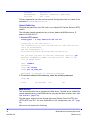
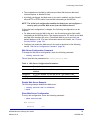
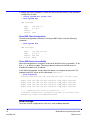
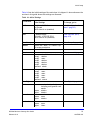
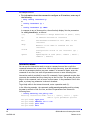
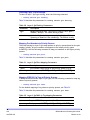
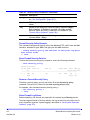
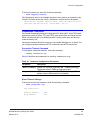
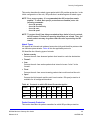
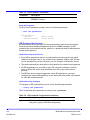
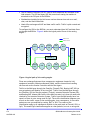
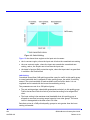
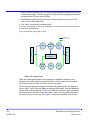
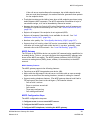
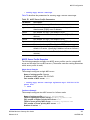
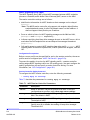
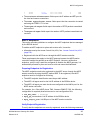
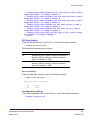
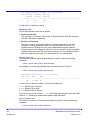
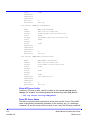
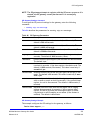
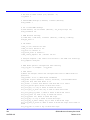
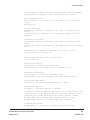
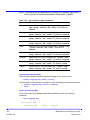
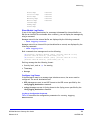
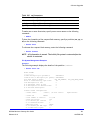
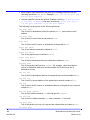
If NAT is enabled, the processes work as below:
Operation of Tunnel-Mode IPsec on outgoing packets
Apply Normal-NAT
Or Drop as
appropriate
no
Outgoing
Packet
(private
domain)
Does the packet go
out a VPN interface
(routing table)?
yes
Apply
outbound
Normal-NAT
Peform
Outbound
Forward
Security
IPsec pkt
(tunnel mode)
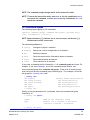
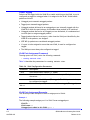
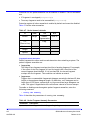
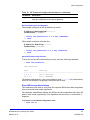
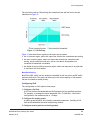
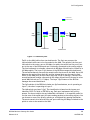
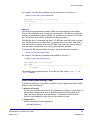
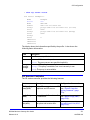
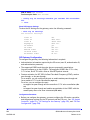
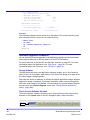
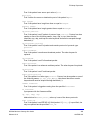
Operation of Tunnel-Mode IPsec on incoming packets
IPSec pkt
coming in
a VPN itf
Perform
inbound
security
(detunnel)
Firewall
rules
Perform
inbound
Normal-NAT
Does the
packet
match a route
Forward
Allow
Deny
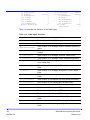
Figure 6 VPN operations when NAT is enabled
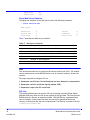
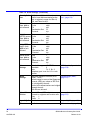
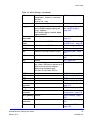
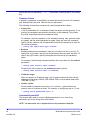
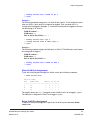
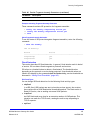
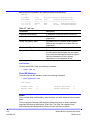
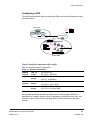
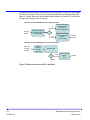
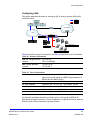
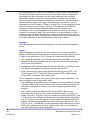
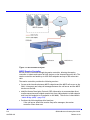
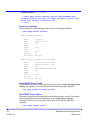
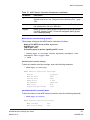
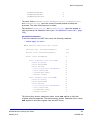
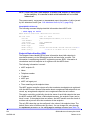
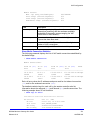
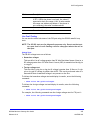
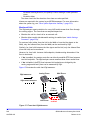
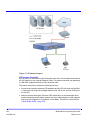
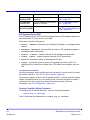
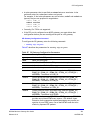
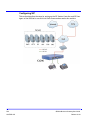
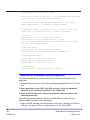
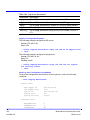
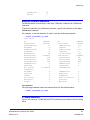
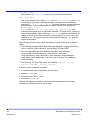
You must understand how traffic is flowing through the unit to understand how
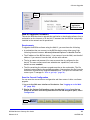
traffic is encrypted. Figure 7 shows this flow.
Internal host traffic
Routed traffic
Relayed traffic
LAN
ICAD40 routing engine
WAN
Internal
host
Figure 7 Flow types
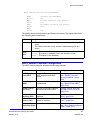
BSGX4e Business Gateway User Guide
Release 01.01
173
NN47928-102